Travelokacom: Difference between revisions
No edit summary |
No edit summary |
||
| (13 intermediate revisions by 3 users not shown) | |||
| Line 1: | Line 1: | ||
[[Category:Channel Manager]] | [[Category:Channel Manager]] | ||
[[Category:Error Messages from Channels]] | [[Category:Error Messages from Channels]] | ||
[[Category: | [[Category:Troubleshooting]] | ||
<div class="heading">Traveloka</div> | |||
This page is about the menu {{#fas:cog}} (SETTINGS) CHANNEL MANAGER > TRAVELOKA and explains how the connection with Traveloka works and how to set it up. | |||
===General=== | ===General=== | ||
| Line 14: | Line 15: | ||
*Beds24.com can import booking cancellations. | *Beds24.com can import booking cancellations. | ||
*Beds24.com can import booking modifications. | *Beds24.com can import booking modifications. | ||
*Beds24.com can export minimum and maximum stays. | |||
*Importing modifications and cancellations can be disabled for individual bookings. | *Importing modifications and cancellations can be disabled for individual bookings. | ||
| Line 21: | Line 23: | ||
*Only bookings made after the connection is established will be imported, existing bookings must be manually entered into Beds24 to block the dates. | *Only bookings made after the connection is established will be imported, existing bookings must be manually entered into Beds24 to block the dates. | ||
*Only mapped rates can be updated. | *Only mapped rates can be updated. | ||
== Before you connect == | == Before you connect == | ||
| Line 28: | Line 29: | ||
Traveloka supports both include and exclude commission prices. This feature is configurable for each hotel in the Traveloka extranet. | Traveloka supports both include and exclude commission prices. This feature is configurable for each hotel in the Traveloka extranet. | ||
*We can only send availability if you have set up prices which are activated for this channel. This tutorial gives general information how to [[Setting_Prices_for_Booking_Channels|set prices for channels]]. | *We can only send availability if you have set up prices which are activated for this channel. This tutorial gives general information how to [[Setting_Prices_for_Booking_Channels|set prices for channels]]. | ||
*Prices for "Extra Person", "Extra child" and discounts set in the "Discounts" tab of the | *If you use Fixed Prices 1 person, 2 person and room price will send. Room price will send for specified occupancy. Multiple prices with different occupancies can send on same rate plan. Prices for "Extra Person", "Extra child" and discounts set in the "Discounts" tab of the Fixed Prices can not be sent. | ||
*If you use Daily Prices the Daily Price will send including occupancy. Multiple occupancy prices can send on each rate plan. Extra person price will send. | |||
'''Bookings''' | '''Bookings''' | ||
| Line 45: | Line 47: | ||
=== What you will need === | === What you will need === | ||
*Your Traveloka hotel | *Your Traveloka hotel mapping/pass code | ||
=== Set Up=== | === Set Up=== | ||
| Line 51: | Line 53: | ||
Contact your Traveloka market manager and ask them to be connected to Beds24 channel manger. After Traveloka has enabled the connection and given you your Traveloka hotel id you can set it up in Beds24. | Contact your Traveloka market manager and ask them to be connected to Beds24 channel manger. After Traveloka has enabled the connection and given you your Traveloka hotel id you can set it up in Beds24. | ||
====Beds24==== | ====Beds24==== | ||
*Enter | *Enter the mapping/pass code Traveloka has given you into the field Hotel code. | ||
*Set the currency. If you are using different currencies on Traveloka and on Beds24 you can use the price multiplier (see below) | *Set the currency. If you are using different currencies on Traveloka and on Beds24 you can use the price multiplier (see below) | ||
| Line 66: | Line 68: | ||
Map Rates: | Map Rates: | ||
It is important to map all rate codes for the room. Unmapped rate codes can not be updated an can cause the room to remain open at Traveloka. | It is important to map all rate codes for the room. Unmapped rate codes can not be updated an can cause the room to remain open at Traveloka. | ||
| Line 75: | Line 75: | ||
*Click SAVE when the correct rate code has copied to the rate plan code setting. | *Click SAVE when the correct rate code has copied to the rate plan code setting. | ||
A price for Single (1 guest), Double (2 guests) and a room price (for the number of guests you have defined in the rate ) can be sent. If you have more than 3 occupancy levels you can set up additional | A price for Single (1 guest), Double (2 guests) and a room price (for the number of guests you have defined in the rate ) can be sent. If you have more than 3 occupancy levels you can set up additional fixed prices in Beds24 for each occupancy level using and map them in the channel settings of the fixed prices or the daily price. | ||
*If you use daily prices you can set the rate code under "Enable" in the Daily Price settings ( | *If you use daily prices you can set the rate code under "Enable" in the Daily Price settings (PRICES > DAILY PRICES SETUP then click on "Edit) | ||
*If you use | *If you use fixed prices go to the "Channels" tab of the fixed price. | ||
<span | <span style="color: #f3e504; font-size: 250%;" >{{#fas:lightbulb}} </span> Click on the "View Actual Data" Button to check which prices and availability will send. Prices that had already been set in HRS be overridden but cannot be removed. If no prices have are sent from Beds24, no availability is sent, but the which originally was in HRS is displayed. | ||
==Multiple Rates at Traveloka== | ==Multiple Rates at Traveloka== | ||
Traveloka can set up multiple rate codes for each room, each with pre-defined booking conditions. Beds24 can map a different Beds24 | Traveloka can set up multiple rate codes for each room, each with pre-defined booking conditions. Beds24 can map a different Beds24 fixed price or daily price to each Traveloka code. [[Setting_Prices_for_Booking_Channels#Mapping_channel_rate_codes|Please use these instructions]]. | ||
== Activate == | == Activate == | ||
| Line 104: | Line 104: | ||
For example *[CONVERT:IDR-EUR] will convert Indonesian Rupees to Euros. | For example *[CONVERT:IDR-EUR] will convert Indonesian Rupees to Euros. | ||
== Updates == | == Updates and Changes== | ||
Changes to availability and prices will be instantly sent to the channel. Changes for | Changes to availability and prices will be instantly sent to the channel. Changes for settings for example minimum stays, the multiplier or number of rooms will send with the next update. Click on "Update" if you want to push them through instantly. | ||
== Notes == | == Notes == | ||
| Line 113: | Line 113: | ||
Any errors occurring during updates will be emailed to you with the error message as returned by Traveloka. Unfortunately Traveloka does not provide us whith information on what exactly the error is. Known problem to check if you receive error messages: | Any errors occurring during updates will be emailed to you with the error message as returned by Traveloka. Unfortunately Traveloka does not provide us whith information on what exactly the error is. Known problem to check if you receive error messages: | ||
'''Rate Code''': At the moment Traveloka only allows the rate code "Retail". Check in your channel manager settings, | '''Rate Code''': At the moment Traveloka only allows the rate code "Retail". Check in your channel manager settings, fixed prices and daily prices that no other than "Retail" is mapped". | ||
'''Prices too low or wrong currency''': Check if the prices you are sending comply with your price limit in Traveloka. | '''Prices too low or wrong currency''': Check if the prices you are sending comply with your price limit in Traveloka. | ||
| Line 126: | Line 126: | ||
'''Invalid rate code" Code="249"''' | '''Invalid rate code" Code="249"''' | ||
You are trying to send prices for a Traveloka code which does not exist. You will see your available rate codes when you click on "Get Codes". Make sure you only map these | You are trying to send prices for a Traveloka code which does not exist. You will see your available rate codes when you click on "Get Codes". Make sure you only map these rate codes in you channel manager settings, daily prices and fixed prices. | ||
'''Required Field Missing" Code="321">Retail price or single price is null''' | |||
*Check the number of guests setup in Traveloka match the Maximum Guests in Beds24 ROOM SETUP, they need to match. | |||
Go to SETTINGS -> CHANNEL MANAGER -> TRAVELOKA click 'Get the Rate Plan Codes for this Hotel code' and search for the Traveloka Room id. Then check the Beds24 Room id in SETTINGS -> PROPERTIES -> ROOMS -> SETUP -> Maximum Guests. | |||
'''Error Type="13" ShortText="System error" Code="448"''' | '''Error Type="13" ShortText="System error" Code="448"''' | ||
Latest revision as of 06:38, 30 April 2025
This page is about the menu (SETTINGS) CHANNEL MANAGER > TRAVELOKA and explains how the connection with Traveloka works and how to set it up.
General
- Click here for general information on how the channel manager works.
- This tutorial explains how to set prices for channels.
Capabilities
- Beds24.com can export inventory.
- Beds24.com can export multiple rates.
- Beds24.com can import bookings.
- Beds24.com can import booking cancellations.
- Beds24.com can import booking modifications.
- Beds24.com can export minimum and maximum stays.
- Importing modifications and cancellations can be disabled for individual bookings.
For details please click here
Limitations
- Only bookings made after the connection is established will be imported, existing bookings must be manually entered into Beds24 to block the dates.
- Only mapped rates can be updated.
Before you connect
Prices
Traveloka supports both include and exclude commission prices. This feature is configurable for each hotel in the Traveloka extranet.
- We can only send availability if you have set up prices which are activated for this channel. This tutorial gives general information how to set prices for channels.
- If you use Fixed Prices 1 person, 2 person and room price will send. Room price will send for specified occupancy. Multiple prices with different occupancies can send on same rate plan. Prices for "Extra Person", "Extra child" and discounts set in the "Discounts" tab of the Fixed Prices can not be sent.
- If you use Daily Prices the Daily Price will send including occupancy. Multiple occupancy prices can send on each rate plan. Extra person price will send.
Bookings
New Bookings are imported.
Existing bookings are not automatically imported when the connection is established and should be entered into Beds24 manually.
Extras and Taxes
"Upsell Items" can not be exported.
Rooms and room types
If you have room types here and sell rooms individually at another channel or your own web site and want to sell them here as a "roomtype" with a quantity of more than one you can set up virtual roooms
What you will need
- Your Traveloka hotel mapping/pass code
Set Up
Traveloka
Contact your Traveloka market manager and ask them to be connected to Beds24 channel manger. After Traveloka has enabled the connection and given you your Traveloka hotel id you can set it up in Beds24.
Beds24
- Enter the mapping/pass code Traveloka has given you into the field Hotel code.
- Set the currency. If you are using different currencies on Traveloka and on Beds24 you can use the price multiplier (see below)
Mapping
Map Rooms:
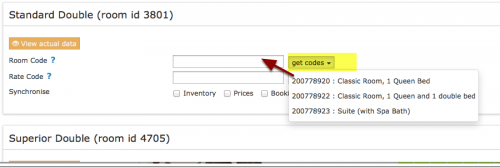
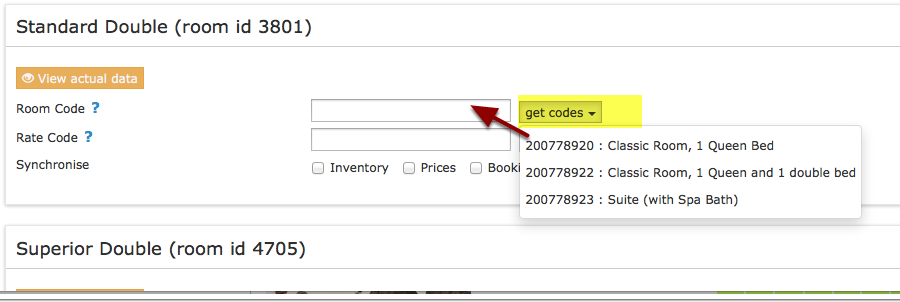
- Click on the "Get Code" link next to the room type id setting. If not codes are shown check if you have set up room types in Traveloka and added at least one price for each room.
- Choose the Agoda room id you want to map to each Beds24 room and click on it.
- When the correct room id has copied to the room type id setting, click Save.
Map Rates:
It is important to map all rate codes for the room. Unmapped rate codes can not be updated an can cause the room to remain open at Traveloka.
- Click on the "Get Code" link next to the rate code setting.
- Choose the Traveloka standard rate for this room and click on it
- Click SAVE when the correct rate code has copied to the rate plan code setting.
A price for Single (1 guest), Double (2 guests) and a room price (for the number of guests you have defined in the rate ) can be sent. If you have more than 3 occupancy levels you can set up additional fixed prices in Beds24 for each occupancy level using and map them in the channel settings of the fixed prices or the daily price.
- If you use daily prices you can set the rate code under "Enable" in the Daily Price settings (PRICES > DAILY PRICES SETUP then click on "Edit)
- If you use fixed prices go to the "Channels" tab of the fixed price.
Click on the "View Actual Data" Button to check which prices and availability will send. Prices that had already been set in HRS be overridden but cannot be removed. If no prices have are sent from Beds24, no availability is sent, but the which originally was in HRS is displayed.
Multiple Rates at Traveloka
Traveloka can set up multiple rate codes for each room, each with pre-defined booking conditions. Beds24 can map a different Beds24 fixed price or daily price to each Traveloka code. Please use these instructions.
Activate
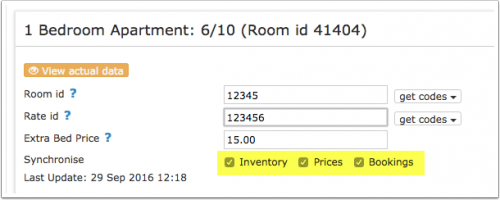
- Tick "Inventory", "Prices" and "Bookings"
- Save

Bookings
New Bookings are imported. Cancellations to bookings are also imported.
Existing bookings are not automatically imported when the connection is established and should be entered into Beds24 manually.
Price Multiplier
If you want to add a multiplier to your prices, for example because of a different currency to your Beds24 currency, add a * followed by the multiplier number to your hotel id.
For example a hotel id setting 123456*12.34 will multiply all prices by 12.34 sent for hotel id 123456.
You can also use currency conversion template variable. All currencies supported by the booking page currency selector can be used.
For example *[CONVERT:IDR-EUR] will convert Indonesian Rupees to Euros.
Updates and Changes
Changes to availability and prices will be instantly sent to the channel. Changes for settings for example minimum stays, the multiplier or number of rooms will send with the next update. Click on "Update" if you want to push them through instantly.
Notes
Channel collect payments will be shown in the booking invoice if SETTINGS->CHANNEL MANAGER -> “Import Channel Collect Payments” is set to “Yes”.
Common Errors
Any errors occurring during updates will be emailed to you with the error message as returned by Traveloka. Unfortunately Traveloka does not provide us whith information on what exactly the error is. Known problem to check if you receive error messages:
Rate Code: At the moment Traveloka only allows the rate code "Retail". Check in your channel manager settings, fixed prices and daily prices that no other than "Retail" is mapped".
Prices too low or wrong currency: Check if the prices you are sending comply with your price limit in Traveloka.
If none of these is the case please contact Traveloka support and ask them why exactly you are receiving error messages.
Retail price is less than single price
Check with Traveloka if you have a price limit and  if so have it raised so it is high enough.
Invalid hotel code" Code="392"
*Check the Traveloka hotel id you have entered is correct and does not have blank spaces.
*If it is please check contact your Traveloka market manager and ask them to check if they have enabled the connection with Beds24 channel manager.
Invalid rate code" Code="249"
You are trying to send prices for a Traveloka code which does not exist.  You will see your available rate codes when you click on "Get Codes". Make sure you only map these rate codes in you channel manager settings, daily prices and fixed prices.
Required Field Missing" Code="321">Retail price or single price is null
*Check the number of guests setup in Traveloka match the Maximum Guests in Beds24 ROOM SETUP, they need to match.
Go to SETTINGS -> CHANNEL MANAGER -> TRAVELOKA click 'Get the Rate Plan Codes for this Hotel code' and search for the Traveloka Room id. Then check the Beds24 Room id in SETTINGS ->  PROPERTIES -> ROOMS -> SETUP -> Maximum Guests.
Error Type="13" ShortText="System error" Code="448"
It appears Traveloka do not accept one or more prices you are sending. Please check your "Rate Protection". You can not send a price from Beds24 which is lower than the rate protection value set in Traveloka. If you do want to send a lower price ask Traveloka to lift the rate protection.
Room Codes are not available
If not codes are shown check that your Traveloka hotel code is correctly entered and  that you have received a confirmation form Traveloka that the connection has been set up. If both is correct check if you have set up room types in Traveloka and added at least one price for each room
Disconnect
- Unticking "Inventory" and "Prices" and "Bookings" will stop the synchronisation for a room.
- To completely disconnect the channel manager you might need to contact Traveloka and ask them to disconnect you.