Breezeway: Difference between revisions
Jump to navigation
Jump to search
No edit summary |
No edit summary |
||
| (8 intermediate revisions by 2 users not shown) | |||
| Line 1: | Line 1: | ||
[[Category: | [[Category:Marketplace]] | ||
[[Category:Task_Scheduling_Housekeeping_Operations_Integrations]] | |||
<div class="heading">Breezeway</div> | <div class="heading">Breezeway</div> | ||
Breezeway | |||
[https://www.breezeway.io/ Breezeway] provides a Property Operations & Services Platform, automated task scheduling & property care programs. | |||
The connection is maintained by Breezeway. | |||
To use the connection you need to allow API access. | To use the connection you need to allow API access. | ||
| Line 7: | Line 11: | ||
'''Step 1. Allow API access''' | '''Step 1. Allow API access''' | ||
*Go to {#fas:cog}} (SETTINGS) | *Go to {{#fas:cog}} (SETTINGS) MARKETPLACE > API | ||
* | *Click "Generate invite code" | ||
*Set | **Select all of the available scopes | ||
*Leave 'IP Whitelist' | **Set "Select which properties token can access" = All owned by account or linked to account | ||
* | **Leave 'IP Whitelist' blank | ||
* | **Name for this token can be ‘Breezeway’ | ||
**Click "Generate invite code" | |||
<span style="color: #f3e504; font-size: 150%;" >{{#fas:lightbulb}} </span> Once the invite code is generated, it will be available to copy/paste. The code must be added to Breezeway within the next 24 hours. Otherwise, a new code must be generated. | |||
[[Image:apiscopes.png|600px|link=]] | |||
[[Media:apisocopes.png|view large]] | |||
'''Step 2. | '''Step 2. Add Beds24 API Key to Breezeway''' | ||
*Login to your Breezeway account | |||
*Go to SETTINGS > INTEGRATIONS | |||
*Find Beds24 and click Add | |||
*Enter your Invitation Code and click Connect | |||
Properties and reservations will load within the next few hours. | |||
For further instructions please contact Breezeway support. | For further instructions please contact Breezeway support. | ||
Latest revision as of 18:24, 17 September 2025
Breezeway
Breezeway provides a Property Operations & Services Platform, automated task scheduling & property care programs.
The connection is maintained by Breezeway.
To use the connection you need to allow API access.
Step 1. Allow API access
- Go to (SETTINGS) MARKETPLACE > API
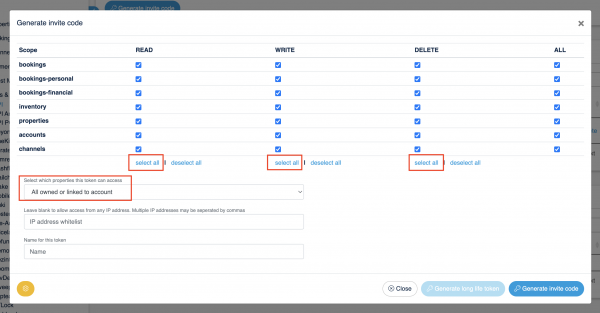
- Click "Generate invite code"
- Select all of the available scopes
- Set "Select which properties token can access" = All owned by account or linked to account
- Leave 'IP Whitelist' blank
- Name for this token can be ‘Breezeway’
- Click "Generate invite code"
Once the invite code is generated, it will be available to copy/paste. The code must be added to Breezeway within the next 24 hours. Otherwise, a new code must be generated.

Step 2. Add Beds24 API Key to Breezeway
- Login to your Breezeway account
- Go to SETTINGS > INTEGRATIONS
- Find Beds24 and click Add
- Enter your Invitation Code and click Connect
Properties and reservations will load within the next few hours.
For further instructions please contact Breezeway support.