Remotelock.com: Difference between revisions
No edit summary |
No edit summary |
||
| (5 intermediate revisions by 4 users not shown) | |||
| Line 1: | Line 1: | ||
[[Category: | [[Category:Marketplace]] | ||
[[Category:Automation]] | [[Category:Automation]] | ||
[[Category:Self-Check-in]] | [[Category:Self-Check-in]] | ||
[[Category:Lock Systems]] | [[Category:Lock Systems]] | ||
<div class="heading">Remotelock, Resortlock, Igloohome, Yale Access, August, Schlage </div> | <div class="heading">Remotelock, Resortlock, Igloohome, Yale Access, August, Schlage </div> | ||
This page is about the menu {{#fas:cog}} (SETTINGS) | This page is about the menu {{#fas:cog}} (SETTINGS) MARKETPLACE > REMOTELOCK and explains how to set up a connection with locks from Remotelock, Resortlock and Igloohome. | ||
To use this service you will need an account with [http://www.remotelock.com Remotelock] | To use this service you will need an account with [http://www.remotelock.com Remotelock] | ||
| Line 18: | Line 18: | ||
If you have a common door, e.g. front door or gate, you can set this up in Remotelock. If you do map the common door in Remotelock, do not map the common door in Beds24. | If you have a common door, e.g. front door or gate, you can set this up in Remotelock. If you do map the common door in Remotelock, do not map the common door in Beds24. | ||
<div class="warning">{{#fas:exclamation-triangle}} Remotelock provides various regional servers, the main one we connect to is the US service, if you need to connect to a regional one (for example Japanese or EU) please let us know and we can configure your account accordingly.</div> | <div class="warning">{{#fas:exclamation-triangle}} Remotelock provides various regional servers, the main one we connect to is the US service, if you need to connect to a regional one (for example Japanese, UK or EU) please let us know and we can configure your account accordingly.</div> | ||
<span style="color:#019cde; font-size: 150%;“ >{{#fas:info-circle}} </span> You can also connect Igloohome via Make (formerly Integromat). Watch this [https://www.youtube.com/watch?v=6iTGZcTGEZI] video or and contact Igloohome support if you have any problems. | <span style="color:#019cde; font-size: 150%;“ >{{#fas:info-circle}} </span> You can also connect Igloohome via Make (formerly Integromat). Watch this [https://www.youtube.com/watch?v=6iTGZcTGEZI] video or and contact Igloohome support if you have any problems. | ||
| Line 77: | Line 77: | ||
==Communication with guests == | ==Communication with guests == | ||
The Email address of the guest is sent to Remotelock. You can set up Remotelock to automatically send Emails to the guest. Alternatively you can create an Auto Action in {{#fas:cog}} (SETTINGS) GUEST MANAGEMENT > AUTO ACTIONS. | The Email address of the guest is sent to Remotelock. You can set up Remotelock to automatically send Emails to the guest. Alternatively you can create an Auto Action in {{#fas:cog}} (SETTINGS) GUEST MANAGEMENT > AUTO ACTIONS. A template is available which you can further customize. Use the context help (?Icons) in the Auto Action and on the help page (click on HELP in the top right menu) for further instructions. | ||
The template variable for the pin is [BOOKINGINFOCODETEXT:LOCKSTATE_PIN]. | The template variable for the pin is [BOOKINGINFOCODETEXT:LOCKSTATE_PIN]. | ||
| Line 112: | Line 112: | ||
'''Pin-Code does not match the 'PIN Strategy' ''' | '''Pin-Code does not match the 'PIN Strategy' ''' | ||
The pin code has been previously used in another booking for this room. The pin-code needs to be unique. | The pin code has been previously used in another booking for this room. The pin-code needs to be unique. | ||
'''Pin codes are not being generated''' | |||
"Cannot create resource, 90 days per access guest is the limit for your billing plan","type":"billing_plan_resource_limit_reached | |||
Check your contract type in Remotelocks to ensure your bookings meet the contract details. | |||
= Disconnect= | = Disconnect= | ||
Click on "Disconnect" to terminate the connection. | Click on "Disconnect" to terminate the connection. | ||
Latest revision as of 18:34, 17 September 2025
This page is about the menu (SETTINGS) MARKETPLACE > REMOTELOCK and explains how to set up a connection with locks from Remotelock, Resortlock and Igloohome.
To use this service you will need an account with Remotelock
For Beds24 the normal channel manger fees apply.
Capabilities
- Beds24 can send booking data to locks.
- Multiple rooms can connect to one lock.
- Auto-Check-in: when a lock is first opened by the guest the info code "CHECKIN" will be added to the booking.
- Support for Resortlocks, Schlage, Yale Access, August and Igloohome
If you have a common door, e.g. front door or gate, you can set this up in Remotelock. If you do map the common door in Remotelock, do not map the common door in Beds24.
You can also connect Igloohome via Make (formerly Integromat). Watch this [1] video or and contact Igloohome support if you have any problems.
Limitations
For Resortlock an Igloohome the PIN is created by the lock so you can not use a custom PIN.
Set Up
- Click on "Connect to Lockstate".
- Authorize Beds24 to access your account
One Beds24 account can connect to one Remotelock account, if you have multiple Remotelock accounts use a Beds24 sub account for each.
When successfully connected you will see the Remotelock account you are connected to.
- The "Pin Strategy" defines how the access code is constructed.
- The "Start Time" and "End Time" define the earliest Check-in time and latest Check-out time.
- The "Days in Advance" sets the days before check-in that the booking is sent to the lock.
- Click on "Get Codes"
You will see one serial number for each lock. Click on the serial number of the lock that is using the lock.
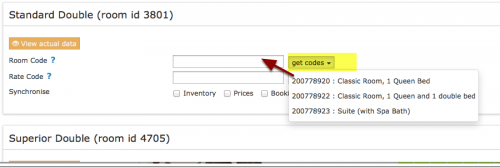
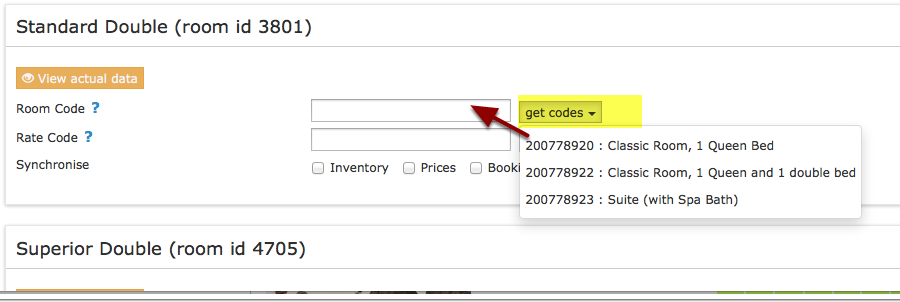
If you have a common lock for multiple units you can enter the same lock serial number for each unit. Remotelock uses several servers. If you are not redirected back to Beds24 send us a support ticket via the SUPPORT button in the top left of your Beds24 control panel.
One Beds24 account connects with one Remotelock account. If you have multiple Remotelock accounts, create sub accounts for each ensure the sub account 'owns' the property, not just has access to the respective properties in Beds24.
How it works
Bookings get sent to the locks at the set time prior to check-in. A booking info code named LOCKSTATE_PIN is created which will show the pin number valid for the booking.
You can change the pin manually in the LOCKSTATE_PIN booking info code and the new pin will be sent to the lock at the next update.
To force no pin to be sent for a booking, change the value of the LOCKSTATE_PIN booking info item to none, (i.e. the word "none")
Updates are sent multiple times per day and send bookings for the selected days in advance. To instantly push updates through click "Send Data to Lockstate".
If the dates of the booking have been changed or the booking has been moved to a different room those details will be sent to the locks.
If bookings are cancelled we delete the guest out of LOCKSTATE. This will remove the access.
Custom Start and End access times
The access start and end times can be customized per booking using booking info codes.
A booking info code ACCESS_STARTTIME with a time of day (23:59 format) as the text will override the default start time.
A booking info code ACCESS_ENDTIME with a time of day (23:59 format) as the text will override the default end time.
Start and end dates can be set relative to the check in and check out date by defining times greater than 24 or negative.
For example ACCESS_ENDTIME = 34:00 would create an end time of 10:00 one day after checkout (34 = 24 + 10 hours)
ACCESS_STARTTIME = -10:00 would create a start time 10 hours before midnight of the check in day, i.e. 14:00 on the day before check in.
If booking info codes are not used to set the time, the property default is used when creating the access, in this case if the time of day is changed in remotelock, it will not be overridden unless a date change is required.
Communication with guests
The Email address of the guest is sent to Remotelock. You can set up Remotelock to automatically send Emails to the guest. Alternatively you can create an Auto Action in (SETTINGS) GUEST MANAGEMENT > AUTO ACTIONS. A template is available which you can further customize. Use the context help (?Icons) in the Auto Action and on the help page (click on HELP in the top right menu) for further instructions.
The template variable for the pin is [BOOKINGINFOCODETEXT:LOCKSTATE_PIN].
Auto Check-in
Auto check-in will add a booking info item called CHECKIN to the booking when the guest first uses the lock. To use auto check-in you must setup a webhook to send notifications from the lock to Beds24.
There are two steps to the webhook setup:
1) Add a Webhook Notification Contact in Remotelock
the URL of the webhook must contain the Beds24 account Id number that owns the property at the end like ?ownerid=12345
https://api.beds24.com/lockstate.com/notify.php?ownerid=<Your Beds24 owner ID>
The Content Type must be "JSON"
The secret can be left empty
2) Add a Notification in Remotelock
The notification type is "Webhook"
The Webhook Notification Contact is the contact you created in step 1)
The source should be "Account"
The Events must be "Access Granted" and "First Access Only"
Common Problems
Remotelock have two types of access: users and guests. Bookings from Beds24 create guests.
Pin-Code does not match the 'PIN Strategy'
The pin code has been previously used in another booking for this room. The pin-code needs to be unique.
Pin codes are not being generated
"Cannot create resource, 90 days per access guest is the limit for your billing plan","type":"billing_plan_resource_limit_reached
Check your contract type in Remotelocks to ensure your bookings meet the contract details.
Disconnect
Click on "Disconnect" to terminate the connection.