Refund Protect: Difference between revisions
No edit summary |
|||
| (2 intermediate revisions by 2 users not shown) | |||
| Line 1: | Line 1: | ||
[[Category: | [[Category:Marketplace]] | ||
<div class="heading">Refund Protect</div> | <div class="heading">Refund Protect</div> | ||
This page is about the menu {{#fas:cog}} (SETTINGS) | This page is about the menu {{#fas:cog}} (SETTINGS) MARKETPLACE > REFUND PROTECT | ||
https://www.refundprotect.me/ | https://www.refundprotect.me/ | ||
| Line 24: | Line 24: | ||
*Refund Protect requires the guest name. Go to {{#fas:cog}} (SETTINGS) PROPERTIES > BOOKING QUESTIONS and make sure they are used and make them obligatory. | *Refund Protect requires the guest name. Go to {{#fas:cog}} (SETTINGS) PROPERTIES > BOOKING QUESTIONS and make sure they are used and make them obligatory. | ||
*Go to {{#fas:cog}} (SETTINGS) BOOKING ENGINE and make sure "Check-out page version" is set to "Responsive. | *Go to {{#fas:cog}} (SETTINGS) BOOKING ENGINE and make sure "Check-out page version" is set to "Responsive. | ||
*Go to {{#fas:cog}} (SETTINGS) | *Go to {{#fas:cog}} (SETTINGS) MARKETPLACE > REFUND PROTECT and choose the percentage amount your guests pay to activate this option. | ||
Your guests will then have the option to add "Refund Protect" to their booking: | Your guests will then have the option to add "Refund Protect" to their booking: | ||
Latest revision as of 08:44, 22 September 2025
This page is about the menu (SETTINGS) MARKETPLACE > REFUND PROTECT
Add Refund Protect as an optional upsell item
You can offer your guests an option to purchase Refund Protect on non refundable direct bookings.
This option is only available for bookings with 100% deposit collection at the time of the booking and a check-in date from the next day or later (not for same day bookings).
If the guest needs to cancel a booking for which they paid 100% at the time of the booking within the Protect terms they can apply for a refund with Refund Protect.
The cost to you is 5% of the booking value which will be deducted from your account at the time the booking is confirmed.
You can choose the percentage amount you charge the guest for this product.
The invoicing for Refund Protect is centralised through Beds24. We will deduct 5% of the booking value from your credit once a booking is confirmed.
Refund Protect will only be offered to your guests when you have enough credit in your account to cover the fees.
Activation
- Check that you have set up to collect a 100% payment at the time of the booking.
- Refund Protect requires the guest name. Go to (SETTINGS) PROPERTIES > BOOKING QUESTIONS and make sure they are used and make them obligatory.
- Go to (SETTINGS) BOOKING ENGINE and make sure "Check-out page version" is set to "Responsive.
- Go to (SETTINGS) MARKETPLACE > REFUND PROTECT and choose the percentage amount your guests pay to activate this option.
Your guests will then have the option to add "Refund Protect" to their booking:
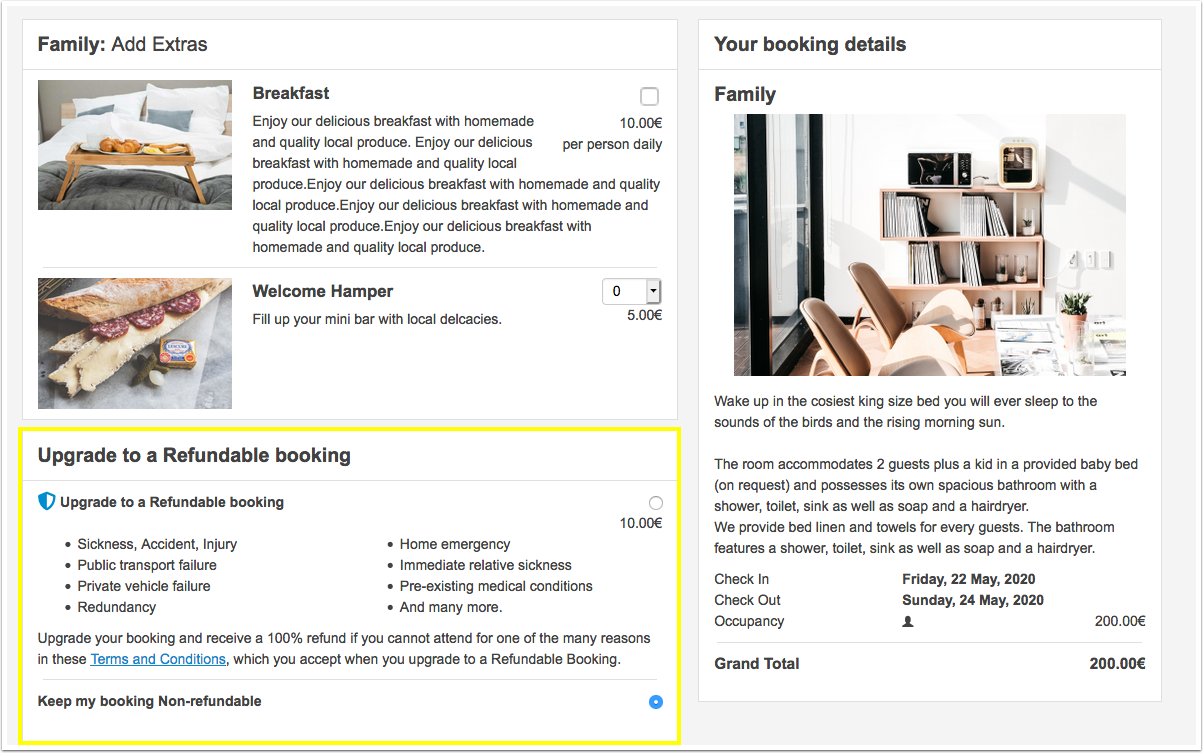
Following text will be added to the booking confirmation (SETTINGS) GUEST MANAGEMENT > CONFIRMATION MESSAGES) after "Booking Confirmation Screen and Email Message (first part)":
You have selected a Refundable booking therefore if you are unable to attend your booking due to unforeseen circumstances outside of your control you may be entitled to a refund – please see our terms and conditions. For more information and/or to apply for a refund please contact our refund team at https://refunds.refundprotect.co/.
For legal reasons this text is not customizable.