Yield Optimiser: Difference between revisions
| (13 intermediate revisions by 4 users not shown) | |||
| Line 1: | Line 1: | ||
[[Category:Prices]] | [[Category:Prices]] | ||
[[Category:Automation]] | [[Category:Automation]] | ||
[[Category:Dynamic_Prices]] | |||
[[Category:Rules]] | |||
[[Category:Enhanced_Selling]] | |||
<div class="heading">Yield Optimiser</div> | |||
This page is about the menu PRICES >YIELD OPTIMISER and explains how to create rules to automatically adjust prices. | |||
__TOC__ | |||
=Summary= | |||
<div class="summarybox"> | |||
The idea of the yield optimizer is to automatically adjust prices based on demand shortly before check-in. | |||
You can set up rules to adjust your prices up or down. Multiple rules can be created and will work together. | |||
Each rule can be assigned to one or more rooms. A rule will only adjust the price when its trigger condition is met and if the room multiplier is not manually over-ridden. | |||
The multiplier will apply to all prices. If you use Fixed Prices you can deactivate the multiplier by setting "Allow Multiplier" = No in the Summary tab of the Fixed Price. | |||
</div> | |||
=Setup= | |||
== Rule == | == Rule == | ||
| Line 23: | Line 34: | ||
The maximum value is 250%. | The maximum value is 250%. | ||
You can choose the rule not to apply for channel management. | |||
<span style="color:#fe746c;“ >{{#fas:exclamation-triangle}} </span> The yield optimizer will NOT override manually entered multipliers. To remove a manual rule go to the Calendar, click in the Price multiplier row, select 'Auto' from the drop-down list and enter a date range This will allow any Yield Optimiser rule to be applied. | |||
== Trigger == | == Trigger == | ||
| Line 50: | Line 63: | ||
<span style="color: #f3e504; font-size: 250%;" >{{#fas:lightbulb}} </span> We recommend you check carefully that your rules work as expected. | |||
Latest revision as of 11:04, 2 March 2025
This page is about the menu PRICES >YIELD OPTIMISER and explains how to create rules to automatically adjust prices.
Summary
The idea of the yield optimizer is to automatically adjust prices based on demand shortly before check-in.
You can set up rules to adjust your prices up or down. Multiple rules can be created and will work together.
Each rule can be assigned to one or more rooms. A rule will only adjust the price when its trigger condition is met and if the room multiplier is not manually over-ridden.
The multiplier will apply to all prices. If you use Fixed Prices you can deactivate the multiplier by setting "Allow Multiplier" = No in the Summary tab of the Fixed Price.
Setup
Rule
Set the start and end dates when the rule is valid and the percentage value of your normal price to charge when the rule is triggered.
Examples: The regular price per night is €100. 40% will lower the price to €40. 150% will raise the price to €150. 100% will leave the price unchanged.
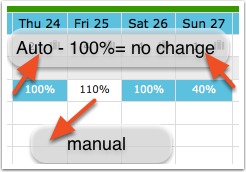
The percentage to which a price is changed by the yield optimizer will show in the CALENDAR with a blue background. These automatic values can be manually over-ridden. Manual overrides will have a white background.
The maximum value is 250%.
You can choose the rule not to apply for channel management.
The yield optimizer will NOT override manually entered multipliers. To remove a manual rule go to the Calendar, click in the Price multiplier row, select 'Auto' from the drop-down list and enter a date range This will allow any Yield Optimiser rule to be applied.
Trigger
Set the condition when the prices should be changed. Rules will trigger on a per date basis so they will only trigger on dates which meet the trigger condition.
A rule can be applied to bookings with arrival up to 30 days in advance. It can be restricted to a shorter period or a time window.
A rule can be set to apply when a certain number of rooms is available on the night.
- If multiple rooms are selected the availability in these rooms will be added up. This sum is then the trigger which will apply the rule.
- If no rooms are ticked the rule will automatically use the availability in the room or rooms selected in the "Apply to" tab. In this case the availability of each individual room is used to trigger the rule on that room.
Apply to
The rule will be applied to the ticked rooms.
Multiple rules can apply at the same time and the changes will accumulate.
Example: Original price = 100€, Rule 1 = 120%, Rule 2 = 150%. After the application of both rules the price will come to 180€.
Explanation:
- 120% of 100€ = 120€.
- 150% of 120€ = 180€.
Note: The order of the rules does NOT matter, because:
- 150% of 100€ = 150€.
- 120% of 150€ = 180€.
We recommend you check carefully that your rules work as expected.