Combine two rooms to sell as a suite: Difference between revisions
No edit summary |
|||
| (18 intermediate revisions by the same user not shown) | |||
| Line 20: | Line 20: | ||
=Example 1 : A B&B has 2 rooms (single and double). The rooms can be sold individually or together as a suite.= | =Example 1 : A B&B has 2 rooms (single and double). The rooms can be sold individually or together as a suite.= | ||
'''Set up''' | |||
'''Step 1. Set up your "real" rooms:''' | '''Step 1. Set up your "real" rooms:''' | ||
*Go to {{#fas:cog}} (SETTINGS) PROPERTIES > ROOMS and add a room for each of your rooms | *Go to {{#fas:cog}} (SETTINGS) PROPERTIES > ROOMS and add a room for each of your rooms | ||
| Line 37: | Line 38: | ||
**Use the context help <span style="color:#007bff;“ >{{#far:question-circle}} </span> for further setup instructions. | **Use the context help <span style="color:#007bff;“ >{{#far:question-circle}} </span> for further setup instructions. | ||
'''Step 3. Set up the room dependency settings | '''Step 3. Set up the room dependency settings:''' | ||
Go to {{#fas:cog}} (SETTINGS) PROPERTIES > ROOMS > DEPENDENCIES and set: | Go to {{#fas:cog}} (SETTINGS) PROPERTIES > ROOMS > DEPENDENCIES and set: | ||
Suite: | |||
*Requires Availability in = double | *Requires Availability in = double | ||
*Requires Availability in = single | *Requires Availability in = single | ||
| Line 46: | Line 49: | ||
*Assign Bookings to = This room | *Assign Bookings to = This room | ||
Optional: If you want to see the bookings in your virtual room you can use the "Include Bookings from" setting. This will mirror the bookings from the "real" rooms into the virtual room. | |||
Double: | Double: | ||
| Line 57: | Line 58: | ||
*Assign Bookings to = This Room | *Assign Bookings to = This Room | ||
Single: | |||
*Requires Availability in = nothing selected | *Requires Availability in = nothing selected | ||
*Combination Logic = Sum of all bookings | *Combination Logic = Sum of all bookings | ||
| Line 65: | Line 65: | ||
*Assign Bookings to = This Room | *Assign Bookings to = This Room | ||
=Example 2: A Lodging has 2 identical rooms which are set up as one room type with the quantity of 2. The rooms can be sold individually or together as a suite.= | |||
''' | '''Set up''' | ||
'''Step 1. Set up your "real" rooms:''' | '''Step 1. Set up your "real" rooms:''' | ||
*Go to {{#fas:cog}} (SETTINGS) PROPERTIES > ROOMS and add a room for each of your rooms | *Go to {{#fas:cog}} (SETTINGS) PROPERTIES > ROOMS and add a room for each of your rooms | ||
| Line 76: | Line 76: | ||
'''Step 2. Set up your "virtual room" Suite''' | '''Step 2. Set up your "virtual room" Suite''' | ||
**Give each room a "Name" | *Go to {{#fas:cog}} (SETTINGS) PROPERTIES > ROOMS and add a room for each of your rooms | ||
*Go to {{#fas:cog}} (SETTINGS) PROPERTIES > ROOMS > SETUP | |||
**Give each room a "Name" | |||
**Set "Quantity" = 1. | **Set "Quantity" = 1. | ||
'''Step 3. Set up the room dependency settings''' | '''Step 3. Set up the room dependency settings:''' | ||
Go to {{#fas:cog}} (SETTINGS) PROPERTIES > ROOMS > DEPENDENCIES and set: | Go to {{#fas:cog}} (SETTINGS) PROPERTIES > ROOMS > DEPENDENCIES and set: | ||
Suite: | Suite: | ||
*Requires Availability in = select all the individual rooms. (2 to 12 of them) | *Requires Availability in = select all the individual rooms. (2 to 12 of them) | ||
| Line 95: | Line 98: | ||
*Assign Bookings to = This Room | *Assign Bookings to = This Room | ||
Optional: If you want to see the bookings in your virtual room you can use the "Include Bookings from" setting. This will mirror the bookings from the "real" rooms into the virtual room. Please note that the unit allocation within the units of the virtual room will not work in this case. | |||
=Example 3: A Lodging has a double room and a twin room. The twin room is also sold as king room. The double and the twin room are sold as Suite 1 and the double and the king room are sold as Suite 2= | |||
The 2 real rooms and the king room can all be sold separately as well as the 2 suites. | |||
''' | '''Step 1. Set up your "real" rooms''' | ||
*Go to {{#fas:cog}} (SETTINGS) PROPERTIES > ROOMS and add a room for each of your rooms | *Go to {{#fas:cog}} (SETTINGS) PROPERTIES > ROOMS and add a room for each of your rooms | ||
*Go to {{#fas:cog}} (SETTINGS) PROPERTIES > ROOMS > SETUP | *Go to {{#fas:cog}} (SETTINGS) PROPERTIES > ROOMS > SETUP | ||
**Create a Room - Name - Double | **Create a Room - Name - Double | ||
**Set "Quantity" = 1 | **Set "Quantity" = 1 | ||
| Line 114: | Line 114: | ||
'''Step 2. Set up your "virtual" rooms''' | '''Step 2. Set up your "virtual" rooms''' | ||
*Go to {{#fas:cog}} (SETTINGS) PROPERTIES > ROOMS and add a room for each of your rooms | |||
*Go to {{#fas:cog}} (SETTINGS) PROPERTIES > ROOMS > SETUP | |||
**Create a Room - Name - King | **Create a Room - Name - King | ||
**Set "Quantity" = 1 | **Set "Quantity" = 1 | ||
| Line 121: | Line 124: | ||
**Set "Quantity" = 2 | **Set "Quantity" = 2 | ||
'''Step 3. Set up the room dependency settings | '''Step 3. Set up the room dependency settings:''' | ||
Go to {{#fas:cog}} (SETTINGS) PROPERTIES > ROOMS > DEPENDENCIES and set: | |||
King: | |||
*Requires Availability in = Twin | *Requires Availability in = Twin | ||
*Combination Logic = Sum of all bookings | *Combination Logic = Sum of all bookings | ||
| Line 130: | Line 135: | ||
Suite 1: | |||
*Requires Availability in = Twin and Double | *Requires Availability in = Twin and Double | ||
*Combination Logic = All rooms must be available | *Combination Logic = All rooms must be available | ||
| Line 137: | Line 142: | ||
*Assign Bookings to = This Room | *Assign Bookings to = This Room | ||
Suite 2: | |||
*Requires Availability in = King and Double | |||
*Requires Availability in = | |||
*Combination Logic = All rooms must be available | *Combination Logic = All rooms must be available | ||
*Dependency Level = Ignore Sub Dependencies | *Dependency Level = Ignore Sub Dependencies | ||
| Line 145: | Line 149: | ||
*Assign Bookings to = This Room | *Assign Bookings to = This Room | ||
Double: | |||
*Requires Availability in = nothing selected | *Requires Availability in = nothing selected | ||
*Combination Logic = Sum of all bookings | *Combination Logic = Sum of all bookings | ||
| Line 152: | Line 156: | ||
*Assign Bookings to = This Room | *Assign Bookings to = This Room | ||
Twin: | |||
*Requires Availability in = nothing selected | *Requires Availability in = nothing selected | ||
*Combination Logic = Sum of all bookings | *Combination Logic = Sum of all bookings | ||
| Line 160: | Line 163: | ||
*Assign Bookings to = This Room | *Assign Bookings to = This Room | ||
=Example 4: A B&B has 3 standard rooms (tulip, iris, rose) and one economy room. Tulip can be combined with the economy room to form a suite. = | |||
'''1. Set up your "real" rooms:''' | '''1. Set up your "real" rooms:''' | ||
*Create one room type standard | *Go to {{#fas:cog}} (SETTINGS) PROPERTIES > ROOMS and add a room for each of your rooms | ||
*Go to {{#fas:cog}} (SETTINGS) PROPERTIES > ROOMS > SETUP | |||
*Create one room type standard | |||
**Set Name = iris and rose | |||
**Set "Quantity" = 2 | |||
**Set "Sell Priority"= hide to hide the room from your booking page | |||
*Create room standard | *Create one room standard | ||
**Set Name = tulip | |||
**Set "Quantity" = 1 | |||
**Set "Sell Priority"= hide to hide the room from your booking page | |||
*Create the economy room | *Create the economy room | ||
**Set Name = economy | |||
**Set "Quantity" = 1 | |||
'''2. Set up your "virtual" rooms:''' | '''2. Set up your "virtual" rooms:''' | ||
*Go to {{#fas:cog}} (SETTINGS) PROPERTIES > ROOMS and add a room for each of your rooms | |||
*Go to {{#fas:cog}} (SETTINGS) PROPERTIES > ROOMS > SETUP | |||
*Create one room type standard | *Create one room type standard | ||
**Set Name = standard | |||
**Set "Quantity" = 3 | |||
*Create | *Create one room type Suite | ||
**Set Name = Suite | |||
**Set "Quantity" = 1 | |||
'''3. Set up the room dependency settings | '''3. Set up the room dependency settings:''' | ||
Go to {{#fas:cog}} (SETTINGS) PROPERTIES > ROOMS > DEPENDENCIES and set: | |||
*Room type standard room: | *Room type standard room: | ||
| Line 184: | Line 203: | ||
**Combination Logic = Sum of all bookings | **Combination Logic = Sum of all bookings | ||
**Assign Bookings to = First available dependency room | **Assign Bookings to = First available dependency room | ||
*Suite: | *Suite: | ||
| Line 190: | Line 208: | ||
**Requires Availability in = economy room | **Requires Availability in = economy room | ||
**Combination Logic = all rooms must be available | **Combination Logic = all rooms must be available | ||
**Assign bookings to = This room | |||
*Tulip: | *Tulip: | ||
**Requires Availability in = nothing selected | |||
**Include Bookings from = Suite | **Include Bookings from = Suite | ||
**Combination Logic = Sum of all bookings | |||
**Assign bookings to = This room | |||
*Economy: | *Economy: | ||
**Requires Availability in = nothing selected | |||
**Include Bookings from = Suite | **Include Bookings from = Suite | ||
**Combination Logic = Sum of all bookings | |||
**Assign bookings to = This room | |||
Latest revision as of 13:49, 24 November 2021
This page explains how to use virtual rooms to sell two rooms independently and as a suite at the same time
Use
You can use this method if: You sell individual rooms and link them together to sell as a suite.
How it works
Selling rooms individually or as a suite. Bookings are assigned to the 'booked' room and a mirror booking is shown in the dependencies to close
The virtual room requires availability in all of the real rooms. Bookings are assigned to the room/suite and mirrored in the other room/suite closing the availability.
Example 1 : A B&B has 2 rooms (single and double). The rooms can be sold individually or together as a suite.
Set up
Step 1. Set up your "real" rooms:
- Go to (SETTINGS) PROPERTIES > ROOMS and add a room for each of your rooms
- Go to (SETTINGS) PROPERTIES > ROOMS > SETUP
- Create one room double
- Set "Quantity" = 1
- Create one room single
- Set "Quantity" = 1
- Use the context help for further setup instructions.
Step 2. Set up your "virtual" room: (Suite)
- Go to (SETTINGS) PROPERTIES > ROOMS and add a room for each of your rooms
- Go to (SETTINGS) PROPERTIES > ROOMS > SETUP
- Create one room Suite
- Use the context help for further setup instructions.
Step 3. Set up the room dependency settings:
Go to (SETTINGS) PROPERTIES > ROOMS > DEPENDENCIES and set:
Suite:
- Requires Availability in = double
- Requires Availability in = single
- Combination Logic = all rooms must be available
- Dependency Level = Ignore Sub Dependencies
- Assign Bookings to = This room
Optional: If you want to see the bookings in your virtual room you can use the "Include Bookings from" setting. This will mirror the bookings from the "real" rooms into the virtual room.
Double:
- Requires Availability in = nothing selected
- Combination Logic = Sum of all bookings
- Dependency Level = Ignore Sub Dependencies
- Include Bookings from = Suite
- Assign Bookings to = This Room
Single:
- Requires Availability in = nothing selected
- Combination Logic = Sum of all bookings
- Dependency Level = Ignore Sub Dependencies
- Include Bookings from = Suite
- Assign Bookings to = This Room
Example 2: A Lodging has 2 identical rooms which are set up as one room type with the quantity of 2. The rooms can be sold individually or together as a suite.
Set up
Step 1. Set up your "real" rooms:
- Go to (SETTINGS) PROPERTIES > ROOMS and add a room for each of your rooms
- Go to (SETTINGS) PROPERTIES > ROOMS > SETUP
- Give each room a "Name"
- Set "Quantity" = 2.
Step 2. Set up your "virtual room" Suite
- Go to (SETTINGS) PROPERTIES > ROOMS and add a room for each of your rooms
- Go to (SETTINGS) PROPERTIES > ROOMS > SETUP
- Give each room a "Name"
- Set "Quantity" = 1.
Step 3. Set up the room dependency settings:
Go to (SETTINGS) PROPERTIES > ROOMS > DEPENDENCIES and set:
Suite:
- Requires Availability in = select all the individual rooms. (2 to 12 of them)
- Combination Logic = 2 units must be available
- Dependency Level = Ignore Sub Dependencies
- Assign Bookings to = This room
Rooms:
- Requires Availability in = suite
- Combination Logic = Sum of all bookings
- Dependency Level = Ignore Sub Dependencies
- Include Bookings from = Suite
- Assign Bookings to = This Room
Optional: If you want to see the bookings in your virtual room you can use the "Include Bookings from" setting. This will mirror the bookings from the "real" rooms into the virtual room. Please note that the unit allocation within the units of the virtual room will not work in this case.
Example 3: A Lodging has a double room and a twin room. The twin room is also sold as king room. The double and the twin room are sold as Suite 1 and the double and the king room are sold as Suite 2
The 2 real rooms and the king room can all be sold separately as well as the 2 suites.
Step 1. Set up your "real" rooms
- Go to (SETTINGS) PROPERTIES > ROOMS and add a room for each of your rooms
- Go to (SETTINGS) PROPERTIES > ROOMS > SETUP
- Create a Room - Name - Double
- Set "Quantity" = 1
- Create a Room - Name - Twin
- Set "Quantity" = 1
Step 2. Set up your "virtual" rooms
- Go to (SETTINGS) PROPERTIES > ROOMS and add a room for each of your rooms
- Go to (SETTINGS) PROPERTIES > ROOMS > SETUP
- Create a Room - Name - King
- Set "Quantity" = 1
- Create a Room - Name - Suite 1
- Set "Quantity" = 1
- Create a Room - Name - Suite 1
- Set "Quantity" = 2
Step 3. Set up the room dependency settings: Go to (SETTINGS) PROPERTIES > ROOMS > DEPENDENCIES and set:
King:
- Requires Availability in = Twin
- Combination Logic = Sum of all bookings
- Dependency Level = Ignore Sub Dependencies
- Include Bookings from = nothing selected
- Assign Bookings to = This Room
Suite 1:
- Requires Availability in = Twin and Double
- Combination Logic = All rooms must be available
- Dependency Level = Ignore Sub Dependencies
- Include Bookings from = nothing selected
- Assign Bookings to = This Room
Suite 2:
- Requires Availability in = King and Double
- Combination Logic = All rooms must be available
- Dependency Level = Ignore Sub Dependencies
- Include Bookings from = nothing selected
- Assign Bookings to = This Room
Double:
- Requires Availability in = nothing selected
- Combination Logic = Sum of all bookings
- Dependency Level = Ignore Sub Dependencies
- Include Bookings from = Suite 1, Suite 2
- Assign Bookings to = This Room
Twin:
- Requires Availability in = nothing selected
- Combination Logic = Sum of all bookings
- Dependency Level = Ignore Sub Dependencies
- Include Bookings from = King, Suite 1, Suite 2
- Assign Bookings to = This Room
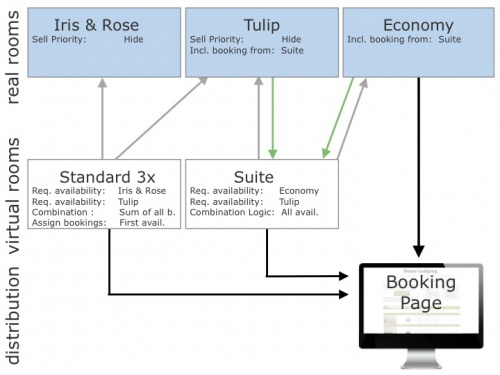
Example 4: A B&B has 3 standard rooms (tulip, iris, rose) and one economy room. Tulip can be combined with the economy room to form a suite.
1. Set up your "real" rooms:
- Go to (SETTINGS) PROPERTIES > ROOMS and add a room for each of your rooms
- Go to (SETTINGS) PROPERTIES > ROOMS > SETUP
- Create one room type standard
- Set Name = iris and rose
- Set "Quantity" = 2
- Set "Sell Priority"= hide to hide the room from your booking page
- Create one room standard
- Set Name = tulip
- Set "Quantity" = 1
- Set "Sell Priority"= hide to hide the room from your booking page
- Create the economy room
- Set Name = economy
- Set "Quantity" = 1
2. Set up your "virtual" rooms:
- Go to (SETTINGS) PROPERTIES > ROOMS and add a room for each of your rooms
- Go to (SETTINGS) PROPERTIES > ROOMS > SETUP
- Create one room type standard
- Set Name = standard
- Set "Quantity" = 3
- Create one room type Suite
- Set Name = Suite
- Set "Quantity" = 1
3. Set up the room dependency settings: Go to (SETTINGS) PROPERTIES > ROOMS > DEPENDENCIES and set:
- Room type standard room:
- Requires Availability in = room type standard containing iris and rose
- Requires Availability in = tulip
- Combination Logic = Sum of all bookings
- Assign Bookings to = First available dependency room
- Suite:
- Requires Availability in = tulip
- Requires Availability in = economy room
- Combination Logic = all rooms must be available
- Assign bookings to = This room
- Tulip:
- Requires Availability in = nothing selected
- Include Bookings from = Suite
- Combination Logic = Sum of all bookings
- Assign bookings to = This room
- Economy:
- Requires Availability in = nothing selected
- Include Bookings from = Suite
- Combination Logic = Sum of all bookings
- Assign bookings to = This room

Note Test dependencies carefully. If you are using dependencies please test thoroughly to make sure your set up reflects your rules. If you are connecting one physical room more than once to a booking channel you are risking overbookings.