TripConnect: Difference between revisions
| (21 intermediate revisions by 5 users not shown) | |||
| Line 1: | Line 1: | ||
[[Category:Channel Manager]] | [[Category:Channel Manager]] | ||
[[Category:Error Messages from Channels]] | [[Category:Error Messages from Channels]] | ||
[[Category: | [[Category:Reviews]] | ||
[[Category:Troubleshooting]] | [[Category:Troubleshooting]] | ||
[[Category:Marketplace]] | |||
<div class="heading">TripAdvisor</div> | <div class="heading">TripAdvisor</div> | ||
This page is about the menu {{#fas:cog}} (SETTINGS) CHANNEL MANAGER > TRIPCONNECT and explains how enable ans connect '''TripConnect Instant Booking''', '''TripConnect Pay per Click''', and/or '''TripAdvisor Review Express'''. | This page is about the menu {{#fas:cog}} (SETTINGS) CHANNEL MANAGER > TRIPCONNECT and explains how enable ans connect '''TripConnect Instant Booking''', '''TripConnect Pay per Click''', and/or '''TripAdvisor Review Express'''. | ||
| Line 9: | Line 10: | ||
TripAdvisor is in the process of integrating their rental sites. At the moment the are still running on separate technological platforms which are all branded as TripAdvisor. | TripAdvisor is in the process of integrating their rental sites. At the moment the are still running on separate technological platforms which are all branded as TripAdvisor. | ||
*If you have the option to syncronise iCal in your Tripadvisor extranet go to {{#fas:cog}} (SETTINGS) CHANNEL MANAGER >TRIPADVISOR RENTALS ICAL | *If you have the option to syncronise iCal in your Tripadvisor extranet go to {{#fas:cog}} (SETTINGS) CHANNEL MANAGER >TRIPADVISOR RENTALS ICAL | ||
=General= | =General= | ||
| Line 20: | Line 21: | ||
TripAdvisor is in the process of integrating their rental sites. At the moment the are still running on separate technological platforms which are all branded as TripAdvisor. | TripAdvisor is in the process of integrating their rental sites. At the moment the are still running on separate technological platforms which are all branded as TripAdvisor. | ||
*If you have the option to syncronise iCal in your Tripadvisor extranet go to {{#fas:cog}} (SETTINGS) CHANNEL MANAGER >TRIPADVISOR RENTALS ICAL | *If you have the option to syncronise iCal in your Tripadvisor extranet go to {{#fas:cog}} (SETTINGS) CHANNEL MANAGER >TRIPADVISOR RENTALS ICAL | ||
==Sponsored Placements== | ==Sponsored Placements== | ||
| Line 29: | Line 30: | ||
With Sponsored Placements Standard guests can book via OTA’s like Booking.com. For Sponsored Placements Direct Tripdavisor remove the OTA’s and only show the visit hotel website link. | With Sponsored Placements Standard guests can book via OTA’s like Booking.com. For Sponsored Placements Direct Tripdavisor remove the OTA’s and only show the visit hotel website link. | ||
To use Sponsored | To use Sponsored Placements Direct, you must be connected via one of the certified connectivity partners like Beds24. | ||
==TripAdvisor Business Advantage== | ==TripAdvisor Business Advantage== | ||
| Line 42: | Line 40: | ||
*Enhance their profile: Use exclusive marketing tools to motivate travelers to book with you — post a Special Offer, highlight a Favorite Review, create a custom Storyboard, feature your Favorite Photos first, and more. | *Enhance their profile: Use exclusive marketing tools to motivate travelers to book with you — post a Special Offer, highlight a Favorite Review, create a custom Storyboard, feature your Favorite Photos first, and more. | ||
*TripAdvisor analytics to make informed business decisions and optimize your performance. | *TripAdvisor analytics to make informed business decisions and optimize your performance. | ||
You receive this discount when you sign up with this promo code: S1TOIT | You receive this discount when you sign up with this promo code: S1TOIT | ||
| Line 50: | Line 45: | ||
With this service you can automatically collect reviews from your guests. | With this service you can automatically collect reviews from your guests. | ||
To use Review | To use Review Express, you must be connected via one of the certified connectivity partners like Beds24. | ||
You receive this discount when you sign up with this promo code: XHU4M8 | |||
==TripConnect== | ==TripConnect== | ||
TripConnect offers two products that help drive direct bookings: | TripConnect offers two products that help hotels drive direct bookings: | ||
*TripAdvisor Instant Booking allows travelers to book with you immediately on TripAdvisor. It is a “Pay for Stays” commission model that does not require up-front investment or a long-term commitment. | *TripAdvisor Instant Booking allows travelers to book with you immediately on TripAdvisor. It is a “Pay for Stays” commission model that does not require up-front investment or a long-term commitment. | ||
*TripAdvisor Cost-Per-Click allows you to drive more incremental direct bookings by spotlighting your | *TripAdvisor Cost-Per-Click allows you to drive more incremental direct bookings by spotlighting your prices and availability on TripAdvisor with a cost-per-click model. | ||
To be eligible for TripConnect, you must be connected via one of the certified connectivity partners like Beds24. | To be eligible for TripConnect, you must be connected via one of the certified connectivity partners like Beds24. | ||
| Line 87: | Line 86: | ||
*Make sure your property is mapped (see above). | *Make sure your property is mapped (see above). | ||
= Use TripConnect Instant Booking= | = Use TripConnect Instant Booking not available for new cusotmers= | ||
Tripadvisor displays | <div class="warning alert alert-danger">{{#fas:exclamation-triangle}} Tripadvisor disconnected this service for new cusotmers. Existing connections are supposed to keep working </div> | ||
Tripadvisor displays prices and availability. Guest can then complete the booking directly on the TripAdvisor web site. | |||
TripConnect Instant Booking works on a pay-per-booking commission model. Full details of the charges will be available from TripAdvisor. | TripConnect Instant Booking works on a pay-per-booking commission model. Full details of the charges will be available from TripAdvisor. | ||
| Line 108: | Line 109: | ||
Tripadvisor requires us to send a confirmation to the guest. The system uses your normal booking confirmation. | Tripadvisor requires us to send a confirmation to the guest. The system uses your normal booking confirmation. | ||
<span style="color:#fe746c;“ >{{#fas:exclamation-triangle}} </span> Instant Booking program is currently only available to people booking from | Instant Booking is available for guests booking from these markets: | ||
*United States | |||
*United Kingdom | |||
*Ireland | |||
*Canada | |||
*Australia | |||
*India | |||
*Malaysia | |||
*New Zealand | |||
*Philippines | |||
*Singapore | |||
*South Africa | |||
<span style="color:#fe746c;“ >{{#fas:exclamation-triangle}} </span> Instant Booking program is currently only available to people booking from locations above, other European countries are planned to roll out shortly. | |||
=== Set up=== | === Set up=== | ||
==== TripAdvisor ==== | ==== TripAdvisor ==== | ||
| Line 117: | Line 132: | ||
*If you have more than one property in the same Beds24 account, all you need to do is enter the same TripAdvisor property code for all of them When TripAdvisor request a price for that code, we will send prices for all the properties that have the same code. They will appear on TripAdvisor as different room options in your TripAdvisor property. | *If you have more than one property in the same Beds24 account, all you need to do is enter the same TripAdvisor property code for all of them When TripAdvisor request a price for that code, we will send prices for all the properties that have the same code. They will appear on TripAdvisor as different room options in your TripAdvisor property. | ||
*Make sure your property is mapped (see above). | *Make sure your property is mapped (see above). | ||
=====Requirements from TripAdvisor===== | =====Requirements from TripAdvisor===== | ||
| Line 131: | Line 144: | ||
c. Your room descriptions | c. Your room descriptions | ||
d. | d. At least one property picture and one picture per room. Double check you have at least these activated in {{#fas:cog}} (SETTINGS) BOOKING ENGINE > PICTURES | ||
Tripadvisor will not accept data if you do not have room descriptions, general policy and/or cancellation policy text. | Tripadvisor will not accept data if you do not have room descriptions, general policy and/or cancellation policy text. | ||
e. '''For Brazil, Greece and US, a STATE in SETTINGS > PROPERTIES > DESCRIPTION > ADDRESS is Mandatory''', if you miss this field, then your data will NOT be transferred. | |||
=====What we are sending===== | =====What we are sending===== | ||
'''Prices:''' | '''Prices:''' | ||
The booking page prices are sent to Tripadvisor. | The booking page prices are sent to Tripadvisor. Daily Prices and Fixed Prices activated for Beds24 offer 1 are considered. If you have prices for other offers these are not sent. | ||
The price of a | The price of a price sent is composed from the Single, Double, Room and extra person prices. | ||
If you select Bookings all compulsory percentage upsell items except for the ones set to "refundable" defined for the property will be included as tax values and added to the final price sent to TripAdvisor. | If you select Bookings all compulsory percentage upsell items except for the ones set to "refundable" defined for the property will be included as tax values and added to the final price sent to TripAdvisor. | ||
| Line 151: | Line 166: | ||
TripAdvisor uses the cancellation rules set in the Beds24 system. The default is to never allow cancellations. | TripAdvisor uses the cancellation rules set in the Beds24 system. The default is to never allow cancellations. | ||
*To allow cancellations go to {{#fas:cog}} (SETTINGS) | *To allow cancellations go to {{#fas:cog}} (SETTINGS) BOOKING ENGINE and change the setting for "Booking Cancellations by Guest" | ||
*To allow cancellations for offer 1 go to {{#fas:cog}} (SETTINGS) PROPERTIES > ROOMS > OFFERS and change the setting for "Booking Cancellations by Guest" | *To allow cancellations for offer 1 go to {{#fas:cog}} (SETTINGS) PROPERTIES > ROOMS > OFFERS and change the setting for "Booking Cancellations by Guest" | ||
| Line 158: | Line 173: | ||
'''Pictures:''' | '''Pictures:''' | ||
*As property picture we will send picture number 1 from {{#fas:cog}} (SETTINGS) BOOKING ENGINE > PICTURES. The room pictures is the ones selected in {{#fas:cog}} (SETTINGS) | *As property picture we will send picture number 1 from {{#fas:cog}} (SETTINGS) BOOKING ENGINE > PICTURES. The room pictures is the ones selected in {{#fas:cog}} (SETTINGS) BOOKING ENGINE > PICTURES as "room pictures". | ||
'''Cancellation rules''' | '''Cancellation rules''' | ||
| Line 164: | Line 179: | ||
Tripadvisor uses the cancellation rules set in the Beds24 system. The default is to never allow cancellations. | Tripadvisor uses the cancellation rules set in the Beds24 system. The default is to never allow cancellations. | ||
*To allow cancellations go to SETTINGS | *To allow cancellations go to {{#fas:cog}} (SETTINGS) BOOKING ENGINE and change the setting for "Booking Cancellations by Guest" | ||
*We send offer 1 to Tripadvisor. To allow cancellations for offer 1 go to SETTINGS | *We send offer 1 to Tripadvisor. To allow cancellations for offer 1 go to {{#fas:cog}} (SETTINGS) > PROPERTIES > ROOMS > OFFERS and change the setting for "Booking Cancellations by Guest" | ||
=== Activation=== | === Activation=== | ||
| Line 187: | Line 202: | ||
*You can disable individual bookings from receiving a review request | *You can disable individual bookings from receiving a review request | ||
*You can select specific or all rooms to participate | *You can select specific or all rooms to participate | ||
The setting "Review Express" allows you to define if all bookings (Default) or "Only enabled " bookings receive invitations. | |||
=== Limitations === | === Limitations === | ||
| Line 220: | Line 237: | ||
= Use TripConnect Cost per Click = | = Use TripConnect Cost per Click = | ||
Your | Your prices and availability will show on TripAdvisor with a link to your own booking page. Guests can then make a booking using your own booking engine. | ||
Tripadvisor charges per click. Full details of the charges will be available from TripAdvisor. | Tripadvisor charges per click. Full details of the charges will be available from TripAdvisor. | ||
Latest revision as of 14:55, 12 November 2025
This page is about the menu (SETTINGS) CHANNEL MANAGER > TRIPCONNECT and explains how enable ans connect TripConnect Instant Booking, TripConnect Pay per Click, and/or TripAdvisor Review Express.
TripAdvisor Holiday Rentals
TripAdvisor is in the process of integrating their rental sites. At the moment the are still running on separate technological platforms which are all branded as TripAdvisor.
*If you have the option to syncronise iCal in your Tripadvisor extranet go to  (SETTINGS) CHANNEL MANAGER >TRIPADVISOR RENTALS ICAL
General
- Click here for general information on how the channel manager works.
- This tutorial explains how to set prices for channels.
TripAdvisor Options
TripAdvisor Holiday Rentals
TripAdvisor is in the process of integrating their rental sites. At the moment the are still running on separate technological platforms which are all branded as TripAdvisor.
- If you have the option to syncronise iCal in your Tripadvisor extranet go to (SETTINGS) CHANNEL MANAGER >TRIPADVISOR RENTALS ICAL
Sponsored Placements
Sponsored Placements are targeted ads which appear above Tripadvisor search results, on local competitors' pages, and on other high-profile shopping pages across all devices.
Properties pay for Sponsored Placements on a cost-per-click basis.
With Sponsored Placements Standard guests can book via OTA’s like Booking.com. For Sponsored Placements Direct Tripdavisor remove the OTA’s and only show the visit hotel website link.
To use Sponsored Placements Direct, you must be connected via one of the certified connectivity partners like Beds24.
TripAdvisor Business Advantage
Business Advantage is a subscription service that empowers accommodations to attract, engage and influence potential customers on the world’s largest travel site. Subscribers can access industry-leading tools designed to better market their property to potential guests and connect them to their direct booking channels.
Business Advantage allows owners to:
- Connect to travelers directly: Make it easy for travelers to contact you directly by including your hotel website, phone or email address — on TripAdvisor.
- Enhance their profile: Use exclusive marketing tools to motivate travelers to book with you — post a Special Offer, highlight a Favorite Review, create a custom Storyboard, feature your Favorite Photos first, and more.
- TripAdvisor analytics to make informed business decisions and optimize your performance.
You receive this discount when you sign up with this promo code: S1TOIT
TripAdvisor Review Express
With this service you can automatically collect reviews from your guests.
To use Review Express, you must be connected via one of the certified connectivity partners like Beds24.
You receive this discount when you sign up with this promo code: XHU4M8
TripConnect
TripConnect offers two products that help hotels drive direct bookings:
- TripAdvisor Instant Booking allows travelers to book with you immediately on TripAdvisor. It is a “Pay for Stays” commission model that does not require up-front investment or a long-term commitment.
- TripAdvisor Cost-Per-Click allows you to drive more incremental direct bookings by spotlighting your prices and availability on TripAdvisor with a cost-per-click model.
To be eligible for TripConnect, you must be connected via one of the certified connectivity partners like Beds24.
Mapping for Sponsored Placements Direct, TripConnect and TripAdvisor Review Express
To use these services your property must be successfully mapped to TripAdvisor.
- Make sure the "Synchronise" setting is set to "Notify" or to one of the Booking options
- View the data we are sending to TripAdvisor and your mapping status clicking on the "View Mapping Status" button.
If this information does not match the information you have entered in the TripAdvisor extranet click on the "Edit Mapping Data" link and correct your data.
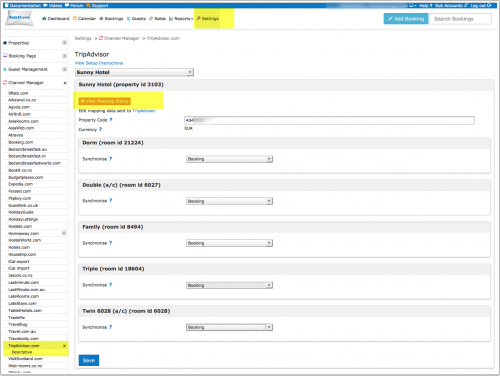
It can take Tripadvisor up to 48 hours to read the data we send. If you have just entered your information in Beds24 you might need to wait. If you are still not mapped after 48 hours and click on 'View Mapping Status'. Copy the information you see there and send this to Tripadvisor and ask them to fix the problem.
Use Sponsored Posts Direct
Tripadvisor charges per click. Full details of the charges will be available from TripAdvisor.
Capabilities
- Beds24 can send prices and availability to TripAdvisor
- Bookings are made on your website. Bookings made on the Beds24 booking page will automatically import.
TripAdvisor
Join the program via your TripAdvisor account.
Beds24
- Set the "Synchronise" setting to one of the Booking options. The Notify setting will only notify Trip Connect you are capable of joining their program using Beds24, it will not allow prices to be sent.
- Enter your TripAdvisor ID into the Property Code field, this is normally the number after the d in the URL of your TripAdvisor page. Without the correct ID Tripadviser may not be able to identify your property.
- Make sure your property is mapped (see above).
Use TripConnect Instant Booking not available for new cusotmers
Tripadvisor displays prices and availability. Guest can then complete the booking directly on the TripAdvisor web site.
TripConnect Instant Booking works on a pay-per-booking commission model. Full details of the charges will be available from TripAdvisor.
Capabilities
- Beds24.com can send price and availability to TripAdvisor
- Beds24.com can send descriptive information about your property
- Beds24.com can import bookings
- Beds24.com can import booking cancellations
For details please click here
The data communication is initiated by TripAdvisor by pulling data from Beds24. That means that Tripadvisor sends us a request for prices and availability and we then send your data for the requested section. We can not push data without a request from TripAdvisor.
Limitations
- If multiple rooms with different occupancies are booked TripAdvisor will apply the highest occupancy price for both rooms
- If your booking type is set to collect a deposit TripAdvisor will collect the credit card details from the guest. You can then manually charge the deposit account to the card.
Tripadvisor requires us to send a confirmation to the guest. The system uses your normal booking confirmation.
Instant Booking is available for guests booking from these markets:
- United States
- United Kingdom
- Ireland
- Canada
- Australia
- India
- Malaysia
- New Zealand
- Philippines
- Singapore
- South Africa
Instant Booking program is currently only available to people booking from locations above, other European countries are planned to roll out shortly.
Set up
TripAdvisor
- Join the program via your TripAdvisor account. Check if you are eligible
Beds24
- Enter your TripAdvisor ID into the Property Code field, this is normally the number after the d in the URL of your TripAdvisor page. Without the correct ID TripAdvisor may not be able to identify your property.
- If you have more than one property in the same Beds24 account, all you need to do is enter the same TripAdvisor property code for all of them When TripAdvisor request a price for that code, we will send prices for all the properties that have the same code. They will appear on TripAdvisor as different room options in your TripAdvisor property.
- Make sure your property is mapped (see above).
Requirements from TripAdvisor
Go to (SETTINGS) CHANNEL MANAGER > TRIPCONNECT > CONTENT DATA for a collection of information about your property required to use TripConnect™ Instant Booking. In particular check the following are all filled in and correct:
a. Your cancellation policy text
Cancellation policy has to be specific to the offer being sent to TripAdvisor. TripAdvisor will not accept ambiguous policies.
b. Your general policy (check-in check-out policy) text
c. Your room descriptions
d. At least one property picture and one picture per room. Double check you have at least these activated in (SETTINGS) BOOKING ENGINE > PICTURES
Tripadvisor will not accept data if you do not have room descriptions, general policy and/or cancellation policy text.
e. For Brazil, Greece and US, a STATE in SETTINGS > PROPERTIES > DESCRIPTION > ADDRESS is Mandatory, if you miss this field, then your data will NOT be transferred.
What we are sending
Prices:
The booking page prices are sent to Tripadvisor. Daily Prices and Fixed Prices activated for Beds24 offer 1 are considered. If you have prices for other offers these are not sent.
The price of a price sent is composed from the Single, Double, Room and extra person prices.
If you select Bookings all compulsory percentage upsell items except for the ones set to "refundable" defined for the property will be included as tax values and added to the final price sent to TripAdvisor.
The currency code sent to TripAdvisor is defined in (SETTINGS) PROPERTIES > DESCRIPTION "Currency Code" and must be set to match your prices entered in Beds24.
Policies:
TripAdvisor uses the cancellation rules set in the Beds24 system. The default is to never allow cancellations.
- To allow cancellations go to (SETTINGS) BOOKING ENGINE and change the setting for "Booking Cancellations by Guest"
- To allow cancellations for offer 1 go to (SETTINGS) PROPERTIES > ROOMS > OFFERS and change the setting for "Booking Cancellations by Guest"
Pictures:
- As property picture we will send picture number 1 from (SETTINGS) BOOKING ENGINE > PICTURES. The room pictures is the ones selected in (SETTINGS) BOOKING ENGINE > PICTURES as "room pictures".
Cancellation rules
Tripadvisor uses the cancellation rules set in the Beds24 system. The default is to never allow cancellations.
- To allow cancellations go to (SETTINGS) BOOKING ENGINE and change the setting for "Booking Cancellations by Guest"
- We send offer 1 to Tripadvisor. To allow cancellations for offer 1 go to (SETTINGS) > PROPERTIES > ROOMS > OFFERS and change the setting for "Booking Cancellations by Guest"
Activation
To receive bookings activate one of the booking options.
- Select "Bookings" to show final price including compulsory upsell items.
- Select "Bookings (no upsell)" compulsory upsell items will be ignored
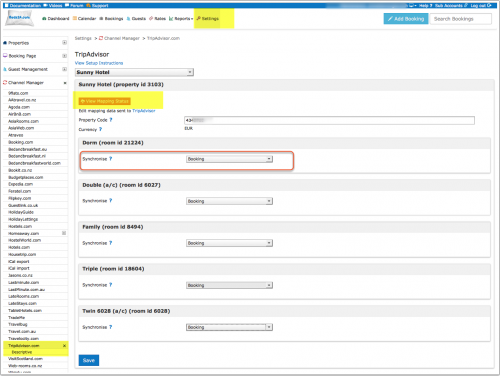

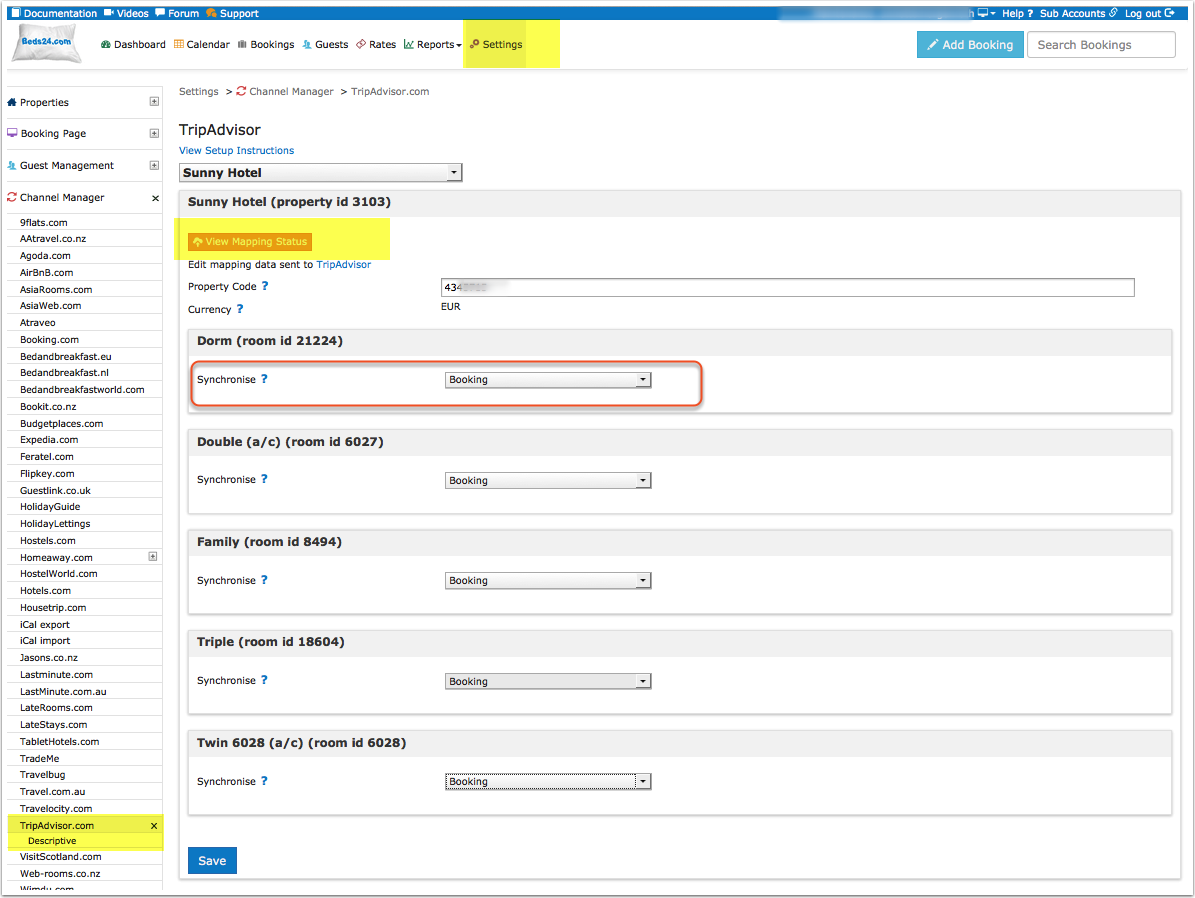
Log into your TripAdvisor account and make sure you have activated Instant Booking.
Potential Issues
If you previously used Instant booking through another provider Tripadvisor might need to delete certain information in your account. Please contact Tripavisor support for assistance.
Use TripAdvisor Review Express
Capabilities
- Beds24 will send details of your bookings one day after check-out to TripAdvisor. TripAdvisor will use this to send an Email directly to the guest to request a review.
- You can disable individual bookings from receiving a review request
- You can select specific or all rooms to participate
The setting "Review Express" allows you to define if all bookings (Default) or "Only enabled " bookings receive invitations.
Limitations
- TripAdvisor require country of residence of the guest for legal reasons. Beds24 booking page provides a standard question (Country Selector). For bookings from other sources you will need to add this information manually.
- The booking must have a valid Email Address.
- Your property must be successfully mapped.
Set Up
TripAdvisor
- opt in to the Review Express programme.
Beds24
- Select one of the options (either Review Express only or Review Express in combination with Bookings) for the rooms you want to enable.
- Set using the setting "Reviews Express" if reviews are collected for all bookings or if you want to manually activate review collection.
- We recommend adding the "Country (Selector)" as a compulsory question to your booking page (SETTINGS->PROPERTIES->BOOKING QUESTIONS).
- Enter your TripAdvisor ID into the Property Code field, this is normally the number after the d in the URL of your tripadvisor page. Without the correct ID TripAdvisor may not be able to identify your property.
- Make sure your property is mapped (see above).
- You must comply to your local privacy laws. TripAdvisor requires you must ensure that each guest has consented to disclosing their guest data to 3rd parties in order to receive the Review Express emails. In order to ensure Guest consent, a prominent statement should be displayed on the booking page at the time Guest Data is collected.
TripAdvisor’s recommended data statement is as follows and should appear prominently on your booking page:
"We may use third-party service providers to process your personal information on our behalf for the purposes specified above. For example, we may share some information about you with these third parties so that they can contact you directly by email (for example: to obtain post stay reviews about your travel experience)."
2. Managing Reviews
Invitations will be send the day after check-out and only for rooms which are opted in. They will not send:
- if a booking is cancelled
- if Email address is missing or invalid
- if country of residence is missing
- if "Allow Reviews" in the "Mail" tab of the booking is set to "Disable". If you have set "Review Express" = "Enabled only" you need to manually set "Allow Reviews" = Activate in each booking for which you want to collect a review.
Data protection
Make sure you comply with your local data protection laws when using this service.
Use TripConnect Cost per Click
Your prices and availability will show on TripAdvisor with a link to your own booking page. Guests can then make a booking using your own booking engine.
Tripadvisor charges per click. Full details of the charges will be available from TripAdvisor.
Capabilities
- Beds24 sends prices and a link to your booking page
For details please click here
TripConnect
Join the program via your TripAdvisor account
Beds24
- Set the synchronise setting to one of the Booking options. The Notify setting will only notify Trip Connect you are capable of joining their program using Beds24, it will not allow prices to be sent.
- Enter your TripAdvisor ID into the Property Code field, this is normally the number after the d in the URL of your TripAdvisor page. Without the correct ID Tripadviser may not be able to identify your property.
- Make sure your property is mapped (see above).
- The currency code sent to TripConnect is defined in (SETTINGS) PROPERTIES > DESCRIPTION "API currency" and must be set to match your prices entered in Beds24.
Activation
TripConnect - How to set up a campaign.pdf
Disconnect
Change the setting for "Synchronise" to either "Notify" or "Disable".