Travia: Difference between revisions
Created page with "[Category:Channel Manager]] Category:Error Messages from Channels Category:Set up Instructions Category:Troubleshooting <div class="heading">Travia</div> This pag..." |
No edit summary |
||
| (8 intermediate revisions by 2 users not shown) | |||
| Line 1: | Line 1: | ||
[Category:Channel Manager]] | [[Category:Channel Manager]] | ||
[[Category:Error Messages from Channels]] | [[Category:Error Messages from Channels]] | ||
[[Category:Troubleshooting]] | [[Category:Troubleshooting]] | ||
<div class="heading">Travia</div> | <div class="heading">Travia</div> | ||
This page is about the menu {{#fas:cog}} (SETTINGS) CHANNEL MANAGER > TRAVIA and explains how the connection with Travia works and how to set it up. | This page is about the menu {{#fas:cog}} (SETTINGS) CHANNEL MANAGER > TRAVIA and explains how the connection with Travia works and how to set it up. | ||
===General=== | ===General=== | ||
| Line 25: | Line 23: | ||
'''Prices''' | '''Prices''' | ||
*We can only send availability if you have set up prices which are activated for this channel. This tutorial gives general information how to [[Setting_Prices_for_Booking_Channels|set prices for channels]]. | *We can only send availability if you have set up prices which are activated for this channel. This tutorial gives general information how to [[Setting_Prices_for_Booking_Channels|set prices for channels]]. | ||
*If you use | *If you use Fixed Prices 1 person, 2 person and room price will send. Room price will send for specified occupancy. Multiple Fixed Prices with different occupancies can send on same rate plan. Prices for "Extra Person", "Extra child" and discounts set in the "Discounts" tab of the Fixed Prices can not be sent. | ||
*If you use daily prices the daily price will send including occupancy. Multiple occupancy prices can send on each rate plan. Extra person price will send. | *If you use daily prices the daily price will send including occupancy. Multiple occupancy prices can send on each rate plan. Extra person price will send. | ||
*Beds24 can send a single (1 person), double (2 guests) and room price which is will apply for the maximum occupancy. | *Beds24 can send a single (1 person), double (2 guests) and room price which is will apply for the maximum occupancy. | ||
* | *Travia can support more than one price per room for example to send prices for different minimum stays, meal options or refundable and non-refundable prices and can auto calculate child prices. See chapter "Multiple Rates" below. | ||
| Line 46: | Line 44: | ||
== What you will need == | == What you will need == | ||
== Set Up== | == Set Up== | ||
| Line 54: | Line 50: | ||
===Beds24=== | ===Beds24=== | ||
*Map your rooms and rates | *Map your rooms and rates | ||
Map Rooms: | Map Rooms: | ||
* | *Enable the room in Beds24 and send the room ID to Travia | ||
Map Rates: | Map Rates: | ||
*Click on the "Get Code" link next to the rate plan id setting. | *Click on the "Get Code" link next to the rate plan id setting. | ||
*Choose the Travia | *Choose the Travia rate plan for this room and click on it | ||
*When the correct rate plan id has copied to the rate plan id setting. | *When the correct rate plan id has copied to the rate plan id setting. | ||
*Click SAVE | *Click SAVE | ||
== Price Multiplier == | == Price Multiplier == | ||
==Multiple Rates at Travia== | ==Multiple Rates at Travia== | ||
Travia can support more than one price per room for example to send prices for different minimum stays, meal options or refundable and non-refundable prices. | Travia can support more than one price per room for example to send prices for different minimum stays, meal options or refundable and non-refundable prices. | ||
Travia can set up multiple rate plan ids for each room, each with pre-defined booking conditions. Beds24 can map a different Beds24 | Travia can set up multiple rate plan ids for each room, each with pre-defined booking conditions. Beds24 can map a different Beds24 price offer to each Travia rate. [[Setting_Prices_for_Booking_Channels#Mapping_channel_rate_codes|Please use these instructions]]. | ||
If you do not have the appropriate rate ids you need to request Travia to add them. | If you do not have the appropriate rate ids you need to request Travia to add them. | ||
== Maximum number accepted bookings == | == Maximum number of accepted bookings == | ||
By default | By default all available rooms are sent to activated channels. | ||
The menu at {{#fas:cog}} (SETTINGS) CHANNEL MANAGER > CHANNEL INVENTORY can limit the number available rooms for this channel. | |||
== Activate == | == Activate == | ||
Latest revision as of 08:38, 9 January 2024
This page is about the menu (SETTINGS) CHANNEL MANAGER > TRAVIA and explains how the connection with Travia works and how to set it up.
General
- Click here for general information on how the channel manager works.
- This tutorial explains how to set prices for channels.
Capabilities
- Beds24.com can export inventory.
- Beds24.com can export multiple rates.
- Beds24.com can import bookings.
- Beds24.com can import booking cancellations.
- Importing cancellations can be disabled for individual bookings.
For details please click here
Limitations
Before you connect
Prices
- We can only send availability if you have set up prices which are activated for this channel. This tutorial gives general information how to set prices for channels.
- If you use Fixed Prices 1 person, 2 person and room price will send. Room price will send for specified occupancy. Multiple Fixed Prices with different occupancies can send on same rate plan. Prices for "Extra Person", "Extra child" and discounts set in the "Discounts" tab of the Fixed Prices can not be sent.
- If you use daily prices the daily price will send including occupancy. Multiple occupancy prices can send on each rate plan. Extra person price will send.
- Beds24 can send a single (1 person), double (2 guests) and room price which is will apply for the maximum occupancy.
- Travia can support more than one price per room for example to send prices for different minimum stays, meal options or refundable and non-refundable prices and can auto calculate child prices. See chapter "Multiple Rates" below.
Bookings
New Bookings are imported.
Existing bookings are not automatically imported when the connection is established and should be entered into Beds24 manually.
Extras and Taxes
"Upsell Items" can not be exported.
Rooms and room types
If you have room types here and sell rooms individually at another channel or your own web site and want to sell them here as a "roomtype" with a quantity of more than one you can set up virtual roooms.
What you will need
Set Up
Travia
Contact your Travia market manager and request to be connected to Beds24.
Beds24
- Map your rooms and rates
Map Rooms:
- Enable the room in Beds24 and send the room ID to Travia
Map Rates:
- Click on the "Get Code" link next to the rate plan id setting.
- Choose the Travia rate plan for this room and click on it
- When the correct rate plan id has copied to the rate plan id setting.
- Click SAVE
Price Multiplier
Multiple Rates at Travia
Travia can support more than one price per room for example to send prices for different minimum stays, meal options or refundable and non-refundable prices.
Travia can set up multiple rate plan ids for each room, each with pre-defined booking conditions. Beds24 can map a different Beds24 price offer to each Travia rate. Please use these instructions. If you do not have the appropriate rate ids you need to request Travia to add them.
Maximum number of accepted bookings
By default all available rooms are sent to activated channels. The menu at (SETTINGS) CHANNEL MANAGER > CHANNEL INVENTORY can limit the number available rooms for this channel.
Activate
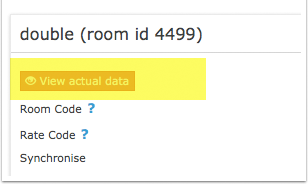
Before you activate the connection you can view the live availability and prices that will be sent to Travia using the "View actual data" button.
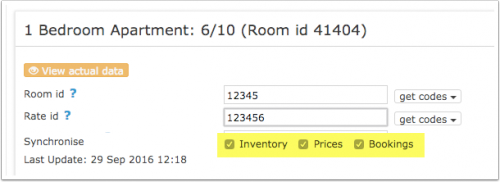
- Tick "Inventory", "Prices" and "Bookings"
- Save
New Bookings are imported. Modifications and cancellations to bookings are also imported.
Existing bookings are not automatically imported when the connection is established and should be entered into Beds24 manually.
Updates and Changes
Changes to availability and prices will be instantly sent to the channel. Changes for settings for example minimum stays, the multiplier or number of rooms will send with the next update. Click on "Update" if you want to push them through instantly.
Notes
Common Errors
Any errors occurring during updates will be emailed to you with the error message as returned by Travia. Below are common error messages and how to fix them.
Disconnect
- Unticking "Inventory" and "Prices" and "Bookings" will stop the synchronisation for a room.
- To completely disconnect the channel manager you might need to contact Travia and ask them to disconnect you.