Hostel and Retreat Setup: Difference between revisions
| (44 intermediate revisions by 2 users not shown) | |||
| Line 1: | Line 1: | ||
[[Category:How to]] | [[Category:How to]] | ||
[[Category:Rooms]] | [[Category:Rooms]] | ||
[[Category: | [[Category:Fixed Prices]] | ||
[[Category:Properties]] | [[Category:Properties]] | ||
[[Category:Dorms]] | [[Category:Dorms]] | ||
| Line 14: | Line 14: | ||
*set ''Quantity of This Type'' to the number of beds in this dorm. If you do not offer a special children price set ''Maximum Adults'' to "Use Guests" and ''Maximum Children'' to ''Dont Ask'' | *set ''Quantity of This Type'' to the number of beds in this dorm. If you do not offer a special children price set ''Maximum Adults'' to "Use Guests" and ''Maximum Children'' to ''Dont Ask'' | ||
*set ''Maximum Guests'' to the number of beds you have. | *set ''Maximum Guests'' to the number of beds you have. | ||
*'''Collect Number of Guests''' = Yes | *'''Collect Number of Guests''' = Yes | ||
| Line 32: | Line 29: | ||
== Step 2 - Set your Prices == | == Step 2 - Set your Prices == | ||
===Using Daily Prices=== | ===Using Daily Prices=== | ||
Go to PRICES > DAILY PRICE | Go to PRICES > DAILY PRICE RULES and create a daily price for each number of guest which can book. | ||
Example 1: | |||
If a dorm can accommodate three guests and the extra person price is different, then you will need three daily prices: | |||
*Daily price 1: "Price for" = Up to 1 person. | |||
*Daily price 2: "Price for" = Up to 2 People. | |||
*Daily price 3: "Price for" = Up to 3 People. | |||
Then go to the CALENDAR and enter your price for each daily price/number of people. | |||
Example 2: | |||
If a dorm can accommodate three guests and the extra person price is the same, then you can enter an Extra Person Price: | |||
*Daily price 1: "Price for" = Up to 1 person, Extra Person Price = 20 | |||
Then go to the CALENDAR and enter your price for the first person. | |||
===Using | Example 3: | ||
Go to PRICES > | |||
If your prices change on a regular based and your dorm can accommodate three guests and each person is charged at the same price, you will need ONE daily price: | |||
*Daily price 1: "Price for" = Per Person. | |||
Then go to the CALENDAR and enter your price for 1 person, the price for each additional person will be calculated from the 1 person price. | |||
===Using Fixed Prices=== | |||
Go to PRICES > FIXED PRICES click on "Add Fixed Prices". | |||
*enter your bed price per night under both ''Single Price'' and ''Extra Person'' | *enter your bed price per night under both ''Single Price'' and ''Extra Person'' | ||
| Line 51: | Line 64: | ||
===Offer the whole dorm at a discounted price=== | ===Offer the whole dorm at a discounted price=== | ||
Set up the price for the whole dorm as ''Room | Set up the price for the whole dorm as ''Room Price'' for ''Max Room Capacity''. | ||
===Discounted price for children=== | ===Discounted price for children=== | ||
If you offer a discounted price for children enter this into ''Extra Child''. If you use this go | If you offer a discounted price for children enter this into ''Extra Child''. If you use this go to {{#fas:cog}} (SETTINGS) PROPERTIES -> ROOMS and set ''Maximum Adults'' and ''Maximum Children'' to the max number you allow in this dorm. | ||
==Manage bookings == | ==Manage bookings == | ||
| Line 63: | Line 76: | ||
==Channels / OTAs == | ==Channels / OTAs == | ||
If you plan to sell your dorm Beds on a booking channel, then please check the specific requirements for pricing and dependencies to ensure you meet their requirements. | If you plan to sell your dorm Beds on a booking channel, then please check the specific requirements for pricing and dependencies to ensure you meet their requirements. | ||
'''Airbnb''' - check the details in this page for Dorms on Airbnb [https://wiki.beds24.com/index.php/Dorms_on_Airbnb See the details of how to setup dorms]. | |||
==Channels/OTA pricing requirements== | |||
{| class="wikitable" | |||
! scope="col"| OTA | |||
! scope="col"| Channel Pricing Model | |||
! scope="col"| Daily Price Rules | |||
! scope="col"| Calendar | |||
! scope="col"| Channel specific requirements | |||
|- | |||
|Agoda | |||
|Per Occupancy Pricing | |||
|Price for = 1 person, no "Extra Person Price" | |||
|Enter Bed/person Price in the calendar | |||
| | |||
|- | |||
|Airbnb | |||
|Per Day Pricing | |||
|Price for = up to 1 person, no "Extra Person Price" | |||
|Enter Bed/person Price in the calendar | |||
|Go to {{#fas:cog}}(SETTINGS) > PROPERTIES > DESCRIPTION > | |||
'''Property Type''' = Hostel | |||
{{#fas:cog}} (SETTINGS) CHANNEL MANAGER > AIRBNB > SPECIFIC CONTENT > LISTING DETAILS > | |||
'''Property Type Group''' = boutique_hotels_and_more | |||
'''Listing Type''' = Shared room | |||
'''Bathroom Shared''' = Choose one of the options with shared bathroom (CAN NOT BE PRIVATE) | |||
{{#fas:cog}} (SETTINGS) CHANNEL MANAGER > AIRBNB > SPECIFIC CONTENT > PRICING > | |||
* Guests Included = 1, | |||
* Extra Person Price = add the value, same as the price in the calendar. | |||
{{#fas:cog}} (SETTINGS) CHANNEL MANAGER > AIRBNB > MAPPING > Sync Type = Limited | |||
<span class="" style="color: #f3e504; font-size: 150%;" >{{#fas:lightbulb}} </span> Airbnb will send ONE booking for the total number of guests, blocking the inventory. The booking will appear that all guests are in the same 'bed' but the inventory will show the correct number. If you prefer to see the bookings as individual bookings, copy the booking from Airbnb and create a group booking. | |||
|- | |||
|Airbnb | |||
|Per Occupancy Pricing | |||
|Price for = 1 person, no "Extra Person Price" | |||
|Enter Bed/person Price in the calendar | |||
|Go to {{#fas:cog}}(SETTINGS) > PROPERTIES > DESCRIPTION > | |||
'''Property Type''' = Hostel | |||
{{#fas:cog}} (SETTINGS) CHANNEL MANAGER > AIRBNB > SPECIFIC CONTENT > LISTING DETAILS > | |||
'''Property Type Group''' = boutique_hotels_and_more | |||
'''Listing Type''' = Shared room | |||
'''Bathroom Shared''' = Choose one of the options with shared bathroom (CAN NOT BE PRIVATE) | |||
<span class="" style="color: #f3e504; font-size: 150%;" >{{#fas:lightbulb}} </span> If you use Pricing Model = Per Occupancy Pricing, then Airbnb '''does not''' limit the number of guests based on the inventory sent from Beds24. | |||
|- | |||
|Expedia | |||
|Per Day Pricing | |||
|Price = 1 person, no "Extra Person Price" | |||
|Enter Bed/person Price in the calendar | |||
| | |||
|- | |||
|Booking.com | |||
|Per Day Pricing | |||
|Price = Max Occupancy | |||
|Enter Bed/person Price in the calendar | |||
|Send Support ticket, requesting the Pricing Model at Booking.com is changed to Standard. | |||
|- | |||
|HostelsClub | |||
| | |||
|Price = Max Occupancy | |||
|Enter Bed/person Price in the calendar | |||
|'''Private Room''' - Daily Price = Price For = Max Occupancy (The price paid by the guest is the bed price multiplied by the number of beds in the private room) | |||
'''Number of Beds''' - select the number of beds in the room if they are different from the Max number of guests. | |||
If the room has a double bed, this will be 1 bed, not 2 to match the number of guests. | |||
|- | |||
|Hostelworld | |||
| | |||
|Price = Max Occupancy | |||
|Enter Bed/person Price in the calendar | |||
|'''Private Room''' - Daily Price = Price For = Max Occupancy (The price paid by the guest is the bed price multiplied by the number of beds in the private room) | |||
'''Number of Beds''' - select the number of beds in the room if they are different from the Max number of guests. | |||
If the room has a double bed, this will be 1 bed, not 2 to match the number of guests. | |||
|- | |||
|} | |||
Latest revision as of 07:35, 23 June 2026
This page explains how to set up dorms or other shared rooms
Setup
Step 1 - Setup your Rooms
Go to (SETTINGS) > PROPERTIES > ROOMS and add a room for each dorm you have.
To set them up go to (SETTINGS) > PROPERTIES > ROOMS > SETUP
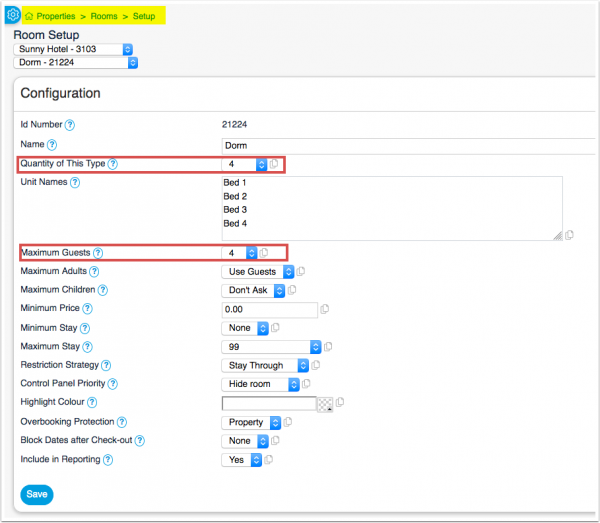
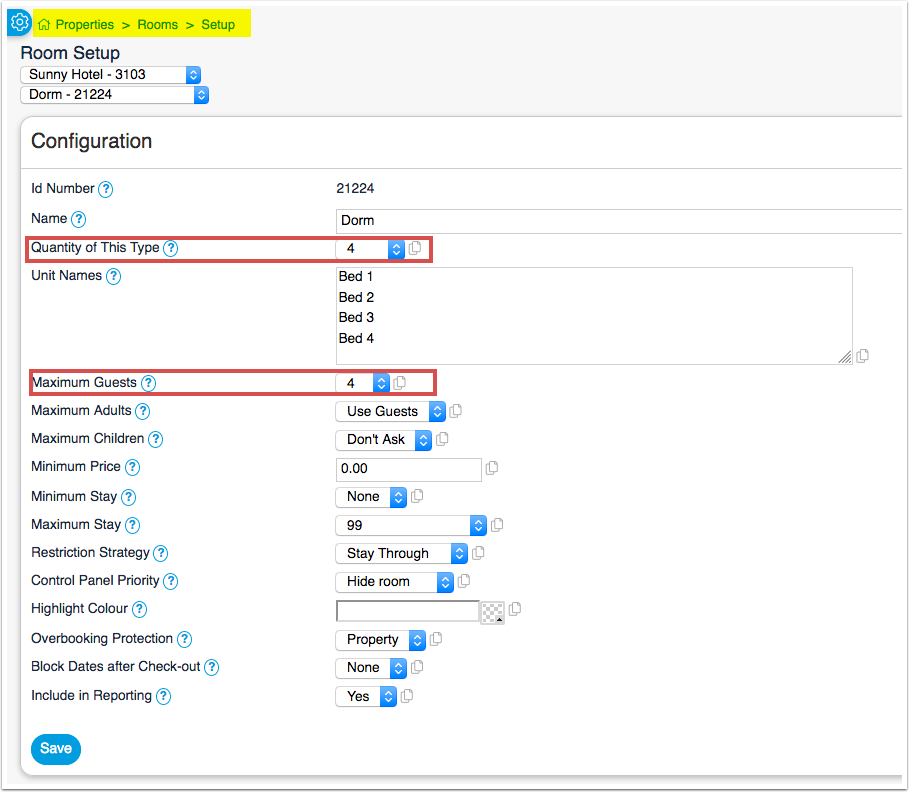
- set Quantity of This Type to the number of beds in this dorm. If you do not offer a special children price set Maximum Adults to "Use Guests" and Maximum Children to Dont Ask
- set Maximum Guests to the number of beds you have.
- Collect Number of Guests = Yes
- Display Name for Dorm = Optionally add a name to show on the booking page if required in all activated languages
- Set the "Accommodation Type" = Dorm
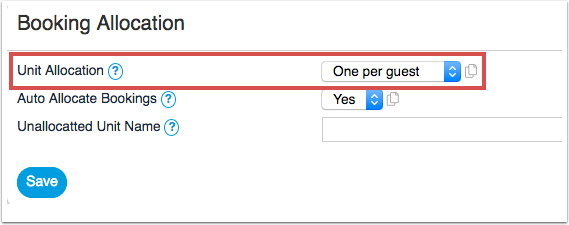
- set Unit Allocation to One per Guest
Step 2 - Set your Prices
Using Daily Prices
Go to PRICES > DAILY PRICE RULES and create a daily price for each number of guest which can book.
Example 1:
If a dorm can accommodate three guests and the extra person price is different, then you will need three daily prices:
- Daily price 1: "Price for" = Up to 1 person.
- Daily price 2: "Price for" = Up to 2 People.
- Daily price 3: "Price for" = Up to 3 People.
Then go to the CALENDAR and enter your price for each daily price/number of people.
Example 2:
If a dorm can accommodate three guests and the extra person price is the same, then you can enter an Extra Person Price:
- Daily price 1: "Price for" = Up to 1 person, Extra Person Price = 20
Then go to the CALENDAR and enter your price for the first person.
Example 3:
If your prices change on a regular based and your dorm can accommodate three guests and each person is charged at the same price, you will need ONE daily price:
- Daily price 1: "Price for" = Per Person.
Then go to the CALENDAR and enter your price for 1 person, the price for each additional person will be calculated from the 1 person price.
Using Fixed Prices
Go to PRICES > FIXED PRICES click on "Add Fixed Prices".
- enter your bed price per night under both Single Price and Extra Person
Bookings for one person will be offered the Single price. Bookings for two people will be offered the Single plus Extra person price. Bookings for three people the Single plus two Extra person etc.
Offer the whole dorm at a discounted price
Set up the price for the whole dorm as Room Price for Max Room Capacity.
Discounted price for children
If you offer a discounted price for children enter this into Extra Child. If you use this go to (SETTINGS) PROPERTIES -> ROOMS and set Maximum Adults and Maximum Children to the max number you allow in this dorm.
Manage bookings
For online bookings containing multiple beds the system will create a group booking with one master booking showing the invoice for all beds and and individual linked bookings for each bed. The Group_Bookings help page gives more information on how to manage group bookings.
When manually adding a booking for a dorm you can assign a free bed via the "Unit" selector in the "Summary" tab of the booking. If you are adding a booking for multiple beds use the "Allocate" button to allocate beds.
Channels / OTAs
If you plan to sell your dorm Beds on a booking channel, then please check the specific requirements for pricing and dependencies to ensure you meet their requirements.
Airbnb - check the details in this page for Dorms on Airbnb See the details of how to setup dorms.
Channels/OTA pricing requirements
| OTA | Channel Pricing Model | Daily Price Rules | Calendar | Channel specific requirements |
|---|---|---|---|---|
| Agoda | Per Occupancy Pricing | Price for = 1 person, no "Extra Person Price" | Enter Bed/person Price in the calendar | |
| Airbnb | Per Day Pricing | Price for = up to 1 person, no "Extra Person Price" | Enter Bed/person Price in the calendar | Go to (SETTINGS) > PROPERTIES > DESCRIPTION >
Property Type = Hostel (SETTINGS) CHANNEL MANAGER > AIRBNB > SPECIFIC CONTENT > LISTING DETAILS > Property Type Group = boutique_hotels_and_more Listing Type = Shared room Bathroom Shared = Choose one of the options with shared bathroom (CAN NOT BE PRIVATE) (SETTINGS) CHANNEL MANAGER > AIRBNB > SPECIFIC CONTENT > PRICING >
(SETTINGS) CHANNEL MANAGER > AIRBNB > MAPPING > Sync Type = Limited Airbnb will send ONE booking for the total number of guests, blocking the inventory. The booking will appear that all guests are in the same 'bed' but the inventory will show the correct number. If you prefer to see the bookings as individual bookings, copy the booking from Airbnb and create a group booking. |
| Airbnb | Per Occupancy Pricing | Price for = 1 person, no "Extra Person Price" | Enter Bed/person Price in the calendar | Go to (SETTINGS) > PROPERTIES > DESCRIPTION >
Property Type = Hostel (SETTINGS) CHANNEL MANAGER > AIRBNB > SPECIFIC CONTENT > LISTING DETAILS > Property Type Group = boutique_hotels_and_more Listing Type = Shared room Bathroom Shared = Choose one of the options with shared bathroom (CAN NOT BE PRIVATE) If you use Pricing Model = Per Occupancy Pricing, then Airbnb does not limit the number of guests based on the inventory sent from Beds24. |
| Expedia | Per Day Pricing | Price = 1 person, no "Extra Person Price" | Enter Bed/person Price in the calendar | |
| Booking.com | Per Day Pricing | Price = Max Occupancy | Enter Bed/person Price in the calendar | Send Support ticket, requesting the Pricing Model at Booking.com is changed to Standard. |
| HostelsClub | Price = Max Occupancy | Enter Bed/person Price in the calendar | Private Room - Daily Price = Price For = Max Occupancy (The price paid by the guest is the bed price multiplied by the number of beds in the private room)
Number of Beds - select the number of beds in the room if they are different from the Max number of guests. If the room has a double bed, this will be 1 bed, not 2 to match the number of guests. | |
| Hostelworld | Price = Max Occupancy | Enter Bed/person Price in the calendar | Private Room - Daily Price = Price For = Max Occupancy (The price paid by the guest is the bed price multiplied by the number of beds in the private room)
Number of Beds - select the number of beds in the room if they are different from the Max number of guests. If the room has a double bed, this will be 1 bed, not 2 to match the number of guests. |