Hotelbeds.com: Difference between revisions
| (5 intermediate revisions by 2 users not shown) | |||
| Line 14: | Line 14: | ||
==Capabilities== | ==Capabilities== | ||
*Beds24 can export inventory | *Beds24 can export inventory | ||
*Beds24 can export | *Beds24 can export prices. We send ONE ROOM price. If you have multiple prices by default the lowest price will be sent. | ||
*Beds24 can export minimum stay | *Beds24 can export minimum stay | ||
*Beds24 can import bookings | *Beds24 can import bookings | ||
| Line 28: | Line 28: | ||
'''Prices''' | '''Prices''' | ||
*We can only send availability if you have set up prices which are activated for this channel. This tutorial gives general information how to [[Setting_Prices_for_Booking_Channels|set prices for channels]]. | *We can only send availability if you have set up prices which are activated for this channel. This tutorial gives general information how to [[Setting_Prices_for_Booking_Channels|set prices for channels]]. | ||
*Prices for "Extra Person", "Extra child" and discounts set in the "Discounts" tab of the | *Prices for "Extra Person", "Extra child" and discounts set in the "Discounts" tab of the Fixed Prices can not be sent. | ||
'''Bookings''' | '''Bookings''' | ||
| Line 97: | Line 97: | ||
== Multiple contracts == | == Multiple contracts == | ||
Specify the first contract in the channel manager settings. Make sure "Hotelbeds" is ticked in the "Channels" tab of all | Specify the first contract in the channel manager settings. Make sure "Hotelbeds" is ticked in the "Channels" tab of all prices you want to send to this contract. | ||
Multiple contracts require | Multiple contracts require prices to be defined for each contract. | ||
Open the | Open the Daily Prices Fixed Prices you want to send to the second contract. | ||
*In | *In Fixed Prices go to the "Channels" tab. Tick "Hotelbeds" and enter the contract name and sequence for this contract separated by the / symbol. | ||
* Daily Prices, scroll down to 'Enable List' Tick "Hotelbeds" and enter the contract name and sequence for this contract separated by the / symbol under "Enable" in the Daily Price settings. | * Daily Prices, scroll down to 'Enable List' Tick "Hotelbeds" and enter the contract name and sequence for this contract separated by the / symbol under "Enable" in the Daily Price settings. | ||
Example: NRF-BAR/45678 | Example: NRF-BAR/45678 | ||
If the office code for the contract is different to that set in the channel manager settings, it can be specified as a third item in the | If the office code for the contract is different to that set in the channel manager settings, it can be specified as a third item in the price setting. | ||
Example: NRF-BAR/45678/164 | Example: NRF-BAR/45678/164 | ||
Daily Prices and Fixed Prices in which you have not specified a contract will send only to the first contract. | |||
Daily | |||
[[Image:hotelbeds2.png|350px|link=]] | [[Image:hotelbeds2.png|350px|link=]] | ||
| Line 122: | Line 121: | ||
==Price Multiplier== | ==Price Multiplier== | ||
If you want to add a multiplier to your prices - perhaps because | If you want to add a multiplier to your prices - perhaps because Hotelbeds requires a different currency to your Beds24 currency - add a '''*''' followed by the multiplier number to your Contract Name. | ||
For example a Contract Name setting '''ABC*1.23''' will multiply all prices by 1.23 sent for Contract Name ABC. (i.e. raised by 23%) | For example a Contract Name setting '''ABC*1.23''' will multiply all prices by 1.23 sent for Contract Name ABC. (i.e. raised by 23%) | ||
| Line 199: | Line 198: | ||
'''This change is not permitted as it does not agree with the signed contract.''' | '''This change is not permitted as it does not agree with the signed contract.''' | ||
You have a contracted allotment or restriction (for example on the minimum stay you are allowed to send) in Hotelbeds. Click on the "Get Contract Detail" link to check if/which minimum stay restriction (MLOS=X) applies. Make sure the data you send from Beds24 complies with your contract with Hotelbeds. | You have a contracted allotment or restriction (for example on the minimum stay you are allowed to send) in Hotelbeds. Click on the "Get Contract Detail" link to check if/which minimum stay restriction (MLOS=X) applies. Make sure the data you send from Beds24 complies with your contract with Hotelbeds. | ||
==Disconnect== | |||
*Untick 'Inventory', 'Prices' and 'Bookings' this will stop Beds24 sending data to Hotelbeds. | |||
*To completely disconnect the channel manager please log into your Hotelbeds extranet and remove the connection to Beds24. | |||
== Notes == | == Notes == | ||
*If you want to sync only inventory and have multiple contracts you need a | *If you want to sync only inventory and have multiple contracts you need a price for each contract. Deselect "Hotelbeds" in your prices and it will not send. | ||
Latest revision as of 07:00, 29 June 2026
This page is about the menu (SETTINGS) CHANNEL MANAGER > HOTELBEDS and explains how the connection with Hotelbeds works and how to set it up.
This connection to Hotelbeds will also update GTA and Tourico Travel.
General
- Click here for general information on how the channel manager works.
- This tutorial explains how to set prices for channels.
Capabilities
- Beds24 can export inventory
- Beds24 can export prices. We send ONE ROOM price. If you have multiple prices by default the lowest price will be sent.
- Beds24 can export minimum stay
- Beds24 can import bookings
- Beds24 can import changes to bookings
For details please click here
Limitations
- Only the ROOM price is sent.
- If you have multiple room types and make a change which applies to your whole property the updates will send for one room type at a time. This limitation will then apply to all channels you use.
Before you connect
Prices
- We can only send availability if you have set up prices which are activated for this channel. This tutorial gives general information how to set prices for channels.
- Prices for "Extra Person", "Extra child" and discounts set in the "Discounts" tab of the Fixed Prices can not be sent.
Bookings
New Bookings are imported.
Existing bookings are not automatically imported when the connection is established and should be entered into Beds24 manually.
Extras and Taxes
"Upsell Items" can not be exported.
Credit Cards
If you want to access credit card details through Beds24 ask Hotelbeds to only accept bookings with credit card details and always send all details to Beds24.
Rooms and room types
If you sell rooms individually at another channel or your own web site and want to sell them here as a "roomtype" with a quantity of more than one you can set up virtual roooms.
You need
- Hotelbeds username
- Hotelbeds password
Hotelbeds
Contact Hotelbeds support with your Hotelbeds username which you are using to access the Hotelbeds extranet and ask them to connect with Beds24. Include following information in the email:
1. The URL where the reservations will be sent is: https://api.beds24.com/hotelbeds.com/booking
2. The email address where the reservations will be sent in case Beds24 cannot process them.
Hotelbeds will notify you when the BMS connection is ready.
Set Up
Once you have this confirmation from Hotelbeds enter:
- Enter your Hotelbeds username into the field "Username"
- Enter your Hotelbeds password in the field "Password".
Beds24
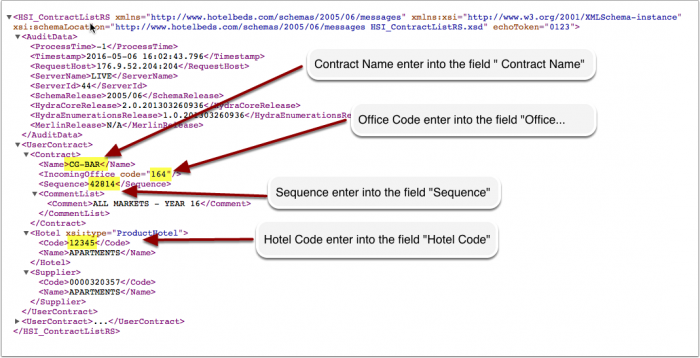
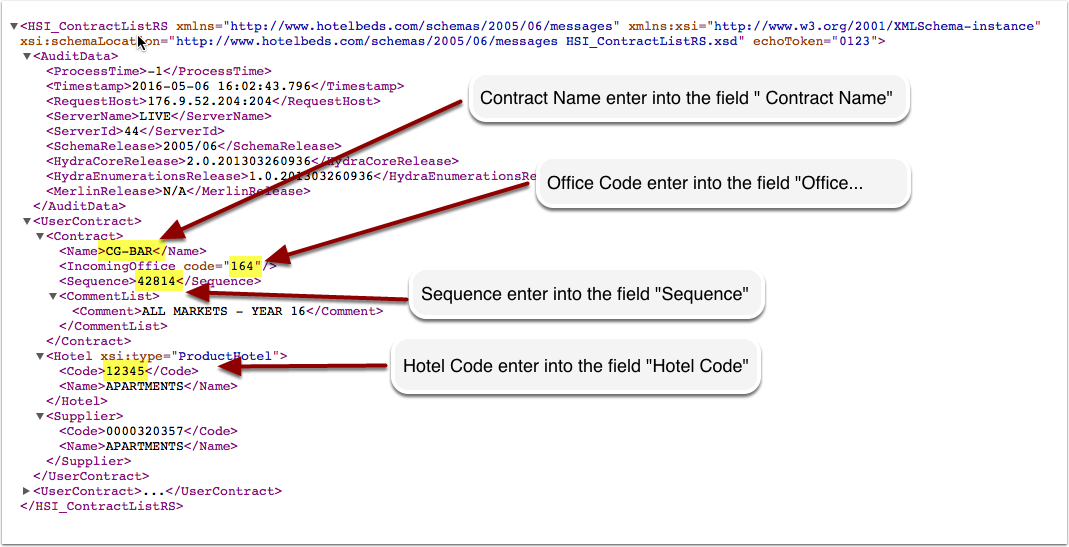
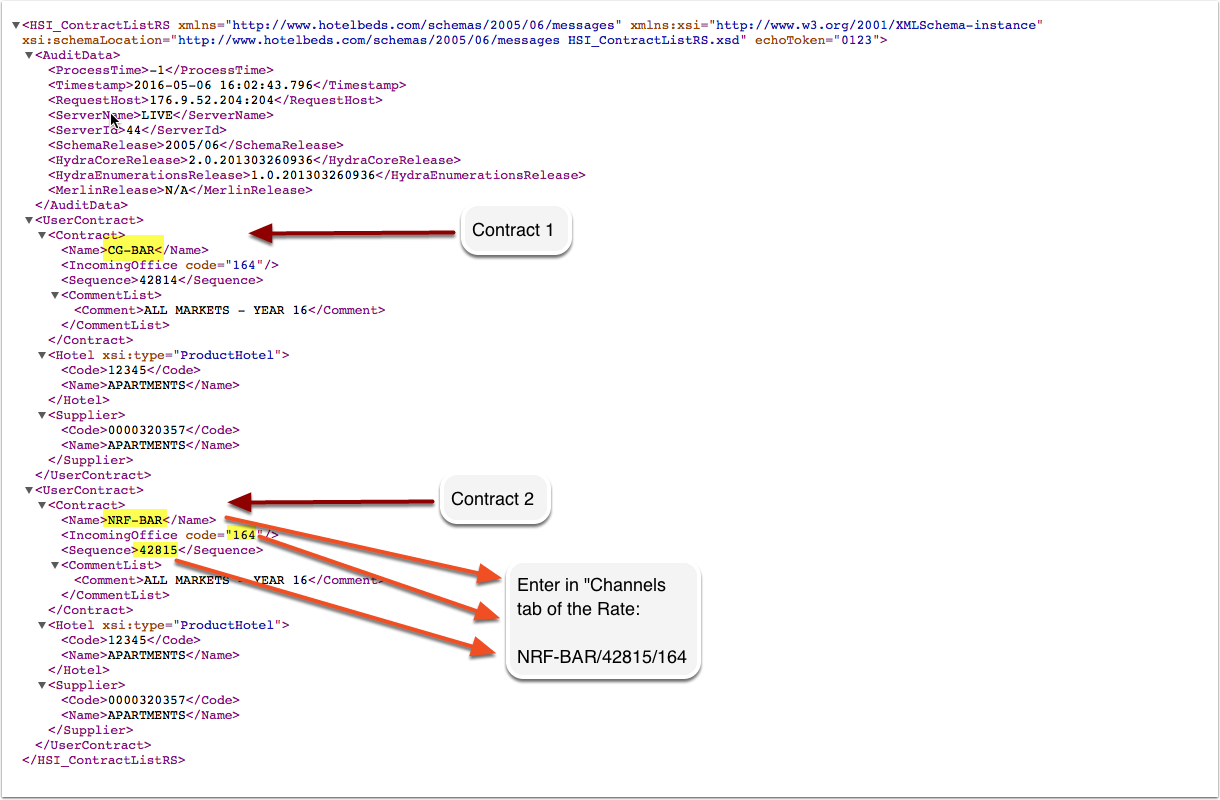
Click on the "Get Contract List" link to access your contract list.
Enter account data:
- Enter your Hotelbeds Hotel Code into the field "Hotel Code"
- Enter your Hotelbeds Contract Name in the field "Contract Name".
- Enter your Hotelbeds Sequence into the field "Sequence"
- Enter your Hotelbeds Office Code into the field "Incoming Office Code"
Press SAVE.
Map rooms
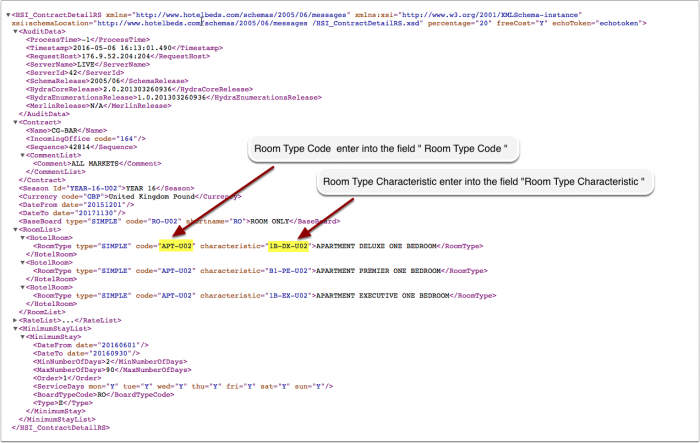
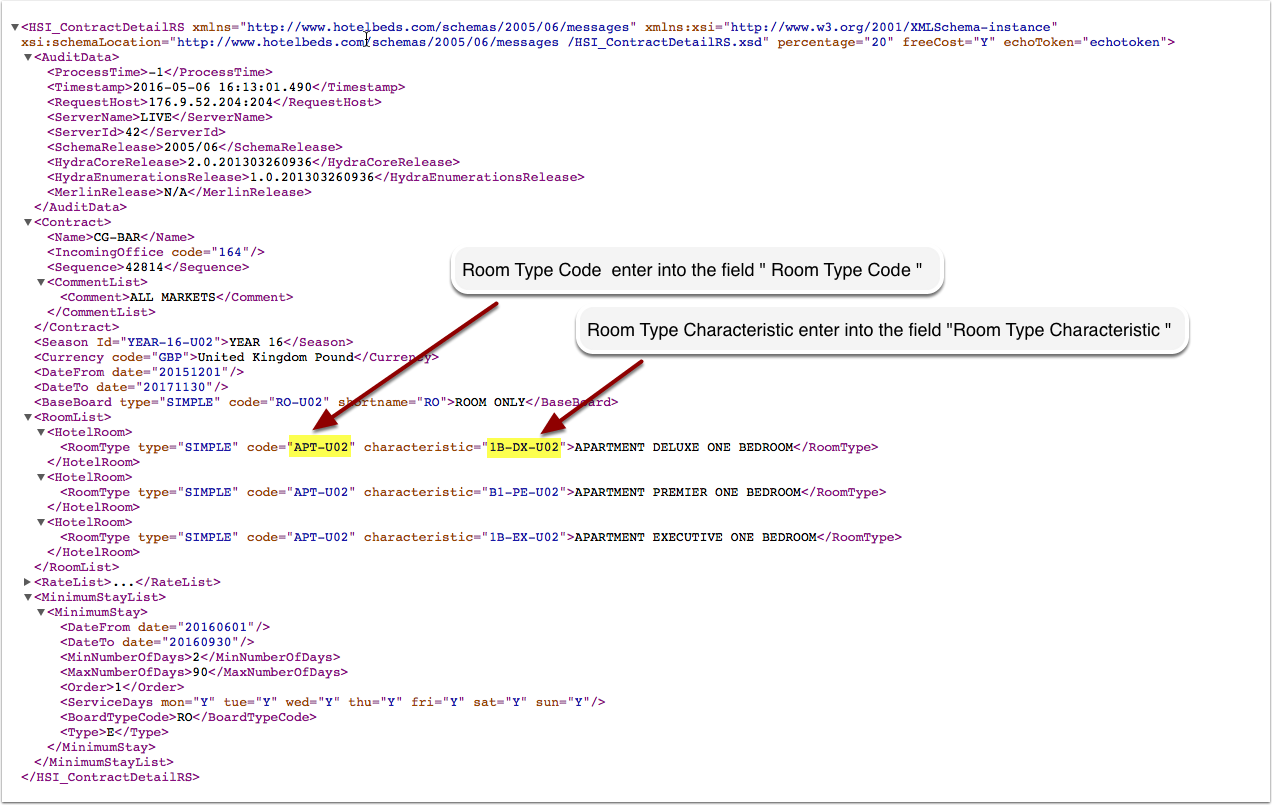
Click on the "Get Contract Detail" link to access your contract details.
For each room you want to connect:
- Enter your Hotelbeds Room Code into the field "Room Code"
- Enter your Hotelbeds Room Characteristic into the field "Room Characteristic"
Click on the "View Actual Data" Button to check which prices and availability will send.
Multiple contracts
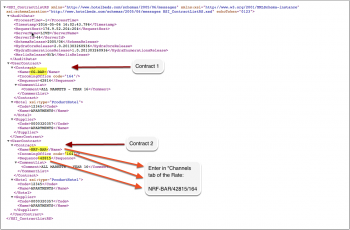
Specify the first contract in the channel manager settings. Make sure "Hotelbeds" is ticked in the "Channels" tab of all prices you want to send to this contract. Multiple contracts require prices to be defined for each contract.
Open the Daily Prices Fixed Prices you want to send to the second contract.
- In Fixed Prices go to the "Channels" tab. Tick "Hotelbeds" and enter the contract name and sequence for this contract separated by the / symbol.
- Daily Prices, scroll down to 'Enable List' Tick "Hotelbeds" and enter the contract name and sequence for this contract separated by the / symbol under "Enable" in the Daily Price settings.
Example: NRF-BAR/45678
If the office code for the contract is different to that set in the channel manager settings, it can be specified as a third item in the price setting.
Example: NRF-BAR/45678/164
Daily Prices and Fixed Prices in which you have not specified a contract will send only to the first contract.
Activate
You can view the live availability and prices that will be sent to Hotelbeds before or after activating using the "View actual data" button.
When everything is correct tick "Inventory", "Prices" and "Bookings" to activate the connection.
Price Multiplier
If you want to add a multiplier to your prices - perhaps because Hotelbeds requires a different currency to your Beds24 currency - add a * followed by the multiplier number to your Contract Name.
For example a Contract Name setting ABC*1.23 will multiply all prices by 1.23 sent for Contract Name ABC. (i.e. raised by 23%) Lower prices can be sent with a multiplier less than 1, i.e. ABC*0.85 will send a price 85% of the normal price (i.e. lowered by 15%)
To convert the price of bookings imported add a * after the multiplier, for example 12345678*1.23* will divide the price of the booking by 1.23.
You can also use currency conversion template variable. All currencies supported by the booking page currency selector can be used.
For example *[CONVERT:IDR-EUR] will convert Indonesian Rupees to Euros.
Check Connection
The connection is working if you are not receiving error messages and the display in the channel is correct. If you are receiving error messages check in the "Common Errors" section why you are receiving the error and how to fix it.
Updates and Changes
Changes to availability and prices will be instantly sent to the channel. Changes for settings for example minimum stays, the multiplier or number of rooms will send with the next update. Click on "Update" if you want to push them through instantly.
Manage bookings
By default the payout amount is imported into the "Invoice" tab of new bookings. After you have chosen your sync option you can change this option in SETTINGS-CHANNEL MANAGER "Invoice" = Booking Amount if you want to import the amount the guest pays. If you use this option the lodging amount and cleaning fee will be shown separately.
If you need a different invoice template for the bookings from this channel you can use the invoicee function. Enter the ID number of the invoicee and all incoming bookings from the channel will be assigned to this invoicee (it does not change existing bookings.
Charge Virtual Credit Cards
Virtual cards can be set to be auto charged at the date they become valid. To use this option set "Auto Process Virtual Cards" = Yes
Virtual cards can be set to be auto charged at the date they become valid.
A payment rule can be specified to be attached to the pending payment, the payment rule can further manage the conditions to collect the payment, for example it could specify to use virtual cards only and not a guest card.
You can only select a "payment rule" in Hotelbeds.com after you have created one. Settings > Payments > Payment Rules and set Payment Source = Virtual card only > then select the payment rule in the channel manager setup for Hotelbeds.com
If you manually charge virtual credit cards please note that they can only be charged after the card activation date.
Info Codes
Info Codes in the "Info" tab of the booking show you relevant information.
| Code | Use |
|---|---|
| VIRTUALCARD | virtual card was sent from the channel |
| CARDTOSTRIPE | card details were sent to Stripe |
| STRIPEPAYMENT | payment imported from Stripe |
| STRIPEFAIL | card could not sent to Stripe |
| CARDEXPIRES | added when the card expires before check-in |
Common Errors
Incorrect user or password
Check if your username password and hotel code are entered correctly. .
If yes send and email to [email protected] and ask them to check the connection with Beds24 is activated.
This change is not permitted as it does not agree with the signed contract.
You have a contracted allotment or restriction (for example on the minimum stay you are allowed to send) in Hotelbeds. Click on the "Get Contract Detail" link to check if/which minimum stay restriction (MLOS=X) applies. Make sure the data you send from Beds24 complies with your contract with Hotelbeds.
Disconnect
- Untick 'Inventory', 'Prices' and 'Bookings' this will stop Beds24 sending data to Hotelbeds.
- To completely disconnect the channel manager please log into your Hotelbeds extranet and remove the connection to Beds24.
Notes
- If you want to sync only inventory and have multiple contracts you need a price for each contract. Deselect "Hotelbeds" in your prices and it will not send.