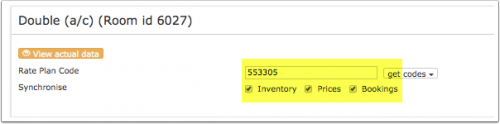
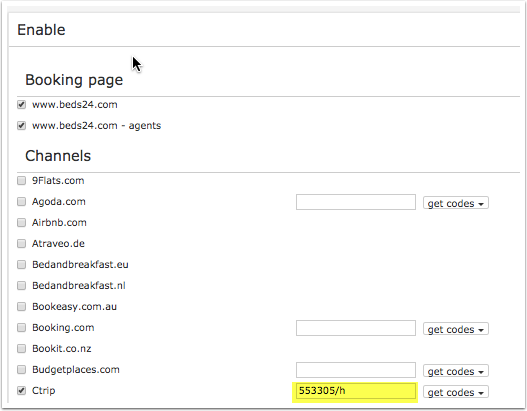
*If you use daily prices you can set the rate code under "Enable" in the Daily Price settings (SETTINGS- >PROPERTIES- >ROOMS- >DAILY PRICES then click on "Edit)
*If you use daily prices you can set the rate code under "Enable" in the Daily Price settings (SETTINGS- >PROPERTIES- >ROOMS- >DAILY PRICES then click on "Edit)
*If you use rates go to the "Channels" tab of the rate.
*If you use rates go to the "Channels" tab of the rate.
A price for Single (1 guest), Double (2 guests) and a room price (for the number of guests you have defined in the rate ) can be sent. If you have more than 3 occupancy levels you can set up additional rates in Beds24 for each occupancy level using the room price and the number of guests it is appropriate for and map them in the channel settings of the rate or the daily price.
If you use daily prices you can set the rate code under "Enable" in the Daily Price settings (SETTINGS- >PROPERTIES- >ROOMS- >DAILY PRICES then click on "Edit)
If you use rates go to the "Channels" tab of the rate.
Breakfast
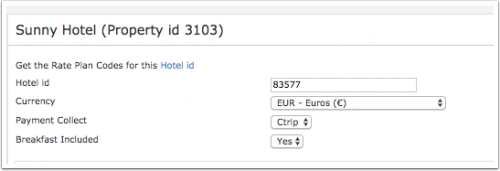
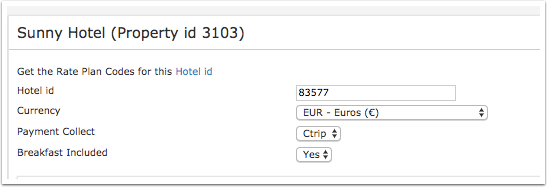
You can set if breakfast included or not. If you want to offer different prices with and without breakfast map your most common option in the channel manager settings.
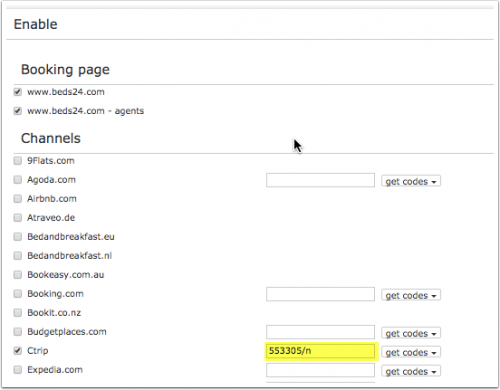
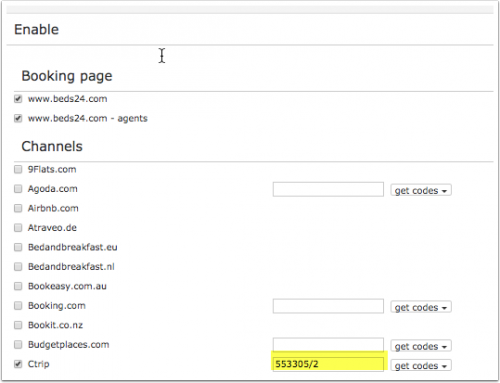
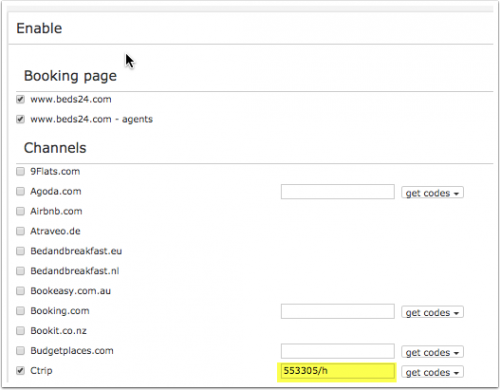
You can specify the other price option in the channel manger settings of the daily price or the rate by adding this information to the Ctrip rate code.
If you use daily prices you can set the rate code under "Enable" in the Daily Price settings (SETTINGS- >PROPERTIES- >ROOMS- >DAILY PRICES then click on "Edit)
If you use rates go to the "Channels" tab of the rate.
add /b if breakfast is included for the maximum number of guests the breakfast is included for
If breakfast is included the default is for the number of breakfasts ist the maximum number of guests the room can accommodate. If breakfast is not included in the price for all guests you have the option to specify the number of included breakfasts by adding
/1 = breakfast included for 1 guest (/2 = 2 breakfasts included.... /9 9 breakfasts included)
Example: The room accommodates 3 guests but breakfast is only for 2 guests included
You can set if guests pay Ctrip or if they pay at the hotel.. If you want to send prices for Ctrip collect and hotel collect you can specify this in the channel manger settings of the daily price or the rate by adding this information to the Ctrip rate code.
If you use daily prices you can set the rate code under "Enable" in the Daily Price settings (SETTINGS- >PROPERTIES- >ROOMS- >DAILY PRICES then click on "Edit)
If you use rates go to the "Channels" tab of the rate.
New Bookings are imported. Cancellations to bookings are also imported.
Existing bookings are not automatically imported when the connection is established and should be entered into Beds24 manually.
Price Multiplier
If you want to add a multiplier to your prices, for example because of a different currency to your Beds24 currency, add a * followed by the multiplier number to your hotel Id.
For example a property code setting 123456*12.34 will multiply all prices by 12.34 sent for hotel id 123456.
Notes
Changes of inventory are pushed instantly. Price changes are sent with the next update. To push price changes immediately press the "Update" buttons.
Channel collect payments will be shown in the booking invoice if SETTINGS->CHANNEL MANAGER -> “Import Channel Collect Payments” is set to “Yes”.
Common Errors
Any errors occurring during updates will be emailed to you with the error message as returned by Ctrip. Below are common error messages and how to fix them.
Disconnect
Unticking "Inventory" and "Prices" and "Bookings" will stop the synchronisation for a room.
To completely disconnect the channel manager you might need to contact Ctrip and ask them to disconnect you.