Booking.com: Synchronise bookings prices availability: Difference between revisions
No edit summary |
|||
| Line 331: | Line 331: | ||
*If not please check in the Booking.com extranet that the connection has been requested. | *If not please check in the Booking.com extranet that the connection has been requested. | ||
*If yes please check the Booking.com hotel id you have entered is correct and does not have blank spaces. | *If yes please check the Booking.com hotel id you have entered is correct and does not have blank spaces. | ||
* | *Click on "Connection Status" to check that the connection is properly activated. | ||
**If you see "Status" = Pending Property you need to confirm the connection in your Booking.com Extranet as explained under „Activating in Beds24 and Booking.com“ step 4 (https://wiki.beds24.com/images/1/16/Bookingconfirm.png). | |||
'''Access denied''' or '''Hotel not allowed for connection type''' | '''Access denied''' or '''Hotel not allowed for connection type''' | ||
*Click on "Connection Status" to check that the connection is properly activated. | |||
**If you see "Status" = Pending Property you need to confirm the connection in your Booking.com Extranet as explained under „Activating in Beds24 and Booking.com“ step 4 (https://wiki.beds24.com/images/1/16/Bookingconfirm.png). | |||
'''Updating availability hasn't been enabled for hotel 0000''' | '''Updating availability hasn't been enabled for hotel 0000''' | ||
Revision as of 17:45, 20 March 2020
Synchronising Prices, Availabiltiy and Bookings with your Booking.com account
General
- You need an account with Booking.com If you do not yet have one you can create a Booking.com account directly from Beds24.
- If you have not yet set up your property in Beds24 you can import your property from Booking.com to Beds24.
- Click here for general information on how the channel manager works.
- This tutorial explains how to set prices for channels.
Capabilities
With the connection you can
- Export prices, availability and rules
- send inventory (available rooms)
- send minimum stay
- send maximum stay
- send closed to arrival and closed to departure
- send multiple rates
- add a multiplier to mark prices up or down.
- Import bookings, modifications to bookings and cancellations, importing modifications or cancellations can be disabled for individual bookings
- create Booking.com rate plans
- Report invalid cards and no-shows can be reported to Booking.com from the "Details" tab of the booking. If you use Stripe you can set in SETTINGS->CHANNEL MANAGER to automatically report invalid cards to Booking.com
- Create and manage promotions
- View reviews and react to reviews
Limitations
If you export inventory you will also need to export rates from Beds24, rates can not be set within the Booking.com extranet.
Booking.com may sometimes withhold the credit card number or CCV unless you specifically request they are sent to you. Contact your Booking.com rep if this is occurring and you require this information.
Before you Connect
Prices
When the connection is activated Booking.com will remove all price and availability details on the Booking.com extranet and replace them with the data sent from Beds24. Therefore prices and availability of all rooms must be set up in Beds24 before connecting.
- We can only send availability if you have set up prices which are activated for this channel. This tutorial gives general information how to set prices for channels.
- Our connection with Booking.com supports these pricing models:
- 1. Per Occupancy Pricing (OBP) - If your Booking.com Rate Type is Per Occupancy Pricing a price for each occupancy defined in Beds24 can be sent.
- If you use daily prices they daily price will send including occupancy. Multiple occupancy prices can send on each rate plan. Extra person price will send.
- If you use rates 1 person, 2 person and room price will send. Room price will send for specified occupancy. Multiple rates with different occupancies can send on same rate plan. Prices for "Extra Person", "Extra child" and discounts set in the "Discounts" tab of the rate can not be sent.
- 1. Per Occupancy Pricing (OBP) - If your Booking.com Rate Type is Per Occupancy Pricing a price for each occupancy defined in Beds24 can be sent.
- 2. Per Day Pricing (Standard) - If your Booking.com Rate Type is "Per Day Pricing / Standard" you will need a price for the maximum room occupancy. Example: If maximum number of guests is 4 you need a ROOM price for four guests. Prices for 1, 2 or 3 guests are not sent. If you use daily prices with "Extra Person" prices your daily price needs to be set for the max occupancy and the "Extra Person" price needs to be added with a negative value so the price for the full occupancy can send. If you have multiple prices for one rate code which are activated for Booking.com the system will use the price for the highest occupancy. If you want to send an additional "Single" price Booking.com needs to activate the single price option. After this is done you can set the Booking.com Rate Type to Per Day Pricing + Single. If your use derived (RLO) prices where Booking.com calculates prices for different occupancies from the standard price sent from Beds24 they do not allow you to send a single price.
- If you want to offer multiple price options for example a non-refundable rate or your rate plan contains meals you can create additional rate plans in SETTINGS->CHANNEL MANAGER->BOOKING.COM->MANAGE RATE PLANS.
Extras and Taxes
"Upsell Items" can not be exported to Booking.com.
If required you can enter extras and fees directly in Booking.com.
Bookings
Upcoming bookings can be imported. Booking.com will only send a summary of the booking, not the full information. The full information can still be accessed in the Booking.com extranet. New bookings made after activation will include full booking information.
Credit Cards
If you want to access credit card details through Beds24 ask Booking.com to only accept bookings with credit card details and always send all details to Beds24.
Rooms and room types
If you sell rooms individually at another channel or your own web site and want to sell them on Booking.com as a "roomtype" with a quantity of more than one you can set up virtual rooms.
Dorms
Booking.com requires the bed price be sent to them as the room price. Therefore they do not accept a single price for a dorm. Make sure you set "Booking.com Rate Type"= One Price. If you want to send a single price for other rooms you can create additional rate plans for single use in SETTINGS->CHANNEL MANAGER->BOOKING.COM->MANAGE RATE PLANS.
Sync Prices, Availability and Bookings
Setting up the connection is a 4 step process:
1) You request a connection on Booking.com extranet. Nothing changes. You are still bookable according to the prices and inventory you have set in the Booking.com extranet.
2) Beds24 accepts your request. Nothing changes. You are still bookable according to the prices and inventory you have set in the Booking.com extranet.
Between step 2 and 3 you should map your rooms and rates, check everything and import existing bookings from Booking.com to block the booked dates.
3) You enable the connection in Booking.com. This is when Booking.com removes your inventory and rates and you are temporarily not bookable.
4) Beds24 sends prices and availability to Booking.com. You are bookable again. To send the update immediately click the "Update" buttons in the channel manager settings.
Bookings are not removed from the Booking.com extranet. Existing and new bookings are always visible in the Booking.com extranet.
Initiate the connection in Booking.com
Initiate the XML connection from the property menu within the booking.com extranet and then do the Beds24 setup.
1) Login to Booking.com and go to ACCOUNT->CHANNEL MANAGER. If you do not see this option contact Booking.com and tell them you want to use a channel manager
2) Click the Start button and search for BEDS24.
3) Complete the rest of the on screen instructions.
It is possible to select a "one way" or "two way" connection with Booking.com. The normal case is "two way" which will both export inventory to Booking.com and import bookings from Booking.com. If you select any of the "one way" options only one of these actions will be performed and the other must be manually maintained by you.
4) When ready you will receive a notification from Booking.com, go to the Channel Manager menu again and activate the connection.
Set up and mapping in Beds24
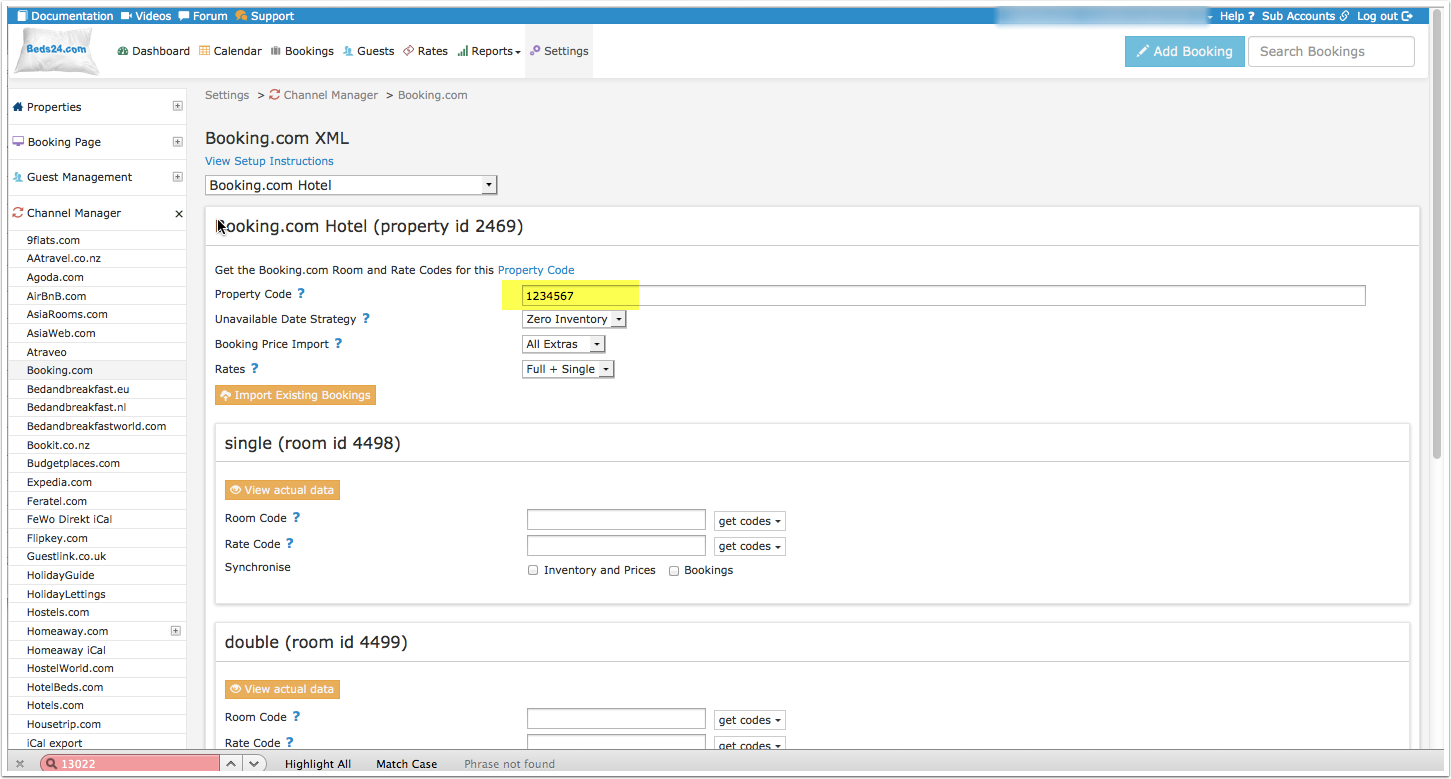
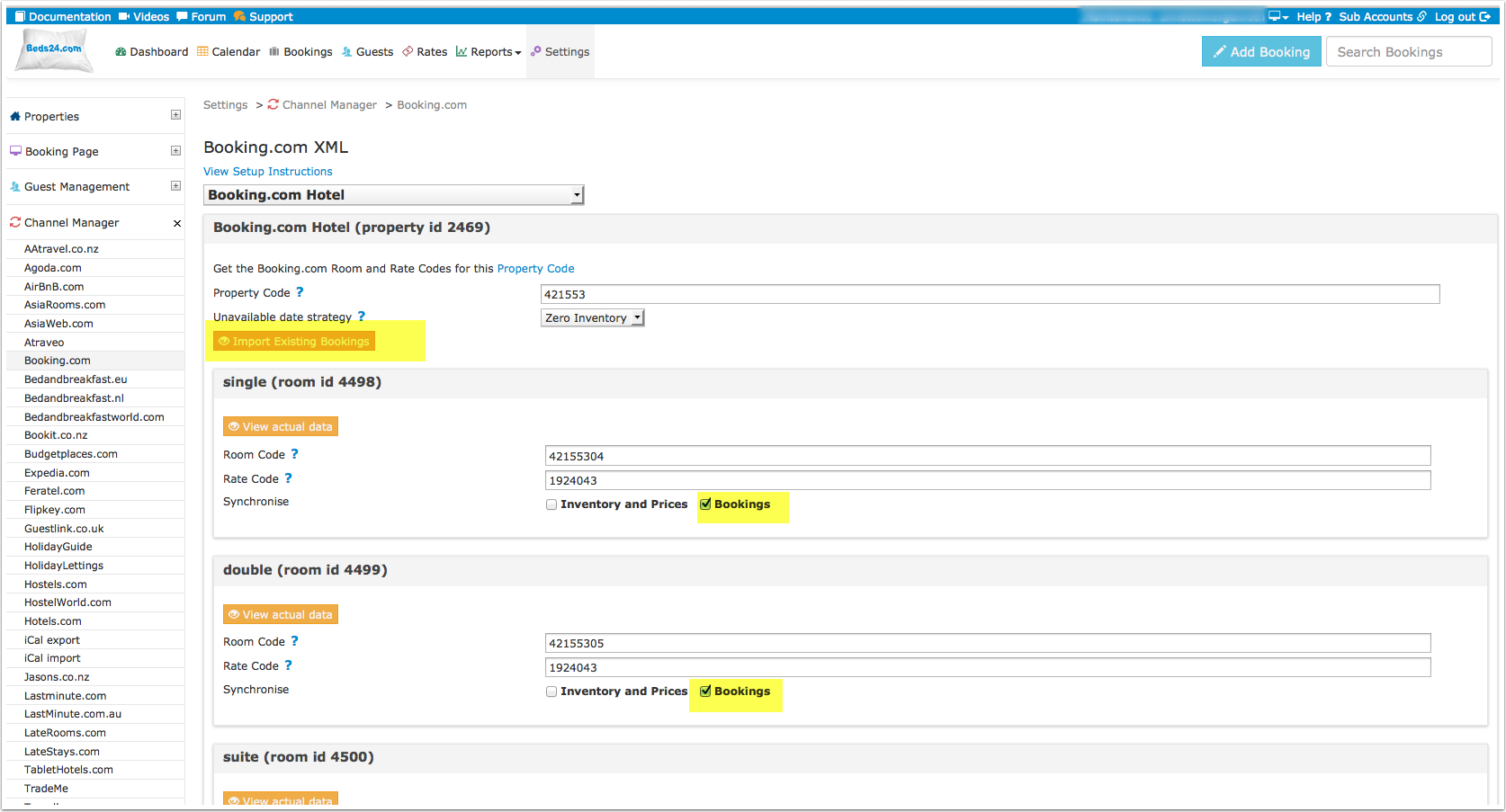
1) Enter your Booking.com Hotel Id into SETTINGS -> CHANNEL MANAGER -> BOOKING.COM "Hotel ID" setting and choose your "Booking.com Rate Type". Then scroll to the bottom of the page and click SAVE.
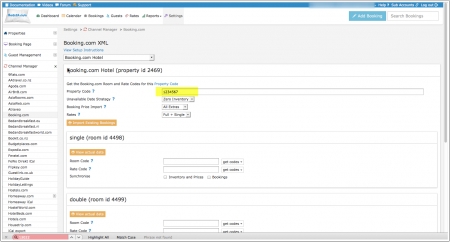
2) Set "Booking Price Import" to either import the room price only or the room price plus unpaid extras (cleaning charges, local taxes etc.)
3) Some Booking.com rate ids can accept a room price plus a single occupancy price on the same rate id. If you have this rate type and want to send the single occupancy price set "Booking.com Rate Type " = "Full + Single". If you do not have this rate type or you are not sure set "Booking.com Rate Type "= "One Price "
4) Mapping
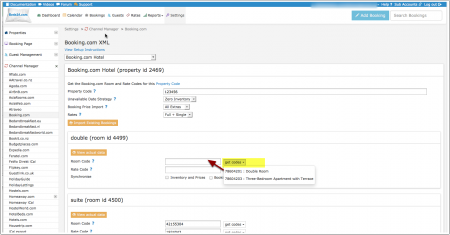
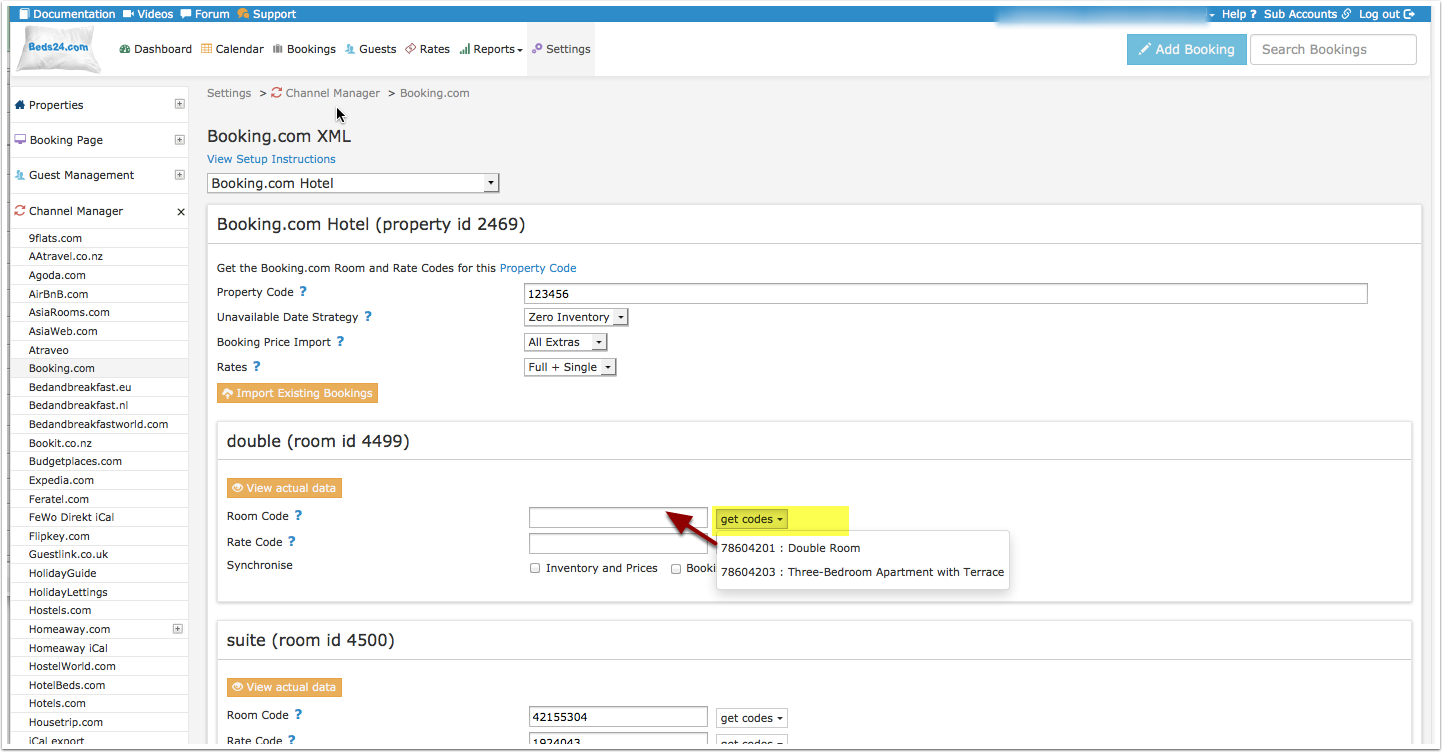
Map Rooms:
- Click on the "Get Code" link next to the room id setting, a list of room ids will be retrieved from Booking.com and displayed.
- Choose the Booking.com room you want to map to the Beds24 room and click on it.
- When the correct room id has copied to the room id setting, click Save.
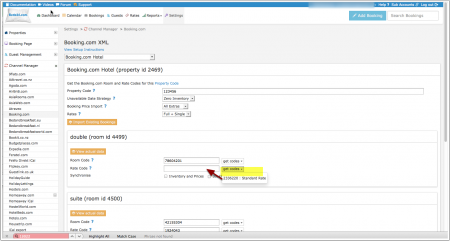
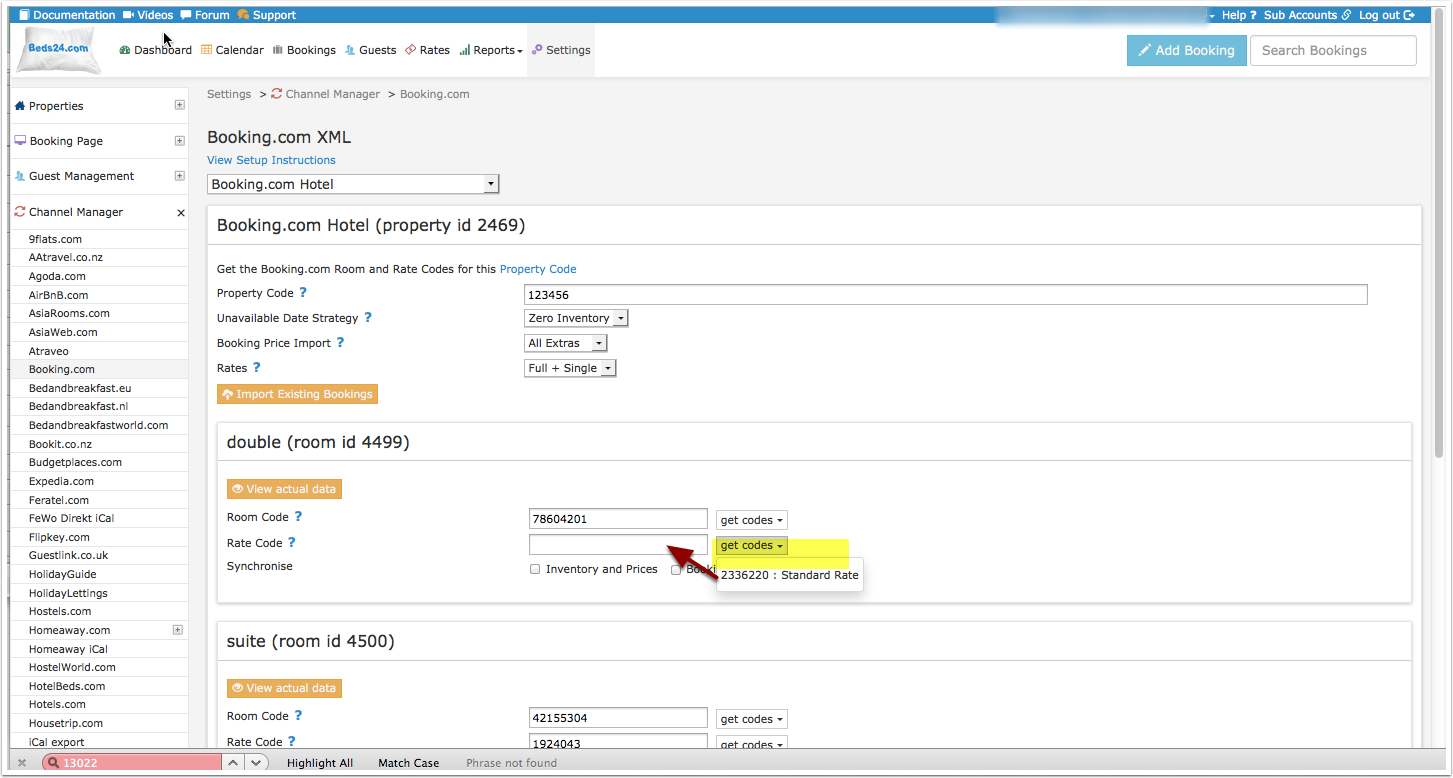
Map Rates:
- Click on the "Get Code" link next to the rate id setting and a list of rate ids will be retrieved from Booking.com for the saved room id.
- Choose the Booking.com rate id for this room and click on it. This will normally be the standard rate.
- When the correct rate id has copied to the rate id setting, click Save.
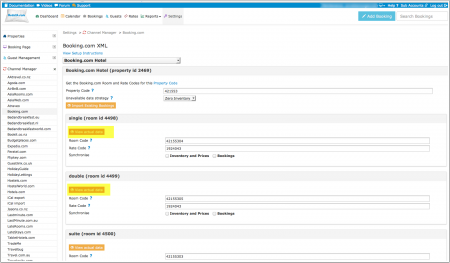
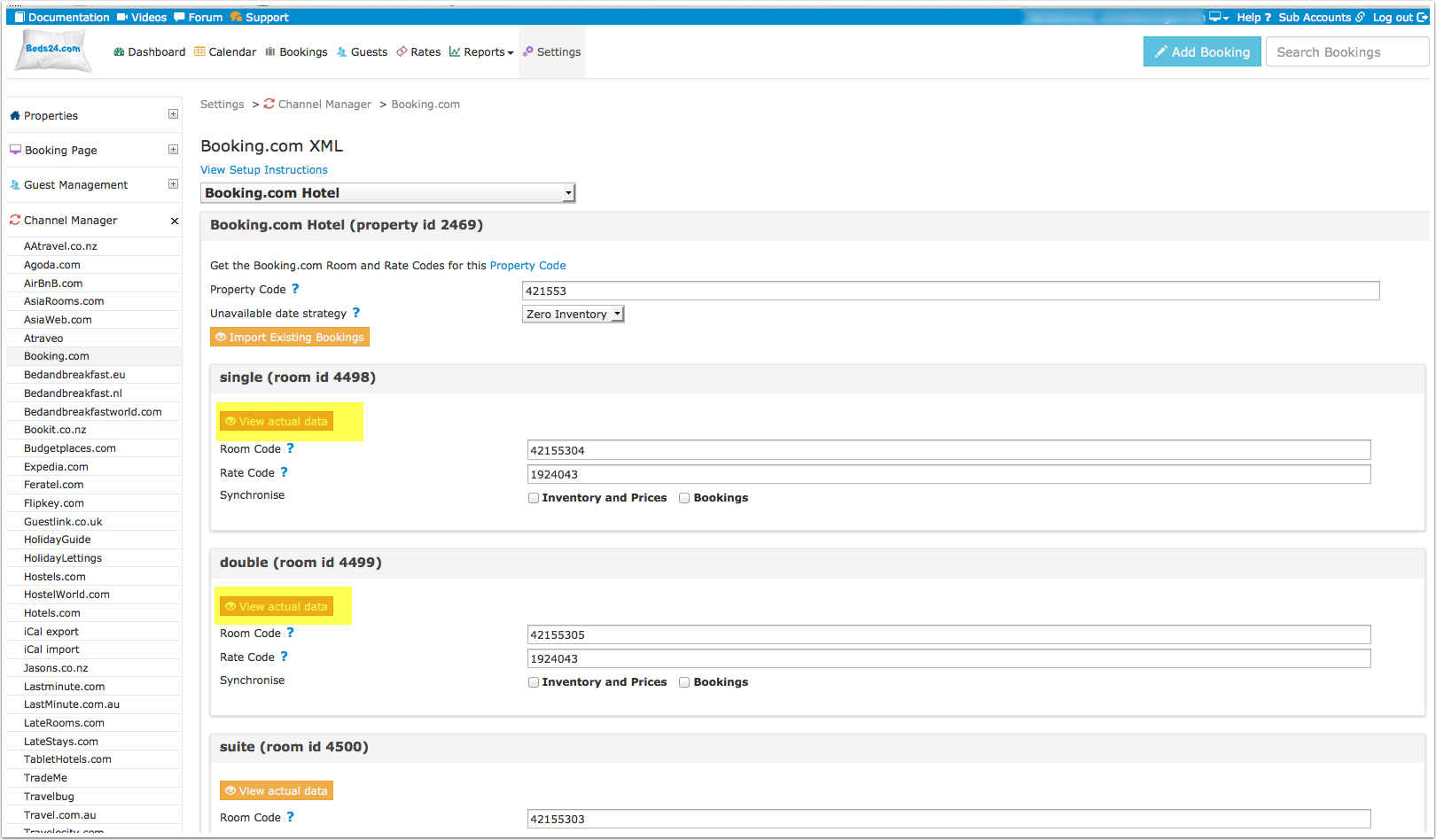
Tip Click on the "View Actual Data" Button to check which prices and availability will send.
Different price options - refundable/non refundable rates, meal plans
Booking.com can support more than one price per room and day. There are two options:
1. Multiple Rate Ids
If you need additional rate plans, for example a for different occupancies, or a non-refundable rate, or your rate plan contains meals, you can create additional rate plans in SETTINGS->CHANNEL MANAGER->BOOKING.COM->MANAGE RATE PLANS.
Please use these instructions for the mapping.
2. Linked/Derived Prices
Booking.com can auto calculate different occupancies from one standard rate. This rate is either for the base or for the maximum occupancy of a specific room. The system then automatically adds or subtracts a percentage price per person when the occupancy increases or decreases.
Talk to your Booking.com rep about how to best set this up (either a base rate to add on to or a maximum occupancy rate to subtract from).
Price Multiplier
If you want to add a multiplier to your prices, add a * followed by the multiplier number to your hotel id.
Example:
Hotel id = 123456*1.23
will multiply all prices by 1.23 sent for hotel id 123456 (i.e. raised by 23%).
Lower prices can be sent with a multiplier less than 1:
123456*0.85
will send 85% of the normal price (i.e. lowered by 15%).
To convert the price of bookings imported from the channel add a * AFTER the multiplier:
123456*1.23*
will divide the price of the booking by 1.23.
Currency Conversion
You can also use currency conversion template variables. All currencies supported by the booking page currency selector can be used.
Examples:
123456*[CONVERT:IDR-EUR] will convert Indonesian Rupees to Euros.
123456*[CONVERT:IDR-EUR][/]0.952 will convert Indonesian Rupees to Euros, and dividing it by 0.952 will raise the price by 5%.
Promotions
Promotions can set up, viewed and changed in SETTINGS-CHANNEL MANAGER-BOOKING-COM-PROMOTIONS.
If you add or change a promotion use the context help (? icons next to the settings) for instructions.
Activating in Beds24 and Booking.com
1) You can view the live availability and prices that will be sent to Booking.com before or after activating using the "View actual data" button.
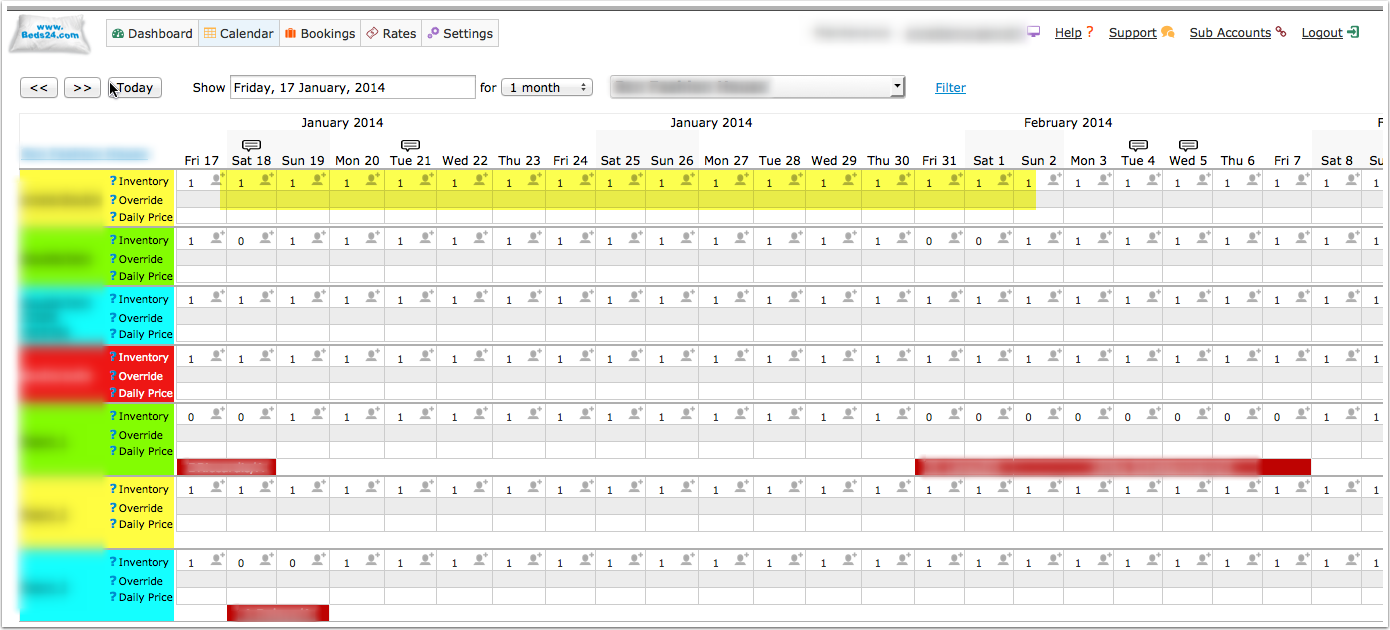
2) Make sure your inventory is correct in Beds24. Check existing bookings in Booking.com imported and dates blocked by other sources are blocked in Beds24. Dates can be blocked by either entering a booking manually into Beds24 for those dates or using the inventory and override functions on the control panel calendar for those dates. Failure to do this could allow new bookings on dates you are not available. All available dates in Beds24 will be sent to Booking.com as available for new bookings.
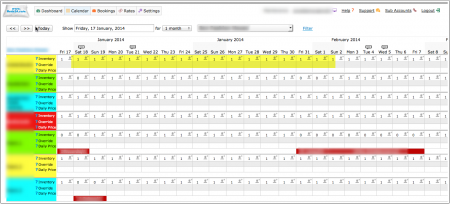
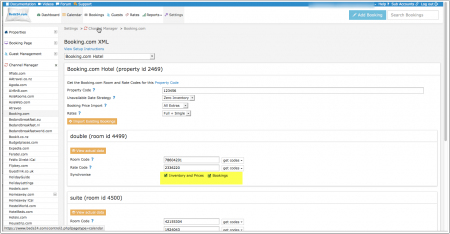
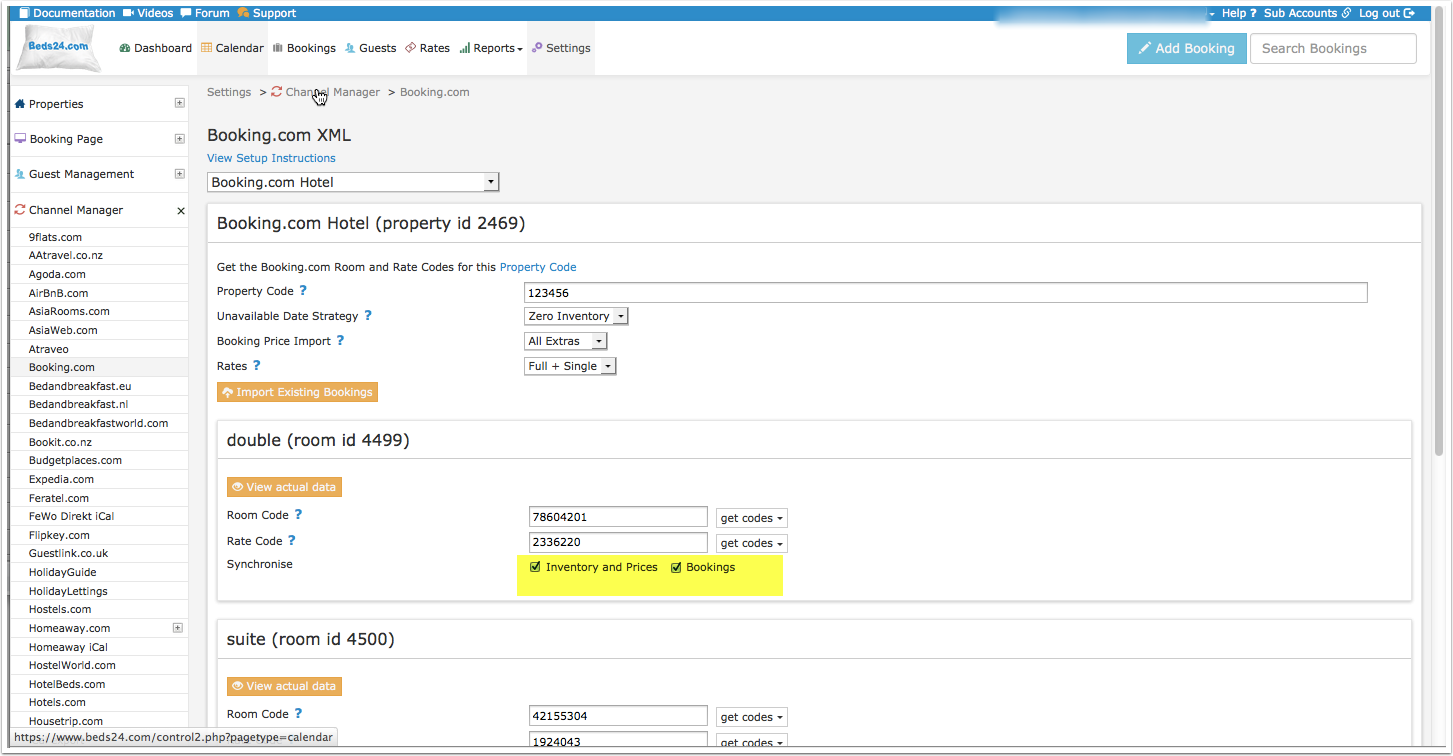
3) Enable the connection in Beds24 by ticking "Inventory and Rates" for each mapped room and saving. The "Bookings" checkbox should already be ticked but tick it as well if it is not ticked and bookings should be imported.
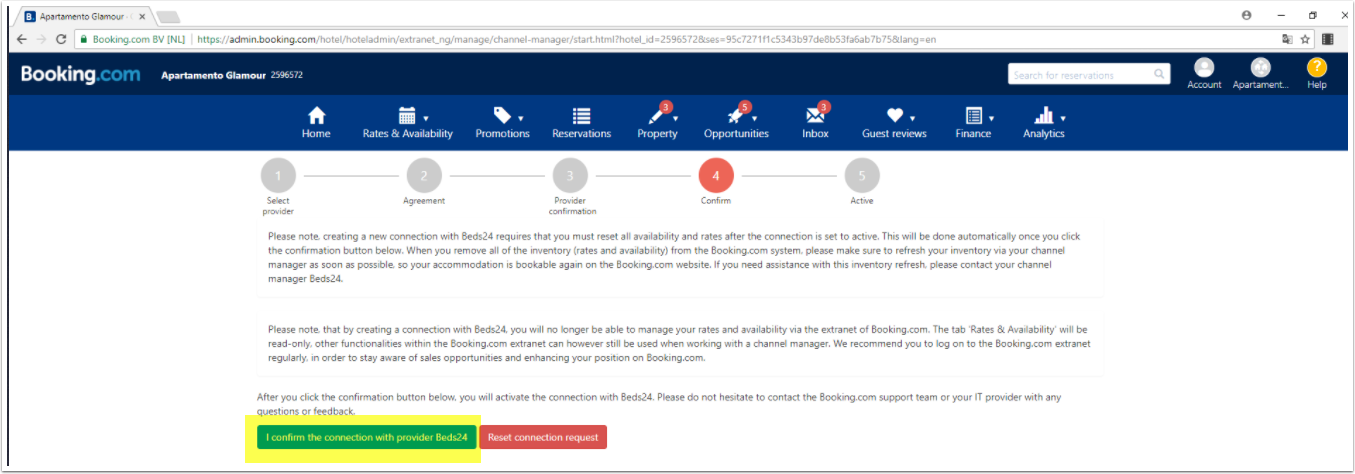
4) When all the set up in Beds24 is correct you can make the final step to confirm the connection (go live) from the Booking.com extranet.
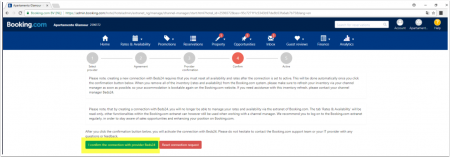
When you go live your rates and inventory will be deleted from Booking.com and a full reload will occur from your Beds24 Inventory.
You can use the "Update" button on each room to speed this up. Your bookings will not be deleted from Booking.com but make sure the dates are blocked in Beds24 before going live so they will not be reopened.
5) Click on "Get Connection Status" to see the connection is properly activated.
6) Import existing bookings from Booking.com
Make sure the "Bookings" check box for each mapped room is ticked and saved and then click the "Import existing bookings" button.
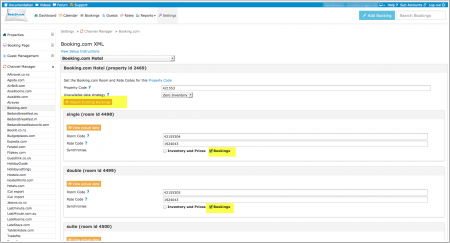
If for any reason your existing bookings do not import, the dates could be reopened and resold. To prevent this import the bookings via CSV.
a. Export your bookings as CSV from booking.com
b. Go to https://api.beds24.com/csv/putbookingcomcsv.php and import the csv file to Beds24.
Follow the instructions on the page carefully so they import to the correct rooms.
If this is also unsuccessful, block the booked dates in the beds24 calendar. Please note that in this case cancellations and modifications will not be imported automatically.
7) Once updated, check all your values in the Booking.com extranet for correctness and if required make any adjustments to the settings to fix.
8) Channel collect payments will be shown in the booking invoice if SETTINGS->CHANNEL MANAGER -> “Import Channel Collect Payments” is set to “Yes”.
9) You can allow cancellation fees and commission values to overwrite booking values when cancelled by channel if SETTINGS->CHANNEL MANAGER -> “IImport Cancel Fees” is set to “Yes”.
Maximum number accepted bookings
By default all available rooms are sent to activated channels. In SETTINGS->CHANNEL MANAGER->CHANNEL INVENTORY limit the number of accepted bookings for this channel.
Check Connection
The connection is working if you are not receiving error messages and the display in the channel is correct. If you are receiving error messages check in the "Common Errors" section why you are receiving the error and how to fix it.
Updates and Changes
Changes to availability and prices will be instantly sent to the channel. Changes for settings for example minimum stays, or quantity of rooms or the multiplier will send with the next update. Click on "Update" if you want to push them through instantly.
Setup Problems
1) The room is being unexpectedly closed at booking.com
The channel manager will close the room on all dates which do not have a valid price available for sending to booking.com. Make sure you have prices for the complete range of dates you are sending (1 year or 2 years)
2) "Room code is not unique" warning when saving in Beds24.
Each Booking.com room id is unique and can be mapped to only one room in Beds24. If you enter the same Booking.com room id more than once the room updates will overwrite each other causing inaccurate information being sent to Booking.com
3) Missing Credit Card Details
When Booking.com sends the credit card number it will be available in the "Payments and Charges" tab of the booking unless it has been stored in a third party system such as Stripe. The encoded CVC number is available from the booking notification email sent to the host as the line labelled Security Code. Enter the Security Code value from the email into the booking to view the CVC.
- If there is no Security Code item in the host notification email, the CVC was not collected or sent for this booking. Please ask Booking.com to collect and send it to Beds24 if you require it.
- If credit card details are always missing and you require them, please ask Booking.com to collect and send credit card details to Beds24
- If Booking.com normally sends credit card details but did not do so for a specific booking and you always want a card as security, please ask Booking.com to exclusively accept bookings with a credit card number.
4) Daily prices and prices for the Room, Double and Single occupancy can be mapped to Booking.com.
These can be mapped to Booking.com rate id's and will use the booking conditions of that rate id. Extra person and extra child prices within a Beds24 Rate and discounts set in a Rates Discount section are not able to export to Booking.com or other channels.
Notes
1) Credit card details are imported and shown on the "INVOICE" tab of the booking. If not please refer to "Missing Credit Card Details" in Setup Problems above.
2) Multiple Rates - if you want to send multiple prices for a room you must have a rate id for each rate in Booking.com and a matching rate with the price and rate id setup in Beds24. See the Multiple Rates section above for more details.
3) Single occupancy prices must be activated within booking.com if you are sending them to multi person room rates. They can be disabled by setting "Rates" = "Full Only"
4) For bookings imported through the button "Import upcoming bookings" Booking.com will only send a summary of the booking, not the full information. The full information can still be accessed in the Booking.com extranet. New bookings made after activation will include full booking information.
5) Deleting a rate or price in Beds24 will not delete the price in Booking.com. If you need to close a rate at Booking.com, make the rate id unbookable at Beds24, for example by closing the room or removing the price and wait for it to update at Booking.com. Only once the rate has closed at Booking.com it is safe to remove it from Beds24.
You can close a rate at booking.com by making sure there is no price for it on the dates to close in Beds24. As long as the rate has at least a price for 1 day in the next year, all the other dates without prices will be closed.
If you have multiple rates at booking.com, the other rates can continue to be available by giving them prices.
Note that if there is no price on any day at all for a rate, this will not necessarily close the rate, in this case no information will be sent and whatever data is in Booking.com will remain.
You can always see the data being sent with the "View Actual Data" button in the channel manager.
6) Bookings with payment collected by booking.com will show the payment amount collected as a payment in the booking invoice.
Manage Bookings
VAT value on extra items
If an extra item name in the booking matches the name of an upsell item for the property, the VAT value of the upsell item will be used. Otherwise the VAT value defined in the Property booking rules will be used.
Report No-shows, Invalid cards or Restrict Channel Modifications
This screenshot shows specific settings for bookings from Booking.com:
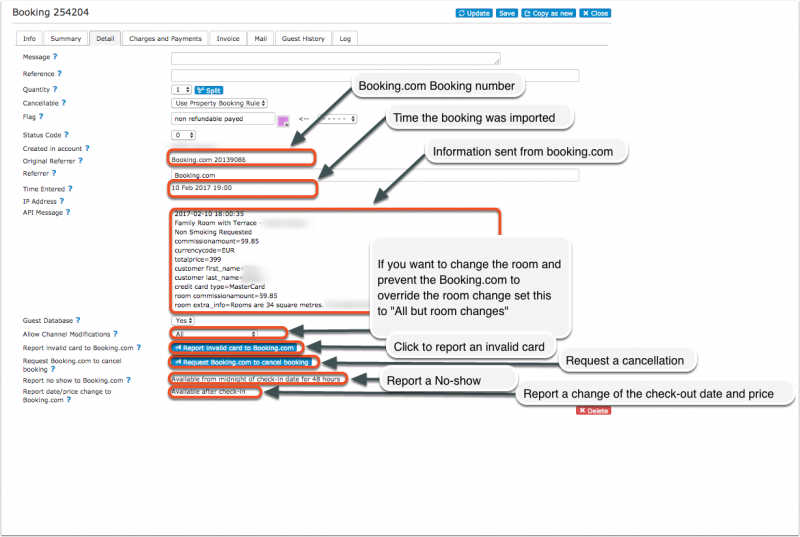
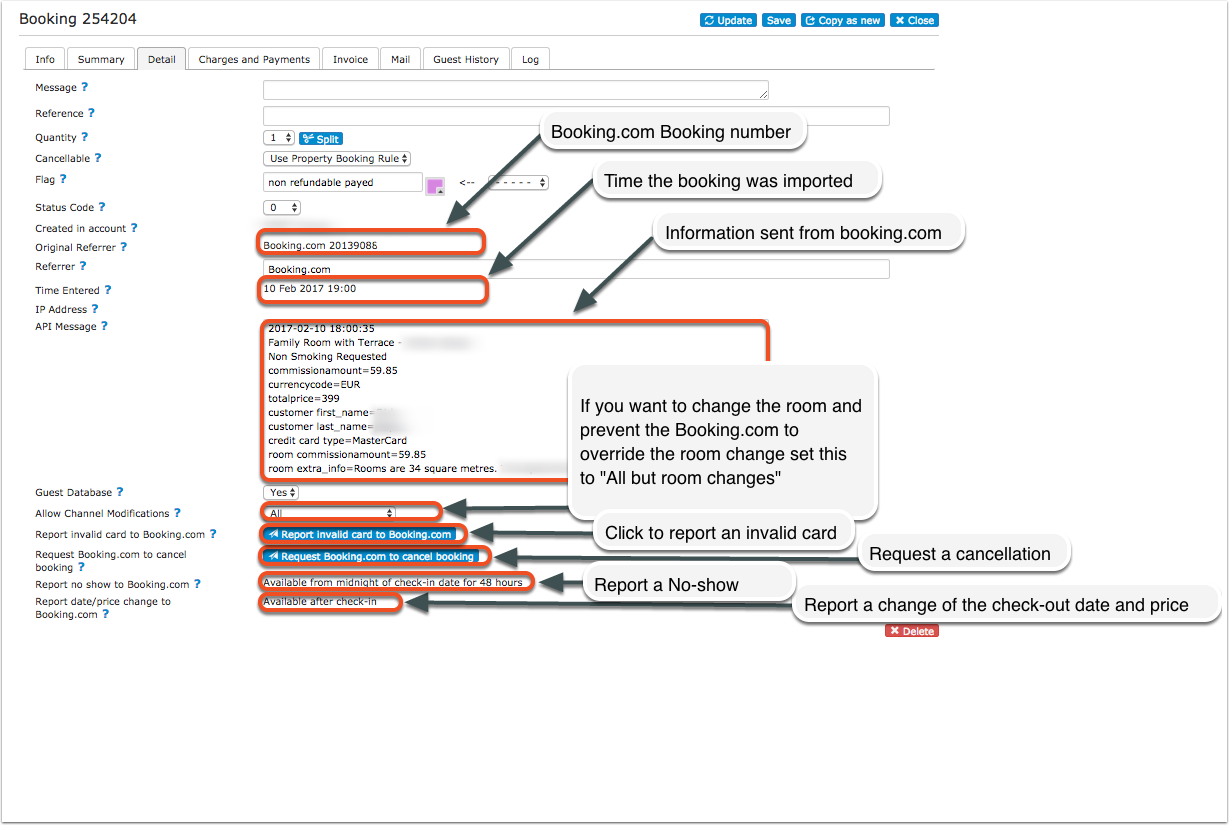
If you want to not allow channel modifications by default you can change the setting for "Allow Channel Modifications" value" in SETTINGS->CHANNEL MANAGER.
Charge Virtual Credit Cards
Virtual cards can be set to be auto charged at the date they become valid. To use this option set "Virtual Cards" = Yes
If you manually charge virtual credit cards please note that they can only be charged when they become valid.
Note: This option is available for customers who use Stripe. If you set "Virtual Cards" = Yes without Stripe activated the system will create a pending payment which can not be collected.
Different Invoice Templates
If you need a different invoice template for the bookings from this channel you can use the invoicee function.
Reviews
To access Booking.com reviews from your DASHBOARD unlock the DASHBORAD click on the hamburger menu then on "Extentions" and add the Booking.com Review Module.
Disconnect
- Unticking "Inventory and Prices" and "Bookings" will stop Beds24 sending data to Booking.com. This will not remove the data from Booking.com and it will still be bookable.
- To completely disconnect the channel manager please log into your Booking.com extranet and click on the Account icon in the top right-hand corner. Select Channel Manager from the drop-down menu. Click the Deactivate button to cancel the connection to Beds24.
Common Errors
Any errors reported by Booking.com will be emailed to you with the error message as returned by Booking.com. The error message usually includes information about the date, rate or room with the problem and a brief description. Below are common error messages and how to fix them.
Access denied while trying to get rooms for hotel XXXXXX
Check if you have received a notification from Booking.com that the connection is ready.
*If not please check in the Booking.com extranet that the connection has been requested.
*If yes please check the Booking.com hotel id you have entered is correct and does not have blank spaces.
*Click on "Connection Status" to check that the connection is properly activated.
**If you see "Status" = Pending Property you need to  confirm the connection in your Booking.com Extranet as explained under „Activating in Beds24 and Booking.com“ step 4 (https://wiki.beds24.com/images/1/16/Bookingconfirm.png).
Access denied or Hotel not allowed for connection type
*Click on "Connection Status" to check that the connection is properly activated.
**If you see "Status" = Pending  Property you need to  confirm the connection in your Booking.com Extranet as explained under „Activating in Beds24 and Booking.com“ step 4 (https://wiki.beds24.com/images/1/16/Bookingconfirm.png).
Updating availability hasn't been enabled for hotel 0000
You have not activated the connection in the booking.com extranet. Please log into your booking.com extranet and activate the connection.
SINGLE_USE_PRICING_PASSED_FOR_RLO_RATE
Booking.com does not allow you to send a single price.
Set "Booking.com Rate Type"= One Price
 OBP_PRICING_PASSED_FOR_DEFAULT_RATE
 Your Booking.com Rate Type is "Per Occupancy". The system will automatically adjust your rate type so prices for different occupancies can send.
 TAG_HAS_INVALID_VALUE
Your connection type does not allow the use the the Booking.com content API. If you have set to use "Occupancy Pricing" in Beds24 we can not automatically adjust your settings in Booking.com. Log into Booking.com, stop the connection and request a new one with Content API.
Did not set price to xx.xx on date xxxx-xx-xx1 for Room xx and occupancy x because the room has a max occupancy of x.
You are trying to send a price for a number of guests which is higher than the number of guests Booking.com has the room set for. Adjust the maximum number of guests to be the same in Beds24 and Booking.com and if required adjust your prices.
WARN_PRICE_TOO_LOW_LIMIT
Booking.com expects a price in a certain price range.
Either adjust your price in Beds24 or try to change the limitation at Booking.com
Not allowed to update Single Use Rate for Room or CANNOT_SET_SINGLE_USE_RATE
Booking.com have not activated a single occupancy price for the room.
Either ask Booking.com to allow a single price (set up a "Single" rate id) or set "Booking.com Rate Type" = One Price

If it is a dorm: Booking.com requires the bed price be sent to them as the room price. Therefore they do not accept a single price for a dorm. Set "Booking.com Rate Type" = One Price and make sure to set your prices in all rates as a room price (and not as a single price).
Not allowed to update Single Use Rate for Room
Booking.com requires the bed price be sent to them as the room price. Therefore they do not accept a single price for a dorm. Set "Booking.com Rate Type"= One Price. If you want to send a single price for other rooms ask Booking.com to set up a "Single" rate id for these.
Rooms to Sell were set below the Minimum Contracted rooms for these dates
You have agreed to supply a minimum number of rooms to Booking.com on the mentioned dates and Beds24 is trying to update them to a number lower than your agreed minimum. Booking.com have ignored the Beds24 values on those dates and used your agreed minimum instead.
*Make sure you have valid rates for the mentioned dates and no bookings from other sources
*Beds24: change your inventory to send the allotment you have guaranteed Booking.com
*Booking.com: Ask Booking.com to remove the guaranteed allotment
Rate is not active or RATE_NOT_ACTIVE or RATE_NOT_ACTIVE_FOR_ROOM
You do not have an active Booking.com rate id with this number. Please double check your rates and daily prices and select a valid Booking.com rate id from the list in 'get codes'. You can only send prices for active Booking.com rate codes. You will see your active rate codes when you click on "Get Codes". Make sure you only map these rates in you channel manager settings, daily prices and rates.
Room is not active or ROOM_NOT_ACTIVE
Booking.com has not activated the room for selling. Please ask Booking.com to activate it and check the room id  is correct.
Rate 123456 cannot be updated via XML
This rate has not been activated for channel management. Ask Booking.com to activate it.
Did not set Close Room 'XY for Rate Category 'ZZ' because of remaining Minimum Contracted Rooms on dates.....
You have guaranteed and to have a minimum number of rooms to sell on  Booking.com but the channel manager is sending a lower quantity than contracted.
*Make sure you have valid rates for the mentioned dates and no bookings from other sources
*Beds24: change your inventory to send the minimum contracted rooms you have guaranteed Booking.com
*Booking.com: Ask Booking.com to remove the minimum contracted rooms
Rate does not exist
You have added a number which is not a valid Booking.com rate id into the field in the "Channels" tab of a rate/daily price.
*Open your rates (Channel Tab) and make sure the correct booking.com rate id is selected from the 'get codes' list.
*Open your daily prices (Enable list) and make sure the correct booking.com rate id is selected from the 'get codes' list.
hotel 'xxxxx' not allowed for user 'Beds24ProductionServer'
 Check if you have received a notification from Booking.com that the connection is ready.
*If not please check in the Booking.com extranet that the connection has been requested.
*If yes please check the Booking.com hotel id you have entered is correct and does not have blank spaces.
hotel 'xxxxx' not allowed for user'
 Check if you have received a notification from Booking.com that the connection is ready.
*If not please check in the Booking.com extranet that the connection has been requested.
*If yes please check the Booking.com hotel id you have entered is correct and does not have blank spaces.
room/rate combination is not active
Your codes are not correctly mapped. Check you have entered the right Booking.com mapping codes.
You have added a number which is not a valid Booking.com rate id into the field in the "Channels" tab of a rate/daily price.
*Open your rates (Channel Tab) and make sure the correct booking.com rate id is selected from the 'get codes' list.
*Open your daily prices (Enable list) and make sure the correct booking.com rate id is selected from the 'get codes' list.
Room reservation does not belong to this hotel reservation
The booking was already cancelled in Booking.com before the Channel synchronisation.
Code 150 - Changes are not permitted. This is because property 5587283 has status Open / bookable. Please contact your account manager if you want to modify latitude, longitude, property name, address
 This means that changes (to certain values like language, latitude, longitude) are not permitted because you have already put the property online. If you want to change anything now you have to contact your account manager at Booking.com and ask for the property to be reviewed again.
Notes
1) Credit card details are imported and shown on the "INVOICE" tab of the booking. If not please refer to "Missing Credit Card Details" in Setup Problems above.
2) Multiple Rates - if you want to send multiple prices for a room you must have a rate id for each rate in Booking.com and a matching rate with the price and rate id setup in Beds24. See the Multiple Rates section above for more details.
3) Single occupancy prices must be activated within booking.com if you are sending them to multi person room rates. They can be disabled by setting "Rates" = "Full Only"
4) For bookings imported through the button "Import upcoming bookings" Booking.com will only send a summary of the booking, not the full information. The full information can still be accessed in the Booking.com extranet. New bookings made after activation will include full booking information.
5) Deleting a rate or price in Beds24 will not delete the price in Booking.com. If you need to close a rate at Booking.com, make the rate id unbookable at Beds24, for example by closing the room or removing the price and wait for it to update at Booking.com. Only once the rate has closed at Booking.com it is safe to remove it from Beds24.
You can close a rate at booking.com by making sure there is no price for it on the dates to close in Beds24. As long as the rate has at least a price for 1 day in the next year, all the other dates without prices will be closed.
If you have multiple rates at booking.com, the other rates can continue to be available by giving them prices.
Note that if there is no price on any day at all for a rate, this will not necessarily close the rate, in this case no information will be sent and whatever data is in Booking.com will remain.
You can always see the data being sent with the "View Actual Data" button in the channel manager.
6) Bookings with payment collected by booking.com will show the payment amount collected as a payment in the booking invoice.
FAQ
Will I receive notifications on new bookings?
After you activate the channel manager the channel will stop sending notifications. You will receive them from Beds24 instead.
Do guests receive a confirmation?
The channel confirms the booking with the guest. Beds24 will not sent a confirmation message. If you want to send one as well you can set up an Auto Action Email.
How do I modify or cancel a booking?
Bookings coming from a channel should be modified by the channel. Cancelling a booking in Beds24 will not cancel the booking in Booking.com and can cause a double booking. Please ask booking.com or the guest to cancel the booking in Booking.com and the cancellation will be sent to Beds24.
If for some reason you need to make a change in Beds24 and do not want the channel to override it, you can set "Allow Channel Modifications" = No ("Details" tab of the booking"). If you have changed the room you can set "Allow Channel Modifications" = All but not room changes.
How can I access credit card details?
This is how you can view credit card details. Booking.com may sometimes withhold the credit card number or CCV unless you specifically request they are sent to you. Contact your Booking.com rep if this is occurring and you require this information to always be sent.
How do I add a promotion or special price?
You can set up promotions directly in Beds24 in SETTINGS->CHANNEL MANAGER-BOOKING.COM-PROMOTIONS or in the Booking.com extranet.
How do I add extra costs or fees?
Extra Costs, e.g. tax, cleaning fee, service charge can be set directly in the channels extranet.
Can I send different prices for different minimum stays or for different numbers of guests?
Yes. You can do this either with "derived" prices or multiple rates ids. See the "Multiple rates" section of this page.
I have multiple Booking.com hotel ids. How do I set this up?
The system can handle multiple properties in one account. Each Booking.com hotel requires one property in Beds24.
I have multiple Booking.com accounts. How do I set this up?
The system can handle multiple properties in one account. It doesn't matter whether the Booking.com properties are in different Booking.com accounts. Each Booking.com property still requires one property in Beds24, though.
What to do when I receive an overbooking?
- Check if you are receiving error messages by email or in the potential issues menu. Error messages need to be addressed immediately because they can mean the channel manger is able to make updates.
- Entering the same Booking.com room code in multiple rooms in Beds24 can cause overbookings. Check your set up for warnings.
If you can not see a problem in your set up send us a support ticket with the booking numbers and dates.
Why did a booking not import?
- Check if the room for which you received the booking is properly mapped.
If you can not see a problem in your set up send us a support ticket with the booking number and the date the booking was made.
Why is the price for the booking wrong?
- A special offer set up in the channel may have reduced the price the channel manager sent.
- Your prices are not set up as you expect.
What are contracted rooms?
This is an agreement between you and the channel where you agree to provide a number of rooms exclusively to that channel. This means you will not be able to sell these rooms directly or on other channels.
What do I do when I have a no show?
To report a no show to Booking.com open the booking and click the button in the "Details" tab.
What do I do when a guest provides an invalid credit card number?
Invalid cards can be reported to Booking.com via a button on the "Details" tab of the booking.
If you use Stripe you can set in SETTINGS->CHANNEL MANAGER to automatically report invalid cards to Booking.com.
I originally set my connection as a one-way connection, now I want a two-way connection
You will need to disconnect your connection with Beds24 in the Booking.com extranet and then initiate the connection with two-way connection.