Card Number Collection: Difference between revisions
No edit summary |
No edit summary |
||
| Line 5: | Line 5: | ||
<div class="heading">Credit Card Collection</div> | <div class="heading">Credit Card Collection</div> | ||
This page is about the menu {{#fas:cog}} (SETTINGS) PAYMENTS > CREDIT CARD COLLECTION | This page is about the menu {{#fas:cog}} (SETTINGS) PAYMENTS > CREDIT CARD COLLECTION | ||
=Functionality= | =Functionality= | ||
You can collect credit card details and process them in Stripe (if used) or your own terminal. With credit card collection auto calculation of amounts is not possible. | You can collect credit card details and process them in Stripe (if used) or your own terminal. With credit card collection auto calculation of amounts is not possible. | ||
<span style="color:#fe746c;“ >{{#fas:exclamation-triangle}} </span>'''Payment Collection''' and '''Credit Card Collection are two different methods'''. You can use both but not at the same time. | <span style="color:#fe746c;“ >{{#fas:exclamation-triangle}} </span>'''Payment Collection''' and '''Credit Card Collection are two different methods'''. You can use both but not at the same time. If you want to automatically collect a payment go to {{#fas:cog}} (SETTINGS) PAYMENTS > PAYMENT COLLECTION | ||
= Collect Credit Card Details for Bookings from your own website = | = Collect Credit Card Details for Bookings from your own website = | ||
Revision as of 12:05, 4 June 2020
This page is about the menu (SETTINGS) PAYMENTS > CREDIT CARD COLLECTION
Functionality
You can collect credit card details and process them in Stripe (if used) or your own terminal. With credit card collection auto calculation of amounts is not possible.
Payment Collection and Credit Card Collection are two different methods. You can use both but not at the same time. If you want to automatically collect a payment go to (SETTINGS) PAYMENTS > PAYMENT COLLECTION
Collect Credit Card Details for Bookings from your own website
Go to (SETTINGS) > ACCOUNT > PREFERENCES > BOOKINGS and set Credit Card Security = 'Email CCV' otherwise the system will not store or pass any credit card details.
When you activate this option guests will be asked to enter their credit card details with their details.
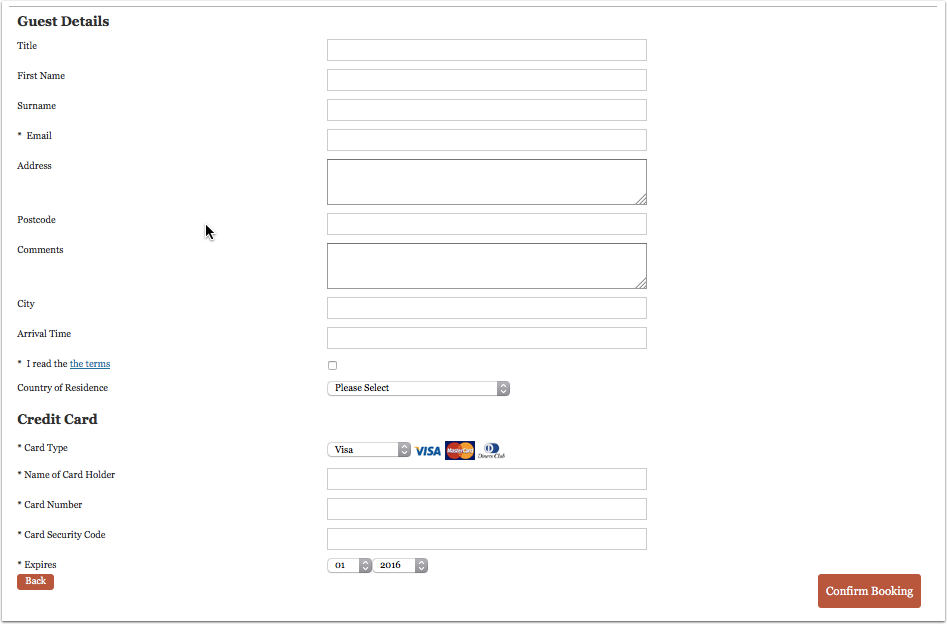
Credit card collection rules can be set for automatically confirmed or request only booking status.
Set your general booking rule in (SETTINGS) PROPERTIES > BOOKING RULES or if you want to collect credit card details only for certain rates in RATES to "Request CC" or "Collect CC".

Set which cards you accept. You also have the option to require the Credit Card Security Number to be entered.

When guests make a booking he will have to enter their credit card details to complete a booking. With the number you can process payments in your merchant account.
Credit card details are stored in the system until the guest checks out. They will be deleted a few days after check-out.
If you want to you can add a message on how you use the card:
- (SETTINGS) BOOKING ENGINE > BOOKING PAGE > CONTENT "Guest Details Header" - content will appear only on the booking page showing the upsell items and guest booking questions. It will appear at the top of the page under the property header information.
- (SETTINGS) BOOKING ENGINE > BOOKING PAGE > CONTENT "Confirm Booking Button Message" - Text entered in this field will appear on the booking page in the area above the Confirm Booking button.
Credit Card Details from Channels
Some channels send credit card details to Beds24. If they do we make them available to you. If the channel did not send credit card details for one booking or all bookings contact the channels support team and ask them to only accept bookings with credit card details and always send these to Beds24.
Request Guests to Submit Credit Card Details
You can set up an Auto Action with a request to submit credit card details. Guests will be able to submit their card details on a secure form.
To use this option you need to
- activate credit card collection in SETTINGS->PAYMENTS->PAYMENT GATEWAYS-> CREDIT CARD
- set which credit cards you accept SETTINGS->PAYMENTS-> CREDIT CARD COLLECTION
- Go to SETTINGS->GUEST MANAGEMENT->AUTO ACTIONS and create an Auto Action. Use the context help (?Icons) and the help page (click on HELP in the top right menu) for general instructions.
Template variables are used to link to the form.
In the "Email" tab click on "Edit" and enter your text. Template variables are used to specify the requested amount:
- The template variable [PAYLINK:NA:CC] creates link to the form where guest can securely enter their credit card details.
- The template variable [PAYURL:NA:CC] creates URL for the form where guest can securely enter their credit card details.
- The template variable [PAYBUTTON:NA:CC] creates button with a link to the form where guest can securely enter their credit card details.
You can show a custom message in header section of the payment request and in the confirmation which the guest sees after they have entered their details. The settings are SETTINGS->PAYMENTS->PAYMENT COLLECTION " Payment Request Header" and "Payment Request Confirmation".
You can also use a direct link. The link uses the booking number plus the parameter &g=cc
https://www.beds24.com/bookpay.php?bookid=1234567&g=cc
https://www.beds24.com/bookpay.php?bookid=[BOOKID]&g=cc
Access Credit Card Details
For security reasons we never send credit card details via email. Owner accounts can always access the credit cards information of a property. Sub accounts can view credit cards when this is activated in the property settings in sub accounts.
There are following restrictions to view cards:
1) The user must login with the primary account password (your Beds24 password), the additional secondary password can not view cards.
2) The login must be using secure https: not http:
3) Credit card details can only be viewed if the password has been changed in the last 90 days. To change the password to to SETTINGS->ACCOUNT->ACCOUNT ACCESS.
4) Viewing credit card details will require your password entry.
View CVC
The encrypted CVC code is in the booking notification email sent to the host. It is a line that looks like this:
Security Code = SBPA
1. Open the Email booking confirmation for this booking
2. In the booking confirmation you will find the code: Security Code= ---
3. Copy the code
4. Go to BOOKINGS in your control panel
5. Open the booking and click on the tab "Charges and Payments"
6. Cick on "Show" and if asked enter your password
7. Click on "Show"
8. Enter the code in the CVC field for decoding
Note for bookings from OTAs: If there is no code for the ccv in the email the channel did not send the ccv to Beds24.
Allow sub accounts to view credit card information
You can allow sub accounts to view credit card details on a per property basis.
Click on the 'User' icon on the top right and then on 'Account Management (in the old control panel SUB ACCOUNT in the top right) then
- click on "Manage Account" for the account which owns the property to open the property lis
- click on "Manage Property" and set "View Credit Cards" = Owner and Linked Accounts
If you allow sub accounts to access to view credit card details accounts with the roles "Admin", "Read Only", "Back Office" and "Front Desk" will be able to access credit card details. To prohibit credit card access enter the word creditcard in "Hide menu pages" in SUB ACCOUNT "Manage Account".
Validate card
We perform a Luhn check which mathematically checks for typos in the card number, it does not check the date except that it is in the future and there is no way to check the CVV except with your bank at processing time.
If you use Stripe as Payment gateway you can set that cards are sent to Stripe. Stripe will the validate the card.
If the expiry date of the card is before check-in the info code CARDEXPIRES is added to the "Info" tab of the booking. If the card gets updated the info item gets deleted.
You have the option to set up a report which you can add to your dashboard.
Trouble Shooting
If credit card details are not collected check booking rules are correct:
 (SETTINGS) PROPERTIES >BOOKING RULES "Booking Type" = Request CC or Collect CC
 (SETTINGS) PROPERTIES > ROOMS  > OFFERS "Booking Type"= Default or  Request CC or Collect CC
Setting for "Booking Type" set in the "Summary" tab of your rates = Default or Request CC or Collect CC
Credit card collection is not visible on the booking page :
  (SETTINGS) PROPERTIES >BOOKING RULES "Booking Type" "Booking Type" = Request CC or Collect CC
 (SETTINGS) PROPERTIES > ROOMS  > OFFERS "Booking Type"= Default or  Request CC or Collect CC
Setting for "Booking Type" set in the "Summary" tab of your rates = Default or Request CC or Collect CC
Credit cards are not visible in the booking :
  (SETTINGS) ACCOUNT > PREFERENCES "Bookings" and set Credit Card Security = 'Email CCV'