Booking.com: Import Properties from Booking.com to Beds24: Difference between revisions
No edit summary |
No edit summary |
||
| Line 67: | Line 67: | ||
'''Step 3: Import Property Shell with Rooms and Prices ''' | '''Step 3: Import Property Shell with Rooms and Prices ''' | ||
#Click on " | #Click on "Sync Content". | ||
# | #Cick on "Import New Property from Booking.com". | ||
#Enter the Booking.com hotel ID of the property you want to import then click on "Import from Booking.com". | #Enter the Booking.com hotel ID of the property you want to import then click on "Import from Booking.com". | ||
#Go to the CALENDAR and check that your prices imported properly. | #Go to the CALENDAR and check that your prices imported properly. | ||
Revision as of 13:43, 31 May 2021
This page is about the menu (SETTINGS) CHANNEL MANAGER > BOOKING.COM > CONTENT and explains how to import properties from Booking.com to Beds24.
Import Properties from Booking.com
You can create a new property and rooms in Beds24 from a property in Booking.com. The Booking.com hotel and room IDs will be automatically added to the channel manager settings.
Step by Step Guide
Step 1: Initiate the XML connection with Booking.com
Initiate the XML connection from the property menu within the booking.com extranet and then do the Beds24 setup.
- Login to Booking.com and go to ACCOUNT->CHANNEL MANAGER. If you do not see this option contact Booking.com and tell them you want to use a channel manager
- Click the Start button and search for BEDS24.
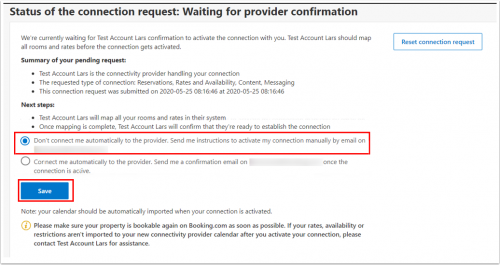
- Choose NOT to connect automatically
 view large
 - Complete the rest of the on screen instructions and make sure you select a two-way connection and content.
- When ready you will receive a notification from Booking.com.
Step 2: Import Property shell with rooms and prices
- Go to (SETTINGS) PROPERTIES then click on "Import from OTA" and choose "Booking.com".
- Click on the "Import Property" button.
- Enter the Booking.com hotel ID of the property you want to import then click on "Import from Booking.com".
- Go to the CALENDAR and check that your prices imported properly.
- Go to SETTINGS->CHANNEL MANAGER-BOOKING.COM and
- Click on the "View Actual Data" Button to check which prices and availability will send to Booking.com.
- Check that all tick boxes for "Inventory and Prices" and "Bookings" are ticked for all rooms.
Up to 10 prices will import as daily prices. Minimum stays will not import.
At this stage Booking.com will NOT send all content. You can check what Booking.com sent when you click on the "View content sent to Booking.com" link so you can see which information needs to be set up in Beds24.
Step 3: Confirm the connection in Booking.com
When your prices are correct you can confirm the connection in Booking.com.
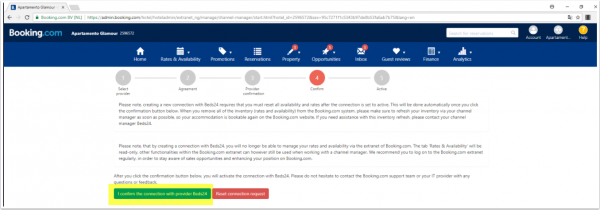

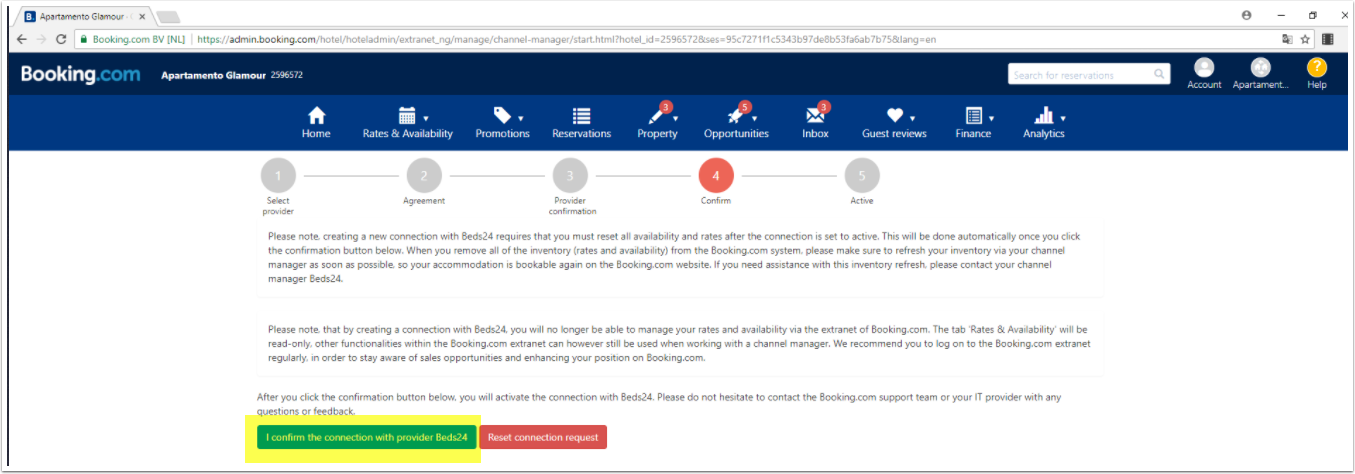
Booking.com will remove your prices and Beds24 will now automatically update prices, availability and import bookings.
Step 4: Import content and existing bookings from Booking.com
- Click on "Manage Content".
- Click on "Property" and select "Import from Booking.com"
- Go back to SETTINGS->CHANNEL MANAGER->BOOKING.COM and click on the the "Import existing bookings" button to import bookings which for future dates.