Combine two rooms to sell as a suite: Difference between revisions
Jump to navigation
Jump to search
No edit summary |
No edit summary |
||
| Line 7: | Line 7: | ||
'''1. Set up your "real" rooms:''' | '''1. Set up your "real" rooms:''' | ||
*Create one room type standard room with | *Create one room type standard containing iris and rose with a quantity of 2 and set "Sell Priority"= hide to hide the room from your booking page | ||
*Create room standard room tulip with a quantity of 1and set "Sell Priority"= hide to hide the room from your booking page | |||
*Create the economy room with a quantity of 1 | *Create the economy room with a quantity of 1 | ||
| Line 13: | Line 15: | ||
'''2. Set up your "virtual" rooms:''' | '''2. Set up your "virtual" rooms:''' | ||
*Create one room type standard | *Create one room type standard room with the quantity of 3 | ||
*Create the suite with a quantity of 1 | *Create the suite with a quantity of 1 | ||
| Line 22: | Line 22: | ||
*Room type standard room: | *Room type standard room: | ||
**Requires Availability in = room type standard | **Requires Availability in = room type standard containing iris and rose | ||
**Requires Availability in = | **Requires Availability in = tulip | ||
**Combination Logic = Sum of all bookings | **Combination Logic = Sum of all bookings | ||
**Assign Bookings to = First available dependency room | **Assign Bookings to = First available dependency room | ||
Leave all other setting set to the defaults. | Leave all other setting set to the defaults. | ||
* | *Suite: | ||
** | **Requires Availability in = tulip | ||
**Requires Availability in = economy room | |||
**Combination Logic = all rooms must be available | |||
Leave all other setting set to the defaults. | Leave all other setting set to the defaults. | ||
| Line 36: | Line 38: | ||
Leave all other setting set to the defaults. | Leave all other setting set to the defaults. | ||
* | *Economy: | ||
** | **Include Bookings from = Suite | ||
Leave all other setting set to the defaults. | Leave all other setting set to the defaults. | ||
[[Image:distribution.jpg|500px|link=]] | [[Image:distribution.jpg|500px|link=]] | ||
[[Media:distribution.jpg|view large]] | [[Media:distribution.jpg|view large]] | ||
Revision as of 16:48, 18 August 2015
This page explains how to use virtual rooms to sell two rooms independently and as a suite at the same time'
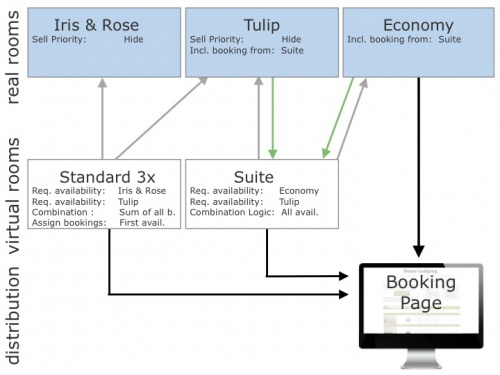
Example 1: A B&B has 3 standard rooms (tulip, iris, rose) and one economy room. Tulip can be combined with the economy room to form a suite.
1. Set up your "real" rooms:
- Create one room type standard containing iris and rose with a quantity of 2 and set "Sell Priority"= hide to hide the room from your booking page
- Create room standard room tulip with a quantity of 1and set "Sell Priority"= hide to hide the room from your booking page
- Create the economy room with a quantity of 1
2. Set up your "virtual" rooms:
- Create one room type standard room with the quantity of 3
- Create the suite with a quantity of 1
3. Set up the room dependency settings in SETTINGS->PROPERTIES->ROOMS->DEPENDENCIES as follows:
- Room type standard room:
- Requires Availability in = room type standard containing iris and rose
- Requires Availability in = tulip
- Combination Logic = Sum of all bookings
- Assign Bookings to = First available dependency room
Leave all other setting set to the defaults.
- Suite:
- Requires Availability in = tulip
- Requires Availability in = economy room
- Combination Logic = all rooms must be available
Leave all other setting set to the defaults.
Tulip:
- Include Bookings from = Suite
Leave all other setting set to the defaults.
- Economy:
- Include Bookings from = Suite
Leave all other setting set to the defaults.