Booking.com: Synchronise bookings prices availability: Difference between revisions
No edit summary |
No edit summary |
||
| Line 323: | Line 323: | ||
6) Changes of inventory are pushed to Booking.com instantly. Price changes are sent with the next update. To push price changes immediately to Booking.com press the "Update" buttons. | 6) Changes of inventory are pushed to Booking.com instantly. Price changes are sent with the next update. To push price changes immediately to Booking.com press the "Update" buttons. | ||
7) | 7) Channel collect payments will be shown in the booking invoice if SETTINGS->CHANNEL MANAGER -> “Import Channel Collect Payments” is set to “Yes”. | ||
==Disconnect== | ==Disconnect== | ||
*Unticking "Inventory and Prices" and "Bookings" will stop Beds24 sending data to Booking.com. This will not remove the data from Booking.com and it will still be bookable. | *Unticking "Inventory and Prices" and "Bookings" will stop Beds24 sending data to Booking.com. This will not remove the data from Booking.com and it will still be bookable. | ||
*To completely disconnect the channel manager please contact Booking.com and ask them to disconnect you. | *To completely disconnect the channel manager please contact Booking.com and ask them to disconnect you. | ||
== FAQ == | == FAQ == | ||
Revision as of 13:35, 5 July 2017
Synchronising Beds24.com with Booking.com
General
- You need an account with Booking.com If you do not yet have a Booking.com account you can sign up here.
- Click here for general information on how the channel manager works.
- This tutorial explains how to set prices for channels.
Capabilities
- Beds24.com can export Inventory
- Beds24.com can export Minimum Stay
- Beds24.com can export Maximum Stay
- Beds24.com can export Closed to Arrival and Closed to Departure
- Beds24.com can export Multiple Rates
- Beds24.com can import Bookings
- Beds24.com can import Booking Modifications and Cancellations
- Beds24.com can add a multiplier to export prices.
- Importing modifications or cancellations can be disabled for individual bookings.
- Invalid cards and no-shows can be reported to Booking.com from the "Details" tab of the booking.
Limitations
If you export inventory you will also need to export rates from Beds24, rates can not be set within the Booking.com extranet.
Booking.com may sometimes withhold the credit card number or CCV unless you specifically request they are sent to you. Contact your Booking.com rep if this is occurring and you require this information.
Extra person and extra child prices within a Beds24 Rate and discounts set in a Rates Discount section are not able to export to Booking.com or other channels.
Set Up
Setting up the connection is a 4 step process:
1) You request a connection on Booking.com extranet- nothing changes you are still bookable according to the prices and inventory you have set in the Booking.com extranet
2) Beds24 accepts your request - nothing changes you are still bookable according to the prices inventory you have set in the Booking.com extranet
Between step 2 and 3 you should map your rooms and rates, check everything and import existing bookings from Booking.com to block the booked dates.
3) You enable the connection in Booking.com - this is when Booking.com removes your inventory and rates and you are temporarily not bookable.
4) Beds24 sends prices and availability to Booking.com. You are bookable again. To send the update immediately click the "Update" buttons in the channel manager settings.
Bookings are not removed from the Booking.com extranet. Existing and new bookings are always visible in the Booking.com extranet.
Booking.com
Initiate the XML connection from the property menu within the booking.com extranet and then do the Beds24 setup.
1) Login to Booking.com and go to ACCOUNT->CHANNEL MANAGER. If you do not see this option contact Booking.com and tell them you want to use a channel manager.
2) Click the Start button and search for BEDS24.
3) Complete the rest of the on screen instructions.
It is possible to select a "one way" or "two way" connection with Booking.com. The normal case is "two way" which will both export inventory to Booking.com and import bookings from Booking.com. If you select any of the "one way" options only one of these actions will be performed and the other must be manually maintained by you. Please send us a support ticket if you want a one way connection only.
4) When ready you will receive a notification from Booking.com, go to the Channel Manager menu again and activate the connection.
Beds24.com
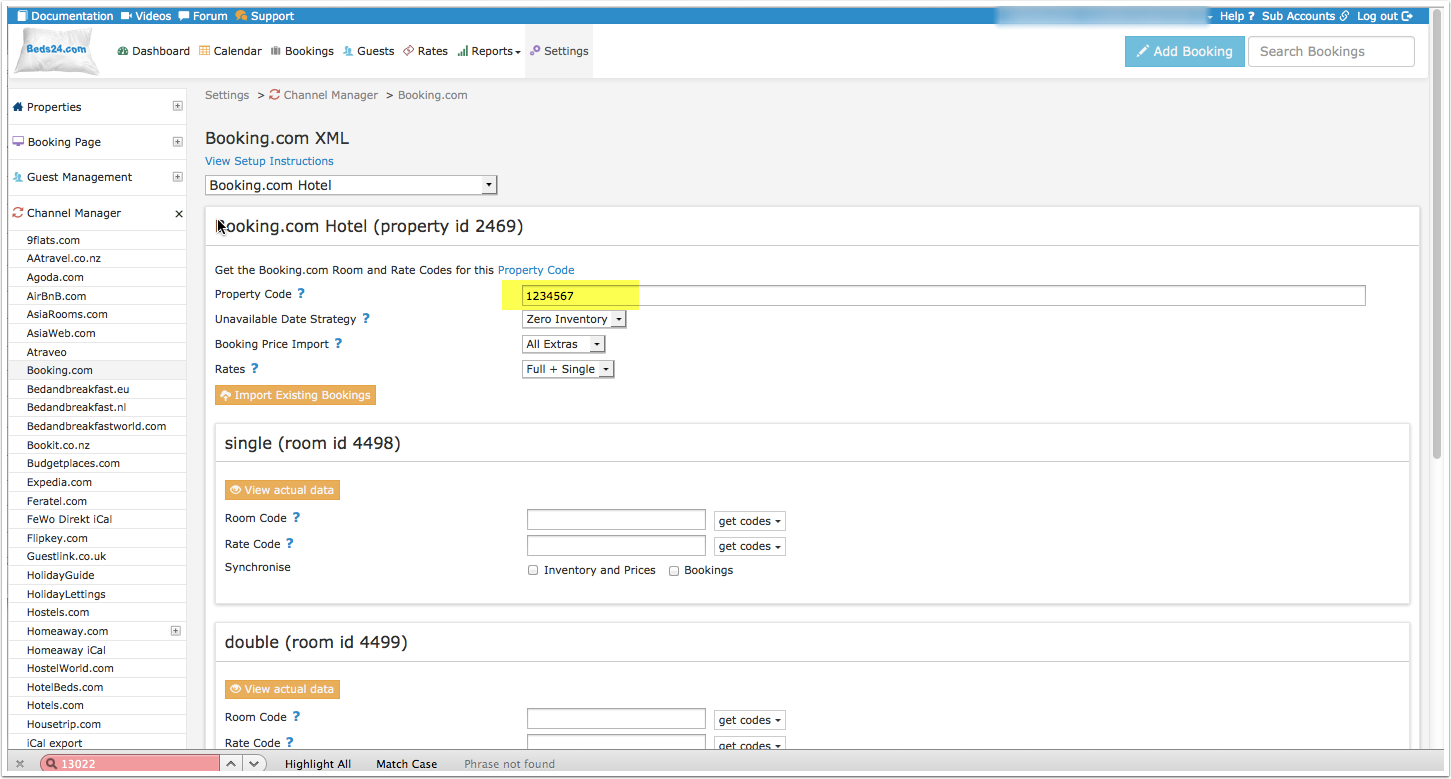
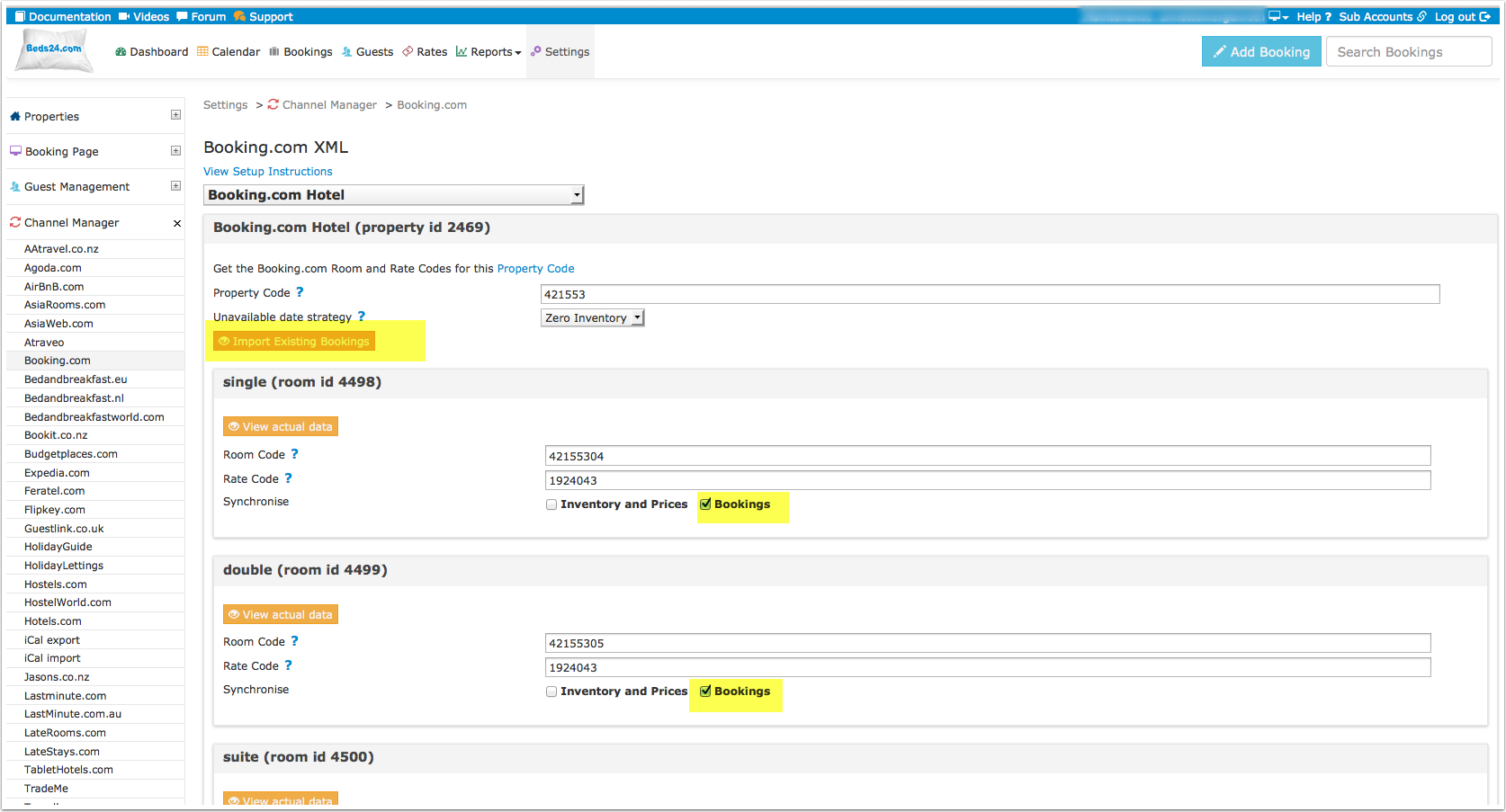
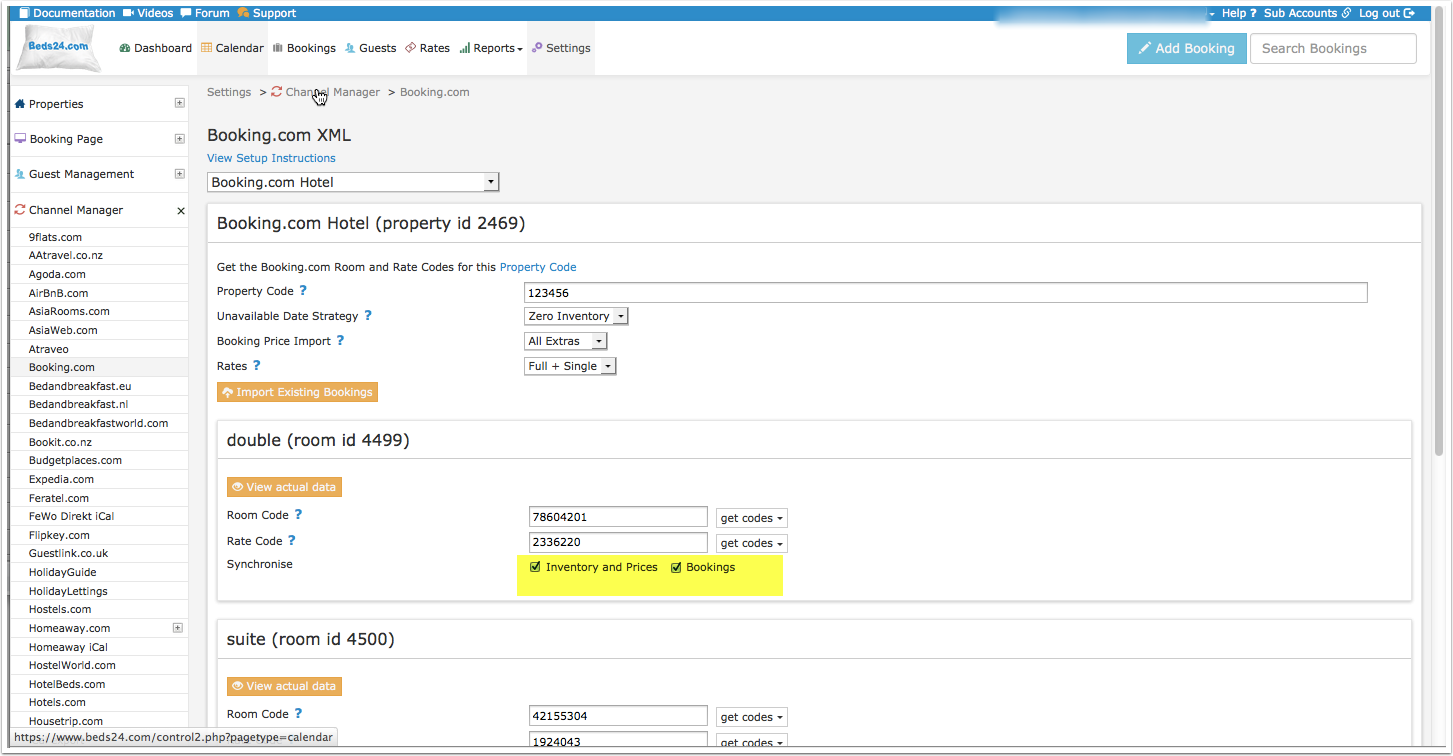
1) Enter your Booking.com Hotel Id into SETTINGS -> CHANNEL MANAGER -> BOOKING.COM "Hotel ID" setting and then SAVE.
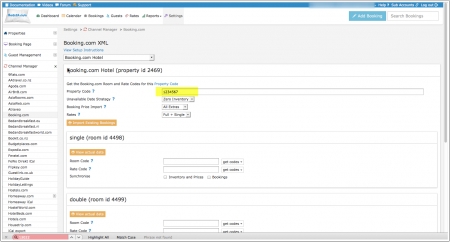
2) Set "Booking Price Import" to either import the room price only or the room price plus unpaid extras (cleaning charges, local taxes etc.)
3) Some Booking.com rate ids can accept a room price plus a single occupancy price on the same rate id. If you have this rate type and want to send the single occupancy price set "Booking.com Rate Type " = "Full + Single". If you do not have this rate type or you are not sure set "Booking.com Rate Type "= "One Price "
4) Mapping
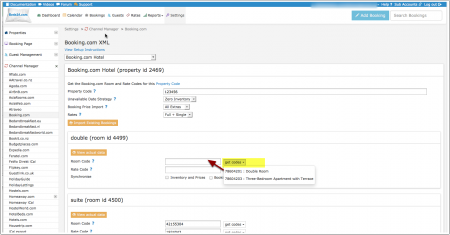
Map Rooms:
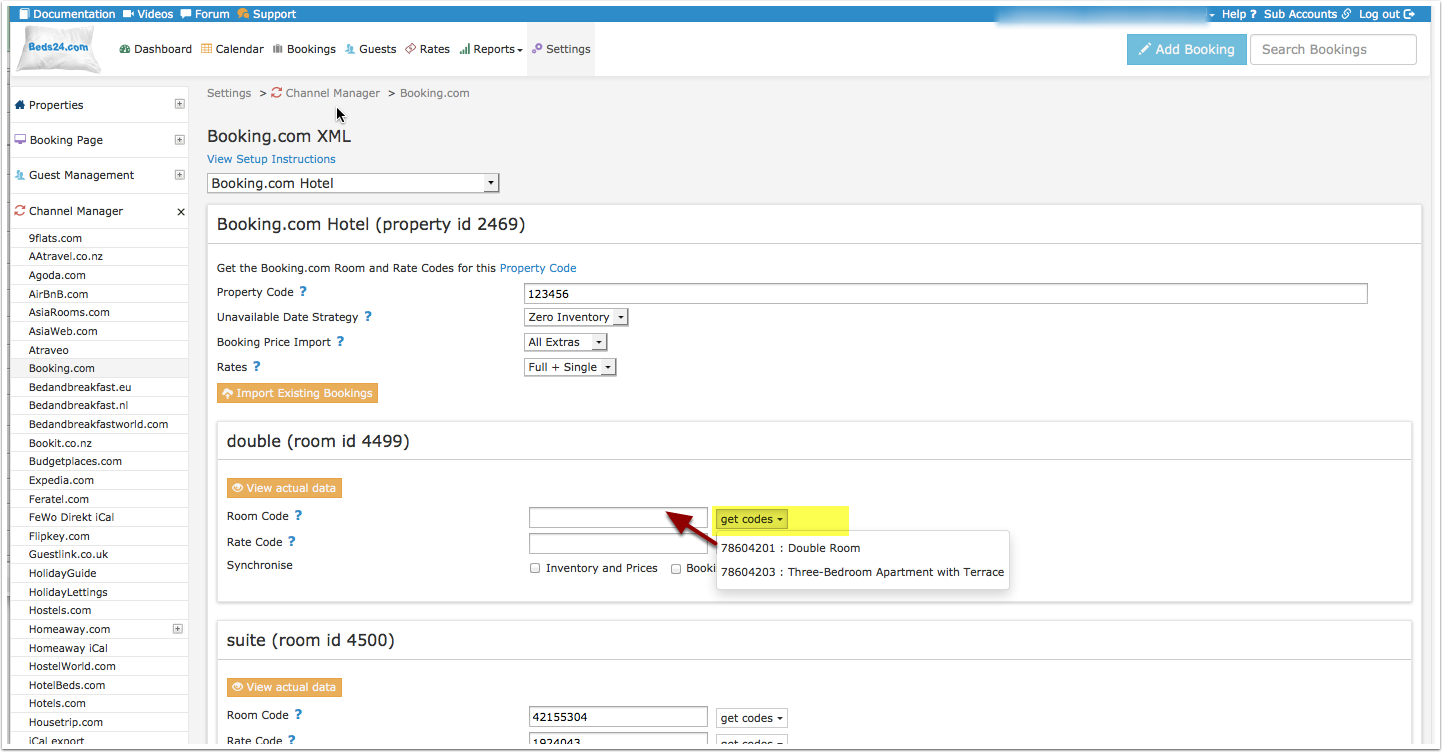
- Click on the "Get Code" link next to the room id setting, a list of room ids will be retrieved from Booking.com and displayed.
- Choose the Booking.com room you want to map to the Beds24 room and click on it.
- When the correct room id has copied to the room id setting, click Save.
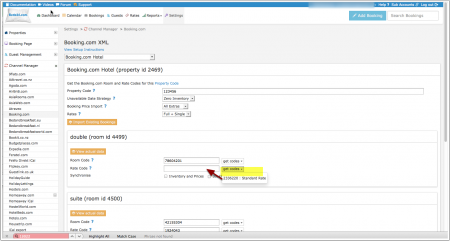
Map Rates:
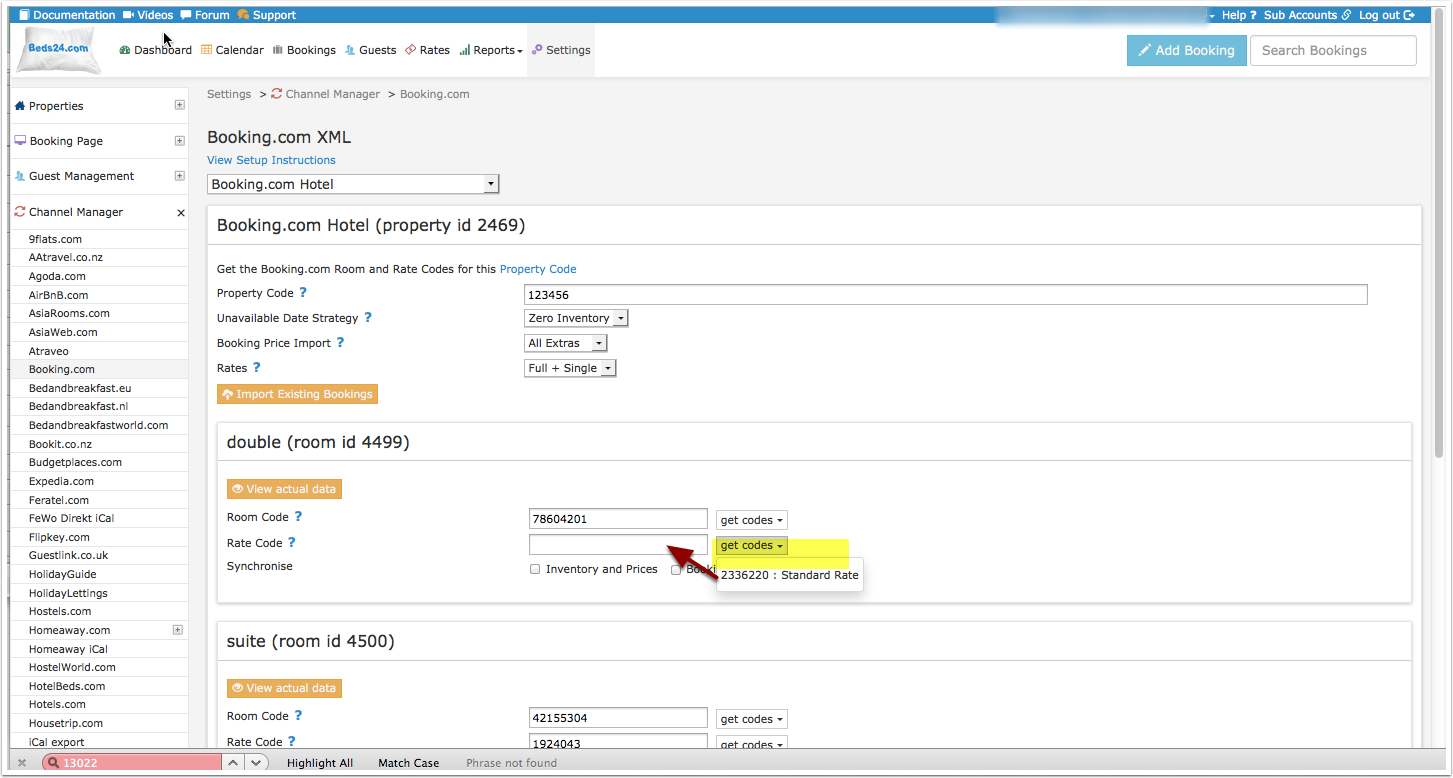
- Click on the "Get Code" link next to the rate id setting and a list of rate ids will be retrieved from Booking.com for the saved room id.
- Choose the Booking.com rate id for this room and click on it. This will normally be the standard rate.
- When the correct rate id has copied to the rate id setting, click Save.
Multiple Rates
Multiple rates can be created for each date, for example to send prices for different occupancies, minimum stays, meal options or refundable and non-refundable prices.
1. Derived Prices
Booking.com can auto calculate different occupancies from one standard rate. Ask your Booking.com rep to set this up. This option means you only need to send one rate from Beds24 to Booking.com and Booking.com will auto-calculate the other rate options.
2. Multiple Rate Ids
Booking.com can set up multiple rate ids for each room, each with pre-defined booking conditions. Beds24 can map a different Beds24 rate or offer to each Booking.com rate id. If you do not have the appropriate rate ids you need to request Booking.com to add them. Once you have them you can set corresponding rates in Beds24 and map them to these codes.
- Click on the "Get the Booking.com Room and Rate Codes for this Property Code" link to view all mapping codes for this property.
Multiple Rate Ids using Rates
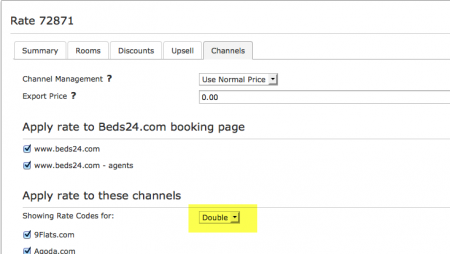
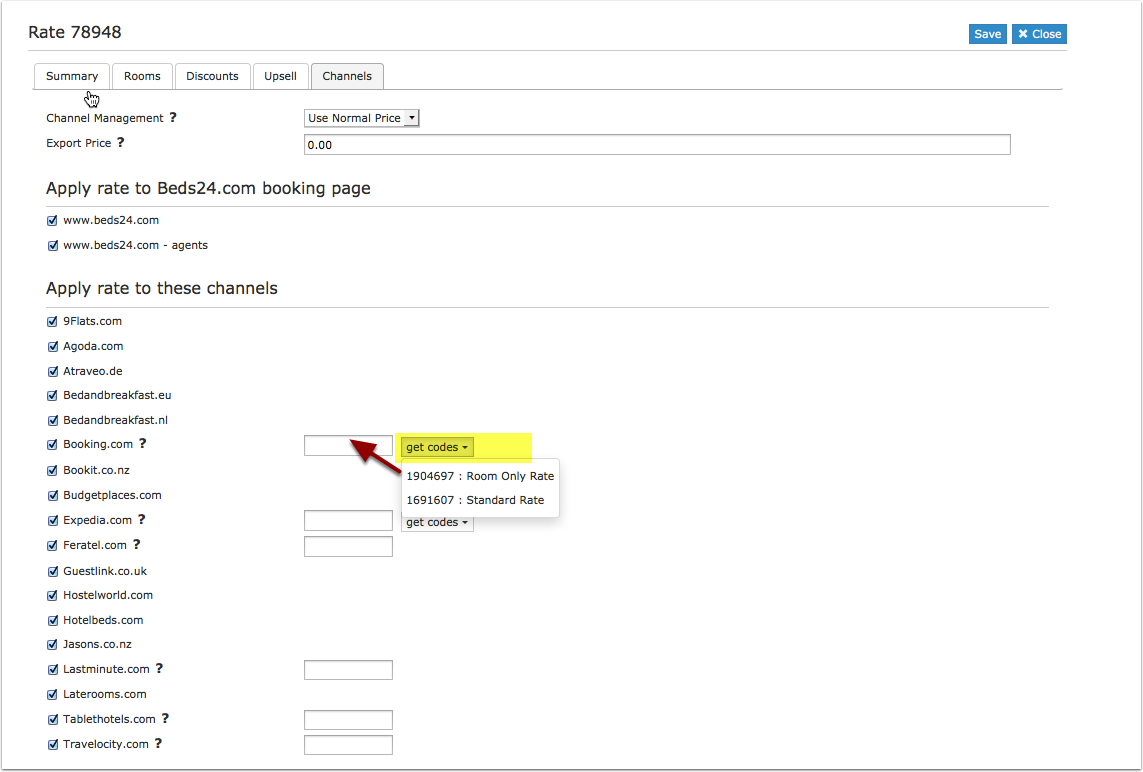
Each Beds24 rate can be mapped to any valid Booking.com rate id. On the CHANNEL tab of each Beds24 Rate is a setting to enter a Booking.com rate id If this setting is left blank, the rate id defined in the Beds24 channel manager settings for Booking.com will be used. If the Beds24 rate should be mapped to an alternative Booking.com rate id, enter the Booking.com rate id here.
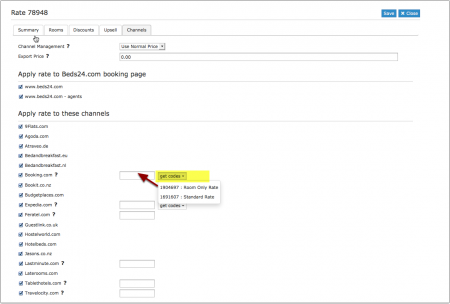
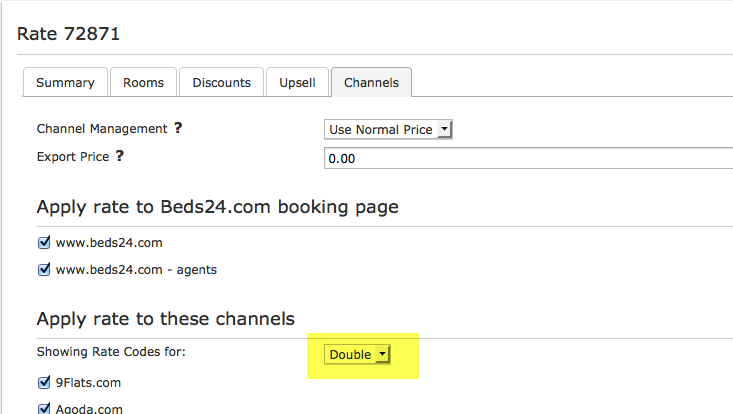
If you have linked a rate to be used for other offers or rooms use the selector to choose the room you want to map.
Multiple Rate Ids using Offers or Daily Prices
Beds24 supports up to four price "offers" for each room. Each of the four offers can be mapped to a different Booking.com rate id. This is particularly useful when mapping daily prices to Booking.com.
To define the Booking.com rate id for each offer, separate the rate ids with colons. For example the following Beds24 rate id setting will map offer 1 to rate id 11111, offer 2 to rate id 22222, offer 3 to rate id 33333 and offer 4 to rate id 44444:
11111:22222:33333:4444
If offer 1 is used only for the Beds24 booking page and only offers 2,3 and 4 are used for Booking.com leave the first rate id blank and start with a colon. For example :22222:33333:44444
The settings for daily prices allow each daily price row to be assigned to a specific offer and therefore mappable to different Booking.com rate ids
Same Price to Multiple Rate Ids
If a Beds24 price should be sent to multiple booking.com rate ids, the multiple rate ids can be entered with a comma separating them. For example 12345678,123456789
This can be used to allow a daily price set to "Do not allow lower prices" to override multiple Booking.com rate ids. If the comma separated rate ids are defined in the channel manager rate id setting and each individual Beds24 rate contains it's specific Booking.com rate id, each rate will be mapped to it's rate id and daily prices will be mapped to all the specified rate ids, over-riding the rate price when appropriate.
Price Multiplier
If you want to add a multiplier to your prices, for example because booking.com requires a different currency to your Beds24 currency, add a * followed by the multiplier number to your hotel id.
For example a hotel id setting 123456*1.23 will multiply all prices by 1.23 sent for hotel id 123456. (i.e. raised by 23%) Lower prices can be sent with a multiplier less than 1, i.e. 123456*0.85 will send a price 85% of the normal price (i.e. lowered by 15%)
To convert the price of bookings imported from booking.com add a * after the multiplier, for example 123456*1.23* will divide the price of the booking by 1.23.
Maximum number accepted bookings
By default all all available rooms are sent to activated channels. In SETTINGS->CHANNEL MANAGER->CHANNEL INVENTORY limit the number of accepted bookings for this channel.
Activating
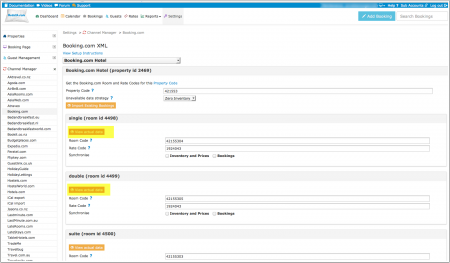
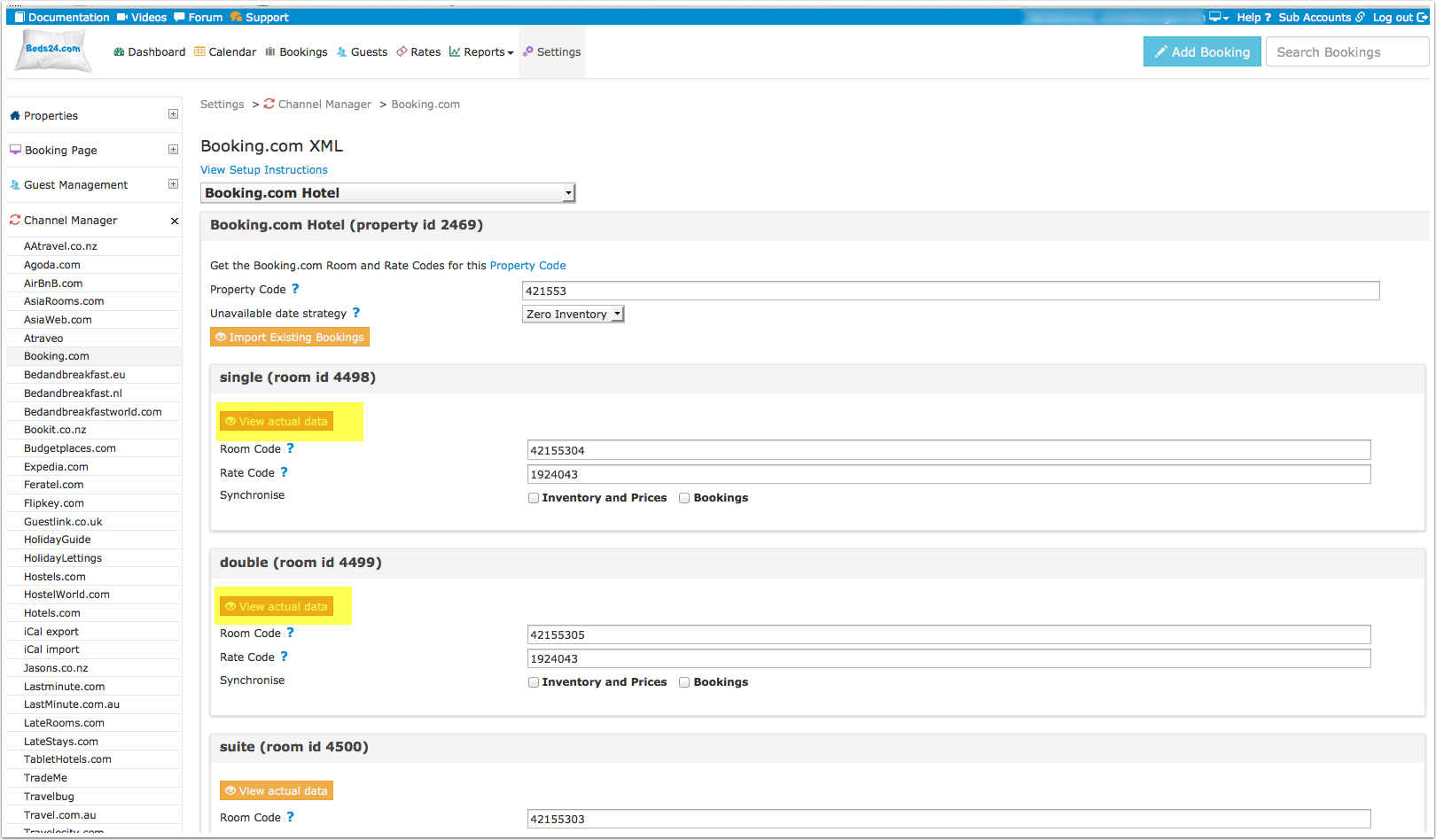
You can view the live availability and prices that will be sent to Booking.com before or after activating using the "View actual data" button.
1) Import existing bookings from Booking.com
Make sure the "Bookings" check box for each mapped room is ticked and saved and then click the "Import existing bookings" button.
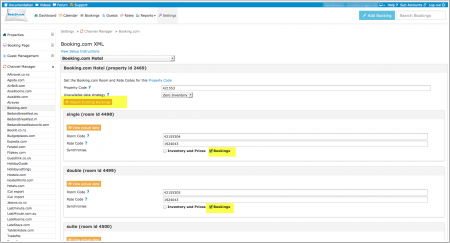
If for any reason your existing bookings do not import, the dates could be reopened and resold. To prevent this import the bookings via CSV.
a. Export your bookings as CSV from booking.com
b. Go to https://api.beds24.com/csv/putbookingcomcsv.php and import the csv file to Beds24.
Follow the instructions on the page carefully so they import to the correct rooms.
If this is also unsuccessful, block the booked dates in the beds24 calendar. Please note that in this case cancellations and modifications will not be imported automatically.
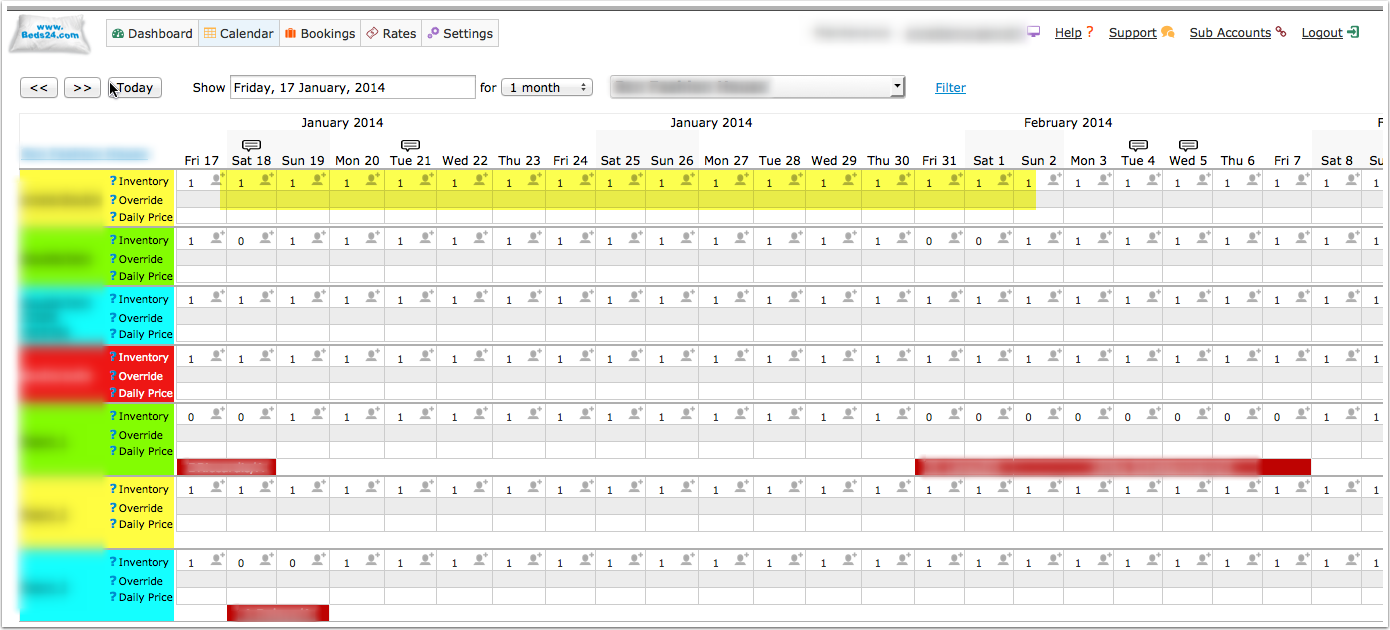
2) Make sure your inventory is correct in Beds24. Check existing bookings in Booking.com imported and dates blocked by other sources are blocked in Beds24. Dates can be blocked by either entering a booking manually into Beds24 for those dates or using the inventory and override functions on the control panel calendar for those dates. Failure to do this could allow new bookings on dates you are not available. All available dates in Beds24 will be sent to Booking.com as available for new bookings.
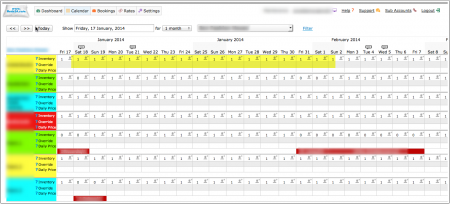
3) Enable the connection in Beds24 by ticking "Inventory and Rates" for each mapped room and saving. The "Bookings" checkbox should already be ticked but tick it as well if it is not ticked and bookings should be imported.
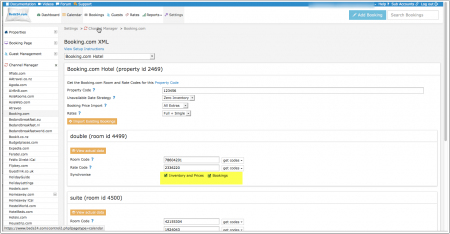
4) When all the set up in Beds24 is correct you can make the final step to enable the connection (go live) from the Booking.com extranet.
5) When you go live your rates and inventory will be deleted from Booking.com and a full reload will occur from your Beds24 Inventory.
You can use the "Update" button on each room to speed this up. Your bookings will not be deleted from Booking.com but make sure the dates are blocked in Beds24 before going live so they will not be reopened.
6) Once updated, check all your values in the Booking.com extranet for correctness and if required make any adjustments to the settings to fix.
7) New bookings made after XML is enabled will import to Beds24 automatically.
Setup Problems
1) The room is being unexpectedly closed at booking.com
The channel manager will close the room on all dates which do not have a valid price available for sending to booking.com. Make sure you have prices for the complete range of dates you are sending (1 year or 2 years)
2) "Room code is not unique" warning when saving in Beds24.
Each Booking.com room id is unique and can be mapped to only one room in Beds24. If you enter the same Booking.com room id more than once the room updates will overwrite each other causing inaccurate information being sent to Booking.com
3) Missing Credit Card Details
When Booking.com sends the credit card number it will be available in the "Payments and Charges" tab of the booking unless it has been stored in a third party system such as Stripe. The encoded CVC number is available from the booking notification email sent to the host as the line labelled Security Code. Enter the Security Code value from the email into the booking to view the CVC.
- If there is no Security Code item in the host notification email, the CVC was not collected or sent for this booking. Please ask Booking.com to collect and send it to Beds24 if you require it.
- If credit card details are always missing and you require them, please ask Booking.com to collect and send credit card details to Beds24
- If Booking.com normally sends credit card details but did not do so for a specific booking and you always want a card as security, please ask Booking.com to exclusively accept bookings with a credit card number.
4) Daily prices and prices for the Room, Double and Single occupancy can be mapped to Booking.com.
These can be mapped to Booking.com rate id's and will use the booking conditions of that rate id. Extra person and extra child prices within a Beds24 Rate and discounts set in a Rates Discount section are not able to export to Booking.com or other channels.
Manage Bookings
This screenshot shows specific settings for bookings from Booking.com:
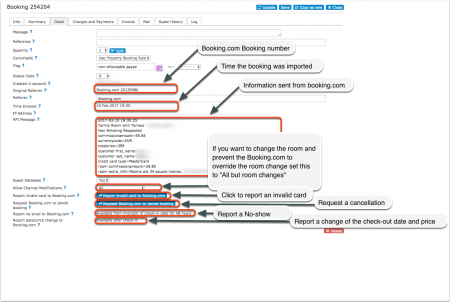
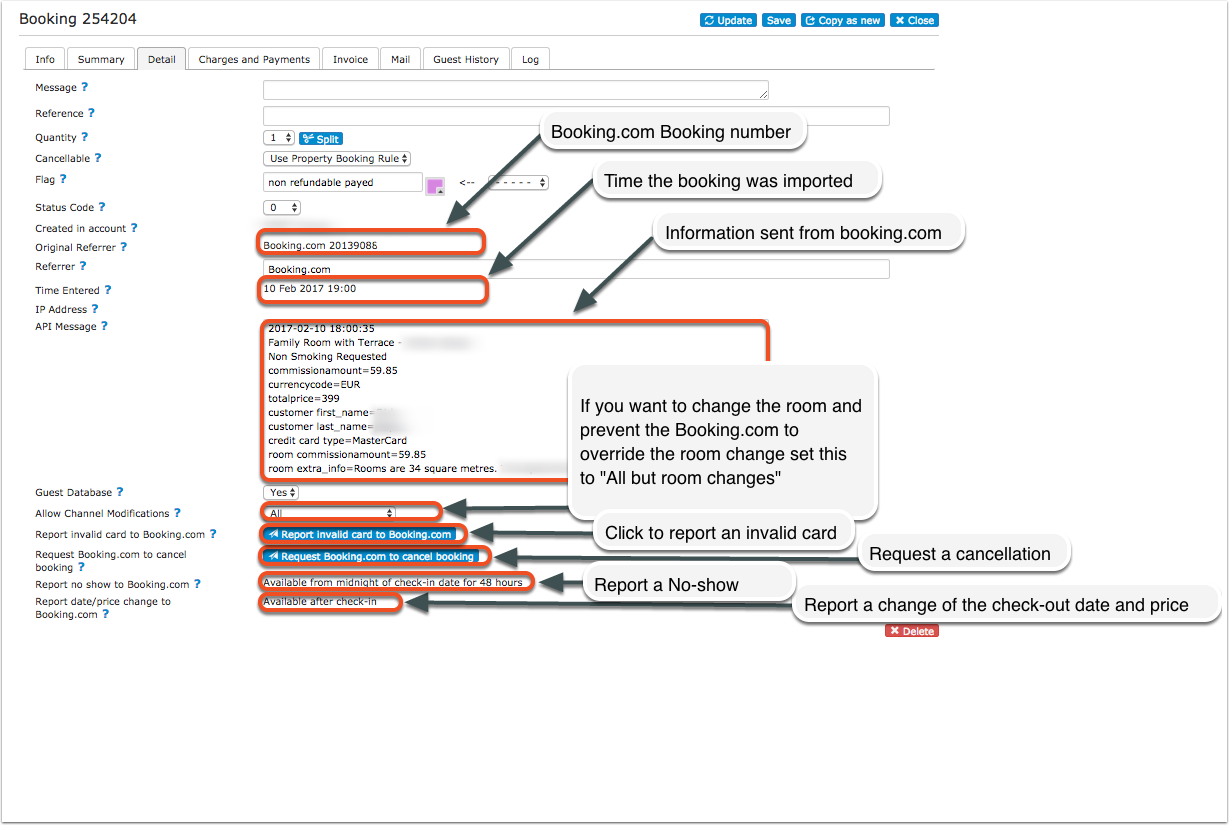
If you want to not allow channel modifications by default you can change the setting for "Booking.com default "Allow Channel Modifications" value" in SETTINGS->CHANNEL MANAGER.
Common Errors
Any errors reported by Booking.com will be emailed to you with the error message as returned by Booking.com. The error message usually includes information about the date, rate or room with the problem and a brief description. Below are common error messages and how to fix them.
Access denied while trying to get rooms for hotel XXXXXX
Check if you have received a notification from Booking.com that the connection is ready.
*If not please check in the Booking.com extranet that the connection has been requested.
*If yes please check the Booking.com hotel id you have entered is correct and does not have blank spaces.
Updating availability hasn't been enabled for hotel 0000
You have not activated the connection in the booking.com extranet. Please log into your booking.com extranet and activate the connection.
Not allowed to update Single Use Rate for Room
Booking.com have not activated a single occupancy price for the room.
Either ask Booking.com to allow a single price or set "Booking.com Rate Type"= One Price
If the room is a dorm check your rates and make sure you have entered your one person price as "Single" and not as "Room Price".
Rooms to Sell were set below the Minimum Contracted rooms for these dates
You have agreed to supply a minimum number of rooms to Booking.com on the mentioned dates and Beds24 is trying to update them to a number lower than your agreed minimum. Booking.com have ignored the Beds24 values on those dates and used your agreed minimum instead.
*Make sure you have valid rates for the mentioned dates and no bookings from other sources
*Beds24: change your inventory to send the allotment you have guaranteed Booking.com
*Booking.com: Ask Booking.com to remove the guaranteed allotment
Rate is not active
You do not have an active Booking.com rate id with this number. Please double check your rate ids and enter a valid Booking.com rate id.
Room is not active
Booking.com has not activated the room for selling. Please ask Booking.com to activate it and check the room id  is correct.
Rate 123456 cannot be updated via XML
This rate has not been activated for channel management. Ask Booking.com to activate it.
Did not set Close Room 'XY for Rate Category 'ZZ' because of remaining Minimum Contracted Rooms on dates.....
You have guaranteed and to have a minimum number of rooms to sell on  Booking.com but the channel manager is sending a lower quantity than contracted.
*Make sure you have valid rates for the mentioned dates and no bookings from other sources
*Beds24: change your inventory to send the minimum contracted rooms you have guaranteed Booking.com
*Booking.com: Ask Booking.com to remove the minimum contracted rooms
Rate does not exist
You have added a number which is not a valid Booking.com rate id into the field in the "Channels" tab of a rate. Open your rates and make sure the correct booking.com rate ids are entered.
hotel 'xxxxx' not allowed for user 'Beds24ProductionServer'
 Check if you have received a notification from Booking.com that the connection is ready.
*If not please check in the Booking.com extranet that the connection has been requested.
*If yes please check the Booking.com hotel id you have entered is correct and does not have blank spaces.
hotel 'xxxxx' not allowed for user BA-bookingautomationadmin'
 Check if you have received a notification from Booking.com that the connection is ready.
*If not please check in the Booking.com extranet that the connection has been requested.
*If yes please check the Booking.com hotel id you have entered is correct and does not have blank spaces.
room/rate combination is not active
Your codes are not correctly mapped. Check you have entered the right Booking.com mapping codes.
Not allowed to update Single Use Rate for Room
Booking.com does not accept a single price for a dorm. Set "Booking.com Rate Type"= One Price. If you want to send a single price for other rooms ask Booking.com to set up a "Single" rate id for these.
Room reservation does not belong to this hotel reservation
The booking was already cancelled in Booking.com before the Channel syncronisation.
Notes
1) Credit card details are imported and shown on the "INVOICE" tab of the booking. If not please refer to "Missing Credit Card Details" in Setup Problems above.
2) Multiple Rates - if you want to send multiple prices for a room you must have a rate id for each rate in Booking.com and a matching rate with the price and rate id setup in Beds24. See the Multiple Rates section above for more details.
3) Single occupancy prices must be activated within booking.com if you are sending them to multi person room rates. They can be disabled by setting "Rates" = "Full Only"
4) For bookings imported through the button "Import upcoming bookings" Booking.com will only send a summary of the booking, not the full information. The full information can still be accessed in the Booking.com extranet. New bookings made after activation will include full booking information.
5) Deleting a rate or price in Beds24 will not delete the price in Booking.com. If you need to close a rate at Booking.com, make the rate id unbookable at Beds24, for example by closing the room or removing the price and wait for it to update at Booking.com. Only once the rate has closed at Booking.com it is safe to remove it from Beds24.
You can close a rate at booking.com by making sure there is no price for it on the dates to close in Beds24. As long as the rate has at least a price for 1 day in the next year, all the other dates without prices will be closed.
If you have multiple rates at booking.com, the other rates can continue to be available by giving them prices.
Note that if there is no price on any day at all for a rate, this will not necessarily close the rate, in this case no information will be sent and whatever data is in Booking.com will remain.
You can always see the data being sent with the "View Actual Data" button in the channel manager.
6) Changes of inventory are pushed to Booking.com instantly. Price changes are sent with the next update. To push price changes immediately to Booking.com press the "Update" buttons.
7) Channel collect payments will be shown in the booking invoice if SETTINGS->CHANNEL MANAGER -> “Import Channel Collect Payments” is set to “Yes”.
Disconnect
- Unticking "Inventory and Prices" and "Bookings" will stop Beds24 sending data to Booking.com. This will not remove the data from Booking.com and it will still be bookable.
- To completely disconnect the channel manager please contact Booking.com and ask them to disconnect you.
FAQ
Will I receive notifications on new bookings?
After you activate the channel manager the channel will stop sending notifications. You will receive them from Beds24 instead.
Do guests receive a confirmation?
The channel confirms the booking with the guest. Beds24 will not sent a confirmation message. If you want to send one as well you can set up an Auto Action Email.
How do I modify or cancel a booking?
Bookings coming from a channel should be modified by the channel. Cancelling a booking in Beds24 will not cancel the booking in Booking.com and can cause a double booking. Please ask booking.com or the guest to cancel the booking in Booking.com and the cancellation will be sent to Beds24.
If for some reason you need to make a change in Beds24 and do not want the channel to override it, you can set "Allow Channel Modifications" = No ("Details" tab of the booking"). If you have changed the room you can set "Allow Channel Modifications" = All but not room changes.
How do can I access credit card details?
This is how you can view credit card details. Booking.com may sometimes withhold the credit card number or CCV unless you specifically request they are sent to you. Contact your Booking.com rep if this is occurring and you require this information to always be sent.
How do I add a promotion or special price?
You can set up promotions in the Booking.com extranet. Please note that rules like minimum stays set in Beds24 will not apply and have to be set directly in Booking.com.
How do I add extra costs or fees?
Extra Costs, e.g. tax, cleaning fee, service charge can be set directly in the channels extranet.
Can I send different prices for different minimum stays or for different numbers of guests?
Yes. You can do this either with "derived" prices or multiple rates ids. See the "Multiple rates" section of this page.
I have multiple Booking.com hotel ids. How do I set this up?
The system can handle multiple properties in one account. Each Booking.com hotel requires one property in Beds24.
What to do when I receive an overbooking?
- Check if you are receiving error messages by email or in the potential issues menu. Error messages need to be addressed immediately because they can mean the channel manger is able to make updates.
- Entering the same Booking.com room code in multiple rooms in Beds24 can cause overbookings. Check your set up for warnings.
If you can not see a problem in your set up send us a support ticket with the booking numbers and dates.
Why did a booking not import?
- Check if the room for which you received the booking is properly mapped.
If you can not see a problem in your set up send us a support ticket with the booking number and the date the booking was made.
Why is the price for the booking wrong?
- A special offer set up in the channel may have reduced the price the channel manager sent.
- Your prices are not set up as you expect.
What are contracted rooms?
This is an agreement between you and the channel where you agree to provide a number of rooms exclusively to that channel. This means you will not be able to sell these rooms directly or on other channels.
What do I do when I have a no show?
To report a no show to Booking.com open the booking and click the button in the "Details" tab.
What do I do when a guest provides an invalid credit card number?
Invalid cards can be reported to Booking.com via a button on the "Details" tab of the booking.
I originally set my connection as a one-way connection, now I want a two-way connection
You will need to disconnect your connection with Beds24 in the Booking.com extranet and then initiate the connection with two-way connection.