Trip: Difference between revisions
No edit summary |
No edit summary |
||
| Line 2: | Line 2: | ||
== This channel is coming soon == | == This channel is coming soon == | ||
< | <di v | ||
style="display:none"> | style="display:none"> | ||
| Line 27: | Line 27: | ||
=== What you will need === | === What you will need === | ||
*Your Ctrip hotel id | |||
=== Set Up=== | === Set Up=== | ||
| Line 44: | Line 45: | ||
'''Mapping''' | '''Mapping''' | ||
Ctrip does not use room codes. Rate codes are used to identify the room and the rate. | |||
*Click on the "Get Code" link next to the rate plan code setting. | *Click on the "Get Code" link next to the rate plan code setting. | ||
| Line 52: | Line 53: | ||
[[Media:ctrip_map.png|view large]] | [[Media:ctrip_map.png|view large]] | ||
<embedvideo service="youtube"> | <embedvideo service="youtube">http://www.youtube.com/watch?v=mjAOFouk-Ic</embedvideo> | ||
A price for Single (1 guest), Double (2 guests) and a room price (for the number of guests you have defined in the rate ) can be sent. If you have more than 3 occupancy levels you can set up additional rates in Beds24 for each occupancy level using the room price and the number of guests it is appropriate for and map them in the channel settings of the rate or the daily price. | |||
*If you use daily prices you can set the rate code under "Enable" in the Daily Price settings (SETTINGS- >PROPERTIES- >ROOMS- >DAILY PRICES then click on "Edit) | |||
*If you use rates go to the "Channels" tab of the rate. | |||
'''Breakfast''' | |||
You can set if breakfast included or not. If you want to offer different prices with and without breakfast map your most common option in the channel manager settings. | |||
You can specify the other price option in the channel manger settings of the daily price or the rate by adding this information to the Ctrip rate code. | |||
If you use daily prices you can set the rate code under "Enable" in the Daily Price settings (SETTINGS- >PROPERTIES- >ROOMS- >DAILY PRICES then click on "Edit) | |||
If you use rates go to the "Channels" tab of the rate. | |||
*add /b if breakfast is included for the maximum number of guests the breakfast is included for | |||
*add /n if no breakfast | |||
Example: Breakfast not included | |||
[[Image:ctrip_nobreakfast.png|500px|link=]] | |||
[[Media:ctrip_nobreakfast.png|view large]] | |||
If breakfast is included the default is for the number of breakfasts ist the maximum number of guests the room can accommodate. If breakfast is not included in the price for all guests you have the option to specify the number of included breakfasts by adding | |||
*/1 = breakfast included for 1 guest (/2 = 2 breakfasts included.... /9 9 breakfasts included) | |||
Example: The room accommodates 3 guests but breakfast is only for 2 guests included | |||
[[Image:ctrip_breakfast.png|500px|link=]] | |||
[[Media:ctrip_breakfast.png|view large]] | |||
'''Payment collection''' | |||
You can set if guests pay Ctrip or if they pay at the hotel.. If you want to send prices for Ctrip collect and hotel collect you can specify this in the channel manger settings of the daily price or the rate by adding this information to the Ctrip rate code. | |||
If you use daily prices you can set the rate code under "Enable" in the Daily Price settings (SETTINGS- >PROPERTIES- >ROOMS- >DAILY PRICES then click on "Edit) | |||
If you use rates go to the "Channels" tab of the rate. | |||
*/c = Ctrip collect | |||
*/h = hotel collect | |||
Example: Rate applies for Ctrip collect | |||
[[Image:ctrip_collect.png|500px|link=]] | |||
[[Media:ctrip_collect.png|view large]] | |||
== Activate == | == Activate == | ||
| Line 67: | Line 114: | ||
Existing bookings are not automatically imported when the connection is established and should be entered into Beds24 manually. | Existing bookings are not automatically imported when the connection is established and should be entered into Beds24 manually. | ||
=== Price Multiplier === | === Price Multiplier === | ||
Revision as of 17:00, 16 July 2017
This channel is coming soon
<di v
style="display:none">
Synchronising Beds24.com with Ctrip
General
- Click here for general information on how the channel manager works.
- This tutorial explains how to set prices for channels.
Capabilities
- Beds24.com can export inventory.
- Beds24.com can export multiple rates.
- Beds24.com can import bookings.
- Beds24.com can import booking cancellations.
- Importing cancellations can be disabled for individual bookings.
For details please click here
Limitations
- Only bookings made after the connection is established will be imported, existing bookings must be manually entered into Beds24 to block the dates.
What you will need
- Your Ctrip hotel id
Set Up
Ctrip
You request a connection with Beds24 .....
Beds24
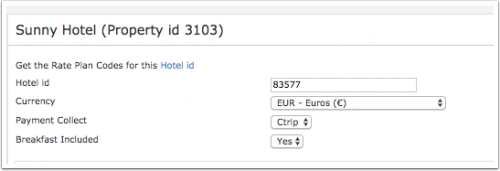
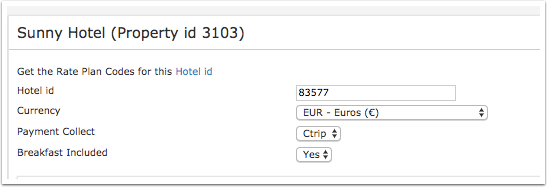
- Enter your Ctrip hotel id
- Set the currency. If you are using different currencies on Ctrip and on Beds24 you can use the price multiplier (see below)
- Choose the Payment Collect method. This defines weather Ctrip collect the payment from the guest or the guest pays a the hotel.
- Set weather breakfast is included in the price or not.
Mapping
Ctrip does not use room codes. Rate codes are used to identify the room and the rate.
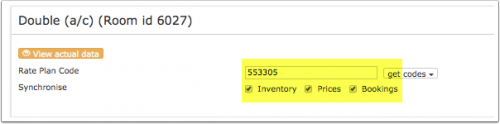
- Click on the "Get Code" link next to the rate plan code setting.
- Choose the Ctrip standard rate for this room and click on it
- Click SAVE when the correct rate plan code has copied to the rate plan code setting.
A price for Single (1 guest), Double (2 guests) and a room price (for the number of guests you have defined in the rate ) can be sent. If you have more than 3 occupancy levels you can set up additional rates in Beds24 for each occupancy level using the room price and the number of guests it is appropriate for and map them in the channel settings of the rate or the daily price.
- If you use daily prices you can set the rate code under "Enable" in the Daily Price settings (SETTINGS- >PROPERTIES- >ROOMS- >DAILY PRICES then click on "Edit)
- If you use rates go to the "Channels" tab of the rate.
Breakfast
You can set if breakfast included or not. If you want to offer different prices with and without breakfast map your most common option in the channel manager settings.
You can specify the other price option in the channel manger settings of the daily price or the rate by adding this information to the Ctrip rate code.
If you use daily prices you can set the rate code under "Enable" in the Daily Price settings (SETTINGS- >PROPERTIES- >ROOMS- >DAILY PRICES then click on "Edit)
If you use rates go to the "Channels" tab of the rate.
- add /b if breakfast is included for the maximum number of guests the breakfast is included for
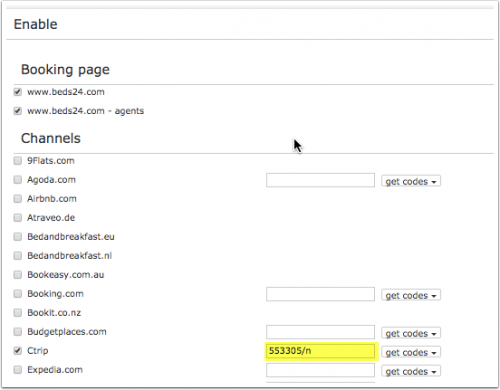
- add /n if no breakfast
Example: Breakfast not included
If breakfast is included the default is for the number of breakfasts ist the maximum number of guests the room can accommodate. If breakfast is not included in the price for all guests you have the option to specify the number of included breakfasts by adding
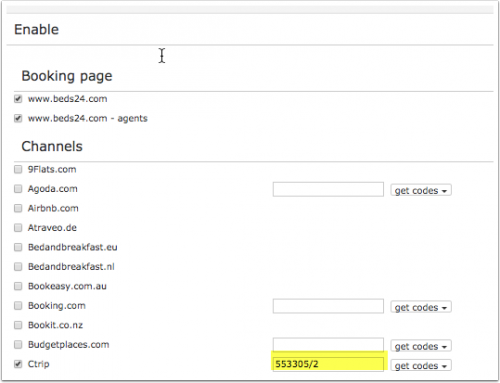
- /1 = breakfast included for 1 guest (/2 = 2 breakfasts included.... /9 9 breakfasts included)
Example: The room accommodates 3 guests but breakfast is only for 2 guests included
Payment collection
You can set if guests pay Ctrip or if they pay at the hotel.. If you want to send prices for Ctrip collect and hotel collect you can specify this in the channel manger settings of the daily price or the rate by adding this information to the Ctrip rate code.
If you use daily prices you can set the rate code under "Enable" in the Daily Price settings (SETTINGS- >PROPERTIES- >ROOMS- >DAILY PRICES then click on "Edit)
If you use rates go to the "Channels" tab of the rate.
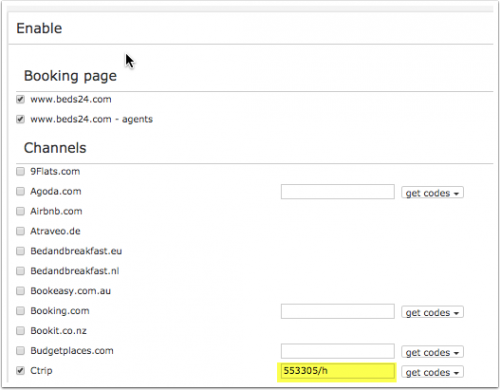
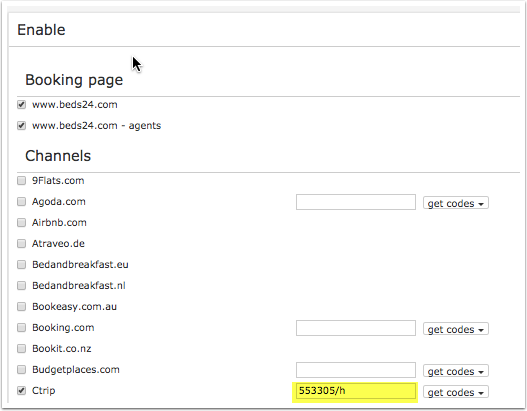
- /c = Ctrip collect
- /h = hotel collect
Example: Rate applies for Ctrip collect
Activate
- Tick "Inventory", "Prices" and "Bookings"
- Save



Bookings
New Bookings are imported. Cancellations to bookings are also imported.
Existing bookings are not automatically imported when the connection is established and should be entered into Beds24 manually.
Price Multiplier
If you want to add a multiplier to your prices, for example because of a different currency to your Beds24 currency, add a * followed by the multiplier number to your hotel Id.
For example a property code setting 123456*12.34 will multiply all prices by 12.34 sent for hotel id 123456.
Notes
Changes of inventory are pushed instantly. Price changes are sent with the next update. To push price changes immediately press the "Update" buttons.
Channel collect payments will be shown in the booking invoice if SETTINGS->CHANNEL MANAGER -> “Import Channel Collect Payments” is set to “Yes”.
Common Errors
Any errors occurring during updates will be emailed to you with the error message as returned by Ctrip. Below are common error messages and how to fix them.
Disconnect
- Unticking "Inventory" and "Prices" and "Bookings" will stop the synchronisation for a room.
- To completely disconnect the channel manager you might need to contact Ctrip and ask them to disconnect you.