Holidu Smart Destinations: Difference between revisions
No edit summary |
|||
| Line 7: | Line 7: | ||
[[Category:Error Messages from Channels]] | [[Category:Error Messages from Channels]] | ||
[[Category:Set up Instructions]] | [[Category:Set up Instructions]] | ||
''Synchronising Beds24.com with | ''Synchronising Beds24.com with Tomas.travel '' | ||
''This page is about the menu SETTINGS->CHANNEL MANAGER->TOMAS'' | ''This page is about the menu SETTINGS->CHANNEL MANAGER->TOMAS'' | ||
| Line 36: | Line 36: | ||
====Beds24==== | ====Beds24==== | ||
*Enter your Tomas hotel id | *Enter your Tomas hotel id | ||
Map Rooms: | Map Rooms: | ||
*Click on the "Get Code" link next to the room type id setting. | *Click on the "Get Code" link next to the room type id setting. | ||
*Choose the | *Choose the Tomas room id you want to map to each Beds24 room and click on it. | ||
*When the correct room id has copied to the room type id setting, click Save. | *When the correct room id has copied to the room type id setting, click Save. | ||
[[Image:agoda_room_mapping.png|500px|link=]] | [[Image:agoda_room_mapping.png|500px|link=]] | ||
| Line 50: | Line 50: | ||
*Click on the "Get Code" link next to the rate plan id setting. | *Click on the "Get Code" link next to the rate plan id setting. | ||
*Choose the | *Choose the Tomas standard rate for this room and click on it | ||
*When the correct rate plan id has copied to the rate plan id setting. | *When the correct rate plan id has copied to the rate plan id setting. | ||
*Click SAVE | *Click SAVE | ||
| Line 57: | Line 57: | ||
If you need prices for more occupancies talk to | If you need prices for more occupancies talk to Tomas and ask them if the can set up additional rate Ids for you.????????? | ||
== Activate == | == Activate == | ||
| Line 86: | Line 86: | ||
==Disconnect== | ==Disconnect== | ||
*Unticking "Inventory" and "Prices" and "Bookings" will stop the synchronisation for a room. | *Unticking "Inventory" and "Prices" and "Bookings" will stop the synchronisation for a room. | ||
*To completely disconnect the channel manager you might need to contact | *To completely disconnect the channel manager you might need to contact Tomas and ask them to disconnect you. | ||
Revision as of 14:51, 22 August 2017
Coming Soon!
Contact us if you are interested to use this connection.
Synchronising Beds24.com with Tomas.travel
This page is about the menu SETTINGS->CHANNEL MANAGER->TOMAS
General
- Click here for general information on how the channel manager works.
- This tutorial explains how to set prices for channels.
Capabilities
- Beds24.com can export inventory.
- Beds24.com can export multiple rates.
- Beds24.com can import bookings.
- Beds24.com can import booking cancellations.
For details please click here
Limitations
- Only bookings made after the connection is established will be imported, existing bookings must be manually entered into Beds24 to block the dates.
Application
Send us a support ticket with your hotel name address, Tomas hotel ID and the name of your touristic organization.
We will then request the connection from Tomas and inform you when the connection is ready. You can then set the connection up.
Set Up
Beds24
- Enter your Tomas hotel id
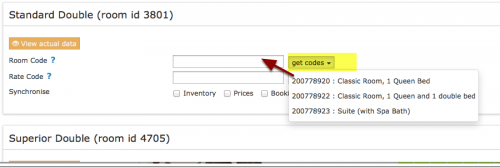
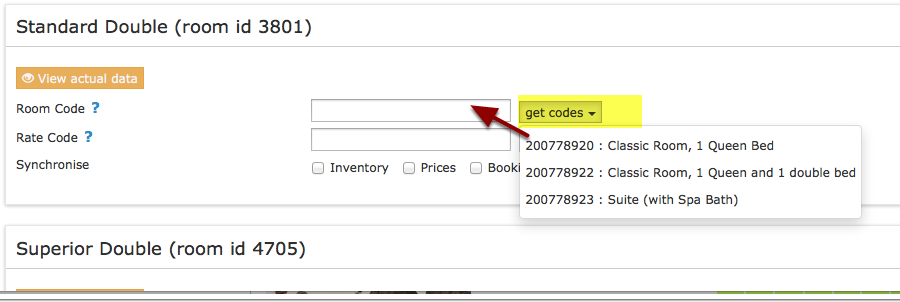
Map Rooms:
- Click on the "Get Code" link next to the room type id setting.
- Choose the Tomas room id you want to map to each Beds24 room and click on it.
- When the correct room id has copied to the room type id setting, click Save.
Map Rates:
A price for for Single (1 guest), Double (2 guests) and a room price (for the number of guests you have defined in the rate ) can be sent.
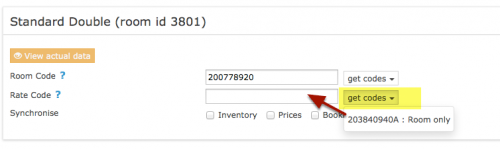
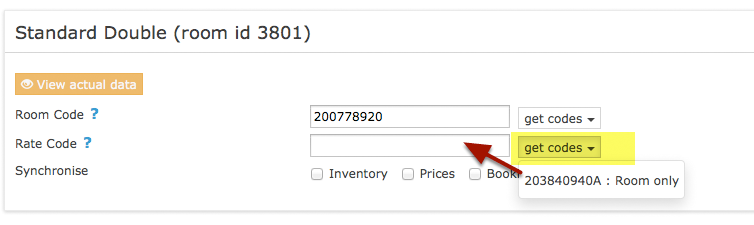
- Click on the "Get Code" link next to the rate plan id setting.
- Choose the Tomas standard rate for this room and click on it
- When the correct rate plan id has copied to the rate plan id setting.
- Click SAVE
If you need prices for more occupancies talk to Tomas and ask them if the can set up additional rate Ids for you.?????????
Activate
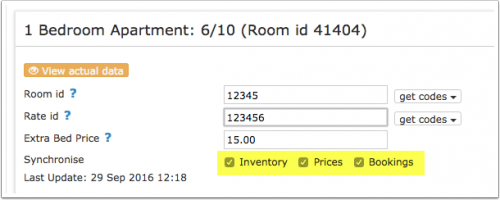
- Tick "Inventory", "Prices" and "Bookings"
- Save

Bookings
New Bookings are imported. Cancellations to bookings are also imported.
Existing bookings are not automatically imported when the connection is established and should be entered into Beds24 manually.
Multiple Rates
can set up multiple rate ids for each room, each with pre-defined booking conditions. Beds24 can send a different price to each Booking.com rate ID. Please use these instructions.
If you do not have the appropriate rate ids you need to request Booking.com to add them.
Price Multiplier
If you want to add a multiplier to your prices, for example because of a different currency to your Beds24 currency, add a * followed by the multiplier number to your hotel Id.
For example a property code setting 123456*12.34 will multiply all prices by 12.34 sent for hotel id 123456.
Notes
Common Errors
Disconnect
- Unticking "Inventory" and "Prices" and "Bookings" will stop the synchronisation for a room.
- To completely disconnect the channel manager you might need to contact Tomas and ask them to disconnect you.