Stripe: Difference between revisions
Markkinchin (talk | contribs) |
No edit summary |
||
| Line 36: | Line 36: | ||
*if you want to make sure that the amount is available for later capture (Capture=No) . | *if you want to make sure that the amount is available for later capture (Capture=No) . | ||
===Additional charges | ===Additional charges === | ||
Further charges | Further charges can be made from within the booking or in Stripe. You can set up an Auto Action (SETTINGS -> GUESTMANAGEMENT->AUTO ACTIONS) to flag these bookings so you can find them easily. You can set up a customer report for these bookings (REPORTS-> CUSTOM REPORTS) which you show on the dashboard. | ||
=== Virtual Cards === | === Auto Charge Virtual Cards from OTAs === | ||
Some channels send virtual cards which are often virtual cards are only valid for a certain period. Virtual cards can be charged automatically. This is how you activate this option: | |||
*Go to SETTINS->CHANNEL MANAGER and set "Channel Collect Invoice" = Charges and Pending Payments | |||
*Go to the channel settings (for example SETTINGS->CHANNEL MANAGER->BOOKING.COM) and set "Virtual Cards" = Yes | |||
====Error when charging Booking.com and Expedia Virtual Cards ==== | ====Error when charging Booking.com and Expedia Virtual Cards ==== | ||
Revision as of 16:57, 16 April 2019
This page is about the menu SETTINGS->PROPERTIES->PAYMENT COLLECTION->STRIPE
Setup
To use this payment option you will need an account with the payment provider.
To connect your Stripe Account click on the "Connect to Stripe" button, you will be prompted to log into Stripe and accept the connection for Stripe Payment Processing
If you do not already have a Stripe account, click on the "Connect to Stripe" button and follow the on screen instructions to create one.
Stripe will display the booking reference in a data field called "data-description".
Send credit card details to Stripe
If you set "Save all cards to Stripe" = Yes all credit cards including cards supplied by all channels will be sent directly to Stripe and not stored at Beds24.
Credit card details can also be sent manually to Stripe.
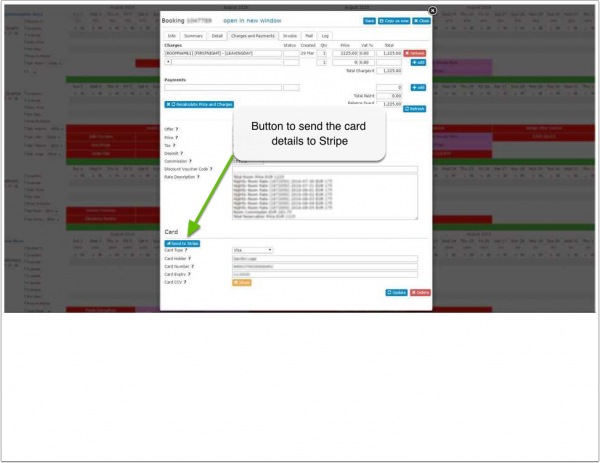
The card will be saved as a new customer in Stripe with the booking number as a reference. Once the new customer is created in Stripe the card can be charged.
Stripe will only accept valid cards. If Stripe reject the card, it's details will still be visible at Beds24.
Collect payment
Payments for bookings with deposit collection on the Beds24 booking page will be automatically collected.
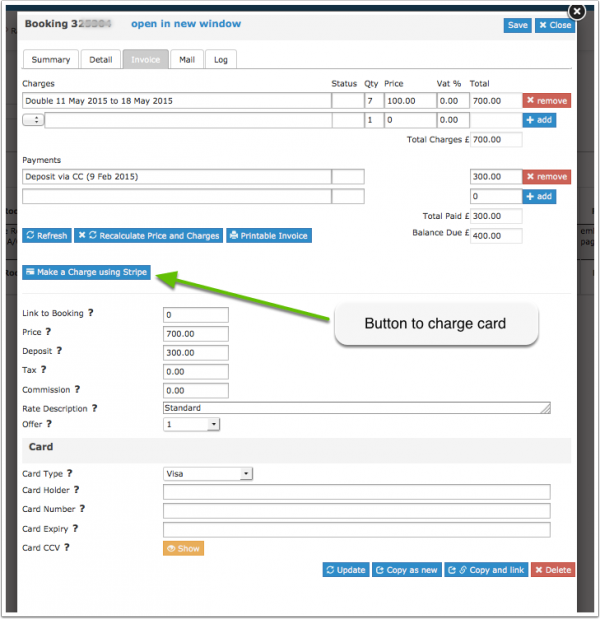
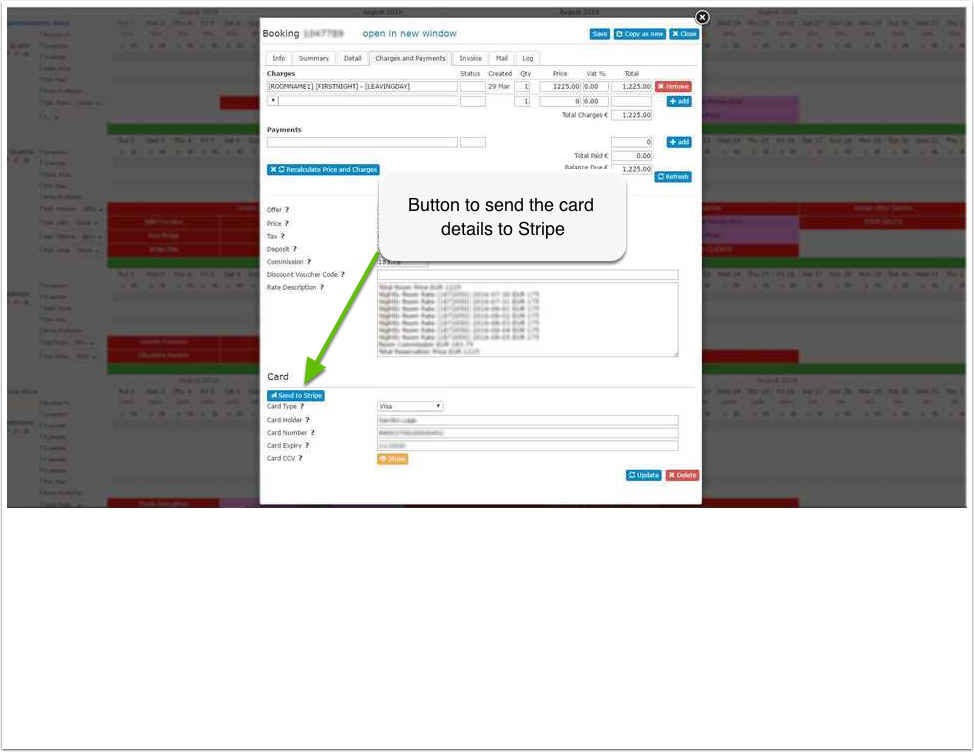
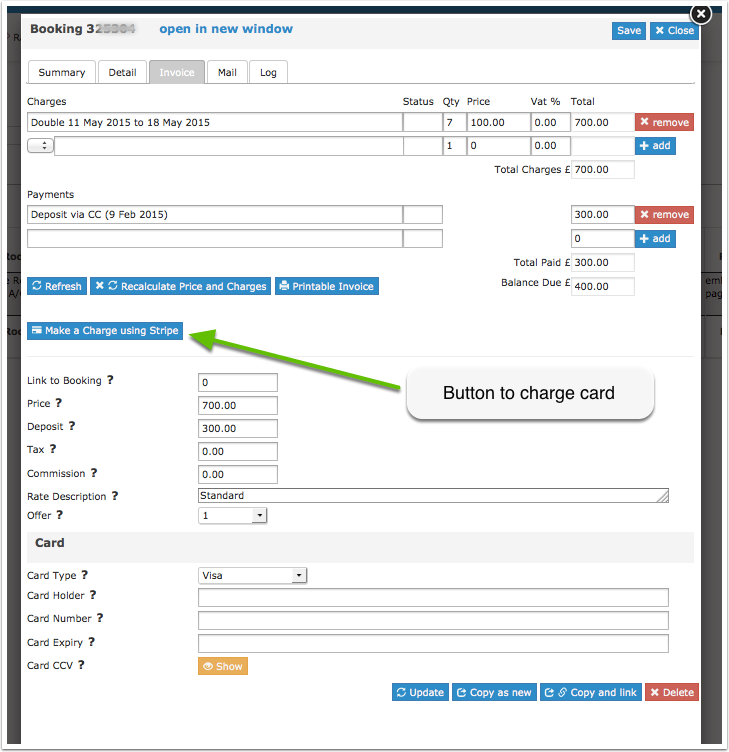
You will see the paid amount in the "Charges and Payments" and "Invoice" tabs of the booking.
You can choose if the card is
- immediately charged (Capture=Yes)
- if you want to make sure that the amount is available for later capture (Capture=No) .
Additional charges
Further charges can be made from within the booking or in Stripe. You can set up an Auto Action (SETTINGS -> GUESTMANAGEMENT->AUTO ACTIONS) to flag these bookings so you can find them easily. You can set up a customer report for these bookings (REPORTS-> CUSTOM REPORTS) which you show on the dashboard.
Auto Charge Virtual Cards from OTAs
Some channels send virtual cards which are often virtual cards are only valid for a certain period. Virtual cards can be charged automatically. This is how you activate this option:
- Go to SETTINS->CHANNEL MANAGER and set "Channel Collect Invoice" = Charges and Pending Payments
- Go to the channel settings (for example SETTINGS->CHANNEL MANAGER->BOOKING.COM) and set "Virtual Cards" = Yes
Error when charging Booking.com and Expedia Virtual Cards
When charging Booking.com and Expedia Virtual Cards with Stripe you may receive this this error: An error occured while processing this card
Possible reasons:
- Merchant Code: The merchant code reflects your type of business (hotel, restaurant, grocery shop etc.). You can only charge a virtual card for a booking if you merchant code category (MCC) is relating to accommodation – 7011. Contact Stripe support and ask them to let your MCC code to reflect 7011.
- Missing CVC: Booking.com and Expedia do not always send a CVC for virtual cards. Ask the channel to povide a CVC for the virtual card and manually reenter it. For Expedia virtual cards you can try to add the generic CVC codes:
- Visa/Mastercard: 469
- American Express: 2469
- Incorrect amount: Double-check you charge the exact amount sent by the channel from the booking.
Refund of Payments in Stripe
Payments can be manually refunded from within the Stripe account. You will also need to enter them manually into the booking.
Troubleshooting and Issues
It has been reported that Browser IE 11 does not show the Stripe payment form when the booking page (and Stripe form) is in an iFrame unless the following Meta tag is included on the parent page.
<meta http-equiv="x-ua-compatible" content="IE=edge">
Accept Cards without CVC
Log into your Stripe account and go to "Radar". You should be able to process charges without the CVC once you turn off that requirement in Radar.