Rakuten: Difference between revisions
No edit summary |
|||
| Line 2: | Line 2: | ||
[[Category:Error Messages from Channels]] | [[Category:Error Messages from Channels]] | ||
[[Category:Set up Instructions]] | [[Category:Set up Instructions]] | ||
<div class="heading">Rakuten Travel and Vacation STAY</div> | |||
This page is about the menues {{#fas:cog}} (SETTINGS) CHANNEL MANAGER > RAKUTEN and {{#fas:cog}} (SETTINGS) CHANNEL MANAGER > and explains how the interface with these channels works and how it is set up. | |||
==General== | ==General== | ||
| Line 15: | Line 16: | ||
For details please [[Channel_Manager_Capabilities|click here]] | For details please [[Channel_Manager_Capabilities|click here]] | ||
The connection between Beds24 and '''Rakuten | The connection between Beds24 and '''Rakuten tTavel''' is made via '''Vacation STAY'''. | ||
Vacation STAY and Rakuten Travel are connected via an API integration. Properties listed on Vacation STAY can be listed on and connected to Rakuten travel. | Vacation STAY and Rakuten Travel are connected via an API integration. Properties listed on Vacation STAY can be listed on and connected to Rakuten travel. | ||
| Line 21: | Line 22: | ||
If you create a listing on Vacation STAY your property will be automatically listed on Rakuten Travel. | If you create a listing on Vacation STAY your property will be automatically listed on Rakuten Travel. | ||
<span style="color:#fe746c;“ >{{#fas:exclamation-triangle}} </span> The property creation on Rakuten Travel is semi-automated, so it might take up to a few weeks for the property to show up on Rakuten | |||
Travel. | Travel. | ||
| Line 61: | Line 62: | ||
*Vacation STAY will notify you by E-mail when the connection is enabled and send you a special API password. | *Vacation STAY will notify you by E-mail when the connection is enabled and send you a special API password. | ||
<span style="color:#fe746c;“ >{{#fas:exclamation-triangle}} </span> The credentials used in the extranet and API are different. '''You can not use your normal Vacation STAY username and password'''. | |||
Revision as of 14:11, 20 May 2020
This page is about the menues (SETTINGS) CHANNEL MANAGER > RAKUTEN and (SETTINGS) CHANNEL MANAGER > and explains how the interface with these channels works and how it is set up.
General
- Click here for general information on how the channel manager works.
- This tutorial explains how to set prices for channels.
Capabilities
- Beds24.com can export Inventory
- Beds24.com can export Price
- Beds24.com can import Bookings
- Beds24.com can import Cancellations
For details please click here
The connection between Beds24 and Rakuten tTavel is made via Vacation STAY.
Vacation STAY and Rakuten Travel are connected via an API integration. Properties listed on Vacation STAY can be listed on and connected to Rakuten travel.
If you create a listing on Vacation STAY your property will be automatically listed on Rakuten Travel.
The property creation on Rakuten Travel is semi-automated, so it might take up to a few weeks for the property to show up on Rakuten Travel.
Limitations
- "Extra Person" prices cannot be exported.
Before you connect
Prices
- We can only send availability if you have set up prices which are activated for this channel. This tutorial gives general information how to set prices for channels.
- Prices for "Extra Person", "Extra child" and discounts set in the "Discounts" tab of the rates can not be sent.
- We can only send one price per day. If you have multiple prices activated for this channel the price with the lowest minimum stay will send.
- If you use daily prices with "Extra Person" prices your daily price needs to be set for the max occupancy and the "Extra Person" price needs to be added with a negative value.
- You can set an "Extra Person" price directly in your VacationSTAY extranet.
Bookings
New Bookings are imported.
Existing bookings are not automatically imported when the connection is established and should be entered into Beds24 manually.
Vacation STAY does not support modification. If a guest wants to modify a booking they will need to cancel and rebook.
If a guest books more than one room Vactation STAY will send a separate unconnected booking for each room.
Extras and Taxes
"Upsell Items" can not be exported.
You need
- Your VacationSTAY propery ID. If you do not already have a account with Vacation STAY sign up on their web site using the “register” function on the extranet then enter your property information, uploads photos etc on Vacation STAYs extranet.
- API username
- API password
Set up
Vacation STAY
- Please fill in this form and ask Vacation STAY customer support to provide API credentials between Beds24 and Vacation STAY.
- Vacation STAY will notify you by E-mail when the connection is enabled and send you a special API password.
The credentials used in the extranet and API are different. You can not use your normal Vacation STAY username and password.
Beds24.com
- Enter your Vacation STAY property ID
- Enter your Vacation STAY API username
- Enter your Vacation STAY API password
- Click SAVE
Map Rooms:
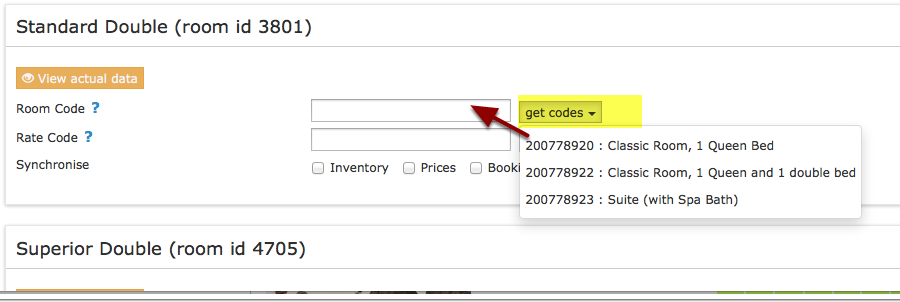
- Click on the "Get Code" link next to the room type id setting.
- Choose the room id you want to map to each Beds24 room and click on it.
- When the correct room id has copied to the room type id setting, click Save.
Tip Click on the "View Actual Data" Button to check which prices and availability will send.
Activate
- Tick "Inventory" and Prices" and "Bookings"
- Save
New Bookings are imported. Modifications and cancellations to bookings are also imported.
Existing bookings are not automatically imported when the connection is established and should be entered into Beds24 manually.
Updates
Changes to availability and prices will be instantly sent to the channel. Changes for settings for example minimum stays or number of rooms will send with the next update. Click on "Update" if you want to push them through instantly.
Check Connection
The connection is working if you are not receiving error messages and the display in the channel is correct. If you are receiving error messages check in the "Common Errors" section why you are receiving the error and how to fix it.
Updates
Changes to availability and prices will be instantly sent to the channel. Changes for settings for example minimum stays or number of rooms will send with the next update. Click on "Update" if you want to push them through instantly.
Common Errors
iCalendar is set on our site. Please cancel icalendar setting to prevent inconsistency of inventory quantity.
Log into your Vacation STAY account and remove the iCal connection.
Stop Sync
Untick "Inventory and Prices" and "Bookings
Use this [1] to request the disconnection at Vacation STAY.