Expedia Mapping: Difference between revisions
No edit summary |
|||
| Line 154: | Line 154: | ||
1) Import existing bookings | 1) Import existing bookings from Expedia | ||
Make sure the "Bookings" check box for each mapped room is ticked and saved and then click the "Import existing bookings" button. | Make sure the "Bookings" check box for each mapped room is ticked and saved and then click the "Import existing bookings" button. | ||
| Line 161: | Line 161: | ||
[[Media:importbookings.png|view large]] | [[Media:importbookings.png|view large]] | ||
Expedia will only send bookings | Expedia will only send a summary for manually imported bookings but modifications to these bookings will automatically import. | ||
Revision as of 15:22, 5 July 2021
This page is about the menu (SETTINGS) CHANNEL MANAGER > EXPEDIA > MAPPING and explains how the connection with Expedia works and how to set it up.
This connection to Expedia EQC will also update other Expedia channels including Hotels.com, AirAsiaGo, Egencia, Venere, Travelocity, Trivago (via Expedia), Expedia Affiliate Network, Wotif Group, Orbitz and Classic Vacations.
General
- Click here for general information on how the channel manager works.
- This tutorial explains how to set prices for channels.
Capabilities
- Beds24.com can export Inventory
- Beds24.com can export Minimum Stay
- Beds24.com can export Maximum Stay
- Beds24.com can export Closed to Arrival and Closed to Departure
- Beds24.com can export Multiple Rates
- Beds24.com can import Bookings, importing modifications or cancellations can be disabled for individual bookings
- Beds24.com can import Booking Modifications and Cancellations
- Beds24.com can add a multiplier to prices to convert to a different currency
- View, manage and create promotions
Orbitz can also be updated via Expedia EQC. If you want to do this your property should be connected to Expedia first. Please contact Expedia support for details.
Rev+, Powered by Expedia Group: After you have connected your property to Expedia you can access real-time pricing data and market insights which will help you make smarter decisions via a click on the "Intelligence" button in the CALENDAR.
Limitations
- Expedia rate plans with with LOS (length of stay) enabled are not supported.
Before you connect
Prices
- We can only send availability if you have set up prices which are activated for this channel. This tutorial gives general information how to set prices for channels.
- Expedia supports two pricing models:
- If your pricing model is Per Day Pricing you will need a price for the maximum room occupancy. Example: If maximum number of guests is 4 you need a ROOM price for four guests. Prices for 1, 2 or 3 guests are not sent. If you use daily prices with "Extra Person" prices your daily price needs to be set for the max occupancy and the "Extra Person" price needs to be added with a negative value so the price for the full occupancy can send.
- If your pricing model is Per Occupancy Pricing a price for each occupancy defined in Beds24 can be sent. If you use rates 1 person, 2 person and room price will send. Room price will send for specified occupancy. Multiple rates with different occupancies can send on same rate plan. Prices for "Extra Person", "Extra child" and discounts set in the "Discounts" tab of the rate can not be sent. If you use daily prices they daily price will send including occupancy. Multiple occupancy prices can send on each rate plan. Extra person price will send.
Bookings
Bookings made within 30 days prior to the connection is established can be imported, older bookings must be manually entered into Beds24 via a .csv file to block the dates.
Extras and Taxes
"Upsell Items" can not be exported.
Rooms and room types
If you sell rooms individually at another channel or your own web site and want to sell them on Expedia as a "roomtype" with a quantity of more than one you can set up virtual rooms.
Dorms
The price sent to Expedia is the price per bed. You will need a daily price or rate for one guest. If you use rates enter your bed price as "room price" as well. If required you can ask Expedia support to add extra person fees directly at their end.
What you will need
- Your Expedia hotel id
Set Up
Expedia
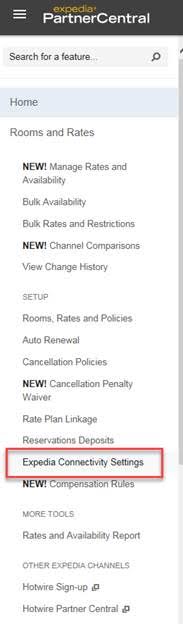
Select Beds24 as channel manager from the "Expedia Connectivity Settings" section in your Exepdia Extranet
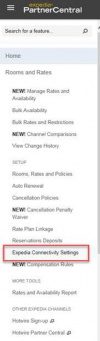
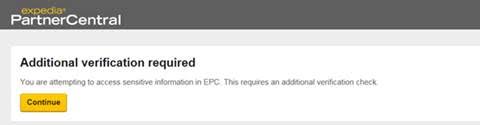
This will take you to the 'Additional verification required' page and where you need to follow the prompted guidelines.
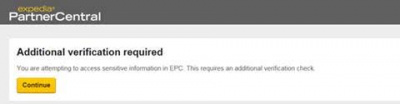
If you have problems please contact Expedia support.
Expedia will then send you an email in which you can also see which Pricing Model you are using.
Beds24.com
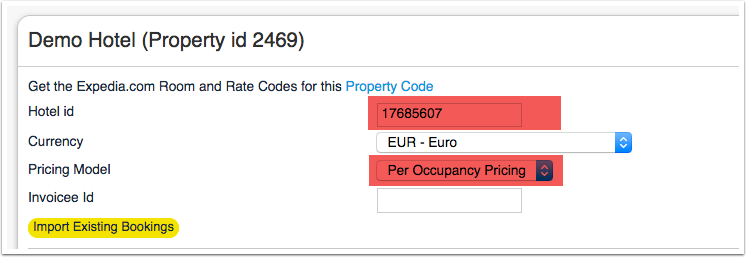
- Enter your hotel id
- Save
- Select if your Expedia price model is "Per Day Pricing" or "Per Occupancy Pricing". You will find this information in the activation E-Mail from Expedia.
- Select if your Expedia "Akquistion type" is "Set by rate plan ID" (if you have both "Sell and "Net" rate plans, "Net" or "Sell". You will find this information in the activation E-Mail from Expedia.
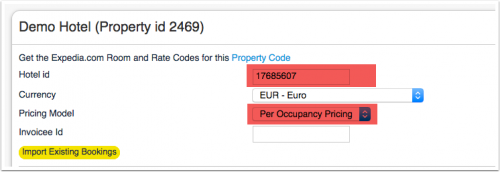
Mapping:
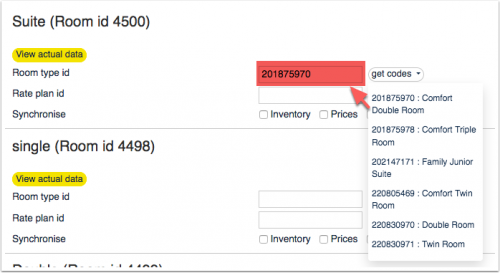
Map Rooms:
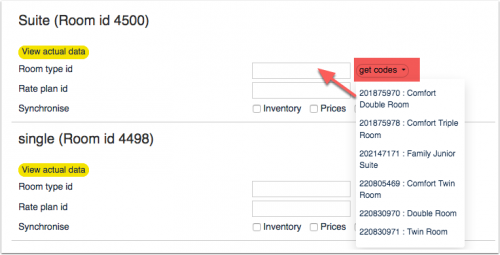
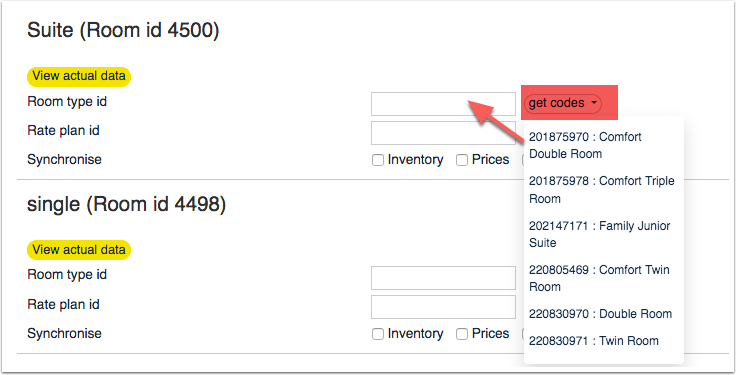
- Click on the "Get Code" link next to the room type id setting.
- Choose the Expedia room type id you want to map to each Beds24 room and click on it.
- When the correct room id has copied to the room type id setting, click Save.
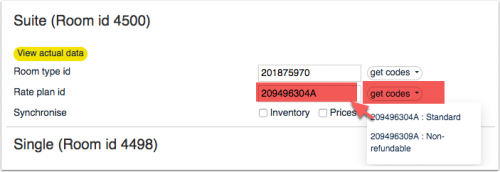
Map Rates:
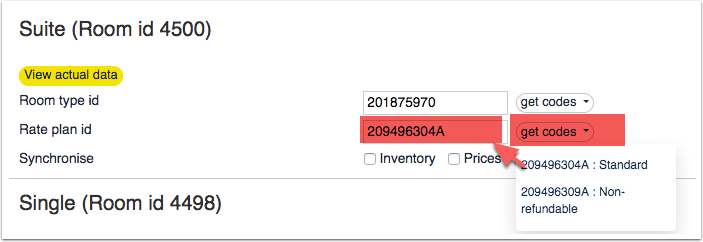
- Click on the "Get Code" link next to the rate plan id setting.
- Choose the Expedia standard rate for this room and click on it
- When the correct rate plan id has copied to the rate plan id setting, click Save.
- If your price model is "Per Day Pricing" you will need a price for the maximum room occupancy. Example: If maximum number of guests is 4 you need a ROOM price for four guests. Prices for 1, 2 or 3 guests are not sent.
- If your price model is "Per Occupancy Pricing" rates can send a price for Single (1 guest), Double (2 guests) and a room price (for the number of guests you have defined in the rate). If you have more than 3 occupancy levels you can set up additional rates or daily prices in Beds24 for each occupancy level and map them in the channel settings of the rate or the daily price.
- If you use daily prices you can set the rate code under "Enable" in the Daily Price settings (PRICES >DAILY PRICE SETUP)
- If you use rates go to the "Channels" tab of the rate.
The end selling price on Expedia may be different to the price sent, please check if your Expedia account is set for "Sell Rate" or "Net Rate" type and adjust the prices accordingly.
Click on the "View Actual Data" Button to check which prices and availability will send. Prices that had already been set in Expedia be overridden but cannot be removed. If no prices have are sent from Beds24, no availability is sent, but the which originally was in Expedia is displayed.
Multiple Rates at Expedia
Expedia can support more than one price per room and date for example to send prices for different minimum stays, meal options or refundable and non-refundable prices. There are two options:
1. Derived (Linked) Prices
Expedia.com can auto calculate, link and derive rate prices using preset rules. Ask your Expedia.com rep to set this up. This option means you only need to send one rate from Beds24 to Expedia.com and Expedia.com will auto-calculate the other rate options.
2. Multiple Rate Plan Ids
Expedia.com can set up multiple rate plan ids for each room, each with pre-defined booking conditions. Beds24 can map a different Beds24 rate/daily price or offer to each Expedia.com rate plan id. Please use these instructions.
If you do not have the appropriate rate plan ids you need to request Expedia.com to add them.
Price Multiplier
If you want to add a multiplier to your prices, for example because of a different currency to your Beds24 currency, add a * followed by the multiplier number to your hotel Id.
For example a hotel id setting 123456*1.23 will multiply all prices by 1.23 sent for hotel id 123456. (i.e. raised by 23%) Lower prices can be sent with a multiplier less than 1, i.e. 123456*0.85 will send a price 85% of the normal price (i.e. lowered by 15%)
To convert the price of bookings imported from Expedia add a * after the multiplier, for example 123456*1.23* will divide the price of the booking by 1.23.
You can also use currency conversion template variable. All currencies supported by the booking page currency selector can be used.
Example: *[CONVERT:IDR-EUR] will convert Indonesian Rupees to Euros.
Example: *[CONVERT:IDR-EUR][/]0.85 will convert Indonesian Rupees to Euros and divides the price by 0.85 which raises it by circa 15%
Maximum number of accepted bookings
By default all available rooms are sent to activated channels. In SETTINGS->CHANNEL MANAGER->CHANNEL INVENTORY limit the number of accepted bookings for this channel.
Activating
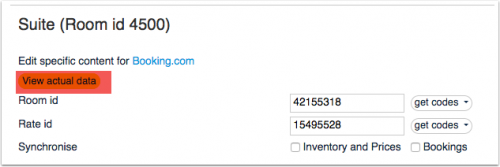
Before you activate the connection you can view the live availability and prices that will be sent to Expedia using the "View actual data" button.
1) Import existing bookings from Expedia
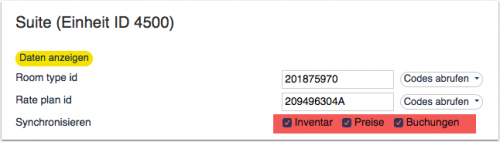
Make sure the "Bookings" check box for each mapped room is ticked and saved and then click the "Import existing bookings" button.
Expedia will only send a summary for manually imported bookings but modifications to these bookings will automatically import.
2) Make sure your inventory is correct in Beds24. Check existing bookings from Expedia imported and dates blocked by other sources are blocked in Beds24. Dates can be blocked by either entering a booking manually into Beds24 for those dates or using the inventory and override functions on the control panel calendar for those dates. Failure to do this could allow new bookings on dates you are not available. All available dates in Beds24 will be sent to Expedia as available for new bookings.
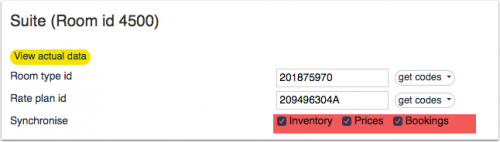
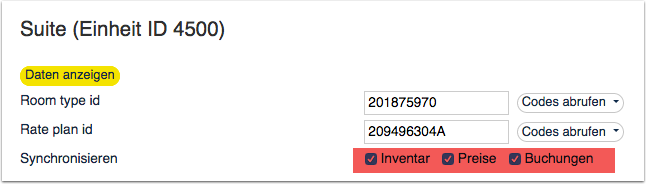
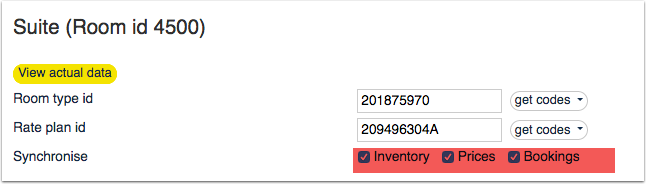
3) Enable the connection in Beds24 by ticking "Inventory and Rates" for each mapped room and saving. The "Bookings" checkbox should already be ticked but tick it as well if it is not ticked and bookings should be imported.


4) New bookings made after XML is enabled will import to Beds24 automatically.
Check Connection
The connection is working if you are not receiving error messages and the display in the channel is correct. If you are receiving error messages check in the "Common Errors" section why you are receiving the error and how to fix it.
Updates and Changes
Changes to availability and prices will be instantly sent to the channel. Changes for settings for example minimum stays, the multiplier or number of rooms will send with the next update. Click on "Update" if you want to push them through instantly.
Manage Bookings
Virtual Credit Cards
Virtual cards can be set to be auto charged at the date they become valid. To use this option set "Auto Process Virtual Cards" = Yes
Virtual cards can be set to be auto charged at the date they become valid.
If you manually charge virtual credit cards please note that they can only be charged on the check-out date.
Expedia Collect
If Expedia collects the payment from the guest they will send the amount you have to pay to Expedia and not the amout the guest paid. The guest has received the invoice from Expedia so you do not need to invoice them for the room charges.
Info Codes
Info Codes in the "Info" tab of the booking show you relevant information.
| Code | Use |
|---|---|
| AGODACOLLECT | Agoda hotel collect booking |
| AGODACOMSERVICE | Agoda booking with extra service (parking, breakfast) |
| CARDTOSTRIPE | card details were sent to Stripe |
| STRIPEPAYMENT | payment imported from Stripe |
| STRIPEFAIL | card could not sent to Stripe |
| CARDEXPIRES | added when the card expires before check-in |
Different Invoice Templates
If you need a different invoice template for the bookings from this channel you can use the invoicee function.
Setup Problems
1) The room is being unexpectedly closed at Expedia The channel manager will close the room on all dates which do not have a valid price available for sending to Expedia. Make sure you have prices for the complete range of dates you are sending.
2) "Room code is not unique" warning when saving in Beds24. Each Expedia room type id is unique and can be mapped to only one room in Beds24. If you enter the same Expedia room type id more than once the room updates will overwrite each other causing inaccurate information being sent to Expedia.
3) "Extra Person" prices cannot be exported but can still be set manually in Expedia.
4) If the room is for more then 2 guests you need a room price for the number of guests the room can accommodate.
Common Errors
If there is an error on an update, the error message returned by Expedia will be emailed to you. Common errors and their solutions are:
Access to this API with a non-API account is forbidden. Please use an API account.
Check if your property is activated for Beds24 channel manager in your Expedia extranet.  If it is check the ID is entered correctly also try removing your username and passsword if entered SAVE and then check if your codes are accessible.
Hotel ID not found. You either specified an invalid hotel ID or your account is not linked to this hotel
Please check with Expedia support that your account is properly set up for channel management with Beds24.  If it is check the ID is entered correctly also try removing your username and passsword if entered SAVE and then check if your codes are accessible.
Pricing models mismatch: you tried to update a price for OCCUPANCY_PRICING, but your property is not configured for this pricing.
Your pricing model is per day pricing so change the selector for "Price model" to  "Per Day Pricing".
The [amount] cannot be specified with conflicting values within the same request.
 Your pricing model is per day pricing so change the selector for "Price model" to  "Per Day Pricing".
Can't specify person count for PDP rate plan
Your pricing model is per day pricing. Change the selector for "Price model" to  "Per Day Pricing".
Pricing models mismatch: your property is configured to use OCCUPANCY_PRICING.
Change the selector for "Price model" to  "Occupancy Pricing"
Sell Rates are expected for Agency or Flex rate plans, when hotel level rate acquisition is Sell Rate
 Change the setting for "Acquisition Type" to "Sell".
 It  you have both sell and net rate rate plans set  "Acquisition Type" = "Set by Rate plan id" and remove the rate plan id in SETTINGS-> CHANNEL MANAGER > EXPEDIA and make sure you have mapped the  mapped the applicable Expedia rate plan in all your prices you want to send to Expedia.
Sell Rates are not expected for Merchant rate plan or Net Rate hotels.
Change the setting for "Acquisition Type" to "Net".
  IIt  you have both sell and net rate rate plans set  "Acquisition Type" = "Set by Rate plan id" and remove the rate plan id SETTINGS-> CHANNEL MANAGER > EXPEDIA and make sure you have mapped the  mapped the applicable Expedia rate plan in all your prices you want to send to Expedia.
The following roomtype id (xxxxx) does not belong to the given hotel: xxxxx
You are trying to update rooms which you do not have in Expedia. You can only update IDs which you see when you go to SETTINGS-CHANNEL MANAGER-Expedia and then click on "Get Codes"
Stop sell outside of Y with remaining base availability
and
Unable to set total inventory below the current base allocation value.
and Inventory request adjusted to prevent prohibited base availability decrease
Base allocation (or contracted allotment) is a minimum number of rooms you have agreed to sell through Expedia.  When the availability the channel manger sends falls below the base allocation, Expedia will ignore availability sent from the channel manager.
A common cause of this error is not having a valid price for the room in Beds24 on the affected dates.
Any date without a price will be closed in Beds24 and we will send an inventory of zero to Expedia.
*Make sure you have valid rates for the mentioned dates and no bookings from other sources
*Beds24: change your inventory to send the allotment you have guaranteed Expedia (e.g. by removing bookings from other sources)
*Expedia: Ask Expedia to remove the guaranteed allotment
The value  of attribute 'password' on element 'Authentication' is not valid with respect to its type,
 The password is empty or contains invalid characters.
Check the username and password entered in the channel manager settings is correct.
RateId XXX is invalid, rate plan should be active, inactive, or staged or Rate not active
You can only update IDs which you see when you click on "Get Codes".
You have added a number which is not a valid Expedia rate id into the field in the "Channels" tab of a rate/daily price.
*Scroll to Rate id and click 'get codes' ensure you select a valid code from the list.
*Open your rates (Channel Tab) and make sure the correct Expedia rate id is selected from the 'get codes' list.
*Open your daily prices (Enable list) and make sure the correct Expedia rate id is selected from the 'get codes' list.
Non-existent rate plan and rate level pair provided
You can only update IDs which you see when you click on "Get Codes". Check all codes entered in SETTINGS-CHANNEL MANAGER-EXPEIDA, the "Channels" tab of your rates (if rates are used) and your daily prices.
Inactive rate plan for restriction or rate updated
You are sending a wrong rate plan id. Check your rate plan ids in SETTINGS->CHANNEL MANAGER->EXPEDIA and in the "Channels" tab of your rates/daily prices. Please use the function 'get codes' and only use the rate ids from the drop-down list.
MinLOS value (x) exceeds Extranet auto-approval threshold (y) for length of stay.
The minimum booking length you are sending is higher than Expedia allows. Contact Expedia and ask them to increase your minimum stay.
The value  of attribute 'username' on element 'Authentication' is not valid with respect to its type
 The username/and or password you entered are wrongEnter your Expedia Quick connect username and password which Expedia sent you by Email (NOT your normal Expedia username and password)
LOS restriction conflict - Min Nights Greater Than Max Nights.
Expedia is not accepting the minimum stay you are sending because you have a maximum stay in your Expedia extranet which is lower than the minimum stay you are sending. You have 2 options fix this:
1. Log into your Expedia extranet and raise or remove the maximum stay.
2. Set the "Maximum Stay" in the rates you are sending to Expedia to 28 or lower.
Access denied
If you receive this error message only once most likely Expedia was doing temporary maintenance. If you repeatedly receive this message check:
*in the Expedia extranet that the connection has been requested.
*the Expedia hotel id you have entered is correct.   If it is also try removing your username and passsword if entered SAVE and then check if your codes are accessible.
Authentication error: invalid username or password
invalid username or password
Check the Expedia hotel id you have entered is correct.   If it is also try removing your username and passsword if entered SAVE and then check if your codes are accessible.
Access to this API with a non-API account is forbidden. Please use an API account.
You are using the wrong credentials.  Try removing your username and password if entered SAVE and then check if your codes are accessible.
Currency code is invalid - Currency for xxx is not the same as the database value
The currency you are sending is not the currency required by Expedia. Change the setting for "Currency" to the currency Expedia requires. If required you can add a multiplier for conversion.
Internal system error, please try again in a few minutes
Expedia sends you this message to inform you that they are having problems with their system. If the error messages stopped Expedia fixed the problem.
The requested resource is not available
 Expedia sends you this message to inform you that they are having problems with their system. If the error messages stopped Expedia fixed the problem.
Net/Sell rate must be within Rate Verification threshold
Expedia thinks the price is either too high or too low. Please check your prices. If you think they are correct contact Expedia and ask them to remove the limitation.
Inventory date 201x-xx-xx; Room Type ID xxxxxx; Rate Plan ID xxxxxx ; Inactive Rate Plan
You are trying to update an inactive rate plan. You can only map rate plans which are available when you click on "Get Codes". Please remove this ID from SETTINGS->CHANNEL MANAGER->EXPEDIA and/or the "Channels" tab in your rates and daily prices.
Rate Plan ID XXXXXXX  Occupancy X; Occupancy exceeds maximum allowed value
You are trying to send a price for a number of guests which is higher than the number of guests Expedia has the room set for. Adjust the maximum number of guests to be the same in Beds24 and Expedia and if required adjust your prices.
Length of stay has to be provided for the Rate Plans with LOS enabled.
Expedia rate plans with with LOS (length of stay) enabled are not supported. Please ask Expedia to change your rate plans.
Room Type ID 1231234234; Rate Plan ID 1231234234; Occupancy x; Occupancy exceeds maximum Room Type Person Count Y
and
Occupancy exceeds maximum Room Type Person Count
You are trying to send a price for a higher occupancy than what the room is set up in Expedia for. Please correct the maximum number of guests either in Expedia or in Beds24.
The restrictions of restrictionId are derived and cannot be updated
Your rates have restricitons which are linked in Expedia therefore Expedia does not allow us to update them. Contact Expedia support and ask them to remove all linkages for restrictions.
7028 (India only)
You are sending a tax inclusive SELL rate with a price which is not permitted. Either adjust the prices in Beds24 or change your prices in Expedia to be tax exclusive so Expedia will calculate the tax for you.
Notes
Expedia supports two different methods to apply minimum and maximum length of stay restrictions. Arrival based restrictions or Stay Through based restrictions. This is a hotel-level setting in Expedia system, and any Expedia market managers can modify this setting. Please contact Expedia to perform this change.
Depending on the acquisition type, Expedia rate plan ids may need to end with an "A". Updates will not work unless the correct code is used.
For Expedia Occupancy price models, Beds24 can send a room price, a double occupancy price and a single occupancy price. If you would like to update 3 person, 4 person prices etc. you need to use the Expedia "Daily price model". You can then have multiple rate plan ids, each with the desired maximum occupancy set at Expedia. They can then be mapped to the appropriate Beds24 rate, offer or daily price.
Channel collect payments will be shown in the booking invoice if SETTINGS->CHANNEL MANAGER -> “Import Channel Collect Payments” is set to “Yes”.
Disconnect
- Unticking "Inventory" and "Prices" and "Bookings" will stop the synchronisation for a room.
Login to www.expediapartnercentral.com and disconnect from Beds24 from the "Expedia Connectivity Settings" section in your Expedia Extranet
If you have problems please contact Expedia support.
FAQ
Will I receive notifications on new bookings?
After you activate the channel manager the channel will stop sending notifications. You will receive them from Beds24 instead.
Do guests receive a confirmation?
The channel confirms the booking with the guest. Beds24 will not sent a confirmation message. If you want to send one as well you can set up an Auto Action Email.
How do I modify or cancel a booking?
Bookings coming from a channel should be modified by the channel. Cancelling a booking in Beds24 will not cancel the booking in Expedia and can cause a double booking. Please ask Expedia or the guest to cancel the booking in Expedia and the cancellation will be sent to Beds24.
If for some reason you need to make a change in Beds24 and do not want an update from the channel to override it, you can set "Allow Channel Modifications" = No ("Details" tab of the booking"). If you have changed the room you can set "Allow Channel Modifications" = All except room changes.
How do can I access credit card details?
This is how you can view credit card details.
How do I add a promotion or special price?
You can set up promotions in the Expedia extranet.
Can I send different prices for different minimum stays or different numbers of guests?
Yes. You can do this either with "derived" prices or multiple rates ids. See the "Multiple rates" section of this page.
I have multiple Expedia hotel ids. How do I set this up?
The system can handle multiple properties in one account. Each Expedia hotel requires one property in Beds24.
Can I use the same Expedia hotel ID for different properties in Beds24?
Theoretically yes but we recommend not to do this because Expedia allows only to send one update for a property at a time. If there is an update for both Beds24 properties Expedia will reject the second one which can cause overbookings.
What to do when I receive an overbooking?
- Check if you are receiving error messages by email or in the potential issues menu. Error messages need to be addressed immediately because they can mean the channel manger is able to make updates.
- Entering the same Expedia room code in multiple rooms in Beds24 can cause overbookings. Check your set up for warnings.
If you can not see a problem in your set up send us a support ticket with the booking numbers and dates.
Why did a booking not import?
- Check if the room for which you received the booking is properly mapped.
If you can not see a problem in your set up send us a support ticket with the booking number and the date the booking was made.
Why is the price for the booking wrong?
- A special offer set up in the channel may have reduced the price the channel manager sent.
- Your prices are not set up as you expect.
What is base allocation?
This is an agreement between you and the channel where you agree to provide a number of rooms exclusively to that channel. This means you will not be able to sell these rooms directly or on other channels.
What do I do when I have a no show?
To report a no show contact Expedia support.