Booking.com: Import Properties from Booking.com to Beds24: Difference between revisions
Jump to navigation
Jump to search
No edit summary |
No edit summary |
||
| Line 9: | Line 9: | ||
You can create a new property and rooms in Beds24 from a property in Booking.com. The Booking.com hotel and room IDs will be automatically added to the channel manager settings. | You can create a new property and rooms in Beds24 from a property in Booking.com. The Booking.com hotel and room IDs will be automatically added to the channel manager settings. | ||
<div class="warning">{{#fas:exclamation-triangle}} It can happen that Booking.com does not send your prices. If this happens you will need to set up your prices manually in Beds24 after you imported. | <div class="warning">{{#fas:exclamation-triangle}} It can happen that Booking.com does not send your prices. For example if you have linked rates in Booking.com or non-XML rates. If this happens you will need to set up your prices manually in Beds24 after you imported. | ||
</div> | </div> | ||
Revision as of 12:57, 30 March 2023
Booking.com: Import properties from Booking.com to Beds24
This page is about the menu (SETTINGS) CHANNEL MANAGER > BOOKING.COM > CONTENT and explains how to import properties from Booking.com to Beds24.
Import Properties from Booking.com
You can create a new property and rooms in Beds24 from a property in Booking.com. The Booking.com hotel and room IDs will be automatically added to the channel manager settings.
It can happen that Booking.com does not send your prices. For example if you have linked rates in Booking.com or non-XML rates. If this happens you will need to set up your prices manually in Beds24 after you imported.
Step by Step Guide
Step 1: Initiate the XML connection with Booking.com
Initiate the XML connection from the property menu within the booking.com extranet and then do the Beds24 setup.
- Login to Booking.com and go to ACCOUNT-> CONNECTIVITY PARTNER. If you do not see this option contact Booking.com and tell them you want to use a channel manager
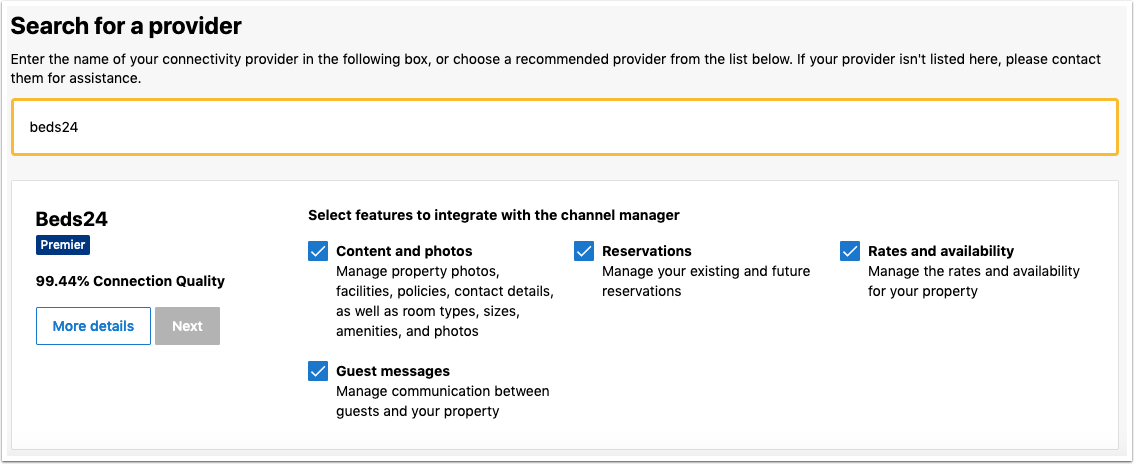
- Click the Start button and search for BEDS24.
- Tick all tick boxes.
- When ready you will receive a notification from Booking.com.
Step 2: Import Property
IMPORTANT: DO NOT enter your Booking.com hotel ID in (SETTINGS) CHANNEL MANAGER > BOOKING.COM > MAPPING if you want to import prices from Booking.com to Beds24. If you have your hotel ID entered there your prices will not import and might be removed from the Booking.com extranet.
- Go to (SETTINGS) PROPERTIES then click on "Import from Booking.com".
- Click on the "Import a property from Booking.com" button.
- Enter the Booking.com hotel ID of the property you want to import then click on "Import from Booking.com".
- Go to the CALENDAR and check that your prices are imported properly. Up to 10 prices will import as daily prices. Minimum stays will not import and will need to be set in Beds24 if required.
Step 3: Import existing bookings from Booking.com
- Go to (SETTINGS) CHANNEL MANAGER > BOOKING.COM and set "Enable" = One way (import only)
- Click on the "Import existing bookings" button to import bookings with future dates.
Step 4: Check what will send
- Go to (SETTINGS) CHANNEL MANAGER >BOOKING.COM > MAPPING scroll down to the Rooms/listings and click on the "Price Data" button to check which prices and availability will send to Booking.com for each.
It can happen that Booking.com does not send your prices. If this happens you will need to set up your prices manually in Beds24 Calendar before you set the Sync to ENABLED (2-way) otherwise the prices will be overwritten in Booking.com.
Step 5: Activate Sync
- Set "Enable" = ENABLED
Beds24 will now automatically send prices and availability to Booking.com and import bookings.
Booking.com will not send all content. In (SETTINGS) CHANNEL MANAGER > BOOKING.COM > VIEW CONTENT you can check what Booking.com sent.