Setting Prices for Booking Channels: Difference between revisions
No edit summary |
|||
| Line 116: | Line 116: | ||
[[Media:Channel-Manager-Export-Price.png|view large]] | [[Media:Channel-Manager-Export-Price.png|view large]] | ||
When you go to PRICES > CHANNEL | When you go to PRICES > CHANNEL MAPPING in the top menu you will see a list of all prices activated for channels. | ||
<span style="color: #f3e504; font-size: 150%;" > {{#fas:lightbulb}} </span> By default, prices are enabled for all channels. You can disable or enable channels for all prices in a room at the same time. Click on the {{#fas:user}} 'User' icon on the top right and then on 'Account Management (in the old control panel SUB ACCOUNT in the top right) then go to MANAGE ACCOUNT > MANAGE PROPERTIES > MANAGE ROOMS "Channels". | <span style="color: #f3e504; font-size: 150%;" > {{#fas:lightbulb}} </span> By default, prices are enabled for all channels. You can disable or enable channels for all prices in a room at the same time. Click on the {{#fas:user}} 'User' icon on the top right and then on 'Account Management (in the old control panel SUB ACCOUNT in the top right) then go to MANAGE ACCOUNT > MANAGE PROPERTIES > MANAGE ROOMS "Channels". | ||
Revision as of 06:34, 22 April 2024
This page is about the menu PRICES > CHANNEL MAPPING and explains how to set prices for booking channels
Pricing Models
Each channel has its own capabilities and limitation when it comes to prices. There are general pricing models which are used.
Occupancy pricing
The channel supports prices for different occupancies.
- If you use Fixed Prices 1 person, 2 person and room price will send. Room price will send for specified occupancy. Multiple Fixed Prices with different occupancies can send on same rate plan. Prices for "Extra Person", "Extra child" and discounts set in the "Discounts" tab of the Fixed Prices can not be sent.
- If you use daily prices the daily price will send including occupancy. Multiple occupancy prices can send on each rate plan. Extra person price will send.
Examples: Agoda, Expedia
Occupancy and length of stay pricing
A price for each occupancy defined in Beds24 and prices for different length of stay can be sent.
- If you use Fixed Prices the price for each occupancy defined in Beds24 and prices for different length of stay can be sent.1 person, 2 person and room price will send. Room price will send for specified occupancy. Multiple Fixed Prices with different occupancies can send. Prices for "Extra Person", "Extra child" and discounts set in the "Discounts" tab of the Fixed Prices can not be sent.
- If you use daily prices the daily price will send including occupancy. Multiple occupancy prices can send. Extra person price will send.
Beds24 sends the price for max. 16 guests. If your property accommodates more than 16 guests use "Per Day" pricing with an extra person price.
Examples: Airbnb, VRBO
Per day pricing
Only ONE price can be sent per date. If you have multiple prices activated for a channel with different minimum stays the system will send the price with the lowest minimum stay. If you use daily prices with "Extra Person" prices your daily price needs to be set for the max occupancy and the "Extra Person" price needs to be added with a negative value so the price for the full occupancy can send.
Examples: Airbnb, Booking.com, Ctrip, Homeaway, Hostelworld, HRS, TripadvisorRentals
Derived/Linked Prices
The channel derives form a price sent by Beds24 or links prices. The disadvantage is that you will not be able to control all prices from Beds24.
Examples: Booking.com, Expedia
Some channels support only one pricing models some support more than one. For specific capabilities please check this page.
Rate Plans or Rate Codes
Some channels support Rate Plans or Rate Codes (i.e Agoda, Booking.com , Expedia and other hotel-based channels). Often you can have multiple rate plans or rate codes which allows you to sell at different prices.
Setting Prices
You can see in PRICES > CHANNEL MAPPING where a price is used. If you need to make changes click on the price to edit it. We recommend you use the "Prices in individual columns" view.
Using Daily Prices in Beds24 - RECOMMENDED
Each daily price can be used for any combination of channels and your booking page. Use the tick boxes at PRICES > DAILY PRICE RULES to specify which channels the price can be used for.
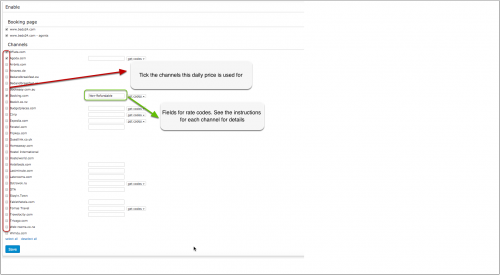
If you have multiple rate codes at a channel, you can map different Daily Prices to each by entering the rate code in each of the Daily Price settings.
Example: Create a Daily Price for your booking page and a different price for one or more channels.
1. Daily Price for your booking page
- Tick only "Beds24" under "Enable" in the Daily Price settings (PRICES > DAILY PRICE RULES then click on "Edit")
2. Daily Price for the channels
- Tick only the channels for which the price should be used under "Enable" in the Daily Price settings (PRICES > DAILY PRICE RULES then click on "Edit")
Then go to the CALENDAR and enter your daily prices there.
By default, daily prices are disabled for all channels. You can disable or enable channels for all prices in a room at the same time. Click on the 'User' icon on the top right and then on 'Account Management (in the old control panel SUB ACCOUNT in the top right) then go to MANAGE ACCOUNT > MANAGE PROPERTIES > MANAGE ROOMS "Channels".
Using Fixed Prices
Only prices per day can send. In the Summary tab, the setting for "Price per" needs to be set to "Night".
The "Channels" tab of the Fixed Pricesdefines where a Fixed Prices is used.
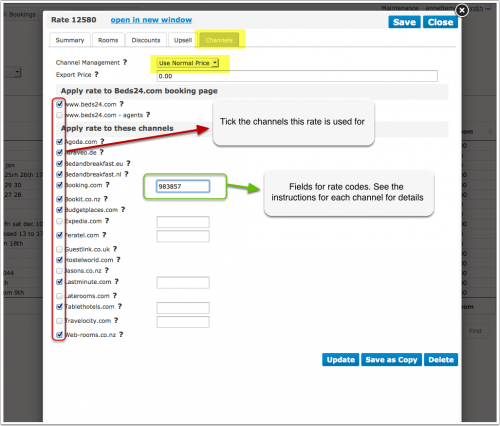
- If you want to use a Fixed Price only on your own website untick all channels.
- If you want to use a Fixed Price only for channel management untick "Beds24" and "Beds24 Agents".
You have the option to create a special Fixed Pricesfor one or each channel and your web site.
1. Fixed Prices for your website
- Create a PRICES > FIXED PRICE clicking on "Add Fixed Price"
- Go to the "Channels" tab and make sure "Beds24" is ticked but not the channels you do not want to use the price for
2. Fixed Prices for the booking channel
- Create a PRICES > FIXED PRICE clicking on "Add Fixed Price"
- Only per night prices can be sent to booking channels so make sure "Prices per" is set to "Night"
- Go to the "Channels" tab of the price and make sure "Beds24" is unticked and the channels you want to send the price to are ticked
Strategy: You can set three different values:
- Allow lower prices - this is the default and will always apply the lowest price for the guests selection
- Do not allow lower prices - if you use multiple rate codes this blocks only this rate code
- Do not allow any other prices - if you use multiple rate codes this blocks all other rate codes
Using the Export Price
The export price can be used to send a different price to channels than used on your booking page.
- Open the Fixed Prices and go to the "Channels" tab
- Enter the price you want to send to the channels in the field "Export Price"
- Set "Channel Management" = "Use Export Price"
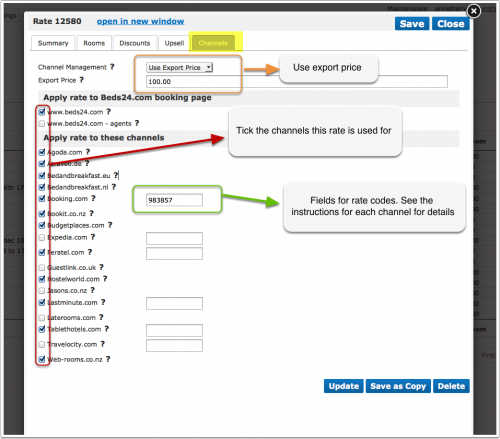
When you go to PRICES > CHANNEL MAPPING in the top menu you will see a list of all prices activated for channels.
By default, prices are enabled for all channels. You can disable or enable channels for all prices in a room at the same time. Click on the 'User' icon on the top right and then on 'Account Management (in the old control panel SUB ACCOUNT in the top right) then go to MANAGE ACCOUNT > MANAGE PROPERTIES > MANAGE ROOMS "Channels".
Use Daily Prices in combination with Fixed Prices
If you use both Daily Prices and Fixed Prices, the system will offer the lowest available price which meets all your rules.
How to show/send prices for two years
Mapping channel rate codes
If a channel rate code is entered directly in a Daily Price or a Fixed Prices, it will be used with that price. If the rate code field is left empty in the Daily Price or Rate, the rate code entered in the Channel Manager settings for the channel will be used, in this case the offer number of the Daily Price or Fixed Prices determines which rate code will be used.
To map the rate codes/rate plans the connection to the channel needs to be established. The set up instructions for each channel explain the procedure. When the connection is established you will be able to access your codes.
- Make sure your property and room codes for the channel are correctly saved.
- Click on the "Get Code" link next to the rate id setting and a list of rate ids will be retrieved from the channel for that room.
- Choose the rate id for this room and click on it. This will normally be the standard rate.
- When the correct rate id has copied to the rate id setting, click Save.
Please also see the help the channel help page for specific information for the channel you are setting up.
If you have multiple Channel rate codes per room
Some channels support more than one price per room for example to send prices for different occupancies, minimum stays, meal options or refundable and non-refundable prices.
The capabilities depend on the channel and are explained on the help page for each channel.
Multiple rate codes using Daily Prices
Each Daily Price can be mapped to any active channel rate code. Under "Enable" in the Daily Price settings (PRICES ->DAILY PRICE RULES then click on "Edit") then select the appropriate rate code from the 'get codes' list. If this setting is left blank, the rate code defined in the Beds24 channel manager settings for the channel will be used. If the Daily Price should be mapped to an alternative channel rate code, select the appropriate rate code from the 'get codes' list..
Multiple rate codes using Fixed Prices
Each Fixed Prices can be mapped to any active channel rate code. On the CHANNEL tab of each Fixed Prices is a setting to enter a channel rate code, select the appropriate rate code from the 'get codes' list.
If this setting is left blank, the rate code defined in the channel manager settings for the channel will be used. If the Fixed Prices should be mapped to an alternative channel rate code, select the appropriate rate code from the 'get codes' list.
If you have linked a Fixed Prices to be used for other offers or rooms use the selector to choose the room you want to map.
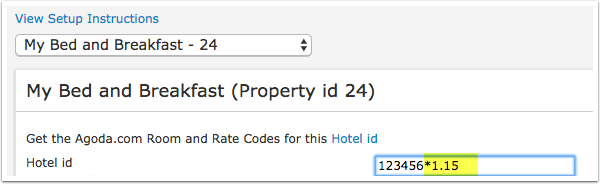
Price Multiplier
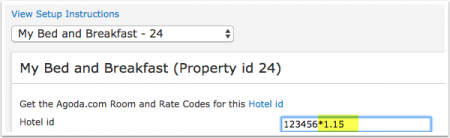
For many channels you can add multiplier to your prices, for example because the channel requires a different currency to your Beds24 currency or you want to add the commission onto your prices.
For some channels we can also convert the prices of bookings imported back to the currency you use in Beds24.
Check the instructions for the channel if this feature is supported. If the instructions do not mention the option to add a multiplier please send us a support ticket (click on HELP in the top right in the channel page in the control panel) and we will see if we can add it.
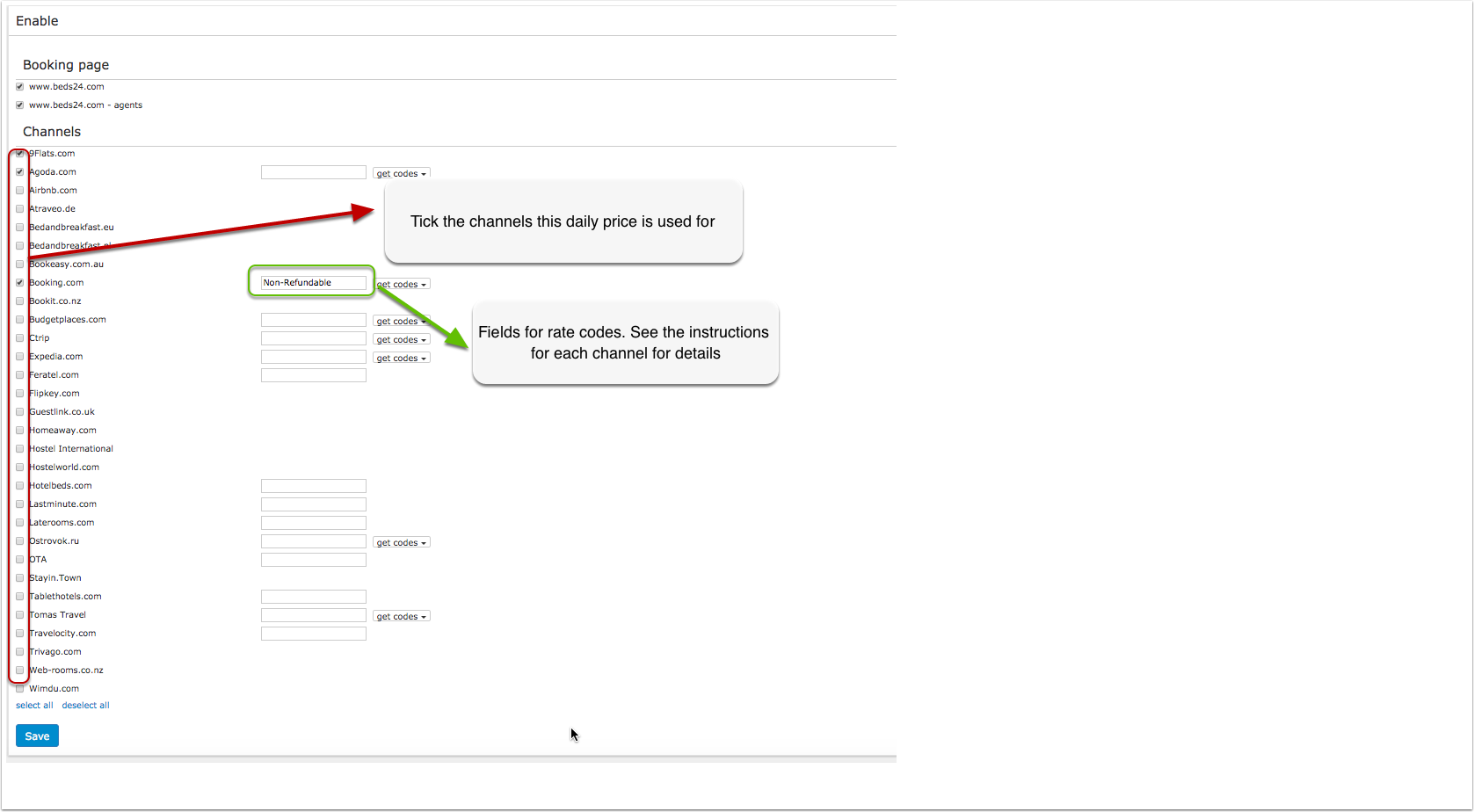
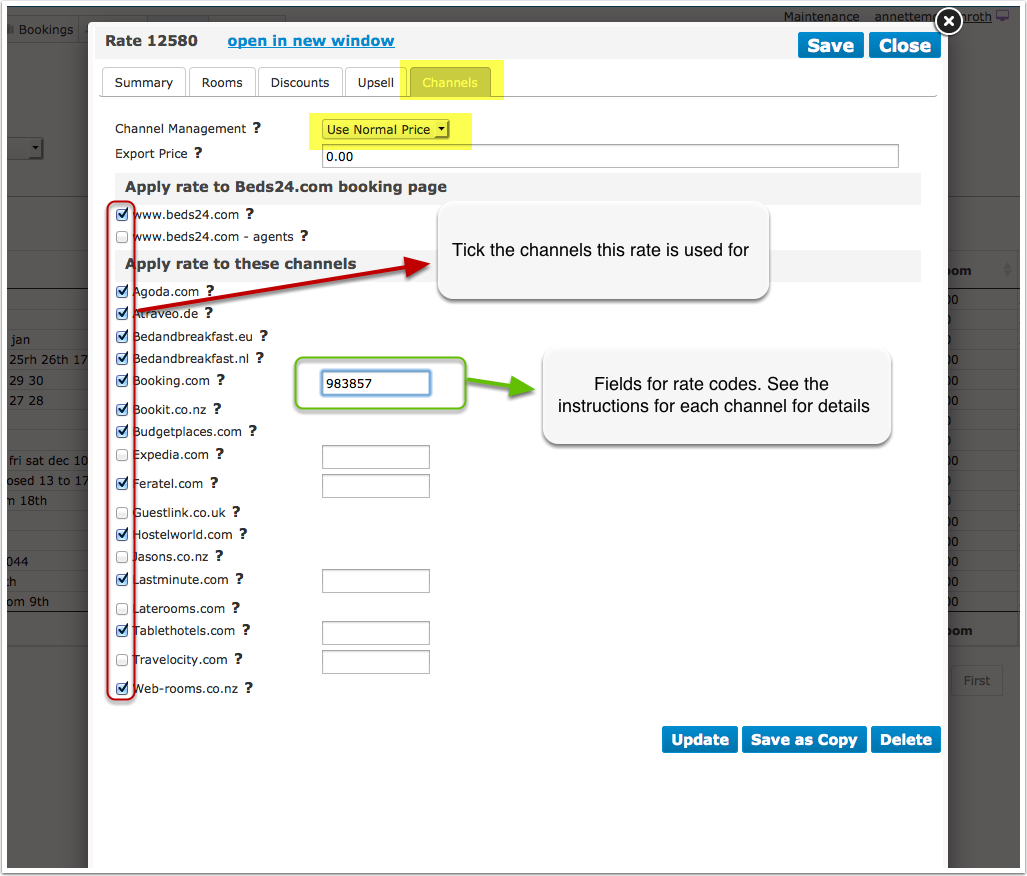
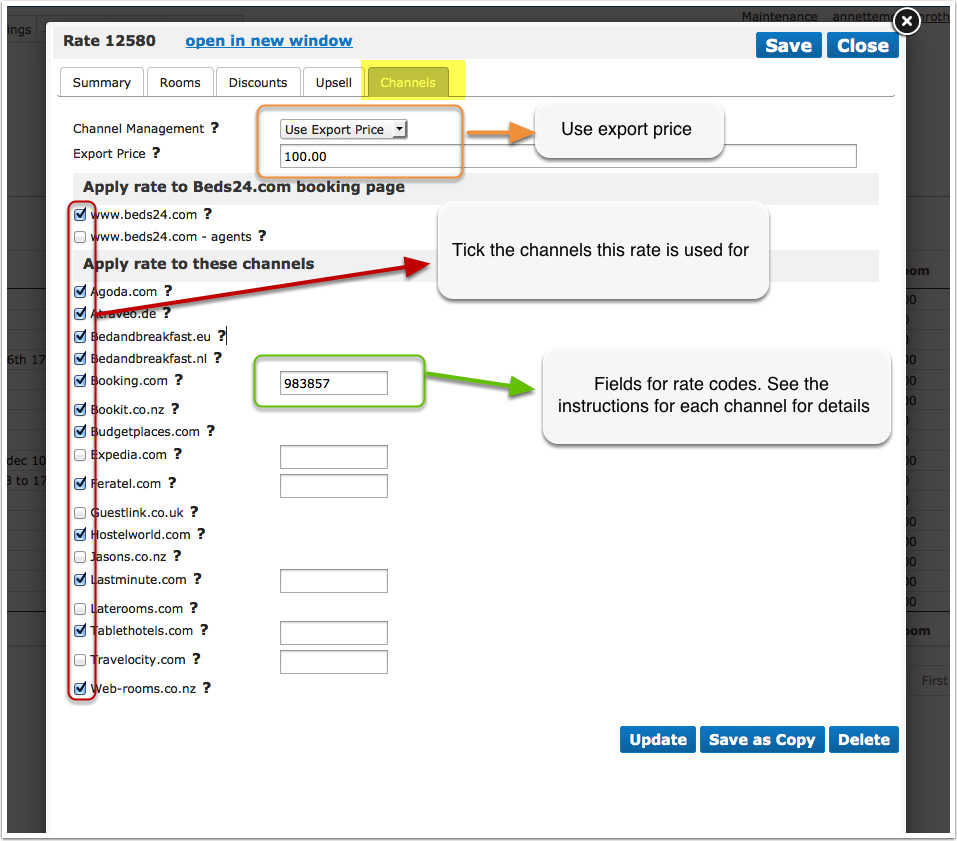
The prices will only be sent to the channels you have activated in the channel manager settings.
Overview
Click on the links or go to the channels help pages for detailed information
| Channel | Supported Pricing Model | Rate Codes | Prices sent when using Daily Prices | Prices sent when using Fixed Prices | Offer Discounts | Create Promotions | Note
|
| Agoda | Occupancy Prices | Multiple rate plans can be used for different prices based on minimum stay or other restrictions. | Daily price will send including occupancy. Multiple occupancy prices can send on each rate plan.
Extra person price will send. |
1 person, 2 person and room price will send. Room price will send for specified occupancy. Multiple prices with different occupancies can send on same rate plan. Extra person price and discounts will not send. | Early bird, last minute and seasonal discounts can be set with standard daily price or rate conditions. Discounts with special conditions can be created with additional daily prices or fixed prices and rate plans.
Discounts set in the "Discounts" tab of Fixed Prices can not be sent. |
Set in the channels extranet | Agoda will depreciate "Per Day Pricing" shortly. |
| Airbnb API | Occupancy prices | Not supported | Daily price will send including occupancy. and different length of stay.
Extra person price will send. "Max Stay" set in the CALENDAR or daily prices can be sent. |
A price for each occupancy defined in Beds24 and prices for different length of stay can be sent.1 person, 2 person and room price will send. Room price will send for specified occupancy. Multiple fixed prices with different occupancies can send. Extra person and extra child price will not send.
"Max Stay" set in the CALENDAR, Daily Prices or Fixed Prices can be sent. Prices for "Extra Person", "Extra child" can not be sent. |
Early bird, last minute and seasonal discounts can be set with standard Daily Price or Fixed Prices conditions. Discounts set in (SETTINGS) CHANNEL MANAGER >AIRBNB > SPECIFIC CONTENT will be shown as promotions in Airbnb
Discounts set in the "Discounts" tab of Fixed Prices can not be sent. |
Set in (SETTINGS) CHANNEL MANAGER AIRBNB > SPECIFIC CONTENT, some promotions directly in the Airbnb Extranet |
|
| Airbnb API | Per Day Prices | Not supported | The price sent is a room price, only ONE price can be sent per date. If you have multiple prices activated for the channel with different minimum stays the system will send the price with the lowest minimum stay. Of the ones with the lowest minimum stay the one with the highest occupancy will be used.
If you use daily prices with "Extra Person" prices your daily price needs to be set for the max occupancy and the "Extra Person" price needs to be added with a negative value so the price for the full occupancy can send. |
The price sent is a room price, only ONE price can be sent per date. If you have multiple prices activated for the channel with different minimum stays the system will send the price with the lowest minimum stay. Of the ones with the lowest minimum stay the one with the highest occupancy will be used. Prices for "Extra Person", "Extra child" can not be sent. In (SETTINGS) CHANNEL MANAGER > AIRBNB > SPECIFIC CONTENT you can set
|
Early bird, last minute and seasonal discounts can be set with standard Daily Price or Fixed Prices conditions. Discounts set in SETTING->CHANNEL MANAGER->AIRBNB XML->SPECIFIC CONTENT will be shown as promotions in Airbnb
Discounts set in the "Discounts" tab of Fixed Prices can not be sent. |
Set in (SETTINGS) CHANNEL MANAGER > AIRBNB > SPECIFIC CONTENT, some promotions directly in the Airbnb Extranet | |
| Booking.com | Occupancy Prices | Multiple rate plans can be used for different prices based on minimum stay or other restrictions. | Daily price will send including occupancy. Multiple occupancy prices can send on each rate plan.
Extra person price will send. |
1 person, 2 person and room price will send. Room price will send for specified occupancy. Multiple fixed prices with different occupancies can send on same rate plan. Extra person price and discounts will not send.
Prices for "Extra Person", "Extra child" can not be sent. |
Early bird, last minute and seasonal discounts can be set with standard Daily Price or Fixed Prices conditions. Discounts with special conditions can be created with additional daily prices or fixed prices and rate plans.
Discounts set in the "Discounts" tab of Fixed Prices can not be sent. |
(SETTINGS) CHANNEL MANAGER > BOOKING.COM > PROMOTIONS | Pricing model set in Booking.com needs to match the pricing model selected in (SETTINGS) CHANNEL MANAGER > BOOKING.COM
|
| Booking.com | Per Day Prices | Multiple rate plans can be used for different prices based on minimum stay or other restrictions. | Only one price can be sent per rate code. If you have multiple prices for one rate code which are activated for the channel the system will use the price for the highest occupancy.
If you use daily prices with "Extra Person" prices your daily price needs to be set for the max occupancy and the "Extra Person" price needs to be added with a negative value. This price will send as room price for the full occupancy. |
Only one price can be sent per rate code. If you have multiple prices for one rate code which are activated for the channel the system will use the price for the highest occupancy.
|
Early bird, last minute and seasonal discounts can be set with standard Daily Price or Fixed Prices conditions. Discounts with special conditions can be created with additional Daily Prices or Fixed Prices and rate plans.
Discounts set in the "Discounts" tab of Fixed Prices can not be sent. |
(SETTINGS) CHANNEL MANAGER > BOOKING.COM PROMOTIONS |
|
| Ctrip | Per Day Prices | Multiple rate plans can be used for different prices based on minimum stay or other restrictions. | Only one price can be sent per rate code. If you have multiple prices for one rate code which are activated for the channel the system will use the price for the highest occupancy.
If you use daily prices with "Extra Person" prices your daily price needs to be set for the max occupancy and the "Extra Person" price needs to be added with a negative value. This price will send as room price for the full occupancy. |
Only one price can be sent per rate code. If you have multiple prices for one rate code which are activated for the channel the system will use the price for the highest occupancy.
Prices for "Extra Person", "Extra child" can not be sent.
|
Early bird, last minute and seasonal discounts can be set with standard Daily Price or Fixed Prices conditions. Discounts with special conditions can be created with additional Daily Prices or Fixed Prices and rate plans.
Discounts set in the "Discounts" tab of fixed prices can not be sent. |
Set in the channels extranet |
|
| Expedia | Occupancy Prices | Multiple rate plans can be used for different prices based on minimum stay or other restrictions. | Daily price will send including occupancy. Multiple occupancy prices can send on each rate plan.
Extra person price will send. |
1 person, 2 person and room price will send. Room price will send for specified occupancy. Multiple fixed prices with different occupancies can send on same rate plan. Extra person price and discounts will not send.
Prices for "Extra Person", "Extra child" can not be sent. |
Early bird, last minute and seasonal discounts can be set with standard Daily Price or Fixed Prices conditions. Discounts with special conditions can be created with additional Daily Prices or Fixed Prices and rate plans.
Discounts set in the "Discounts" tab of Fixed Prices can not be sent. |
Set in the channels extranet | Pricing model set in Expedia needs to match the pricing model selected in (SETTINGS) CHANNEL MANAGER > EXPEDIA |
| Expedia | Per Day Prices | Multiple rate plans can be used for different prices based on minimum stay or other restrictions. | Only one price can be sent per rate code. If you have multiple prices for one rate code which are activated for the channel the system will use the price for the highest occupancy.
If you use daily prices with "Extra Person" prices your daily price needs to be set for the max occupancy and the "Extra Person" price needs to be added with a negative value. This price will send as room price for the full occupancy. |
Only one price can be sent per rate code. If you have multiple prices for one rate code which are activated for the channel the system will use the price for the highest occupancy.
Prices for "Extra Person", "Extra child" can not be sent. |
Early bird, last minute and seasonal discounts can be set with standard Daily Price or Fixed Prices conditions. Discounts with special conditions can be created with additional Daily Prices or Fixed Prices and rate plans.
Discounts set in the "Discounts" tab of Fixed Prices can not be sent. |
Set in the channels extranet | Pricing model set in Expedia needs to match the pricing model selected in (SETTINGS) CHANNEL MANAGER > EXPEDIA
|
| Homeaway XML | Occupancy prices | Not supported | Daily prices for different occupancies and different length of stay will send.
If you use daily prices with "Extra Person" prices the prices for the different occupancies will be automatically calculated. "Max Stay" set in the CALENDAR or daily prices can be sent. |
A price for each occupancy defined in Beds24 and prices for different length of stay can be sent. 1 person, 2 person and room price will send. Room price will send for specified occupancy. Multiple fixed prices with different occupancies can send. Extra person price and discounts will not send.
Prices for "Extra Person", "Extra child" can not be sent. |
Early bird, last minute and seasonal discounts can be set with standard Daily Price or Fixed Prices conditions.
Discounts set in the "Discounts" tab of Fixed Prices can not be sent. |
Homeaway does not support promotions. |
|
| Homeaway XML | Per Day Prices | Not supported | The price sent is a room price, only ONE price can be sent per date. If you have multiple prices activated for the channel with different minimum stays the system will send the price with the lowest minimum stay. Of the ones with the lowest minimum stay the one with the highest occupancy will be used. In (SETTINGS) CHANNEL MANAGER > VRBO > SPECIFIC ROOM CONTENT you can set
If you use daily prices with "Extra Person" prices your daily price needs to be set for the max occupancy and the "Extra Person" price needs to be added with a negative value so the price for the full occupancy can send. |
The price sent is a room price, only ONE price can be sent per date. If you have multiple prices activated for the channel with different minimum stays the system will send the price with the lowest minimum stay. Of the ones with the lowest minimum stay the one with the highest occupancy will be used. Prices for "Extra Person", "Extra child" can not be sent. In (SETTINGS) CHANNEL MANAGER > VRBO > SPECIFIC ROOM CONTENT you can set
|
Early bird, last minute and seasonal discounts can be set with standard Daily Price or Fixed Prices conditions. You can set other discounts in (SETTINGS) CHANNEL MANAGER- > VRBO > SPECIFIC ROOM CONTENT.
Discounts set in the "Discounts" tab of rFixed Prices can not be sent. |
Homeaway does not support promotions.
| |
| Hostelworld | Per Day Prices | Multiple rate plans can be used for different prices based on minimum stay or other restrictions. | For dorms Beds24 checks the prices in this order:
1. single price: 2. double price: if no single price is found the system will look for a double price 3. room price: if no single or double price are found the system will look for a room price |
For dorms Beds24 checks the prices in this order:
1. single price: 2. double price: if no single price is found the system will look for a double price 3. room price: if no single or double price are found the system will look for a room price. This includes the export price. Prices for "Extra Person", "Extra child" can not be sent. |
Early bird, last minute and seasonal discounts can be set with standard Daily Price or Fixed Prices conditions. Discounts with special conditions can be created with additional daily prices or Fixed Pricesand rate plans.
Discounts set in the "Discounts" tab of Fixed Prices can not be sent. |
'Set in the channels extranet | |
| HRS | Per Day Prices | Not supported | We can send one price to each HRS room type. For a double you need a price for two guests, a price for extrabed 1 you need a price for 3 guests, for extrabed 2 you need a price for 4 guests.
If you use daily prices with "Extra Person" prices your daily price needs to be set for the max occupancy and the "Extra Person" price needs to be added with a negative value so the price for the full occupancy can send. |
We can send one price to each HRS room type. For a double you need a price for two guests, a price for extrabed 1 you need a price for 3 guests, for extrabed 2 you need a price for 4 guests.
Prices for "Extra Person", "Extra child" can not be sent. |
Not supported | Early bird, last minute and seasonal discounts can be set with standard Daily Price or Fixed Pricesconditions.
Discounts set in the "Discounts" tab of Fixed Prices can not be sent. |
Hot Deals have their own availability. To avoid overbookings you can ask HRS to limit the number of rooms bookable with one booking to 1. |
| TripadvisorRentals API | Per Day Prices | Not supported | The price sent is a room price, only ONE price can be sent per date. If you have multiple prices activated for the channel with different minimum stays the system will send the price with the lowest minimum stay. Of the ones with the lowest minimum stay the one with the highest occupancy will be used. In (SETTINGS) CHANNEL MANAGER Y TRIPADVISOR RENTALS ->SPECIFIC CONTENT you can set
If you use daily prices with "Extra Person" prices your daily price needs to be set for the max occupancy and the "Extra Person" price needs to be added with a negative value so the price for the full occupancy can send. |
The price sent is a room price, only ONE price can be sent per date. If you have multiple prices activated for the channel with different minimum stays the system will send the price with the lowest minimum stay. Of the ones with the lowest minimum stay the one with the highest occupancy will be used. Prices for "Extra Person", "Extra child" can not be sent. In (SETTINGS) CHANNEL MANAGER > TRIPADVISOR RENTALS > SPECIFIC CONTENT you can set
|
Early bird, last minute and seasonal discounts can be set with standard Daily Price or Fixed Pricesconditions. You can set other discounts in (SETTINGS) CHANNEL MANAGER >TRIPADVISOR RENTALS > SPECIFIC CONTENT.
Discounts set in the "Discounts" tab of fixed prices can not be sent. |
Tripadvisor does not support promotions.
| |
| Channel | Supported Pricing Model | Rate Codes | Prices sent when using Daily Prices | Prices sent when using Fixed Prices | Offer Discounts | Create Promotions | Note |