Category:Calendar: Difference between revisions
m →Diary Function: changed 'A click on the icon will show the diary note.' to 'Click on the icon will show the diary note. ' |
|||
| Line 17: | Line 17: | ||
*rates in green for each room - hover the mouse over individual rates to show more information or click on them to open them in a popup. | *rates in green for each room - hover the mouse over individual rates to show more information or click on them to open them in a popup. | ||
'''Inventory''': The number of rooms remaining to sell is also shown and they can be edited to quickly change your availability. Click to open a popup and save the changes in your inventory. | '''Inventory''': The number of rooms remaining to sell is also shown and they can be edited to quickly change your availability. (It is only possible to lower the number based on the value in SETTINGS - > PROPERTIES -> ROOMS-> SETUP "Quantity of this type" and any existing bookings) Click to open a popup and save the changes in your inventory. | ||
'''Add Booking:''' To add a booking click on the person+ icon. | '''Add Booking:''' To add a booking click on the person+ icon. | ||
Revision as of 08:06, 21 November 2016
This page is about the menu CALENDAR
Overview
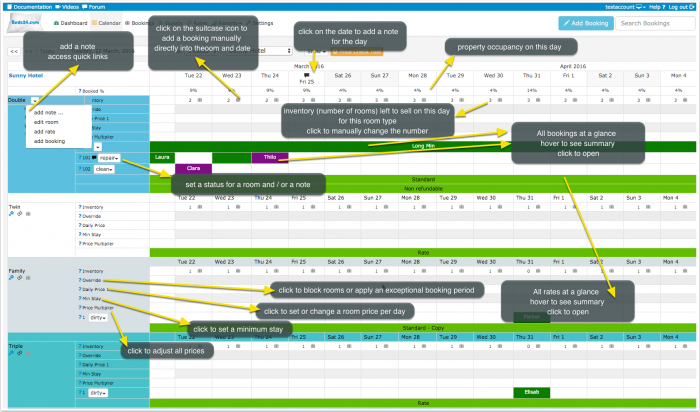
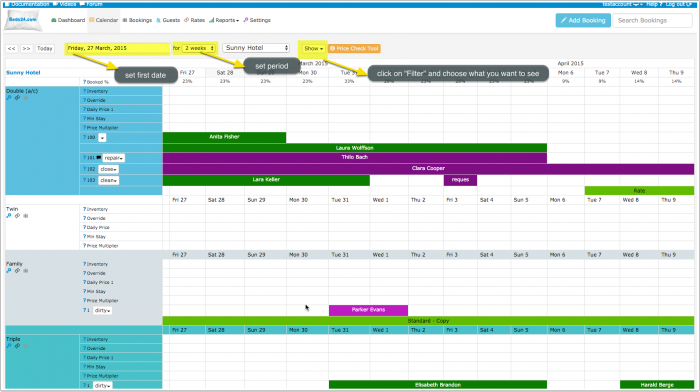
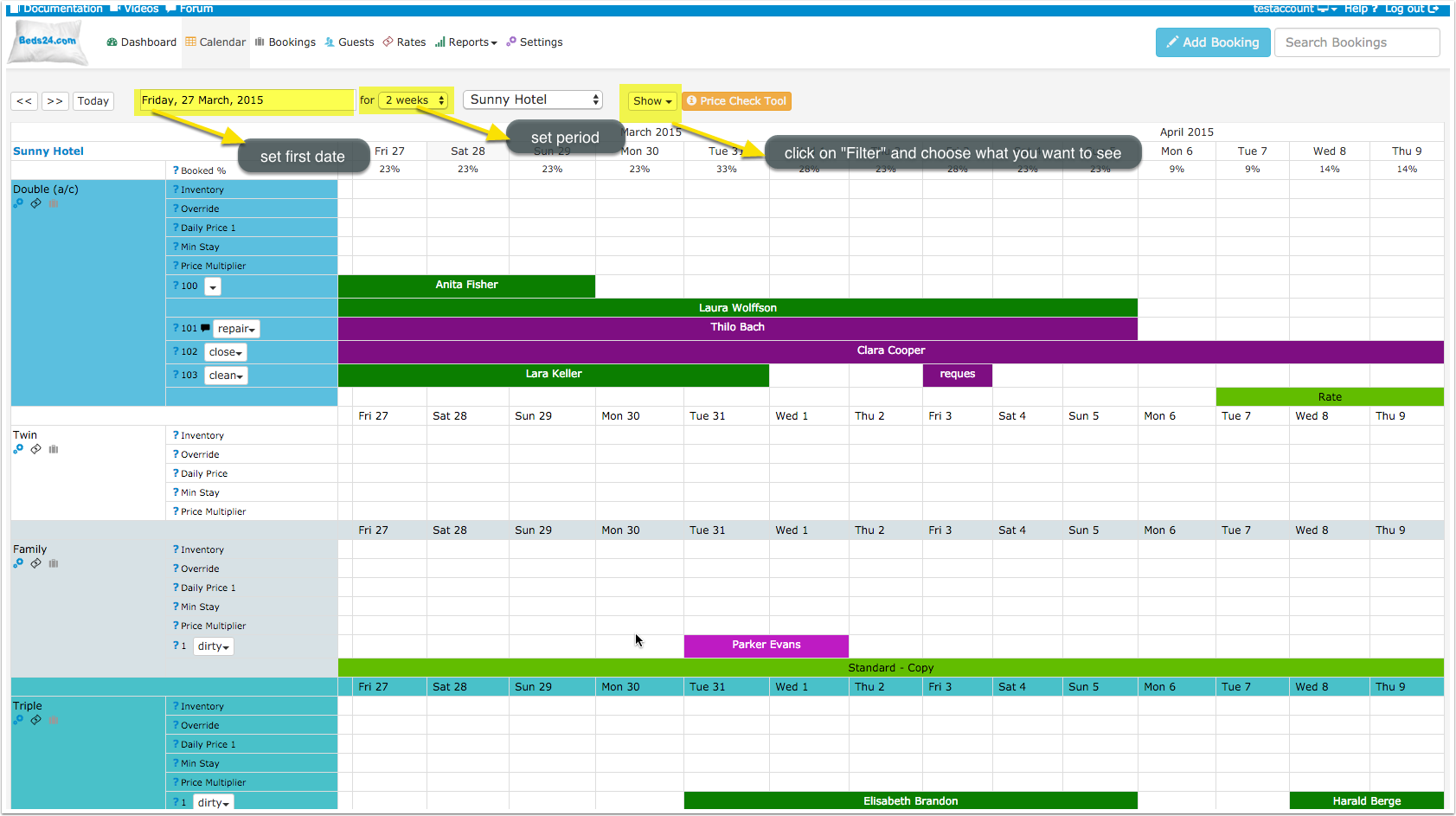
This view gives you a complete overview on your bookings, rates and occupation and inventory. By clicking on "Filter" then ticking the boxes you can select what you want to display.
- bookings are displayed in red (or your selected colour) - hover the mouse over individual bookings to show more information or click on them to open them in a pop up.
- rates in green for each room - hover the mouse over individual rates to show more information or click on them to open them in a popup.
Inventory: The number of rooms remaining to sell is also shown and they can be edited to quickly change your availability. (It is only possible to lower the number based on the value in SETTINGS - > PROPERTIES -> ROOMS-> SETUP "Quantity of this type" and any existing bookings) Click to open a popup and save the changes in your inventory.
Add Booking: To add a booking click on the person+ icon.
Daily Prices: You can set simple room prices here. Click in on the day the rate starts to open a popup and set the price and date range and click SAVE. You may modify individual dates as required.
To remove a price set it to 0 (numeral zero)
These daily prices are offered per room per night. Alternatively you can set prices using RATES in the RATES section in the top menu. Rates offer more flexibility to charge different prices for extra people, minimum stays etc.
The price offered to the guest will be the lowest from your Daily Prices and your Rates which match the requested stay period.
Override Dates
- BLACKOUT will close the room so it is not available for booking
- NO CHECK IN - guests can not check in on this day but guests checking in before can stay on this day
- NO CHECK OUT - guests can not check out on this day but guests checking in before this date can stay on this day
- NO CHECK IN AND NO CHECK OUT - guests can not check in or check out on this day but guests checking in before can stay on this day
- EXCEPTION will apply the booking rule for the "Exceptional Period" set in SETTINGS -> PROPERTIES -> BOOKING RULES
- NONE - the booking strategy is as defined for the property
Min Stay: Set a minimum stay. (This can be used to override the Minimum stay in a RATES as long as the number is higher than that in the RATES)
Price Multiplier: Adjust all rates/daily price by a percentage. (For an increase in price add a number in excess of 100 and for a lower price a number lower than 100)
Diary Function
Click on a date to add a diary note for this day. When you have a diary note you will see a bubble in the date field of the CALENDAR. Click on the icon will show the diary note.
Diary notes will also display in the "Diary"on the DASHBOARD on the day.
Customise Display
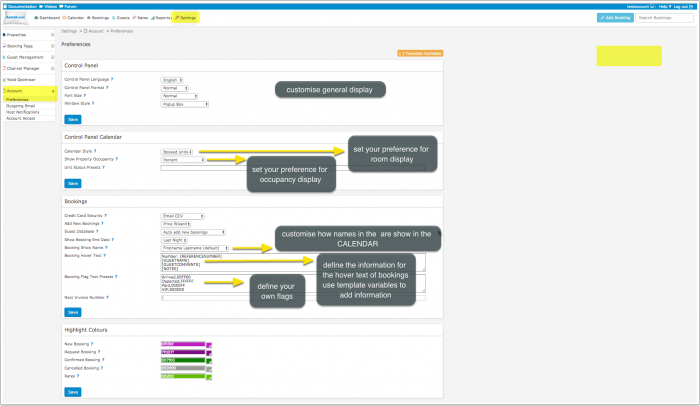
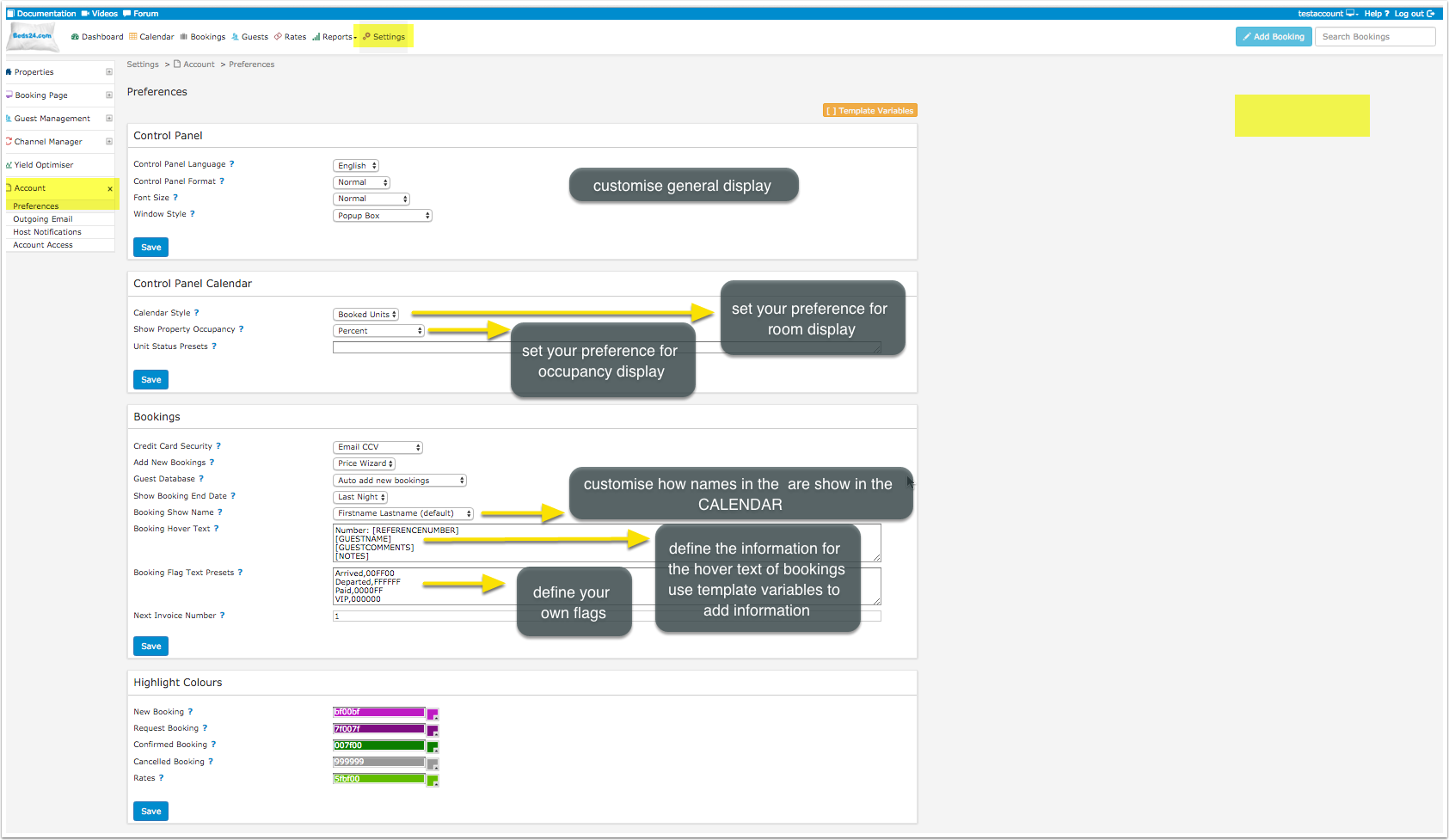
To change the look of your Calendar and set your preferences, go to Settings > Account > Preferences
Set preferences
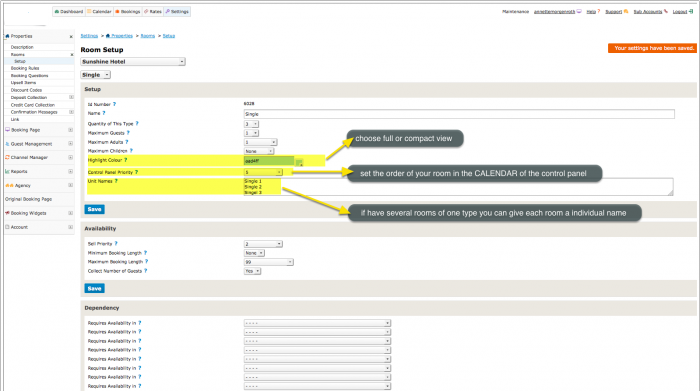
Customise room display:

Show Groups of Properties
Properties can be opened as groups in the calendar. Use the SETTINGS-> BOOKING PAGE-> MULTIPLE PROPERTIES-> PROPERTY SETTINGS "Group Keywords "setting to assign keywords to each property. These keywords will appear in the property selector and show all properties having that keyword.
Enhance Performance
If you have many properties and/or slow internet you can do the following:
- Show less data e.g. a week only
- Turn off all rows which you are not using via the "Show" selector"
- Avoid opening all properties. Instead open individual properties or create property groups
Further Customisation using CSS
If you are comfortable working with CSS you can use custom CSS to customise the control panel further. Use Firebug or a similar tool to detect the classes you want to change.
Example: Give the inventory cell a different color if the inventory is 0.
.caltable .inv0{
background-color: #d43f3a;
}
.inv0 .dashgrid_inventory {
color: #fff;
}
.inv0 .lightgrey {
color: #fff;
}
Example: display roomname and icons in one line.
.dashgrid_rowroomname {
display: inline;
}
.editroomlink{
padding-left: 2px;
}
Pages in category "Calendar"
The following 2 pages are in this category, out of 2 total. download this selection of articles as a PDF book