Category:Sub Account: Difference between revisions
No edit summary |
|||
| Line 95: | Line 95: | ||
bookings-calendar | bookings-calendar | ||
Standard reports can be hidden using | |||
reports-arrivals | |||
reports-departures | |||
reports-dailyactivity | |||
reports-dailyunitactivity | |||
reports-dailyunitnotes | |||
reports-currentguests | |||
reports-cleaning | |||
reports-cleaningbrief | |||
reports-invoices | |||
reports-occupancy | |||
reports-monthlyrevenue | |||
reports-financial | |||
reports-country | |||
reports-payments | |||
If you want to hide the 'Show' options from some of the ROLES in the Calendar, change the sub-account to the role "Admin" then log into the account, go to the CALENDAR and click on "Show". Then deselect all bits you do not want to show. Then go back ROLE and change back to the appropriate ROLE. | If you want to hide the 'Show' options from some of the ROLES in the Calendar, change the sub-account to the role "Admin" then log into the account, go to the CALENDAR and click on "Show". Then deselect all bits you do not want to show. Then go back ROLE and change back to the appropriate ROLE. | ||
Revision as of 17:30, 13 March 2018
This page is about the menu SUB ACCOUNTS
Each account can have sub accounts with a unique username and password. Sub accounts can be given restricted or full access to other accounts or individual properties. A sub account can also contain it's own properties.
Only one person at a time can log in to any account or sub account.
Sub Accounts
A property is always owned by one account or sub account but it can be set up to be accessed from other accounts. It inherits it's account level settings from this owner account. Therefore a property should be owned by the account which manages the property and whose Email address is used to send out confirmation messages and other system Emails.
- If a property is managed mainly in the master account and the sub account just needs access to see certain information or to perform certain tasks it should be owned by the master account. In this case sub accounts are given access to the property.
- If a property is managed mainly by the sub account and the master accounts just needs access it should be owned by the sub account. In this case the master account is given access to the property.
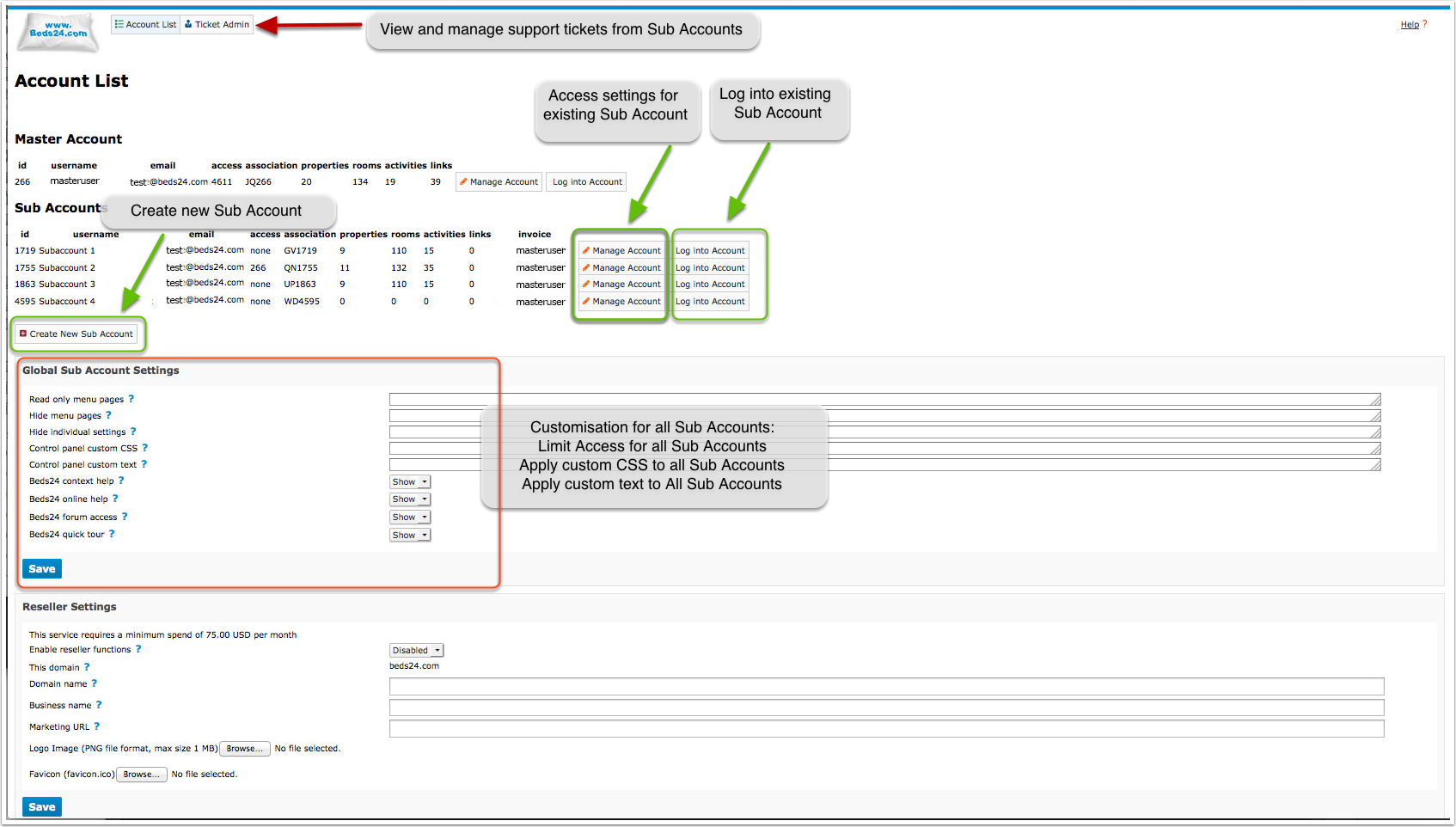
Go to SUB ACCOUNTS to create new sub accounts or manage existing sub accounts
Global sub account settings apply to all sub accounts in one master account
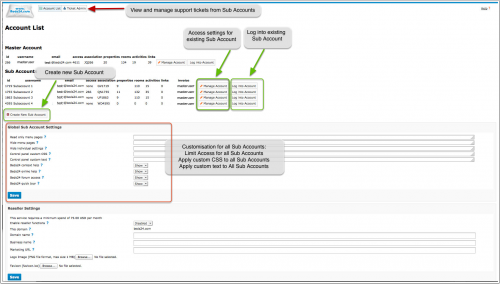
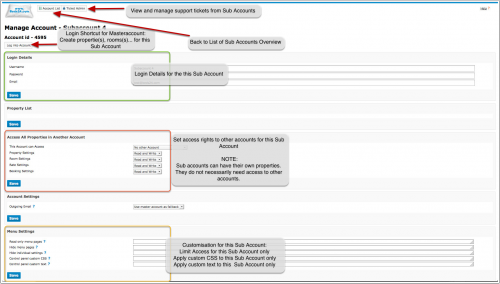
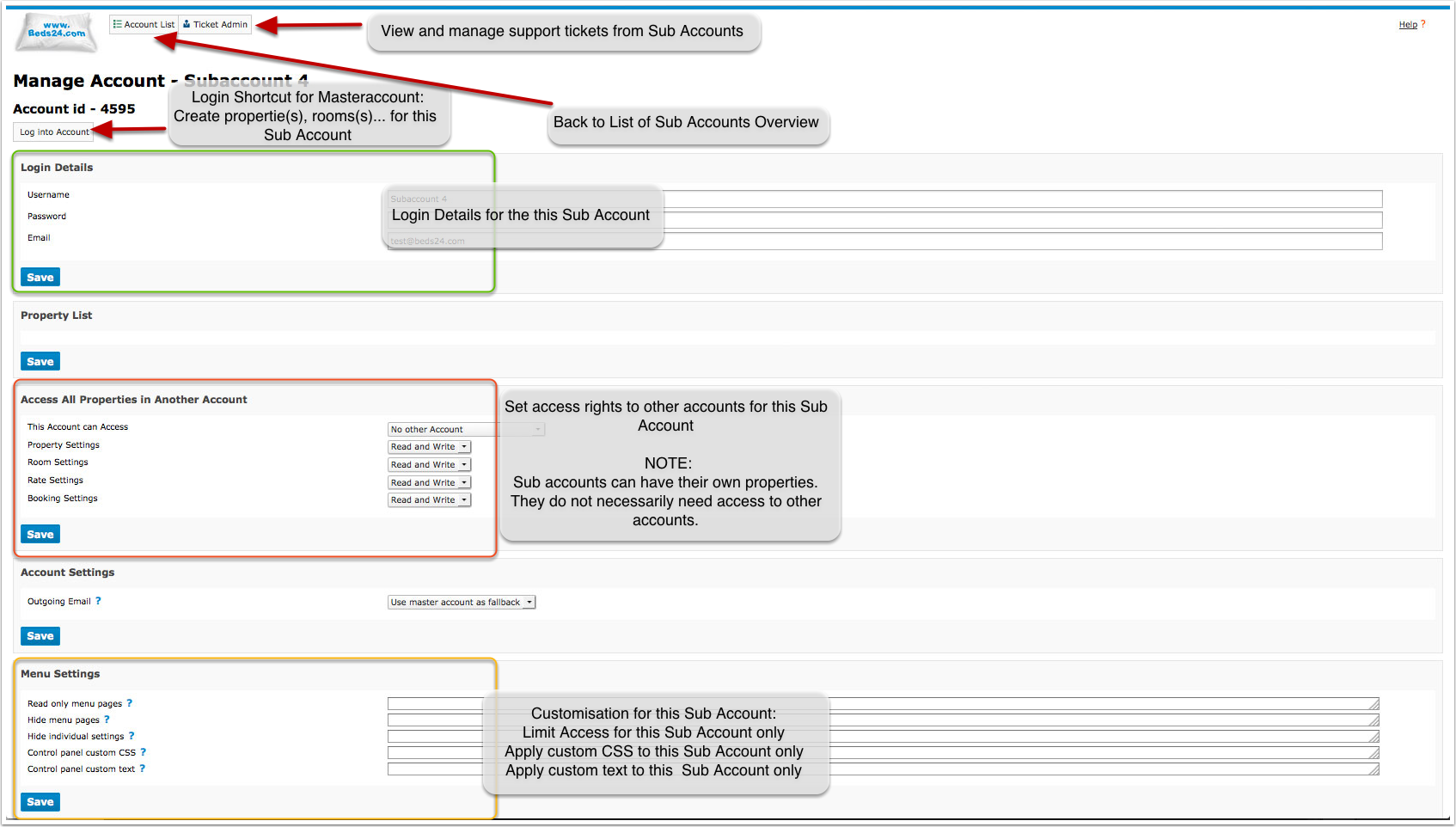
Click on "Manage" to apply settings to an individual sub account
Create a Sub Account
Click on SUB ACCOUNTS then on "CREATE NEW SUB ACCOUNT". Enter username password and Email.
The "Role determines the access rights":
- Admin: all rights
- No Credit Card: all rights but no access to credit cards.
- Read Only: All parts of the control panel can be seen but not changed.
- Back Office: All parts of the control panel can be seen and edited except for "SETTINGS" .
- Back Office 2: All parts of the control panel can be seen be seen and edited except "SETTINGS" are "read only".
- Front Desk: Has read and write rights for "bookings" and "guests". No access to SETTINGS and reports with revenue information. Read only access to all other areas.
- Front Desk 2: Has read only access to all areas of the control panel. Has read and write rights for "bookings" and "guests".
- Cleaner: Read only access to bookings in the CALENDAR. Access to standard reports "Cleaning", "Daily Activity", "Cleaning Brief" and "Daily Unit Activity".
- Cleaner Manager": Read only access to bookings in the CALENDAR. Can open the booking and see details. Access to standard reports "Arrival", "Departure", "Current Guests", "Cleaning", "Daily Activity", "Cleaning Brief" and "Daily Unit Activity".
- Agent: Access to the CALENDAR only. Can add and manage own bookings if he as write access to a property. Bookings from other sources only show as blocked dates.
NOTE: If you allow sub accounts to access to view credit card details accounts with the roles "Admin", "Read Only", "Back Office" and "Front Desk" will be able to access credit card details. Credit card access is set per property. See further down how to allow credit card access for a property. To prohibit credit card access enter the word creditcard in "Hide menu pages".
Click on the "Clone Account Settings" button to select settings to apply from one account to another account/sub account.
Give Sub Account Access to all Properties in the Master Account
- Click on ACCOUNT LIST
- Click on MANAGE ACCOUNT for the Sub Account
- in "Access All Properties in Another Account" select the account that can be accessed. Set which areas the sub account can access "read only" and which "read and write"
- if required block sub accounts from selected pages in "Menu Settings"
Give Sub Accounts Access to Selected Properties in the Master Account
- Click on ACCOUNT LIST
- Click on MANAGE ACCOUNT for the Master Account
- in the "Property List" click on "MANAGE PROPERTY" for the property you allow the sub account to access
- in "Make Property Available in Multiple Accounts" set "Make Property Available In Sub Account" to the sub account which can access the property then SAVE
- After you have saved you can set which "Access Rights" the sub account has
- if required block sub accounts from selected pages in "Menu Settings"
Hide Menus and/or Settings from Sub Account
- To hide menu pages click on SUB ACCOUNTS and enter the names of the pages you want to hide in "Hide menu pages". The context help gives a detailed explanation. EXAMPLE: To hide all channel manager pages you need to enter:
synchroniser
to hide all settings enter:
settings
to hide all settings and rates enter
settings, rates
Tabs in the "Booking" can be hidden using
bookedit-info
bookedit-summary
bookedit-detail
bookedit-charges
bookedit-invoice
bookedit-guest
bookedit-log
bookedit-mail
The "Calendar" tab in BOOKINGS can be hidden using
bookings-calendar
Standard reports can be hidden using
reports-arrivals
reports-departures
reports-dailyactivity
reports-dailyunitactivity
reports-dailyunitnotes
reports-currentguests
reports-cleaning
reports-cleaningbrief
reports-invoices
reports-occupancy
reports-monthlyrevenue
reports-financial
reports-country
reports-payments
If you want to hide the 'Show' options from some of the ROLES in the Calendar, change the sub-account to the role "Admin" then log into the account, go to the CALENDAR and click on "Show". Then deselect all bits you do not want to show. Then go back ROLE and change back to the appropriate ROLE.
If you want to hide the "Delete" button in booking add the following code in the "Control panel custom CSS" for the sub account:
.pagetypeajaxbookedit .b24btn_Delete { display: none }
If you want to hide a certain setting box on a page add the following code in the "Control panel custom CSS" for the sub account for example:
.pagetypecommunicationbooktemplate #settingformid .background_boxprop:nth-of-type(2) { display:none; }
this will hide booking template 2.
- If you only want to hide individual settings send us a support ticket for the code required here to hide the particular setting.
Allow Sub Accounts to View Credit Card Details
This is set per property. Click on "Manage Account" for the Master Account, to see the property list. In the "Property List" click on "MANAGE PROPERTY" and set "View Credit Cards" = Owner and linked accounts.
Set Sub Account to send Email from their own Email Address
- Log into the sub account and go SETTINGS->ACCOUNT->OUTGOING EMAIL. Set the system up to use the sub accounts Email address following the instructions (click on HELP in the top right menu).
- Go to SUB ACCOUNTS click on "Manage Account" and set "Outgoing Email"=Never use Master Account or Use Master Account as Fallback.
Block Sub Accounts from sending SMS
Hide the menu pages by adding
automail.smsenable,owners.smsenable,owners.smsenable2
in "Hide menu pages".
Messages to Sub Accounts
The function "Message to Account" allows to send information in the same style as Beds24 News to all sub accounts. When you click on "Manage Account" you can also create messages for individual sub accounts.
Make Sub Account Properties available in the Master Account
- Click on ACCOUNT LIST
- Click on MANAGE ACCOUNT for the Sub Account
- Click on MANAGE PROPERTY for the Property
- Set "Available in Master Account" to enable.
Make a Property available in another Account or Sub Account
- Click on ACCOUNT LIST
- Click on MANAGE ACCOUNT for the Sub Account
- Click on MANAGE PROPERTY for the Property
- Add the Accounts which should access the property in the "Make Property Available in Multiple Accounts" menu.
Sub accounts will appear in a selector list. Other accounts can be added by entering the other accounts "Association Code".
Inter Property Linking
- Click on Manage Property
Certain items like rates and room dependency settings can be linked with other rooms. The Inter Property Linking settings controls the ability of this property to link with other properties.
Possible values are:
- None - The properties rooms can only link with rooms in the same property.
- Same Owner Account - The properties rooms can only link with other properties owned by the same account.
- All - The properties rooms can link with all properties available in the owner account.
Make one Account access Another Account
- Click on ACCOUNT LIST
- Click on MANAGE ACCOUNT for the Sub Account.
- Use the "Access All Properties in Another Account" menu to allow this account access to another account.
This will only allow access to properties "owned" by the other account but not properties owned by a third account which are visible in the account.
Clone Properties
Settings from one property can be applied to one or more properties in a sub account.
Click on "Manage Account" and then on "Clone Property Settings" and select which settings from which property should be copied to others.
Move Properties to a different Account
- Click on ACCOUNT LIST
- Click on MANAGE ACCOUNT for the Sub Account
- Click on MANAGE PROPERTY for the Property
- Change the owner account of the property.
Move Rooms to a different Property
- Click on ACCOUNT LIST
- Click on MANAGE ACCOUNT for the Sub Account
- Click on MANAGE PROPERTY for the Property
- Click on MANAGE ROOM for the Room
- Select the property to move to
Custom Tab
You can add a custom tab to bookings.
For content you can use HTML and template variables to include information from the booking.
To change the name of the tab enter the following in the Control Panel Custom Text setting: Custom Tab|New Name of the Tab replacing New Name of the Tab with your preferred name.
Each sub account can have its own custom tab. If a sub account has a custom tab defined, this will be shown instead of the global custom tab.
If there is no custom tab for a sub account, the global custom tab (if used) will be shown.
To hide the custom tab from individual sub accounts go to ACCOUNT LIST then click on "Manage Account" and enter
bookedit-custom
in "Hide menu pages"
Subcategories
This category has the following 2 subcategories, out of 2 total.
Pages in category "Sub Account"
This category contains only the following page. download this selection of articles as a PDF book