Agoda.com: Difference between revisions
No edit summary |
|||
| Line 60: | Line 60: | ||
*Enter your Agoda hotel id. If you are using Agoda Homes and have multiple rooms in the property set the selector for "Set Hotel ID per" = Room | *Enter your Agoda hotel id. If you are using Agoda Homes and have multiple rooms in the property set the selector for "Set Hotel ID per" = Room | ||
*Set the currency. If you are using different currencies on Agoda and on Beds24 you can use the price multiplier (see below) | *Set the currency. If you are using different currencies on Agoda and on Beds24 you can use the price multiplier (see below) | ||
[[Image:hotel-id-agoda.png|500px|link=]] | |||
[[Media:hotel-id-agoda.png|view large]] | |||
<embedvideo service="youtube">https://youtu.be/-SbeMMSk8wc</embedvideo> | <embedvideo service="youtube">https://youtu.be/-SbeMMSk8wc</embedvideo> | ||
| Line 68: | Line 71: | ||
*Choose the Agoda room id you want to map to each Beds24 room and click on it. | *Choose the Agoda room id you want to map to each Beds24 room and click on it. | ||
*When the correct room id has copied to the room type id setting, click Save. | *When the correct room id has copied to the room type id setting, click Save. | ||
[[Image: | [[Image:map-room.png|500px|link=]] | ||
[[Media: | [[Media:map-room.png|view large]] | ||
[[Image:map-room1.png|500px|link=]] | |||
[[Media:map-room1.png|view large]] | |||
Map Rates: | Map Rates: | ||
| Line 82: | Line 88: | ||
*Choose if you pricing model is "per day" or "per occupancy" (see notes about "Prices" above"). | *Choose if you pricing model is "per day" or "per occupancy" (see notes about "Prices" above"). | ||
*You have the option to set a price for an "Extra Bed" if this option is activated in Agoda. | *You have the option to set a price for an "Extra Bed" if this option is activated in Agoda. | ||
[[Image: | [[Image:map-rate.png|500px|link=]] | ||
[[Media: | [[Media:map-rate.png|view large]] | ||
Note: Agoda do not allow single unit Agoda Homes to have extra bed. If you use Agoda Homes you need to set Extra bed price = 0. | Note: Agoda do not allow single unit Agoda Homes to have extra bed. If you use Agoda Homes you need to set Extra bed price = 0. | ||
| Line 118: | Line 124: | ||
== Activate == | == Activate == | ||
*Before you activate the connection you can view the live availability and prices that will be send using the "View actual data" button. | |||
[[Image:actualdata.png|500px|link=]] | |||
[[Media:actualdata.png|view large]] | |||
*Tick "Inventory", "Prices" and "Bookings" | *Tick "Inventory", "Prices" and "Bookings" | ||
*Save | *Save | ||
[[Image: | [[Image:activate.png|500px|link=]] | ||
[[Media: | [[Media:activate.png|view large]] | ||
'''Important''': If you receive error messages from Agoda you will need to fix them immediately. Agoda will reject all updates if there is an error. The "Common Error" section below gives information on common errors and how to fix them. | '''Important''': If you receive error messages from Agoda you will need to fix them immediately. Agoda will reject all updates if there is an error. The "Common Error" section below gives information on common errors and how to fix them. | ||
Revision as of 15:06, 11 May 2020
Synchronising Beds24.com with Agoda.com and Agoda Homes
General
- Click here for general information on how the channel manager works.
- This tutorial explains how to set prices for channels.
Capabilities
The connection will work for Agoda and AgodaHomes. Click here if you need an account with AgodaHomes.
- Beds24.com can export inventory.
- Beds24.com can export multiple rates.
- Beds24.com can import bookings.
- Beds24.com can import booking cancellations.
- Importing cancellations can be disabled for individual bookings.
For details please click here.
Limitations
- Only bookings made after the connection is established will be imported, existing bookings must be manually entered into Beds24 to block the dates.
Before you connect
Prices
- We can only send availability if you have set up prices which are activated for this channel. This tutorial gives general information how to set prices for channels.
- Beds24 can send a single (1 person), double (2 guests) and a room price which will be applied for the maximum occupancy. You have the option to set a price for an "Extra Bed" if this option is activated in Agoda.
- Agoda can support more than one price per room for example to send prices for different minimum stays, meal options or refundable and non-refundable prices and can auto calculate child rates. See chapter "Multiple Rates" below.
- Agoda supports Per Occupancy Pricing
- If you use rates 1 person, 2 person and room price will send. Room price will send for specified occupancy. Multiple rates with different occupancies can send on same rate plan. Prices for "Extra Person", "Extra child" and discounts set in the "Discounts" tab of the rates can not be sent.
- If you use daily prices the daily price will send including occupancy. Multiple occupancy prices can send on each rate plan. Extra person price will send.
Note: Agoda will depreciate "Per Day Pricing" shortly. Please do NOT choose "Per Day Pricing" any more.
Bookings
New Bookings are imported.
Existing bookings are not automatically imported when the connection is established and should be entered into Beds24 manually.
Extras and Taxes
"Upsell Items" can not be exported.
Rooms and room types / Agoda Homes
If you have room types here and sell rooms individually at another channel or your own web site and want to sell them here as a "roomtype" with a quantity of more than one you can set up virtual roooms.
You can use the this method if you have a property with one hotel ID and three rooms for example on Booking.com or Expedia but a different Agoda hotel ID for each room on Agoda Homes
What you will need
The Agoda.com hotel id code for your property. This number can be seen near the top right side of the screen in Agoda
Set Up
Agoda
Request a connection with Beds24 from Agoda. You may have a menu in your Agoda extranet to do this if not ask your Agoda rep.
For Agoda Homes please send a connection request to [email protected] to set BEDS24 as the channel manager via Support Widget in the extranet.
Beds24
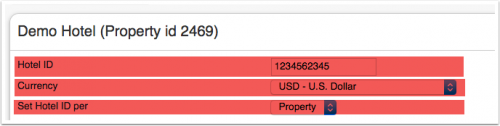
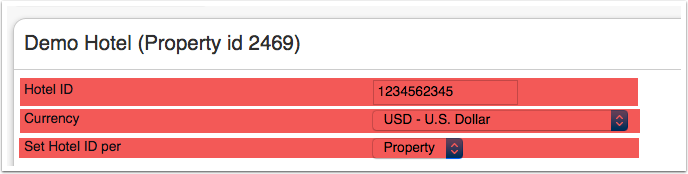
- Enter your Agoda hotel id. If you are using Agoda Homes and have multiple rooms in the property set the selector for "Set Hotel ID per" = Room
- Set the currency. If you are using different currencies on Agoda and on Beds24 you can use the price multiplier (see below)
Map Rooms:
- Select if your price model is "Per Day Pricing" or "Per Occupancy Pricing".
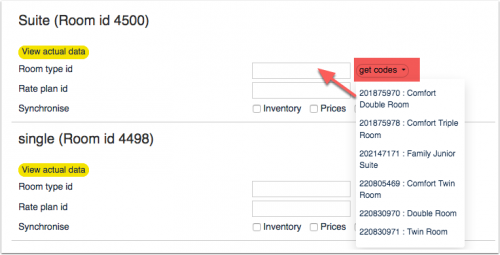
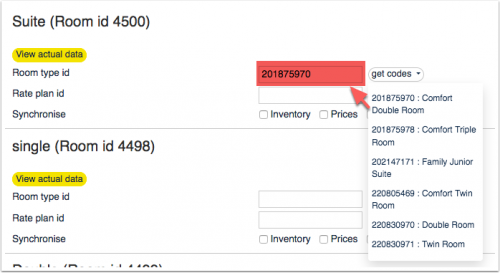
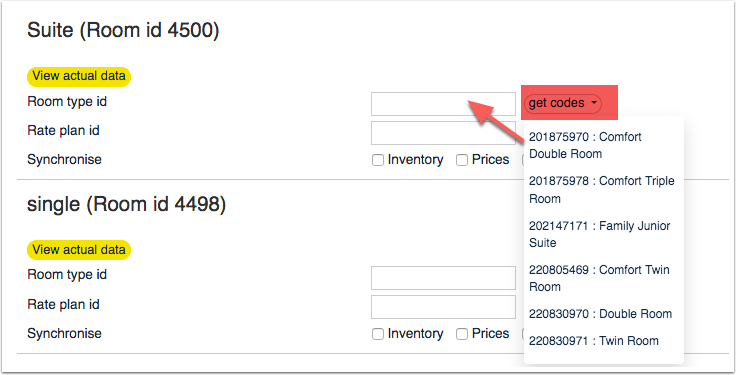
- Click on the "Get Code" link next to the room type id setting.
- Choose the Agoda room id you want to map to each Beds24 room and click on it.
- When the correct room id has copied to the room type id setting, click Save.
Map Rates:
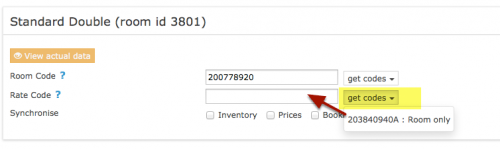
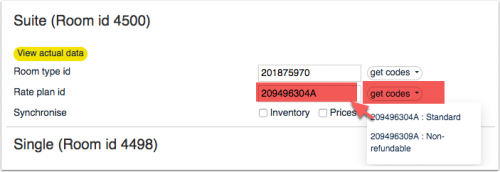
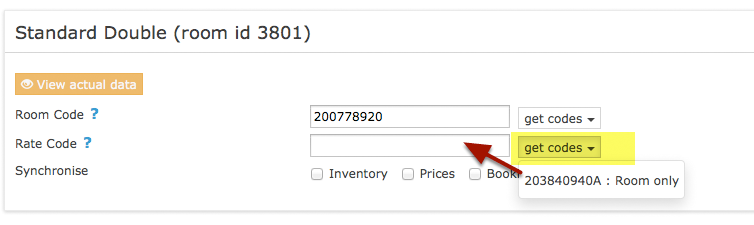
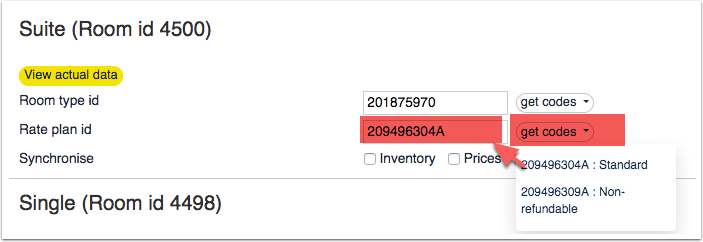
- Click on the "Get Code" link next to the rate plan id setting.
- Choose the Agoda standard rate for this room and click on it
- When the correct rate plan id has copied to the rate plan id setting.
- Click SAVE
- Choose if you pricing model is "per day" or "per occupancy" (see notes about "Prices" above").
- You have the option to set a price for an "Extra Bed" if this option is activated in Agoda.
Note: Agoda do not allow single unit Agoda Homes to have extra bed. If you use Agoda Homes you need to set Extra bed price = 0.
Tip Click on the "View Actual Data" Button to check which prices and availability will send.
Multiple Rates at Agoda
Agoda can support more than one price per room for example to send prices for different minimum stays, meal options or refundable and non-refundable prices. There are two options:
1. Derived (Child) Prices Agoda can auto calculate child rates from one master rate we send. Ask your Agoda rep to set this up. This option means you only need to send one rate from Beds24 to Agoda and Agoda will auto-calculate the other rate options.
2. Multiple Rate Plan Ids
Agoda can set up multiple rate plan ids for each room, each with pre-defined booking conditions. Beds24 can map a different Beds24 rate or offer to each Agoda rate. Please use these instructions. If you do not have the appropriate rate ids you need to request Agoda to add them.
Price Multiplier
If you want to add a multiplier to your prices, for example because of a different currency to your Beds24 currency, add a * followed by the multiplier number to your hotel id.
For example a Hotel Id setting 123456*1.23 will multiply all prices by 1.23 sent for Hotel id 123456. (i.e. raised by 23%) Lower prices can be sent with a multiplier less than 1, i.e. 123456*0.85 will send a price 85% of the normal price (i.e. lowered by 15%)
To convert the price of bookings imported add a * after the multiplier, for example 123456*1.23* will divide the price of the booking by 1.23.
You can also use currency conversion template variable. All currencies supported by the booking page currency selector can be used.
Example: *[CONVERT:IDR-EUR] will convert Indonesian Rupees to Euros.
Example: *[CONVERT:IDR-EUR][/]0.85 will convert Indonesian Rupees to Euros and divides the price by 0.85 which raises it by circa 15%
Maximum number accepted bookings
By default all all available rooms are sent to activated channels. In SETTINGS->CHANNEL MANAGER->CHANNEL INVENTORY limit the number of accepted bookings for this channel.
Activate
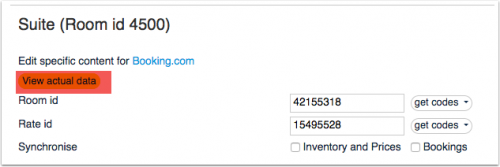
- Before you activate the connection you can view the live availability and prices that will be send using the "View actual data" button.
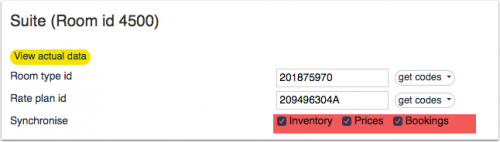
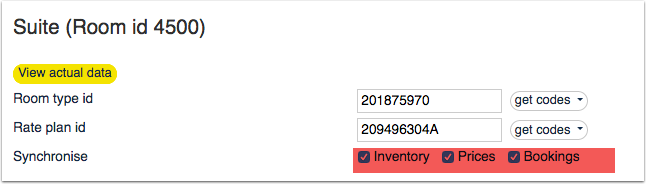
- Tick "Inventory", "Prices" and "Bookings"
- Save


Important: If you receive error messages from Agoda you will need to fix them immediately. Agoda will reject all updates if there is an error. The "Common Error" section below gives information on common errors and how to fix them.
New Bookings are imported. Modifications and cancellations to bookings are also imported.
Existing bookings are not automatically imported when the connection is established and should be entered into Beds24 manually.
Check Connection
The connection is working if you are not receiving error messages and the display in the channel is correct. If you are receiving error messages check in the "Common Errors" section why you are receiving the error and how to fix it.
Updates and Changes
Changes to availability and prices will be instantly sent to the channel. Changes for settings for example minimum stays, the multiplier or number of rooms will send with the next update. Click on "Update" if you want to push them through instantly.
Manage Bookings
Different Invoice Templates
If you need a different invoice template for the bookings from this channel you can use the invoicee function.
Notes
For dorms Agoda expects only a single price and not a double or room price.
Channel collect payments will be shown in the booking invoice if SETTINGS->CHANNEL MANAGER -> “Import Channel Collect Payments” is set to “Yes”.
Common Errors
Any errors occuring during updates will be emailed to you with the error message as returned by Agoda. Below are common error messages and how to fix them.
API key is not authorised for Property id:xxxxx
Please check if your Agoda hotel ID is entered correctly. If it is please contact Agoda and ask them to check if you are connected to the Beds24.com channel manager.
Authentication failed. Invalid authentication or User not have permission to access Hotel.
Please check if your codes are entered correctly. If they are please contact Agoda and ask them to check if you are connected to the Beds24.com channel manager.
Available allotment (x) cannot greater than number of rooms (x)
This error means Beds24 is sending a quantity greater than you have listed on Agoda.
Please set extrabed rate
Agoda expects a price for an extra bed. Please log into your Agoda account and set the extrabed price there.
Property id: 00000 has not been migrated yet
You need to  complete your profile creation and self self activation in the Agoda extranet before you map your rooms and rates.
Rate: for ratePlanId: 123456 which is out of stay start/end period: (201X-XX-XX/201X-XX-XX) has not been set
The rate has a start and/or end date in Agoda. Prices sent for any dates outside this range will cause this error. Either adjust your prices in Beds24 or in Agoda.
Invalid room type please check your room type ID
Please check your room type ids are correct and the connection is enabled.
Room: 00000000 does not exist for Property id: 00000
You are trying to update a room code which is not a valid Agoda room code. You can only update room codes which are available when you click on "Get Codes".
Cannot set Double rate because max occupancy is 1
 Agoda must have the room set for single occupancy only and we are sending a double price. Either remove the double price or have Agoda set the room for a higher occupancy.
Cannot set double rate when maximum occupancy less than 2
Agoda must have the room set for single occupancy only and we are sending a double price. Either remove the double price or have Agoda set the room for a higher occupancy.
Cannot set full rate when maximum occupancy less than 3
Agoda must have the room set for double occupancy but Beds24 is sending a room price for more guests. Either set a double price in Beds24 remove the room prices or have Agoda set the room for a higher occupancy.
Cannot set full rate because max occupancy is 2
Agoda have the room set for a maximum of two people but Beds24 is sending a room price for more guests. Either set the max people for the room to two in Beds24 or have Agoda raise it to the same value as Beds24.
Default rate: xxxx should be between xx and xxxx
Agoda expects the price to be within this range. Either correct the prices in Beds24 or remove the restriction from Agoda.
Please set full occupancy rate.
A full occupancy rate is a price for 3 or more guests. Double rooms do not use full occupancy rates. Agoda expects the room to hold 3 or more guests and is expecting a price for 3 or more people. A common cause it that you have set the room for an occupancy of 2 in Beds24 but for a higher occupancy in Agoda.
Price provided not sufficient for Max occupancy = X, rate missing: Full rate
Agoda expects the room to hold up to X guests and is expecting a price for up to X guests. Check that you have a price for the full occupancy. Another common cause it that you have set the room for a certain occupancy in Beds24 but for a higher occupancy in Agoda.
Full Rate should be greater than Double Rate
Agoda expects the full rate to be higher. This applies to prices we are sending and prices already in the Agoda system. A common cause is that in Beds24 you have set the room as a double room and in Agoda it is set as a 3 or more person room. Correct the room occupancy so it is the same in both systems. If this is not the reason check which prices are in your Agoda system.
Rate x00.00 cannot less than Minimum Rate xxx.00.
Agoda has set a minimum price limit for this rate. Either ask Agoda to lower the limit or raise the price in Beds24 to be at least as high as the limit.
Rate x00.00 should be between xxx.00.
Agoda has set a price limit for this rate. Either ask Agoda to change or remove the limit or change the price in Beds24 to be between the prices shown by Agoda.
Max extrabed has not been set, You cannot set the extrabed rate.
You do not have an extrabed option in Agoda. Either remove the extrabed price in Beds24 or change your set up in Agoda.
Rate plan: 0 does not exist for Property id: 00000
You are trying to update a code which is not a valid Agoda rate plan. You can only update rate plans which are available when you click on "Get Codes".
Requested currency: XXX does not match with Property currency: YYY
Check the Currency code entered in SETTINGS ->  PROPERTIES -> DESCRIPTION -> CURRENCY CODE matches that entered in SETTINGS -> CHANNEL MANAGER -> AGODA.com -> CURRENCY.
Disconnect
- Unticking "Inventory" and "Prices" and "Bookings" will stop the synchronisation for a room.
- To completely disconnect the channel manager you might need to contact Agoda and ask them to disconnect you.