Category:Fixed Prices: Difference between revisions
| (6 intermediate revisions by 3 users not shown) | |||
| Line 4: | Line 4: | ||
__TOC__ | __TOC__ | ||
=Summary= | |||
<div class="summarybox"> | |||
Fixed prices have a start and end date so they apply to a range of dates. Fixed Prices contain many rules about the conditions which must apply to make them available. | |||
[[:category:Daily_Prices|Daily Prices]] are easier to manage if you have seasonal prices, many price options or want to use dynamic prices. | |||
Tip: Click on "Price Check" at to the top to see which prices and rules apply for specific dates/selections and why a certain price or rule was applied or not applied. | |||
</div> | |||
=Functionality= | |||
*When multiple Fixed Prices exist for a given date the system default will calculate and offer the lowest price that matches your criteria. | *When multiple Fixed Prices exist for a given date the system default will calculate and offer the lowest price that matches your criteria. | ||
*You can override this setting in the Fixed Pricesby changing "'''Strategy'''" to "Do not allow lower prices or shorter stays" | *You can override this setting in the Fixed Pricesby changing "'''Strategy'''" to "Do not allow lower prices or shorter stays" | ||
| Line 17: | Line 21: | ||
The ''PRICE CHECKER'' lets you see which price applies to a certain booking situation. | The ''PRICE CHECKER'' lets you see which price applies to a certain booking situation. | ||
=Create a Fixed | =Limitations= | ||
If linked prices are used for channel management only the price for room for which the price was set up will instantly update to the channels. All linked rooms will update with the next routine update but you have the option to push them manually if you require an instant update. | |||
=Create a Fixed Price= | |||
Go to PRICES > FIXED PRICES and lick on the button ''Add Fixed Price'' (there is a limit of 100 Fixed Prices per room type, if you need more than this, daily prices may be a better way to define your prices) | Go to PRICES > FIXED PRICES and lick on the button ''Add Fixed Price'' (there is a limit of 100 Fixed Prices per room type, if you need more than this, daily prices may be a better way to define your prices) | ||
| Line 48: | Line 55: | ||
*'''Extra Person''' - This price will be added per extra person to single or double prices when more people are staying. | *'''Extra Person''' - This price will be added per extra person to single or double prices when more people are staying. | ||
For example if you allow 3 people to stay, the price will be the double | For example if you allow 3 people to stay, the price will be the double price plus the extra person price. If you only have a single price and no double, the price for 3 people will be the single price plus two extra person prices. If you also have a room price the system will determine the cheapest combination and offer that. | ||
The price will only be offered if the box is checked. | The price will only be offered if the box is checked. | ||
| Line 66: | Line 73: | ||
*'''Strategy''' - Set whether you allow the price to be undercut with a lower price. | *'''Strategy''' - Set whether you allow the price to be undercut with a lower price. | ||
**Default (Allow lower prices) - this will always apply the lowest price for the guests selection | **Default (Allow lower prices) - this will always apply the lowest price for the guests selection | ||
**Do not allow lower prices or minimum stays- lower prices or shorter stays (if this prices minimum stay is greater than one) will not be allowed (Note for channel management: if you use multiple | **Do not allow lower prices or minimum stays- lower prices or shorter stays (if this prices minimum stay is greater than one) will not be allowed (Note for channel management: if you use multiple fixed prices this blocks only this rate code) | ||
**Do not allow any other prices - all other prices will be overridden (Note for channel management: if you use multiple | **Do not allow any other prices - all other prices will be overridden (Note for channel management: if you use multiple fixed prices this blocks all other fixed prices) | ||
*'''Minimum Stay''' - this sets the minimum number of nights that must be stayed for this price to apply. | *'''Minimum Stay''' - this sets the minimum number of nights that must be stayed for this price to apply. | ||
Latest revision as of 12:12, 30 May 2025
This page is about the menu PRICES > FIXED PRICES
Summary
Fixed prices have a start and end date so they apply to a range of dates. Fixed Prices contain many rules about the conditions which must apply to make them available.
Daily Prices are easier to manage if you have seasonal prices, many price options or want to use dynamic prices.
Tip: Click on "Price Check" at to the top to see which prices and rules apply for specific dates/selections and why a certain price or rule was applied or not applied.
Functionality
- When multiple Fixed Prices exist for a given date the system default will calculate and offer the lowest price that matches your criteria.
- You can override this setting in the Fixed Pricesby changing "Strategy" to "Do not allow lower prices or shorter stays"
When creating multiple Fixed Prices , you would generally set your highest price to always be available and create discounted price prices for longer stays, specific days of the week or date ranges as you require. This way you can create sophisticated price models.
The PRICE CHECKER lets you see which price applies to a certain booking situation.
Limitations
If linked prices are used for channel management only the price for room for which the price was set up will instantly update to the channels. All linked rooms will update with the next routine update but you have the option to push them manually if you require an instant update.
Create a Fixed Price
Go to PRICES > FIXED PRICES and lick on the button Add Fixed Price (there is a limit of 100 Fixed Prices per room type, if you need more than this, daily prices may be a better way to define your prices)
A popup with several tabs opens.
Summary
You can set:
- Name - For your price (this will not display on your booking page)
- Color - You can apply your custom color. The default color is #4aa41c
- Price Per - 'Night' is the default
- Room Price - The room price will only be offered if the box is checked. You do not need to offer a room price you can offer one or more of single, double or room prices. The system will identify the appropriate price based on the number of guests staying.
- Room Price for - This price will be offered for the room up to the number of people you specify or the maximum occupancy you have specified in SETTINGS -> PROPERTIES -> ROOMS -> SETUP.
If you have limited the number of people the room price is valid for, extra guests will be charged the Extra Person or Extra Child price as applicable. The extra child price (if allowed) will be calculated first for any excess children and then the extra person price will be applied to the remaining excess guests.
If you also have single or double prices the system will identify the cheapest applicable price and offer that.
- Single Price - This price will be offered for single occupancy, i.e. one person staying. The pride will only be offered if the box is checked. You do not need to offer a single price you can offer one or more of single, double or room prices. The system will identify the appropriate price based on the number of guests staying.
- Double Price - This price will be offered for double occupancy, i.e. two people staying. If you do not define a single price this will also be offered for single occupancy.
The price will only be offered if the box is checked. You do not need to offer a double price, you can offer one or more of single, double or room prices. The system will identify the appropriate price based on the number of guests staying.
- Extra Person - This price will be added per extra person to single or double prices when more people are staying.
For example if you allow 3 people to stay, the price will be the double price plus the extra person price. If you only have a single price and no double, the price for 3 people will be the single price plus two extra person prices. If you also have a room price the system will determine the cheapest combination and offer that.
The price will only be offered if the box is checked.
- Extra Child - This price functions as per the Extra Person Price but only applies to children. The price will only be offered if the box is checked. If the children price applies to a certain age group you can change the text on the selector of your booking page. Go to{#fas:cog}} (SETTINGS) > BOOKING ENGINE > PROPERTY BOOKING PAGE > DEVELOPERS "Custom Text" and exchange the default text for children:
Children|Children under 10 Child|Child under 10
Note: Prices for "Extra person" and "Extra Child" do not send to channels.
- First Night the price is valid
- Last Night the price is valid
- Slice by Date - this divides the price into individual prices with a different start date and end date
- Strategy - Set whether you allow the price to be undercut with a lower price.
- Default (Allow lower prices) - this will always apply the lowest price for the guests selection
- Do not allow lower prices or minimum stays- lower prices or shorter stays (if this prices minimum stay is greater than one) will not be allowed (Note for channel management: if you use multiple fixed prices this blocks only this rate code)
- Do not allow any other prices - all other prices will be overridden (Note for channel management: if you use multiple fixed prices this blocks all other fixed prices)
- Minimum Stay - this sets the minimum number of nights that must be stayed for this price to apply.
For example: if you do not want to accept one night stays, set all your prices to a minimum stay of 2 or more.
This field can also be used to set a cheaper price for longer stays. Create a second price with this field set to the required stay period and your cheaper prices and it will be offered when the guest books to stay this period or longer.
- Min days until check-in - For example a setting of 365 will allow this price to be booked up to a year in advance. A setting of 7 means this price is only available one week before the first night of the booking. This setting can be used to create special early bird prices that are only available shortly before the booked night.
- Max Days in Advance - For example a setting of 0 will allow this price to be booked for a stay tonight. A setting of 3 means this priceis only available at least 3 days before the first night of the booking. This setting can be used to create special last minute prices that are only available shortly before the booked night.
- Booking Type - you can define different booking styles for different periods or booking conditions.
For example: you could define two prices, one with a 1 night minimum stay as an "Request only" and the second as a 2 night minimum as "Automatic" booking allowed.
- Allowed - Here you can set which nights of the week this price applies. If it applies to all nights make sure all check boxes are ticked.
For example: if you wish to define a weekend special price you could deselect Monday to Thursday and this price will then only be available on Friday, Saturday and Sunday nights. If you deselect certain nights they will show as not available unless you have another price set that includes those nights. This price will only be offered if all dates of the stay fall on checked days.
- Check-in Allowed - This sets which night of the week a booking must start on. If you allow bookings to start on any night make sure all check boxes are checked. Only if for example you rent by the week and a rental must run Saturday to Saturday you could deselect all nights except Saturday.
This price will only be offered if the arrival day is on a checked day.
- Check-out Allowed - This sets the days that a booking may end on (vacate day). This functions in a similar manner to the start allowed night but for the vacate day. If you allow departures on any day of the week please make sure all check boxes are checked. This price will only be offered when the vacate day falls on a checked day.
Rooms, Offers and Linking
Select the room the price applies to. You have the option to "link" a price. This is a simple way to create prices for multiple rooms if they are similar to the originating price An "offset" raises or lowers the linked price.
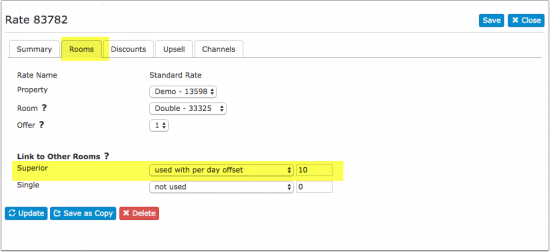
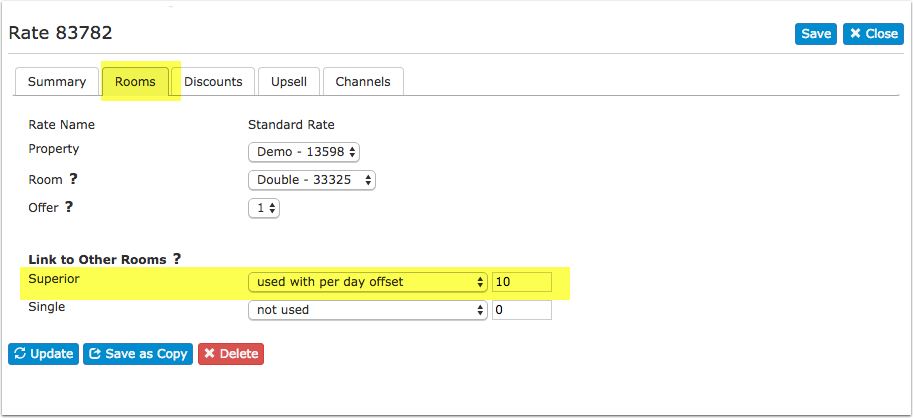
Your default offer which is always shown in "Offer 1" only change the offer number if you have activated additional offers.
Discounts
For information on discount option please go to Discounts.
These discounts are not sent to channels
Upsell
Optional Upsell items can be enabled/disabled for individual prices. When a booking is made only those optional Upsell items enabled for any price involved in the booking will be offered to the guest.
If a combination of Daily Prices and Fixed Prices is offered then all Upsell items will be offered.
Compulsory Upsell items are always enabled and cannot be disabled by a price.
Copy a Fixed Price
If you want to use the same price or another room click on SAVE AS A COPY
Changing Fixed Prices
Click on the price you want to change and enter your changes.
You can delete a price setting and add new ones. You may re-use old price that are still in the system by changing their start and end dates.
Bulk Changes
To bulk delete a number of prices ck on the 'User' icon on the top right and then on 'Account Management (in the old control panel SUB ACCOUNT in the top right) then click on "Manage Account" then "Manage Property" then "Manage Room".
Prices for OTA channels and your own booking page
Prices are used for the channels and/or the Beds24 booking page according to what is ticked in the "Channels" tab of a price.
See this help page for specific information on how to set prices for OTA channels.
Check Prices
The 'Price Check Tool' shows you which prices and rules apply for specific dates/selections and why a certain price or rule was applied or not applied. You can find links to the 'Price Check Tool' on the CALENDAR and SUPPORT pages.
Combination of Fixed Prices and Daily Prices
If you use Fixed Prices you do not need to set up Daily Prices for every day. If required you can use a Daily Price to adjust the prices for an individual date or date range.
If you are using Daily Prices and Fixed Preices you can define your price strategy in SETTINGS -> BOOKING RULES click on "Daily Price Strategy" to open and select if your daily prices can be undercut by Fixed Prices ("Default") or cannot be undercut by Fixed Prices ("Do Not Allow Lower Prices").
Booking Channels
If you use the Channel Manager, tick the booking channels the price applies to. If you are using the Channel Manager you can set which channels the price applies to. The price will only be offered to the channels which are checked. This allows you to set different prices for different booking channels.
Customise display in the CALENDAR
- In the "Summary" tab of the booking you can set a color for each price.
- In SETTINGS->ACCOUNT->PREFERENCES you can set if the only the name is displayed in the calendar or the name and the prices.
Fixed Price Description
The template variable [RATEDESC] which is for example used in the host notification on new bookings shows following information:
-Bookings from your own booking page the "offer summary" from (SETTINGS) PROPERTIES > OFFERS -Bookings from OTAs the rate description the channel sends
Pages in category "Fixed Prices"
The following 15 pages are in this category, out of 15 total. download this selection of articles as a PDF book