New Features and Updates: Difference between revisions
No edit summary |
No edit summary |
||
| Line 22: | Line 22: | ||
As a special offer Beds24 will waive channel management fees for connecting to Google for Vacation Rentals until November 30th 2021. After this date connections will be charged as normal channel management links | As a special offer Beds24 will waive channel management fees for connecting to Google for Vacation Rentals until November 30th 2021. After this date connections will be charged as normal channel management links | ||
You can connect your properties to Google in SETTINGS >CHANNEL MANAGER >GOOGLE | You can connect your properties to Google in SETTINGS >CHANNEL MANAGER >GOOGLE ADS. | ||
For more information on Google for Vacation Rentals, how to set it up and on the differences to Google Hotel Ads please see [https://wiki.beds24.com/index.php/Google_Hotel_Ads here]. | For more information on Google for Vacation Rentals, how to set it up and on the differences to Google Hotel Ads please see [https://wiki.beds24.com/index.php/Google_Hotel_Ads here]. | ||
| Line 253: | Line 253: | ||
* Display your hotels’ direct rates and availability on Google Search and Maps
| * Display your hotels’ direct rates and availability on Google Search and Maps
| ||
Go to {{#fas:cog}} (SETTINGS) CHANNEL MANAGER > GOOGLE | Go to {{#fas:cog}} (SETTINGS) CHANNEL MANAGER > GOOGLE ADS and set „Notify“ = Notify for your most economic double room to benefit from Googles free booking links. | ||
If you want to go one step further and increase your visibility you can add a commission bid. [[Google_Hotel_Ads|More information]. | If you want to go one step further and increase your visibility you can add a commission bid. [[Google_Hotel_Ads|More information]. | ||
| Line 379: | Line 379: | ||
We have negotiated a special deal with Google. | We have negotiated a special deal with Google. | ||
For a limited time Google offers zero commission bookings. All you need to do is activate Google as a channel in {{#fas:cog}} (SETTINGS) > CHANNEL MANAGER > GOOGLE | For a limited time Google offers zero commission bookings. All you need to do is activate Google as a channel in {{#fas:cog}} (SETTINGS) > CHANNEL MANAGER > GOOGLE ADS and set the commission bid to "None". | ||
If you want to have more exposure you can achieve this with a higher commission bid. | If you want to have more exposure you can achieve this with a higher commission bid. | ||
| Line 723: | Line 723: | ||
Also you can now choose to to pay commission on completed bookings instead of at booking. | Also you can now choose to to pay commission on completed bookings instead of at booking. | ||
For more information to to SETTINGS->CHANNEL MANAGER->GOOGLE | For more information to to SETTINGS->CHANNEL MANAGER->GOOGLE ADS and then click on HELP in the top right | ||
27th April 2020 | 27th April 2020 | ||
Revision as of 09:36, 28 June 2021
Webinar on Tuesday: Standard Reports and Cusom Reports
We will be hosting a “Reports” webinar next Tuesday. In the webinar we will show how to use reports and how to create your own custom reports. You will also have the option to ask your questions.
Date & Time: June 29th, 11:00 CET (Amsterdam, Berlin, Rome, Stockholm, Vienna)
Register: Click to register for this webinar
You can find a list with upcoming webinars here.
29th June 2021
Google for Vacation Rentals partners with Beds24
Listing your vacation rentals on Google is a fantastic opportunity to generate commission-free direct bookings.
Vacation rental listings from select OTAs and a handful of Channel Managers - now including Beds24 - appear directly in search results, giving property managers the opportunity to reach the many customers using Google to find and book accommodation every day.
As a special offer Beds24 will waive channel management fees for connecting to Google for Vacation Rentals until November 30th 2021. After this date connections will be charged as normal channel management links
You can connect your properties to Google in SETTINGS >CHANNEL MANAGER >GOOGLE ADS.
For more information on Google for Vacation Rentals, how to set it up and on the differences to Google Hotel Ads please see here.
23rd June 2021
Free Pre-Arrival tool
Thanks to our partner Chargeautomation we can now offer a free online Pre Arrival-in tool for Vacation Rentals & Hotels.
You can u se the Free Pre-Arrival tool to
Collect
- Guest ID/passport
- Card scan
- Email, phone, arrival time, guest count
- Selfie
- Terms & Conditions confirmation
- E-signature
- Collect additional information via custom questions
Offer guests
- Digital Guidebook & Guest Portal
- Custom Upsells (i.e. Pet fee, early check in, parking, airport pickup)
You can connect via (SETTINGS) APPS & INTEGRATIONS > PRE-ARRIVAL TOOL. For more information please click on HELP in the top right of this page. Or join ChargeAutomations webinars for which you can sign up here.
22nd June 2021
Pronto Housekeeping and Maintenence
Our partner Godo Pronto simplifies housekeeping, maintenance, and task management.
The Basic subscription plan for Pronto is free. Other subscription plans have a fixed monthly fee.
You can start an account and set up a connection in (SETTINGS) APPS & INTEGRATIONS > PRONTO.
16th June 2021
Check listing status on VRBO
If you use the VRBO XML connection you can now use the "View Status at VRBO" button in (SETTINGS) CHANNEL MANAGER > VRBO > MAPPING to check the status of your listing.
15th June 2021
Intergration with Feratel Meldeclient in live test
If your municipality uses the Feratel Meldeclient, you can now send the reports directly from Beds24.
For detailed instructions, go to (SETTINGS) APPS & INTEGRATIONS > FERATEL MELDECLIENT and click on HELP in the top right corner.
3rd June 2021
Webinar on Thursday: Getting started with Beds24
We will be hosting a “Getting started with Beds24” webinar next Thursday. In the webinar we will show how Beds24 works and you will also have the option to ask your questions.
Date & Time: June 3rd, 15:00 CEST (Amsterdam, Berlin, Rome, Stockholm, Vienna)
Register: Click to register for this webinar
You can find a list with upcoming webinars here.
1st June 2021
Booking questions for guests
Booking questions are now also available for guests. If there are multiple bookings with different entries the system will instert the value from the latest booking.
If you have mutliple properties you will need to make sure the booking questions are in the same order for all your properties.
31st May 2021
Licence information for Booking.com
When you click on the "Licence" button in (SETTINGS) CHANNEL MANAGER > BOOKING.COM - > SYNC CONTENT you will see which licence types are possible in your region and you can enter your licence ID. A click on "Send" will update the licence information to Booking.com.
22nd May 2021
Announcing Elite Connectivity Partner status with Expedia Group
We are proud to provide our customers with high-quality connections which have earned us Expedia Elite Connectivity Partner status, Airbnb Preferred Partner status, VRBO Preferred Partner status and Booking.com Premier Partner status for the sixth time in a row.
12th May 2021
Capture mobile bookers
With increasing mobile use more online bookings are made on mobile devices.
You can conveniently create and update Mobile Rates for Booking.com and Exedia from PRICES > PROMOTIONS PRICES > PROMOTIONS > BOOKING.COM/EXPEDIA .
Read more on our https://blog.beds24.com/how-to-capture-mobile-bookers/ blog].
11th May 2021
Upgrade for the "Channel Maping page
When you go to PRICES > CHANNEL MAPPING you can now choose between the original "Channels in one column" view and a new "Channels in individual columns" view which gives you a better overview on where prices are used. If you need to make changes click on the price to edit it.
3rd May 2021
VRBO: Connection upgrade
We have changed the way properties across multiple acconts can be assinged to VRBO account to make it easier to manage mutliple VRBO accounts.
If you use subaccounts please read the VRBO help page before connecting new rooms or properties ( (SETTINGS) CHANNEL MANAGER > VRBO > ACCOUNT then click on HELP in the top right of this page).
22nd April 2021
Webinar on Thursday: Getting started with Beds24
We will be hosting a “Getting started with Beds24” webinar next Thursday. In the webinar we will show how Beds24 works and you will also have the option to ask your questions.
Date & Time: April 22nd, 11:00 CEST (Amsterdam, Berlin, Rome, Stockholm, Vienna)
Register: Click to register for this webinar
You can find a list with upcoming webinars here.
21st April 2021
VRBO: API connection for customers with less than five listings
VRBO provides a new self-onboarding tool through which most property manager can connect.
You can start the tool from (SETTINGS) CHANNEL MANAGER > VRBO > ACCOUNT. For detailed instructions click on HELP in the top right of this page.
13th April 2021
Custom header for bookings
You can now add a custom header text to your bookings. The content you enter as "Booking Header" in (SETTINGS) ACCOUNT > PREFERENCES will show at the top of each tab of your bookings. You can use templa
6th April 2021
Webinar on April 7th: What's new and what's cooking
We will be hosting a “What's new and what's cooking” webinar next Wednesday. In this webinar we will show you the latest feature releases new features in development and you will also have the option to ask questions.
Date & Time: April 7th, 11:00 CEST (Amsterdam, Berlin, Rome, Stockholm, Vienna)
Register: Click to register for this webinar
You can find a list with upcoming webinars here.
1st April 2021
Stripe: refund and release an authorization in the booking
You can now refund an amount or the full payment and release an authorization directly in the booking.
If you refund within Beds24 the invoice will automatically update.
29th February 2021
Manage Expedia rooms and rate plans from Beds24
You can now add or change room types and rate plans for Expedia directly in Beds24. This convenience function will make it easier for you to update your settings and keep them aligned in both Expedia nd Beds24.
The new functions are available in (SETTINGS) CHANNEL MANAGER > EXPEDIA > ROOMS AND RATES. For instructions on how it works please click on HELP in the top right of this page.
23rd March 2021
Communication Booking.com guests: Early access for Beds24 customers
We are pleased to announce that we have been granted early access to Booking.com's new messaging API.
Booking.com had included Beds24 in their beta test and we can now make it available to all customers.
The feature is automatically enabled. For more information click here.
11th March 2021
Free booking links on Google
Beds24 has partnered with Google for an experiment with free booking links.We are happy to announce that Google has now officially launched free booking links as a permanent option.
As official Google Hotel Ads partner Beds24 can distribute your direct rates and inventory on Hotel Search by Google.
- You get a direct connection to Google with the best rate coverage and real time prices
- Display your hotels’ direct rates and availability on Google Search and Maps
Go to (SETTINGS) CHANNEL MANAGER > GOOGLE ADS and set „Notify“ = Notify for your most economic double room to benefit from Googles free booking links.
If you want to go one step further and increase your visibility you can add a commission bid. [[Google_Hotel_Ads|More information].
10th February 2021
Stripe extended authorization for Beds24 customers
Stripe is giving all Beds24 customers early access to their extended authorization window.
The extended maximum holding period depends on the the card type and the country the card is from:
- Visa 31 days (Japan 7 days)
- Mastercard 30 days
- Discover 30 days
5th February 2021
Webinar: Road to Recovery with Airbnb & Beds24 on March 4th
In a webinar exclusively for Beds24 users Airbnb will be sharing insights on the latest trends for bookings and demand.
We will discuss strategies and there will also be an open interactive questions and answers session.
Date & Time: March 4th, 13:00 GMT
26h February 2021
Create and manage Expedia Promotions
We are proud that Beds24 was one of the first channel managers to be certified for Expedias new Promotions API.
You can now create change and view Expedia promotions in Beds24 in PRICES > PROMOTIONS > EXPEDIA PROMOTIONS or (SETTINGS) CHANNEL MANAGER > EXPEDIA > EXPEDIA PROMOTIONS.
Members Only Deals can help you capture travelers who will travel first. 67% of those traveling first will be under 40 and mobile is one of the preferred channels for this demographic. You can attract travellers under 40 by offering a Member Only Deal only visible for mobile bookings.
12th February 2021
Airbnb API Upgrade
What has changed?
- We can now send availability and price updates instantly
- Multiple Airbnb accounts can be connected from one Beds24 account
- New improved mapping and management menus
Why we upgraded our Airbnb connection
Beds24 was one of the original partners to connect with the first Airbnb API in 2016. Recently Airbnb has created a new API with improved functionality and reliability. To maintain the best possible service we have fully upgraded to the new API.
What do you need to do?
There is nothing you should need to do. Airbnb has migrated all connections automatically. If you see any problems with your Airbnb listings please start a support ticket with us.
11th February 2021
New options for Custom Reports
We have added new "Layout" options for custom reports which will allow you to show booking data grouped by
- Property
- Room
- Day
- Week
- Month
- Quarter
- Year
10th February 2021
Automated Check-in with Nuki and Beds24
Nuki now supports Auto-Check-in: when a lock is first opened by the guest the info code "CHECKIN" will be added to the booking.
If you already have a connection with Nuki please go to (SETTINGS) APPS & INTEGRATIONS > NUKI and
- Set "Auto Check-in" = Yes and click on "Save"
- Disconnect from Nuki then reconnect
For more information on our integration with Nuki Smart Locks please see here.
8th February 2021
Poster POS Integration
We can now offer a POS integration with Poster. Poster is a fast, stable, and functional cross-platform point of sale which takes orders, monitors sales, and manages the entire restaurant or bar.
To connect with Poster POS please to to (SETTINGS) APPS & INTEGRATIONS > POSTER POS. Click on HELP right on the page for setup instructions.
4th February 2021
New options for Standard Reports
In REPORTS > STANDARD REPORTS you can now fine tune which bookings you want to include in reports.
25th January 2021
Zero Commission Bookings from Google for Beds24 customers
We have negotiated a special deal with Google.
For a limited time Google offers zero commission bookings. All you need to do is activate Google as a channel in (SETTINGS) > CHANNEL MANAGER > GOOGLE ADS and set the commission bid to "None".
If you want to have more exposure you can achieve this with a higher commission bid.
18th January 2021
Rezintel Website Builder
We are excited to announce our partner RezIntel allows Beds24 users to create a website directly from the content you already have entered or are about to enter into Beds24.
If you need a new website you can check out Rezintel via (SETTINGS) APPS & INTEGRATIONS > REZINTEL.
RezIntel offers all Beds24 users a 14 day free trial.
8th January 2021
Multiple Credit Card Functionlaity
Multiple cards can be sent for each Stripe customer and a specific one selected when charging.
You can use this function if you want to charge for example both virtual cards from OTAs and customer cards.
5th January 2021
Invoice Audit Report
In REPORTS > STANDARD REPORTS you can now generate an "Invoice Audit Report" which will give you a list of all charges and payments and the time the user has made.
21st December 2020
New payment gateway: Borgun
Borgun is a payment gateway which is available in several countries including Croatia and Iceland. The connection is available in (SETTINGS) > PAYMENTS FROM GUESTS > PAYEMNT GATESWAY > BORGUN
18th December 2020
Learn how to improve your performance on TripAdvisor
In a webinar exclusively for Beds24 users our partner TripAdvisor will provide up-to-date tips and tricks on how to
- Improve free TripAdvisor listings
- Drive bookings from reviews
- Generate bookings from TripAdvisor
You can join the free webinar
On: December 2nd, 16:00 CET (15:00 GMT)
In case you have missed the webinar you can access the presentation here: https://blog.beds24.com/wp-content/uploads/2020/12/Beds24-presentation-version-3.0.pdf
26th November 2020
Discounts from TripAdvisor for Beds24 customers
Our partner Tripadvisor grants Beds24 special discounts.
- Sponsored Placement & Sponsored Placement Direct: 10% off for the first month for customers that have not used Sponsored Placement in the last year. Promo code: CT9PF5
- Business Advantage: One month free trial for those that have not used Business Advantage in the last year. Promo code: S1TOIT
- Reputation Pro: One month free trial for those that have not used Reputation Pro in the last year. Promo code: XHU4M8
For more information on how to use Tripadvisor through Beds24 please see here.
10th November 2020
Airbnb users need to log into their Airbnb Account
All Airbnb users need to log into their Airbnb account and
- Accept the "Enhanced Cleaning Protocol"
- Accept Airbnb's new standards
If you you do not accept these Airbnb will take your listings offline.
23rd October 2020
Bedding Information and Reports
You can now set up info codes for do display bedding information on the DASHBAORD and int the standard "Group Arrivals" report. For more information see here.
19th October 2020
Picture limit raised to 99 per property
You can now upload up to 99 pictures per property in (SETTINGS) BOOKING ENGINE > PICTURES.
If you need more you can use external pictures.
14th October 2020
Custom Cancellation Policies for VRBO / Homeaway
If you want to send a custom cancellation policy you need to set the actual policy in "Custom" in (SETTINGS) CHANNEL MANAGER > VRBO > SPECIFIC ROOM CONTENT. Use the context help for detailed instructions.
13th October 2020
Sortable custom reports
Custom reports are sortable if you set "Layout" = "Sortable Table".
8th October 2020
Rev+ Powered by Expedia Group available in Beds24
We are proud to announce that Beds24 and Expedia Group have partnered to provide real-time pricing data and market insights. Beds24 is among the first channel managers providing this data which can help making smarter decisions and optimizing revenue.
When you select a property which is connected to Expedia in the CALENDAR and click on the "Intelligence" button, you will have access to following data:
- Current Rate: This is the lowest price you offer on Expedia on this date.
- Competitive Av. Rate: This is the average lowest rate of your competitive set in Expedia on this date.
- Market Recovery Insights: Market Recovery Insights metric provides a percentage of how many page visits a market receives for a specific stay date when compared to last year.
25th September 2020
Airbnb and VRBO content fields added to the property content API
setPropertyContent and getPropertyContent now contain Airbnb and VRBO content field so you can send and retrieve them.
08th September 2020
Activity Log released in open beta
When you go to REPORTS > ACTIVITY LOG you can now see which changes were made when and by whom they were made.
This function is in an open beta release and not all settings might have speaking names. If you see missing speaking names or other problems please start a support ticket.
27th August 2020
New functions for the Grid
In BOOKINGS > GRID you will now see a icon next to the property selection. When you click on it you can change the order to be per unit and add a summary which will show you the number of bookings and requests for each room type and each day.
20th August 2020
Boost your performance on Booking.com
Booking.com Opportunities are a quick and easy to use service that can help you improve your business. For example:
- Preferred partners receive up to 40% more bookings and get up to 65% more page views. If you have a high-performing property, you can earn a ‘preferred’ status on Booking.com which can give you extra visibility in search results, and show you as recommended to a larger number of customers.
- If you improve your Property Page Score you can expect up to 18% more bookings. You can view your property page score and tailored recommendations when you go to (SETTINGS) CHANNEL MANAGER > BOOKING.COM > MANAGE CONTENT. Click on "Property" and then select "Check Status".
You can find out if you qualify for the ‘Preferred’ program and access and action your directly in Beds24 via a click on the new “Intelligence” button in the CALENDAR in (SETTINGS) CHANNEL MANAGER > BOOKING.COM > OPPORTUNITIES.
13th August 2020
Please never share your Beds24 username and password or enter it into a third party app. If you do this you give complete access to your Beds24 account including all your customers data.
If you have
- entered your Beds24 username and password into a third party app
- forwarded your Beds24 username and password via Email to anybody
please immediately change your Beds24 password. You can change your password in (SETTINGS) ACCOUNT > ACCOUNT ACCESS. You will need to first enter your new password and then your old password.
7th August 2020
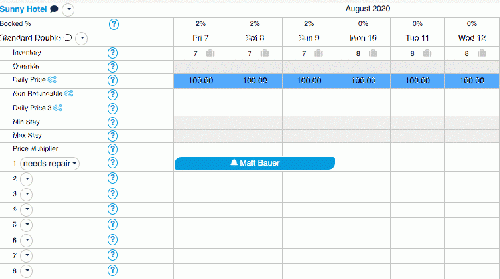
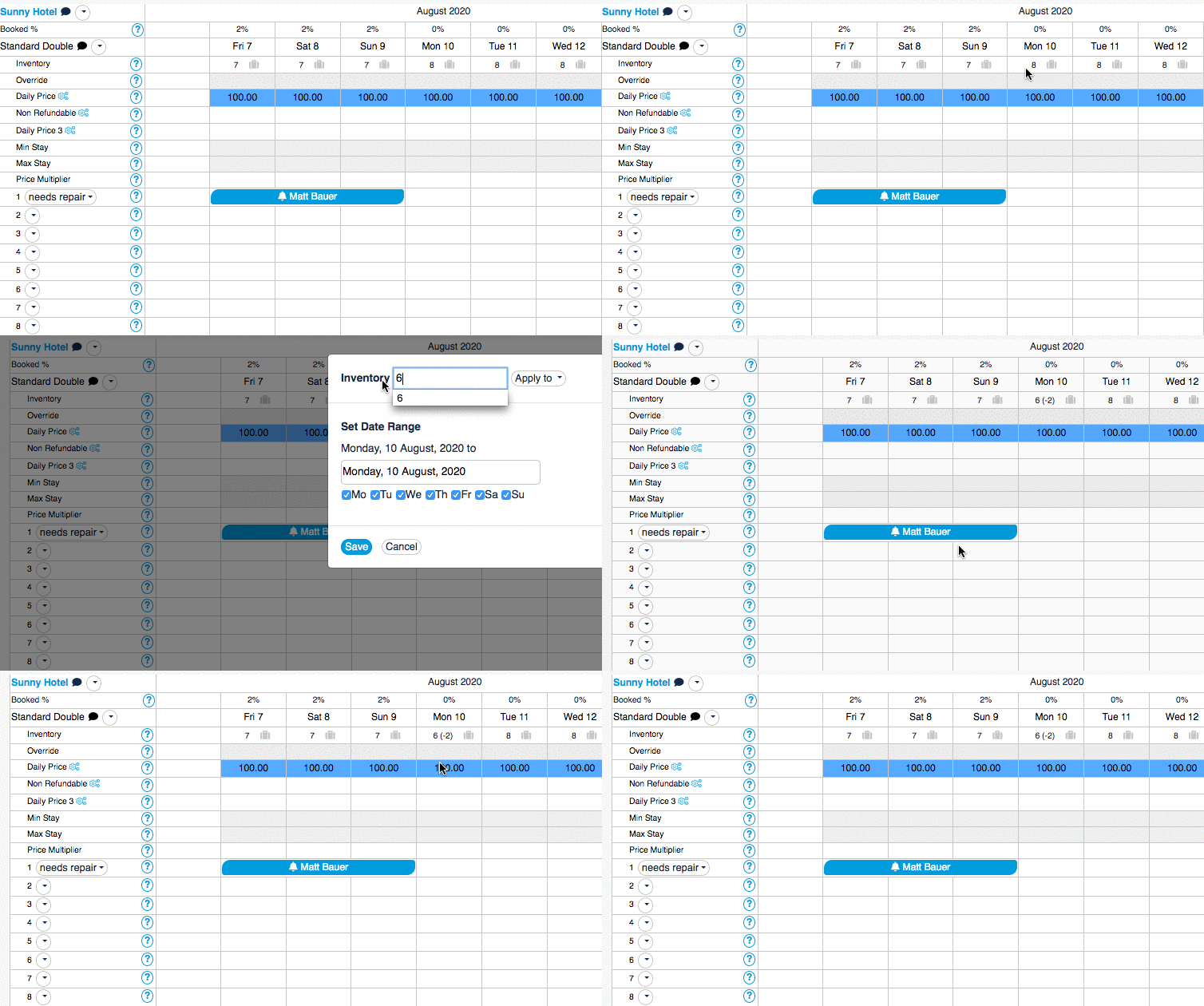
Enhanced inventory display in the CALENDAR
If you reduce the number of available rooms manually or via API you will see now in the CALENDAR by how many rooms the inventory was reduced.
7th August 2020
Fully automated contactless access with Nuki and Beds24
We are excited to announce that we partnered with Nuki. The Nuki Smart Lock is an electronic, retrofit door lock that can be installed on the inside of the door within a few minutes, allowing guests 24/7 self check-in via the Nuki app or by entering a 6-digit code. Beds24 will automatically send the key code or app access to guests.
Until 31.10.2020 Nuki offers Beds24 customers 15% discount for purchases of € 239 or more. Send us a support ticket for your discount code.
If you already have Nuki locks you can set the connection up in (SETTINGS) APPS & INTEGRATIONS > NUKI.
24th July 2020
Check how your properties perform on Booking.com
You can access your property score on Booking.com and suggestions on how to improve your properties performance Click here for instructions.
13th July 2020
User Forum upgrade
The user forum where you can search for answers to your questions and exchange with other users have been completely redesigend. To access the forum click on FORUM under SUPPORT.
1st July 2020
Google Map for the Multi Booking Page
You can now display add a map to the multi booking page which shows markers for all your properties. You can activate the map module in SETTINGS > BOOKING ENGINE > MULTI BOOKING PAGE > LAYOUT. Please check the context help for instructions and visit the forum for more information.
30th June 2020
Direct integration with Jomes
The direct integration which sends prices from Beds24 to Jomres which is available in (SETTINGS) APPS & INTEGRATIONS > JOMRES. The plugin which works the other way around meaning Jomres sends prices to Beds24 will continue to work.
26th June 2020
New interactive functions for the Dashboard
For the components "Arrivals", "Departures" and "Current Guests", "Modified Bookings", "Latest Bookings" you can add "CQ editable" custom question columns. These columns show the questions which are activated in (SETTINGS) PROPERTIES > BOOKING QUESTIONS and are editable.
Here you can find more information on the interactive Dashboard functions.
6th June 2020
Price per night in invoice
You can now select to display the loding price per for each night in the invoide. The setting for "Room Charge Display " is available in (SETTINGS) GUEST MANAGEMENT > INVOICE.
For now this option only works for direct bookings and uses the average price for each night.
28th May 2020
Susbstatus feature for specific reports
Next to the "Status" selector in the "Summary tab" of the booking we have added a second one which allows you to add a "sub status". The sub status has no direct effect on the booking. Its purpose is to hold information and allow you create custom reports according to this information. If required you can add the custom reports to your Dashboard. Examples are:
- To-Do list
- Waitinglist
26th May 2020
Offer guests to purchase refund protection on non refundable bookings
Offer your guests risk-free non-refundable booking with our new partner Refund Protect. If you activate Refund Protect in (SETTINGS) APPS & INTEGRATIONS your guests will be able to buy an optional refund protection which will cover them if they need to cancel a non-refundable booking.
For more information please see here.
20th May 2020
Facelift for the control panel
We have been working on a facelift for the control panel which is now released in open beta.
When you go to SETTINGS->ACCOUNT ->PREFERENCES you will see a new setting „Control Panel“ in SETTINGS->ACCOUNT ->PREFERENCES. Set to „New Control Panel“ to change. In the first step we have made a visual upgrade to the look and improved the navigation.
- Navigation
- Better mobile navigation
- Navigation on the left is collapsible. It opens via the settings icon on the left
- New "User" menu
- Accessible via the user icon in the top right corner
- Sub accounts was renamed to "Account Management"
- Price checker is now on every page
- The context help opens via the icon on the right
- All support functions are centralized under "Support"
Click here for more information.
7th May 2020
We have improved the menu structure to better reflect how most customers work
All menus related to Bookings have been grouped under the BOOKINGS menu:
- The GUESTS menu was moved there.
- The new MESSAGES menu will show messaging via channels. Click on HELP for further information on this function.
All menus related to prices have been grouped under PRICES:
- Daily prices can be set in the new DAILY PRICES grid.
- The RATES menu shows all rates in a list view and a calendar view.
- In CHANNEL MAPPING you can see all daily prices and rates which are activated for channel management.
- The YIELD OPTIMIZER was moved from the rooms menu on the left.
6th May 2020
Voucher codes for multiple properties
In SETTINGS > BOOKING ENGINE > MULTIPLE PROPERTIES you can now create voucher coldes which apply to all properties in the account.
2nd May 2020
Create reports on cancelled bookings
We have added a new column "Cancel Date" in REPORTS >CUSTOM REPORTS which allows you to create reports on cancelled bookings.
28th April 2020
Google Hotel Ads commission on completed stays and bids from 4%
Google has lowered the limit on commission bids. If you do not have many OTAs bidding against you you can get bookings for a 4% bid.
Also you can now choose to to pay commission on completed bookings instead of at booking.
For more information to to SETTINGS->CHANNEL MANAGER->GOOGLE ADS and then click on HELP in the top right
27th April 2020
Internal Notes added to "Info"
In addition to info codes you can now also add internal notes on the "Info" tab of the booking.
14th April 2020
Overview on pending payment
If you have created payments you can view them in in list under BOOKINGS.
11th April 2020
Google Hotel Ads
Google has lowered the limit on commission bids. If you do not have many OTAs bidding against you you can get bookings for a 4% bid. We have updated the knowledge base for COVID-19
April 6th 2020
Once-off voucher codes
You can now issue once-off voucher codes.
We have linked them in the knowledge base for COVID-19
March 15th 2020
Knowledge base to help you deal with COVID-19
For many hosts times are rough at the moment. We have put together a knowledge base to help you deal with the situation.
March 15th 2020
Beds24 supports 'Per Occupancy Pricing' with Booking.com
Occupancy pricing makes sending prices for different occupancies to Booking.com easy. For more information please see the Booking.com help page and check out our forum.
March 5th 2020
Number of offers increased to 15
From now on, 16 offers are available to you. Offer 1 is your standard offer, which is normally always available. Additional offers can be used to offer different price options or promotions on the booking page or to create internal prices.
March 3rd 2020
Airbnb listing import with prices
The listing import now pulls in rules and prices as daily prices. Importing from Airbnb is the quickest way to get a new property or room set up in Beds24.
For more information please see here
January 25th 2020
Delay Auto Actions based on info codes
The new setting "Booking Info Delay" will set a auto action t trigger only after the booking info item(s) have existed for the defined number of hours.
January 21st 2020
Send reports via EMail
You can now send standard reports and custom reports via Email.
To use this function go to SETTINGS->ACCOUNT->ROUTINES. For instructions please use the context help (? icons) and click on HELP (top right) of this page.
January 11th 2020
Fulfil legal obligations and collect documents via our new partner Chekin
Our partner Chekin.io automate the guest identification and legal obligations.
- Send guest forms automatically to the authorities.
- Generate the mandatory statistical reports on demand.
- Produce and store all documents required by law.
For more information please see here
January 10th 2020
Generate reports for bookings with expired credit cards
If the expiry date of the card is before check-in the info code CARDEXPIRES is added to the "Info" tab of the booking. If the card gets updated the info item gets deleted.
You have the option to set up a report which you can add to your dashboard.
January 8th 2020
Communicate with Airbnb guest directly from Beds24
- You can view all messages from the "API Messages" component on the dashboard.
- The complete message thread with a guest is available in "API Messages" tab in the booking. Attachments are available as links.
- You and your guests will see the messages in the channels extranet.
For more information please see here.
December 27th 2019
Multiple currencies
If you need to manage bookings in another currency than your default currency you can create an "invoicee" for the additional currency and assign the charges it. For more information on the invoice function please see here.
December 9th 2019
Zero Commission* bookings from Agoda Homes
Agoda Homes charges 0% per booking for single-room units (rent out entire places). Read more about advertising on Agoda Homes on our Agoda blog.
For information on how to set a connection up go to SETTINGS-> CHANNEL MANAGER -> AGODA and click on HELP in the top right.
November 26th 2019
Occupancy pricing for Agoda supported
You can now choose to send occupancy based prices to Agoda. When you go to SETTINGS-> CHANNEL MANAGER -> AGODA you will see a new setting "Pricing Model"
- If your pricing model is Per Day Pricing only single price, double price and room price will send.
- If your pricing model is Per Occupancy Pricing a price for each occupancy defined in Beds24 can be sent.
For details please see the Agoda help page.
November 21st 2019
Airbnb will be limiting iCal functionality
Airbnb have informed us that they will be removing guest information from their iCal data from Dec 1st 2019.
After this change, Airbnb iCal will contain little or no more than the booked dates.
As an Airbnb preferred partner our certified XML connection is more reliable than iCal and will continue to provide detailed booking information.
If you are still using Airbnb iCal we recommend changing to XML. You can choose to send only prices and availability if you do not want to change the content of your listings from Beds24.
To set the XML connection up please go to SETTINGS-> CHANNEL MANAGER -> AIRBNB XML and click on HELP in the top right for instructions.
October 30th 2019
Calendar link for guests
If you add one of the new iCal template variables to your confirmation messages guests will be able to add their booking dates to their calendars.
October 23rd 2019
Interface with eDreams Odigeo / Opodo
The interface allows you to automatically update prices and inventory to eDreams Odigeo and import bookings into Beds24. To set the connection up go to SETTINGS-CHANNEL MANAGER-EDREAMS ODIGEO. For instructions click on HELP in the top right of the page.
October 15th 2019
Trigger Auto Actions on template variables
You can now use template variables to generate dynamic trigger values based on the booking.
All template variables are available here. For information on how to set up Auto Actions go to SETTINGS->GUEST MANAGEMENT->AUTO ACTIONS then click on HELP in the top right.
October 8th 2019
Integration with RoomPriceGenie
This seamless integration allows Beds24 customers to push dynamic prices from RoomPriceGenie to their own web site and to their booking channels.
Click here for more information.
October 1st 2019
Strong customer Authentication in the EU
Strong Customer Authentication (SCA) comes into effect on September 14th in Europe.
This will affect EU based businesses charging cards issued within the EU. Non EU business’s and non EU cards should not be affected by the new rules.
Bookings from OTAs:
Collecting a credit card number without SCA will no longer be a reliable means of security as the card holders bank will likely reject the transaction. Many OTAs including Booking.com and Expedia can collect guest payments at the time of booking (channel collect) with SCA. The OTA will then distribute the funds to you by bank transfer or virtual credit card so you avoid the need to deal with SCA and declined transactions. Beds24 can automatically process the virtual cards on the day the funds become available at Stripe and deposit them directly to your account. If you require security or prepayment but do not want the OTA to collect payment, you can accept bookings without card or deposit from the OTA and send a payment request to the guest from Beds24 manually or using auto actions.
Direct bookings:
You can collect a card payment with the booking using SCA. If you require additional payments from EU guests you will need to send a payment request so the guest can complete the SCA again.
Payment Gateways:
Paypal and Realex will are taking care of the required functionality from their end.
If you enable ‘Strong Customer Authentication’ for Stripe in SETTINGS-> PAYMENTS -> PAYMENT GATEWAYS ->STRIPE , it enables SCA authentication for Stripe booking page payments and payment requests sent to guests.
Payment requests:
Payment requests sent to the guest after booking are an alternative to collecting a card from an OTA as security. Information on how to set up payment requests is available here.
You can find more information about SCA on our blog.
September 12th 2019
Set "Extra person" and "Extra child" prices in daily prices
There are two options to set an extra person/extra child price by specifying either a positive or negative value:
- A positive value will be applied to each additional guest above the "Maximum Guests" setting for the daily price. The daily price will be available up to the number of guests the room settings allow.
- A negative value will be deducted for each guest less than the "Maximum Guests" setting for the daily price. The daily price will not be available for more than the daily price Maximum Guests value.
There are limitations for channel management which are different for each channel. Channels do not accept children prices and most channels cannot accept the extra person price. Please see the daily prices help pages and channel help pages for more information.
August 19th 2019
Create Custom Graphs and Charts
You can now also create custom graphs and charts.
Like all custom reports graphs can be added to the DASHBOARD.
Go to SETTINGS -> REPORTS->CUSTOM REPORTS and click on HELP in the top right for further instructions.
July 30th 2019
Upgrade for Auto Actions sent to Airbnbn Guests
We can now send messages via the Airbnb messaging system. This means that you and your guests will see the Auto Actions which are sent from Beds24 in Airbnb. To use this function you need to:
1. Add a plain text version to your Auto Actions (Airbnb does not support HTML).
2. Upgrade the connection. This is how you do it:
- If you have multiple Airbnb accounts, log completely out of Airbnb.
- Log into Beds24. If you have connected more than one Airbnb account in Beds24 make sure you are logged into the Beds24 account/subaccount which is connected to the Airbnb account you are logged in.
- Go to Settings > Channel Manager > AirBnB.com XML > Specific Content
- Scroll down and click the 'Airbnb additional functions' link.
- Then click the button. This will take you to Airbnb where you should log into the Airbnb account connected to your beds24 account.
- Accept the new permissions and you will be returned to Beds24
To check the upgrade worked, log into your Airbnb account and go to ACCOUNT SETTINGS -> CONNECTED APPS. Click on 'Beds24. If you see 'Access and respond your messages' in the list of permissions, your upgrade worked.
July 24th 2019
Plain text option for Auto Action EMails
You have now the option to set up plain text versions for Auto Action Emails.
If you have both a HTML version and a plain text version the plain text version will be sent additionally as back-up for systems which do not support HTLM.
July 19th 2019
Create properties on Booking.com from Beds24
Create a new Booking.com account from Beds24
We are beta testing our new integration with Booking.coms content API. With this new function you can
- onboard new properties on Booking.com directly from Beds24 without having to enter your data in Booking.com
- create new Booking.com accounts directly from Beds24
This help page gives more information.
Send us a support ticket if you want to use these new functions.
July 10th 2019
View and respond to reviews from Booking.com from Beds24
To access Booking.com reviews from your DASHBOARD unlock the DASHBORAD click on the hamburger menu then on "Extentions" and add the Booking.com Review Module.
You can also access them via SETTINGS->CHANNEL MANAGER-BOOKING.COM->REVIEWS.
June 7th 2019
Increase bookings with new Airbnb service fee options
Airbnb now offers property managers using our XML connection two structures for their service fee.
The new Host-only fee gives you full control over your end rate by removing the guest fee so guests will see a 0 service fee throughout the booking process.
You can find more information for hotels here and more inforrmation for property managers here. Please also visit Airbnbs help center.
June 5th 2019
VactionStay by Rakuten added to the channel manager
The 2-way interface allows you to automatically update prices and inventory to VacationStay and import bookings into Beds24. To set the connection up go to SETTINGS->CHANNEL MANAGER->VACATIONSTAY. For instructions click on HELP in the top right of the page.
May 30th 2019
New menu for payment functions
We have added new payment functions and restructured the menus so all payment functions are available in SETTINGS->PAYMENTS.
May 11th 2019
Automatically report invalid cards to Booking.com
If you use Stripe and send all credit card details to Stripe you can set in SETTINGS->CHANNEL MANAGER to automatically report invalid cards to Booking.com.
May 9th 2019
Hostelsclub added to the channel manager
The 2-way interface allows you to automatically update prices and inventory to Hostelsclub and import bookings into Beds24. To set the connection up go to SETTINGS->CHANNEL MANAGER->HOSTELSCLUB. For instructions click on HELP in the top right of the page.
May 7th 2019
Manage Pending Payments
Customers using Stripe can automatically collect channel collect payments with virtual cards. To use this function you will need to adjust your setting for "Channel Collect Invoice" in SETTINGS->CHANNEL MANAGER to "Charges and Pending Payments" and adjust your set "Virtual Cards" = Yes on the channel pages of the channels which supply virtual cards i.E. SETTINGS->CHANNEL MANAGER->BOOKING.COM.
Pending payments can also be scheduled manually.
For more information see this help page.
April 25th 2019
Send WhatsApp messages to Guests
Click on the green icon next to the phone number in the "Summary" tab of the booking to send a WhatsApp message to guests.
April 23rd 2019
Multi Room Bookings across properties
When you click on "Add Booking" and then on "Price Check" and select "All" properties you can now add rooms from different properties to the cart.
April 8th 2019
Enhance the booking display in the CALENDAR with icons
This help page explains how to add icons to the bookings in the CALENDAR: https://wiki.beds24.com/index.php/Category:Bookings#Info
March 12th 2019
Company and State
Company and State have been added to the standard booking questions.
March 11th 2019
New template variables
We have added a range of useful new template variables:
[DAYSTOCHECKIN] - number of days until Check-in
[PERMITID] - the permit ID
[OFFERNAME1] - offer name for this booked room only
For group bookings: [BOOKGROUPROOMLIST], BOOKGROUPROOMLISTTOTAL], [BOOKGROUPROOMLISTCHARGETOTAL], [BOOKGROUPNAMELISTCHARGETOTAL] , [BOOKGROUPUNITLISTCHARGETOTAL], [BOOKGROUPUNITLIST], [BOOKGROUPUNITLISTTOTAL], [GROUPNOTE]
See all template variables here.
March 9th 2019
Copy settings
Where you see this a copy Icon you can click and then copy the value of this setting to other rooms or properties.
March 2nd 2019
Manage Booking.com promotions directly in Beds24
Promotions can set up, viewed and changed in SETTINGS-CHANNEL MANAGER-BOOKING-COM-PROMOTIONS.
February 22nd 2019
Mailchimp integration
We have just launched a new integration with MailChimp the probably most popular email marketing service available today.
Go to SETTINGS->APPS & INTEGRATIONS->MAILCHIMP to set up your integration. Beds24 will start to populate your mailing list with your guests, ready for your next newsletter.
January 24th 2019
Scheduled maintenance
Due to sheduleded maintenance Beds24 will be unavailable for 5-10 minutes on 30th of January between 3am and 5am GMT to perfrom important updates.
January 23rd 2019
Add multiple guests fo bookings
In the "Guests" tab of the booking you can now add additional guests and remove guests.
January 22nd 2019
Prices for different occupancies to Google Hotel Ads
Prices for 1, 3, 4 , 6 and 8 guest will now also be send if they are defined. Please note that a 2 person price is still compulsory. If no 2 person price is supplied the room will send as unavailable.
January 21st 2019
Booking.com Reservations Degradation - Resolved
Booking.com reported technical issues sending some XML booking notifications to partners on the 7th and 8th Jan.
The issue is reportedly now resolved.
f any bookings have still not imported, please contact us via support ticket with the Booking number and we will request a resend.
If these issues have resulted in an overbooking or any other loss, please contact Booking.com support and reference the Degraded performance of reservation retrieval issues from the 7th or 8th January.
January 9th 2019
Prices for different occupancies and different length of stay via Airbnb XML
You can now send prices for different occupancies and different length of stay to Airbnb. If you want do use this option please go to SETTINGS-CHANNEL MANAGER-AIRBNB XML- SPECIFIC CONTENT and change the setting for "Price Strategy" to "Per Occupancy Pricing. Please read the information under "Prices" on the Airbnbn help page before you change the setting.
January 2nd 2019
Company and State added to booking questions
Happy New Year!
If you want to ask your guests for their "Company" and / or "State" you can do this now using a "Standard Question" which you can activate in SETTINGS-PROPERTIES-BOOKING QUESTIONS.
December 31st 2018
Integrate with myriads of apps and services via Integromat
Thanks to our new integration with Integromat, the most advanced online automation platform, you have now have unlimited access to myriads of apps and services.
The seamless integration allows you to connect your favourite tools with a few clicks to Beds24. Available connections include popular accounting software like Xero and Quickbooks, Twilio, Google services, CRM systems like Salesforce, Zoho as well as Slack and Zapier.
You can set the connection up in SETTINGS-APPS AND INTEGRATIONS-INTEGROMAT. For instructions click on HELP in the top right of the page.
December 19th 2018
Connect Guest Experience Tools
Our partners Wishbox and YourWelcome who provide exciting tools which will improve your guests experience integrate smoothly with Beds24.
December 14th 2018
Automatically assign invoice numbers
If you want to automatically assign invoice numbers you can set up an Auto Action in SETTINGS-GUEST MANAGEMENT-AUTO ACTIONS. These instructions explain how to do this.
December 12th 2018
New Booking Page Check-out Screen
We have modernized the look of the check out screen and added new features.
- Upsell items can show a picture, a headline and a descriptive text. To add or change extras go to SETTINGS -> BOOKING ENGINE -> UPSELL ITEMS
- Modern look and better mobile support.
If you want to use the new version of the check out page, change SETTINGS -> BOOKING ENGINE "Check-out Page Version" = Responsive.
December 3rd 2018
Google Maps on the Booking page now need an API key
Google has changed their licensing for using a Google Map. The optional map on your booking page now requires a Google maps API key and will not work without one. There is a free quota per month for each API key but you do have to sign up for a free plan and you have to enter your credit card details.
You will need a Google Account in order to get your API key via this link.
Once you have your maps API key you can enter it into the Beds24 at {#fas:cog}} (SETTINGS) > BOOKING ENGINE >DEVELOPER. Your map should then work.
November 24th 2018
Upgrade your Airbnb XML connections to "synchronous availability check"
Airbnb has now implemented the option to check availability and accept or reject a booking at the very last step of the booking process, when the guest enters their payment method.
The normal XML availability check is performed when the guest first clicks the book button. Airbnb does not limit the time they give a guest to complete the booking so it is possible the room can become unavailable before the guest completes the booking.
By upgrading your Airbnb connection, both checks will be performed. The upgrade requires granting Beds24 permission to accept or reject reservations in your Airbnb account.
How to upgrade:
- If you have multiple Airbnb accounts, log completely out of Airbnb.
- Log into Beds24. If you have connected more than one Airbnb account in Beds24 make sure you are logged into the Beds24 account/subaccount which is connected to the Airbnb account you are logged in.
- Go to Settings > Channel Manager > AirBnB.com XML > Specific Content
- Scroll down and click the 'Airbnb additional functions' link.
- Then click the button. This will take you to Airbnb where you should log into the Airbnb account connected to your beds24 account.
- Accept the new permissions and you will be returned to Beds24
To check the upgrade worked, log into your Airbnb account and go to ACCOUNT SETTINGS -> CONNECTED APPS. Click on "Beds24". If you see "Accept and decline reservations" in the list of permissions, your upgrade worked and a final check of availability will now be made at the end of every booking process.
October 28th 2018
Enhanced Daily Price Functions
You can now also set "Min days until Check-in" and "Max Days in Advance" for Daily Prices". The new settings are available at SETTINGS > PROPERTIES > ROOMS > DAILY PRICES
Smart Template Variables
Smart template variables will display the set contend only if a certain condition is met or not met. For instructions an examples please see here.
October 14th 2018
Upgrade to invoice functions
We have upgraded the invoing functions. New functionalities are:
- Option to lock invoices after an in inovice number has been assigned.
- Invoicees can be changed or removed.
- If you need a different invoice template for certain channels you can set this in the channel manger settings (currently for Booking.com and Expedia). Use the channel help pages for details.
Click here and here for detailed information about invoices.
September 26th 2018
XML interface with Despegar / Decolar
The 2-way interface allows you to automatically update prices and inventory to Despegar / Decolar and import bookings into Beds24. To set the connection up go to SETTINGS-CHANNEL MANAGER-DESPEGAR. For instructions click on HELP in the top right of the page.
September 14th 2018
Booking.com Outage - missed bookings
Due to an issue at Booking.com, some bookings and cancellations have not been sent to us on September 4th between 10:36 CEST and 11:08 CEST.
Booking.com have reported that they are working on sending all missed bookings by the enf of the of Sept 5th.
September 4th 2018
Import a listing from Airbnb to create a new property or room
If you have a listing on Airbnb you can import it and create a new property with a new room or add a room in a property you already have in Beds24.
Click here for instructions.
Security Update
Regular password changes are highly recommended to keep data secure.
From now on you will only be able to view credit card details if you have changed your password within the last 90 days.
If the password has not been changed, all other functions will continue as normal but cards will not be visible until the password is changed.
You can change your password at the menu SETTINGS -> ACCOUNT -> ACCOUNT ACCESS.
August 27th 2018
Create your own invoice table
You have not the option to create your own invoice table.
Click here for more information.
August 23rd 2018
Airbnb XML connection simplified
Airbnb has added new features to their API which simplify the set up significantly:
- No more navigating in Airbnb to publish:
- You can now merge existing listings and select sync settings directly in Beds24 when you first send a room.
- New listings added through Beds24 are now automatically published without the need to visit the Sync page in Airbnb.
- No need to send full content if you only want to sync prices and availability.
- Seamless transfer of listing registration info in markets that require it. Registration details added in Beds24 automatically sync to Airbnb listings. This feature is live now for Japan and support for other markets will be released shortly.<
The updated set up instructions explain the new process.
August 18th 2018
Upgrades to the Beds24 API
Customers using the Beds24 API can now also use it to import/export content like descriptions and pictures.
The functions are documented directly in the API.
August 1st 2018
Notes per property or room
You now also can add notes for a property a room in the CALENDAR. When you have added a note a note icon will display on which you can hover.
July 16th 2018
Attach invoices or booking templates to Emails
You can now choose to attach an invoice or a booking template as pdf in the "Email" tab of Auto Actions. Auto Actions can be created in SETTINGS->GUESTMANANGEMENT->AUTO ACTIONS. For instructions click on HELP at the top right of the page.
July 13th 2018
New options for minimum stay and maximum stay
You can now override the maximum stay in the CALENDAR
July 5th 2018
Google Hotel Ads
Beds24 is now a Certified Google Hotel Ads Integration Partner
Google Hotel Ads commission is only charged per booking, there is no pay per click cost as with Google Adwords.
Activate Google Hotel Ads and set your commission bid at SETTINGS->CHANNEL MANAGER->GOOGLE HOTEL ADS
June 5th 2018
Airbnb XML now supports room types with multiple rooms
Airbnb have recently officially opened their portal to Hotels, B&Bs and they now support room types with a quantity greater than one. Previously each Airbnb listing could only be for one unique room.
You can now connect your room types directly in SETTINGS -> CHANNEL MANAGER -> AIRBNB XML.
May 15th 2018
Booking page Facelift
We have created new options for the reponsive booking page:
- Display an image or picture slider in full width with date selectors as shown here. The new default template 7 comes preset with this option.
- Split dates for the calendars and price tables as shown here.
- Box shadow around rooms (property booking page) and properties (multi-property booking page) as shown here.
- Updated the Booking Engine -> Booking Page -> Layout menu.
Information about the new options is available here.
April 6th 2018
New Airbnb XML features
Airbnb has officially opened up its platform to hotels and B&Bs which meet Airbnb's standards. Also new regions such as Italy and Amsterdam are now allowed to use the Airbnb XML interface.
New settings at SETTINGS -> CHANNEL MANAGER -> AIRBNB XML -> SPECIFIC CONTENT include:
- A new setting "Check-in Type" can specify the type of check in available at the property.
- A new setting "Property Type Group" specifies the listing categorization at Airbnb.
- Information about shared spaces and bathrooms can be specified.
March 20th 2018
Address check for Stripe
You can now have Stripe check the address along with the card. This function only works for bookings from the booking page and payment requests and is available in SETTINGS->PAYMENTS PAYMENT GATEWAYS->STRIPE.
March 19th 2018
Prevent accidental changes to room assignments
The info codes LOCKROOM or LOCKUNIT prevent manual room changes by staff.
Here you can find more information.
February 5th 2018
XML interface with HRS
The 2-way interface allows you to automatically update prices and inventory to HRS and import bookings into Beds24. If you want to use this connection please send us a support ticket.
February 9th 2018
Prevent accidental changes to room assignments
The info codes LOCKROOM or LOCKUNIT prevent manual room changes by staff.
Here you can find more information.
February 5th 2018
New Payment Gateway: Asiapay
Asiapay is a payment provider available in many Asian countries.
Please send us a support ticket if you want to use Asiapay.
December 11th 2017
XML interface with Traveloka
The 2-way interface allows you to automatically update prices and inventory to Traveloka and import bookings into Beds24. To set a connection up go to SETTINGS -> CHANNEL MANAGER -> TRAVELOKA. For instructions click on HELP in the top right menu of this page.
December 11th 2017
XML interface with Asiatravel
The 2-way interface allows you to automatically update prices and inventory to Asiatravel and import bookings into Beds24.
To set a connection up go to SETTINGS -> CHANNEL MANAGER -> ASIATRAVEL. For instructions click on HELP in the top right menu of the page.
October 13th 2017
Send payment requests to guests
We have created a special link to send a specific payment request to a guest.
Send the request to the guest by email or auto action using template variables and they can click on the link and be taken to a secure page to make a payment or enter their card details.
For instructions click here.
September 27th 2017
Guest Login
A guest login is also available with the payment request or can be used separately.
See here for more information.
September 27th 2017
Ctrip certifies 2- way XML integration with Beds24
We are pleased to announce that Chinas leading OTA Ctrip partnered with Beds24 to offer XML connectivity. The new 2-way interface allows to automatically update their prices and inventory to Ctrip and import bookings into Beds24 in real time.
To set a connection up go to SETTINGS > CHANNEL MANAGER >CTRIP. For instructions click on HELP in the top right menu of this page.
August 4th 2017
Enhanced Daily Price Functions
Each room type can now have up to 10 daily prices. Each daily price can have occupancy and min stay rules and individual mapping to channels.
Daily prices can now be linked with offsets so adjusting the base price will auto update all the linked prices.
The new settings are available at SETTINGS > PROPERTIES > ROOMS > DAILY PRICES
July 13th 2017
Adjust Inventory sent to Channels
The menu SETTINGS -> CHANNEL MANAGER -> CHANNEL INVENTORY allows you to set the maximum number of bookings per date from selected channels.
You can close the room to new bookings or set a limit on the number of bookings you will accept.
For detailed instructions how to use this function click on HELP (top right menu) of the SETTINGS ->CHANNEL MANAGER-> CHANNEL INVENTORY page.
June 23rd 2017
New Booking Widgets
The new widget designer makes it easy to create custom booking widgets for your web sites. Key features are:
- widgets for individual properties, individual rooms or multiple properties
- booking strips, booking boxes
- availability calendars for one or multiple months
- over 30 languages
- fully customisable
Visit our web site to see some of the almost unlimited options.
The new widget designer is available at SETTINGS ->BOOKING ENGINE-> BOOKING WIDGETS. For instructions please use the context help (? icons) and click on HELP (top right menu) of the page.
June 7th 2017
Booking Grid with drag and drop function
In the BOOKINGS menu you can now choose from three views. The new Booking Grid view shows all bookings and rooms in a grid. You can easily drag and drop bookings to move to a new room.
May 30th 2017
Price Export to Wimdu
We have upgraded our Wimdu.com connection to now send a room price and minimum stay for every date. The data is sent via the existing iCal connection so if you are using Wimdu all you need to do is enable prices.
To enable Wimdu prices go to SETTINGS -> CHANNEL MANAGER -> WIMDU and tick "Prices" and save.
May 12th 2017
XML Interface with HomeAway Group
Property managers with five or more listings can use the XML connection for mayor HomeAway sites such as VRBO.com, abritel.fr, aluguetemporada.com.br, fewo-direkt.de, homdelidays, ownersdirect.co.uk, vacationrentals.com.
The connection needs to be requested from HomeAway. If HomeAway allows XML use you will be able to automatically update listings, prices and availability directly from Beds24.
If you are interested please follow these instructions.
As an alternative to the XML interface we still offer the iCal based connection which can synchronise availability and bookings.
April 24th 2017
Two-Way Interface with Ostrovok now live
Beds24 connects to Ostrovok.ru Russia’s leading and fastest growing online hotel booking channel. The interface allows you to send real-time rates and availability to Ostrovok and have bookings automatically delivered to Beds24.
For detailed set up instructions see the Ostrovok help page.
April 4th 2017
New Booking import for Tripadvisor Vactation Rentals (Flipkey and Holidaylettings)
Tripadvisor now provides an export calendar which Beds24 can read to import bookings.
The iCal booking import can be setup in SETTINGS->CHANNEL MANAGER->FLIPKEY. It will work for any Tripadvisor account that provides an export calendar.
This iCal booking import replaces the Holidaylettings email import which is now obsolete. If you are using the Holidaylettings email import, please switch to the iCal method.
March 25th 2017
Invoices for corporate clients or agencies
By default every booking (or group booking) has one invoice. A new function allows you to assign some or all of the invoice items to a specific invoicee or create multiple invoices per booking. For example:
- Agents make bookings and pay for accommodation and guests pay for any extra items
- Companies making bookings and pay for bookings for employees
- Guests making multiple and or repeat bookings.
March 15th 2017
Full Two-Way XML connection with Airbnb
We proudly announce that Airbnb has chosen Beds24 as interface partner.
Together with Airbnb we will explain to you on Wednesday February 15th at 5:00pm MEZ how to create an ideal profile and use the XML interface.
To participate in this free webinar just clicking this link on February 15th at 5pm MEZ.
February 13th 2017
Show features on your booking page
The responsive booking page can now show property and/or room features. Room features can be entered in SETTINGS->ROOMS->SETUP property features can be added in SETTINGS->PROPERTIES->DESCRIPTIONS.
To show the features you will need to activate the new features module in SETTINGS-> BOOKING ENGINE -> BOOKING PAGE->LAYOUT.
January 27th 2017
Connection with BookingSuite Rate Manager by Booking.com
Beds24 and BookingSuite worked together to develop a two-way interface between Beds24 and BookingSuite’s revenue management solution RateManager.
Any pricing changes made within RateManager are instantly pushed to Beds24. More information
January 5th 2017
Price Check added to "Add Bookings"
When you click on "Add Booking" you will now see a button "Price Check". When you click on it you can
- see a list of all available rooms
- also see unavailable rooms if you tick "Show unavailable"
- see how the price/availability is calculated by clicking on the "Calculate" button
- book a single room
- book unavailable rooms or multiple rooms in one property by selecting the rooms and clicking on "Book Selected"
December 22nd 2016
Integration with Kashflow accounting software
Beds24 integrates with Kashflow accounting software. This allows you to automatically send invoice information from the booking to Kashflow.
For more information click here.
Click here to get a Kashflow account.
October 17th 2016
New dashboard available
Fully customisable - choose which content to display, where to display it, move and re-size of each component.
- Components include booking reports with customisable columns, graphs, statistics, custom reports, notes and potential issues.
- The quick check-in and check-out function allows guest check-in and check-out directly from the dashboard.
- A housekeeping component makes housekeeping and room management easy.
- Up to four different dashboards per account.
Click on the "Try" link to load the new dashboard. For more information visit the Dashboard help page.
Click on the the menu icon (right side of screen) to customise the new dashboard or return to the original dashboard. More information
October 12th 2016
New Functions Button
The new FUNCTIONS button in the top left menu of the control panel opens a page with links to the menu pages for key features and functions.
October 6th 2016
Integration with PriceLabs
This seamless integration allows Beds24 customers to push PriceLabs data-driven pricing to their own web site and to their booking channels.
PriceLabs algorithm uses data from multiple sources such as occupancy, weather, tourist demand, special events, and historical booking trends to calculate nightly rates that can improve occupancy and and revenue. For more information click here
September 23rd 2016
Interface with trivago is live
The interface with trivago Direct Connect allows hotels to advertise their rates and run cost-per-click (CPC) marketing campaigns on trivago. For activation and set up instructions go to SETTINGS->CHANNEL MANAGER -> TRIVAGO. Click here for more information.
August 22nd 2016
Deposit Payment Options Update
We have modernized the deposit payment page with an accordion system to better support multiple payment gateways.
Each payment gateway can have it's own title and text instruction. New options for "Offline Payment", "Credit Card" and "Custom Payment Gateway" are also available.
If you are using deposit collection on your booking page we recommend you check the new display format, especially if you:
- allow more than one payment option
- have offline payment (custom instruction) activated
- have applied custom CSS to the page
For more information visit the help page for Deposit Collection.
August 15th 2016
New Room Management functions
You can now generate a report which also contains the notes about a unit and set up an Auto Action which automatically changes the status of a room when a guest arrives or departs. See this help page for more information.
August 11th 2016
Use externally hosted pictures on your booking page
Instead of or additionally to pictures uploaded to Beds24 you can now also use externally hosted pictures. External pictures have to be hosted securely (HTTPS not HTTP). The menu is available in SETTINGS->BOOKING ENGINE->PICTURES->EXTERNAL. For more information have a look here.
Aug 5th 2016
Upgrade for Custom Reports
A range of new options have been added to the custom reports. When you go to REPORTS->CUSTOM REPORTS you will these new options in the list of "Available Columns".
- "Upsell Items" - this allows you to generate reports for one or multiple upesell items which you have set up in SETTINGS->BOOKING ENGINE->UPSELL ITEMS.
- "Extra Invoice Items" - this allows you to generate reports for one or multiple extras which you have set up in SETTINGS->GUEST MANAGEMENT->INVOICES.
- "Invoice Status Values" - this allows you to generate reports for the "Status" you have entered in the "Charges and Payments" tab of the booking.
June 14th 2016
Search function for manually added bookings
When you manually add a booking you can now search for repeat guests. The search looks for matches in the guest database. A click on the guest will enter the information from the guest database into the booking.
This function is available in the Price Wizard. If you are not using the Price Wizard you can activate it by changing the setting for "Add New Bookings" in SETTINGS->ACCOUNT->PREFERENCES.
May 2nd 2016
Upgrade for the Facebook APP
The Facebook App can now also display the multi property booking page.
Unfortunately Facebook does currently not show custom tabs on mobile. We suggest you add a "Book Now" Call-to-Action button which will also display on mobile devices.
For more information have a look here.
April 25th 2016
New "Info" Tab for Bookings
The new "Info" tab show a summary of the booking information and if the booking comes from a channel important channel information.
You can quickly add "Info Codes" from a pre set list or manual notes. These info codes can be used in custom reports to show or hide selected bookings.
The tab is fully customisable or can be hidden. For more information have a look here.
Report invalid credit cards and no-shows to Booking.com
You can not report invalid cards and no-shows directly from the "Details" tab of the booking.
April 8th 2016
Room Management
When you look a the CALENDAR you will see that we have added a "Status" option for all units. This allows you to set a status for each unit and/or add a note. The status pre sets can be customised so you can use your own criteria to mark a unit. See this help page for more information.
March 22nd 2016
Upgrades to bookings
1. Additional functions for all bookings:
- All upsell items be selected as from a drop down list in the “Charges and Payments” tab.
- Those of you who work with sub accounts will now also see all auto actions set up in the sub account as manual auto actions in the “Mail” tab.
- When you split a booking you and now choose to copy or not copy charges.
2. Manually added bookings:
- You can now select each which offer should apply.
- You can create "internal" prices which are only available in the control panel but not for online bookings. This tutorial explains how to create internal prices.
March 11th 2016
Hostelbookers interface live now
We can now sync with your Hostebookers listing. If you are already connected to Hostelworld there is nothing else you need to do. For a new connection go to SETTINGS->CHANNEL MANAGER->HOSTELBOOKERS. For instructions click on HELP.
February 2016
New Group Booking Functions
You can now perform bulk changes on group bookings. For more information see help page.
February 13th 2016
Display of last booked date
We have added a new setting to change the display. When you go to SETTINGS->ACCOUNT->PREFERENCES you can change "Show Booking End Date" to "Check-out".
February 9th 2016
FLIPKEY - Important Upgrade information ACTION REQUIRED
We have received confirmation from Flipkey that they will make their XML available to us to update their calendar for Flipkey customers with 5 or more bookings.
The XML only allows calendar updates. We are planning to introduce a method of parsing booking emails to import Flipkey bookings in the near future.
January 15th 2016
Additional Template Variables
We have added a number of new template variables amongst them smart mathematical template variables and template variables to create custom date formats. For a complete list click here.
January 13th 2016
Beds24 has been appointed Preferred IT Provider status with Booking.com
We are very proud of this recognition of the quality of our services. Amongst the criteria Booking.com measure are performance, reliability and quality of the interface as well as agility, flexibility and the ability to adapt to innovations.
January 4th 2016
Responsive Booking Page Beta Test
We have created a new responsive booking page which is more mobile friendly. The use of modules allows you to control the screen position and hide specific items from the mobile view to keep it clean and uncluttered. This demo page shows a few of the many options.
If you want to give it a go please see these instructions. Please note that if you change to the new “Responsive” design your live booking page will immediately change. You can always change back to your original booking page at any time.
Dec 21st 2015
Synchronisation with Hotelbeds
Beds24 now integrates with Hotelbeds. For more information see the Hotelbeds help page.
December 1st 2015
Assign unique consecutive invoice numbers
You can now assign a unique consecutive invoice number for each booking by clicking on "Assign Invoice Number" in the "Invoice" tab of the booking. Invoice numbers are generated per account or sub account. The default starting number is 1 and it will increment with each assingment. The starting number can be changed at SETTINGS->ACCOUNT->PREFERENCES "Next Invoice Number". The invoice number can be displayed or printed with the template variable [INVOICENUMBER].
Nov 21st 2015
Channel Management with Homeaway/VBRO
A specially constructed Ical based connection can now keep Homeaway/VBRO calendars synchronised. For more information please see the Homeaway/VBRO Ical help page .
Nov 3rd 2015
Use Auto Actions to trigger SMS messages
A newly added function allows to trigger SMS messages to a fixed phone number. To set this up go to SETTINGS->GUEST MANAGEMENT->AUTO ACTIONS.
Oktober 6th 2015
Yield Optimiser
The newly added yield optimiser can adjust prices up or down based on remaining availability and time to arrival. For more information go to SETTINGS->YIELD OPTIMISER and the yield optimiser help page.
September 29th 2015
Currency Conversion
Smart template variables are now available to auto convert the values from the booking into another currency.
August 26th 2015
TripConnect Instant Booking now available
Beds24 is now certified as a TripConnect™ Premium Partner. All Beds24 users who are eligible can now accept direct booking from TripAdvisor using using TripConnect™ Instant Booking. For more information please see these instructions.
August 18th 2015
Channel Manager Updates up to 2 Years in Advance
The channel manager can now update up to two years of data on channels which support this.
June 23th 2015
New Channel Management Connections with 9flats and Housetrip
Specially constructed connections can now keep Housetrip and 9flats calendars synchronised. For more information please see the 9flats help page and the Housetrip help page.
June 12th 2015
New Group Booking Functions
Bookings can now be easily grouped together to create a combined invoice. The new functions are on the "Invoice" tab of the bookings pop up window. For more information please check this help page.
June 1st 2015
Control Panel gets a facelift
We have redesigned the control panel to make it easier for you to use:
- The blue bar at the top of each page contains links to all help functions.
- An "Add Booking" button and a search field will shortly be available on the top right of every page.
- Buttons now have colors and icons indicating which actions they perform.
- REPORTS can now be accessed directly from the top menu. The "Reports" menu in SETTINGS has been removed.
May 20th 2015
Automatically Recalculate Price and Auto Populate Invoice Description
Two new functions have been added to the "Invoice" tab of bookings:
- The "Recalculate Price and Charges" button allows you to recalculate the price after you have made changes in the booking (for example changed dates).
- Template variables can now be used to insert information from the booking into the invoice description. To customise your description go to SETTINGS->GUEST MANAGEMENT->INVOICE" Invoice Description". If left blank the default description will be the room name followed by check-in and check-out dates.
April 20th 2015
Split Bookings for multiple rooms
The new "Split" function in the invoice tab of a booking can be used to split a booking for multiple rooms into separate bookings so each can be assigned to an individual room. All split bookings will be linked so they can be easily managed.
April 17th 2015
New Override functions in the CALENDAR
Use the daily override function in the control panel CALENDAR to disallow arrivals and/or departures on specific days without closing the room to guests staying through. For more information please see the help page for the CALENDAR.
March 20th 2015
Upgrade Price Check Tool
If you can not work out where a price is coming from or why no price is displayed the "Price Check Tool" will show you the prices and rules which apply to a certain booking condition. Links to open the tool are available on the RATES, CALENDAR and SUPPORT pages.
March 11th 2015
Weekly Rates
The new setting "Prices per" allows you to create rates for weeks, month or other periods. Have a look here for instructions. Jan 19th 2015
Killer Rates
A new setting has been added to the rates. If you set "Strategy" = "Do not Allow Any other Rates" this rate will override any other rates. This allows you to quickly adjust your rates for certain periods.
Jan 12th 2015
Atraveo added to the Channel Manager
Happy to announce the latest addition to the channel manager. To connect go to SETTINGS->CHANNEL MANAGER->ATRAVEO.
Dec 18th 2014
Guest Database
The newly added Guest Database lets you to not only view a guests previous and upcoming bookings but also store additional information, preferences and add bookings using the guests data. Click on GUESTS to use the functions.
December 10th 2014
Security Alert
You might have read about security issues around phishing in the hospitality industry.
Criminals are gaining access to guest data and using it to contact the guests asking for full payment in advance. The guest thinks it is the hotel and transfers the money to the criminal.
All the criminal needs is the email address or contact information for the guest. Read here how criminals are gaining access to guest data and how you can protect yourself.
December 10th 2014
Tripadvisor Review Express now available
Automatically upload your booking contacts to Tripadvisor and Tripadvisor will contact your guest asking for a review of their stay a few days after check-out. You can cancel a review request being sent to any guest up to and including check-out day. Opt in to the service in the menu SETTINGS->CHANNEL MANAGER-> TRIPADVISOR. For more information please use the setup instructions.
November 18th 2014
Customisable Reports
You can now create and store custom reports at the menu SETTINGS->REPORTS->CUSTOM REPORTS.
October 1st 2014
VAT Invoices
If your prices include VAT you can now generate invoices showing how much VAT is included. The default VAT can be set in SETTINGS->PROPERTIES->BOOKING RULES. The template variable for a VAT invoice is [INVOICETABLEVAT].
September 11th 2014
Norwegian and Slowenian added to the booking page
The multi language function can be activated in SETTINGS -> BOOKING PAGE-> INTERNATIONALIZATION.
September 5th 2014
Mobile Friendly Control Panel
After you logged in today you might have noticed the control panel looks slighly different. The reason is improved mobile use. We will keep working on this and keep you posted on the upgrades.
August 20th 2014
Upgrade to Booking Page Logs
The booking page logs have been upgraded showing more detail on the activities on your booking page. The new "Export" function lets you download the data so you can analyse the data further.
August 5th 2014
Resend Booking Confirmation
The booking confirmation to guests is now listed in the "Mail" tab of the booking. You can see when it was sent and resend it if required. This function is available for all bookings.
July 9th 2014
Customise Host Notifications
You can customise the host notification now. In SETTINGS->ACCOUNT->HOST NOTIFICATIONS you will now have a field where you can use template variables to add more information to the notification Email.
July 6th 2014
Accept Bitcoins We can offer you two new options to collect deposits:
- Accept Bitcoin
- Add a custom payment link to ask for a cheque or bank transfer
The new functions are available in SETTINGS-> PAYMENTS
June 18th 2014
Major Upgrades to the CALENDAR
You might have already noticed that we have added new functions to the CALENDAR:
- Min Stay: Set a minimum stay
- Price Mulitplier: Adjust all rates by a percentage
- Occupancy per property
Have a look here for a complete overview on all the functions (view and add bookings, view rates, block out dates, add notes).
Danish added to the booking page
The multi language function can be activated in SETTINGS-> ACCOUNT-> LANGUAGES
June 16h 2014
Stripe added Payment Processing Options
With Stripe we are offering another option to collect deposit payments. Stripe allows you to collect outstanding amounts. Once a payment is successfully collected further charges can be made to the customer's card via Stripe. The menu for this is available on the Booking -> Invoice Tab.
June 4th 2014
More Options to Quickly Adjust Prices
When you go to the CALENDAR you will see two new options:
Minimum Stay: Sets a minimum number of nights stay for bookings which include a stay on this night. This minimum stay value cannot be lower than that set for the room. When left empty the minimum stay set for the room will be applied.
Price Mulitplier: Applies between 50% and 250% to all prices on this day. The adjustment will affect both your booking page and channel management prices.
May 23rd 2014
Enquiry Form Widget
We have created a new widget which allows you to embed an enquiry form into your web site. It gives guests the option to send you a message with their booking request. The new widget is available in SETTINGS->BOOKING WIDGETS->ENQUIRY FORM.
May 9th 2014
holidaylettings.co.uk now connected
Happy to announce the latest addition to the channel manager.
May 1st 2014
Add New Booking Wizard
We have made adding a manual booking more comfortable. The new functionality lets you auto insert rates and add extras and calculates the price based on your rates and booking rules.
Guest Registration Form
A new template has been added which lets you print a booking with custom information. The default is a guest registration form but you can change it to suit your needs. Customisation can be done in SETTING->GUEST MANAGEMENT-> BOOKING TEMPLATES. Forms can be printed directly from the booking.
Hide Unavailable Rooms or set Room Order on your Booking Page
The new setting is available in SETTINGS->BOOKING PAGE->PAGE DESIGN "Room Order".
April 25th 2014
New option for template Emails
When you open a template Email (SETTINGS-> GUEST MANAGEMENT -> EMAIL TEMPLATES ) you will see two new settings: "Send to Guest" and "Cc Email Address". These allow you for example to create templates to send:
- to guests cc staff
- to staff or third parties only
April 16th 2014
Gap Filler
With the "Gap Filler" rate strategy you can create a special rate which is only allowed if less than a certain number of consecutive nights have availability. This allows you to accept bookings for less nights than your normal minimum stay when you have gaps. More information
April 15th 2014
Finnish, Russian and Swedish added to the booking page
The booking page is now available in 15 languages. The multi language function can be activated in SETTINGS-> ACCOUNT-> LANGUAGES
March 14h 2014
Allow Enquiries when Your Booking Page Shows no Availabiilty
If you enable "Allow Enquiries" in a rate the booking page will show a link to an with the text "Enquire" linking to a form instead of --- . The enquiry form will only be available between the start and end dates of this rate and if no price can be found but the room is not fully booked. To give you maximum control the new function can be activated per rate.
You can set a custom text to display before the entry fields in SETTINGS-> BOOKING PAGE -> CONTENT.
To see an example have a look at our demo page.
March 10th 2014
New Functions for Email Templates
Many of you are use template Emails to send out payment requests. To make this more comfortable we have added the option to the invoice balance.
Feb 26th 2014
Hostelworld has been Added to the Channel Manager
You can now sync your rates and availability with Hostelworld.
Feb 20th 2014
Booking Information can be Added to iCal Export
The "Help" in SETTINGS-> CHANNEL MANAGER -> iCAL Export explains how to set it up.
Daily Price Import and Export added to API
The API can now also import and export daily prices (not rates). To access the API go to https://api.beds24.com
Feb 11th 2014
Wordpress Plugin Update
Improved functionality for individual and multiple properties. Shortcodes add booking widgets to posts, pages and sidebars.
Feb 10th 2014
Tablet Hotels has been added to the Channel Manager
Tablet Hotels is now channel management partner. The two way connectivity will keep your rates and inventory synchronised.
Jan 10th 2014
Budgetplaces hast been added to the Channel Manager
Budgetplaces experts for 1, 2 & 3 star hotels, hostels, apartments and bed & breakfasts worldwide is our latest channel management partner. The two way connectivity will keep your rates and inventory synchronised.
Dec 11th 2013
Display Average Prices per Night and/or Prices per Person
Two new settings in SETTINGS -> BOOKING PAGE -> DESIGN allow you to choose between a price display per room or (NEW) per person and show the summary as the total or als (NEW) average price per night.
Nov. 25, 2013
Improved Discount Codes
We have just released the upgrade for the discount codes. You set the code in SETTINGS -> PROPERTIES -> DISCOUNT CODES. When you open a RATE and go to the tab "Discounts" you have now the option to deselect discount codes for this rate. This allows you to apply discount codes only to booking which fulfill certain conditions.
Nov. 07, 2013
TripConnect - Beds24 is "Premium Commited" partner
We have a working API with TripConnect and we on their list of "Premium Commited" partners. We can connect our users on an opt-in basis.
Your information will only be sent to Tripadvisor if you give us permission to do so. To enable the connection go to SETTINGS -> CHANNEL MANAGER -> TRIP CONNECT enter your Tripadvisor Business Account Number and tick the rooms you want to send.
- Please make sure your complete "LOCATION and CONTACT" information is entered in SETTINGS -> PROPERTIES -> DESCRIPTION.
- The currency send to TripConnect is defined in SETTINGS -> PROPERTIES -> PAYMENT COLLECTION
If you have trouble finding us on Tripadvisor look for "MPK Systems". If you have any problems please get in touch with your Tripadvisor rep and let us know.
Oct. 25, 2013
New Feature: Same Day Booking Cut off
The new feature allows you to set up to which time you accept bookings for the same day. To use this feature go to SETTINGS -> BOOKING RULES. The setting will make your rooms unavailable for online booking after this time if check-in is today.
It works in conjunction with your account timezone as set in ACCOUNT settings.
The availability cut off will be sent to channels via the channel manager but depending on the channel there may be some delay before it is effective.
Oct. 24, 2013
New Options for your Booking Page
We have added new options to customise your booking page. You can define the content you display and choose from:
- show an availability calendar for each room or unit
- keep it simple - just pictures, description and price
- display a full price table - if you want to add rack rates
Look here for a tutorial.
Sept. 30, 2013
Import bookings from iCal
The new iCal import allows you s to import bookings or block dates into the online booking system using an external iCal or google calendar.
Sept 27, 2013
Setup Wizards
Our new Setup Wizards are designed to help setting up and customising the system. Click here or use the link on the SUPPORT page.
Sept 12, 2013
Beds24 is TripConnect Premium Partner
We have been announced as TripConnect Premium partner for TripAdvisor’s new platform. TripConnect will be a new way for hotels and B&Bs to generate incremental bookings by participating in Hotel Price Comparison and self-managing their online advertising campaigns using TripConnect’s unique bid management platform. The service will start in September. If you are interested in connection send us a message via SUPPORT.
Aug 30, 2013
Template Emails
There are new functions for template emails. Mails can be created for bookings and set for manual or automatic sending. The mails are created in the guest management menu and can be sent from the mail tab of each booking.
Aug 21, 2013
Booking Change Log
Changes to bookings can be viewed on the LOG tab of each booking. The old and new values and the time of the change are shown.
Jul 28, 2013
Change Default Text
You can exchange any of the default text on the booking page e.g. change "Check-in" to "Arrival". The new setting is in SETTINGS -> BOOKING PAGE -> DEVELOPERS "Custom Text"
Jul 24, 2013
Diary Function
We have added a diary function to the calendar view within the control panel.
To add a diary entry click on any day/date displayed on the property name line, for example "Wed 10". A text area will pop up and your notes will be saved to that property and date. An icon will appear with the date to indicate there is a diary entry and you can view it by hovering the mouse over the date. Clicking will allow you to edit the text, to remove it completely simply delete the text and save.
 [Show Video]'
Jul 08, 2013
Flag Bookings with Text and Colour
Each booking has a Flag text and a Flag colour. These can be used to quickly draw attention to bookings with a special status.
The text and colour can be entered on the edit booking pop-up window.
We have now added a flag selector which can be pre-populated with your own text and colour combinations to make setting the Flag an easy one step process.
Create your own preset flag options at SETTINGS -> ACCOUNT -> PREFERENCES. Add one option per line and an optional colour code after a comma.The colour code is the same 6 character HTML code the colour selector creates for any colour (without the #). A google for "HTML COLOR CODE" will return lots of colour code examples.
Jul 08, 2013
New option for children
In SETTINGS >> PROPERTIES -> ROOMS -> SETUP you can set the number of children to "None", this will make the room un-bookable if any children are selected. If you set the number of children to "Dont Ask", children will be allowed at the adult price.
Jul 08, 2013
New Payment Processing Options
The system now integrates with leading payment gateways. Authorize.Net and Paymill can be used to collect credit card payments from guests. Alteratively hosts can securly collect credit card details and charge outside the system or use PayPal.
Juli 2nd 2013
Wordpress Plugin 1.1
The plugin has been updated. New settings allow easy customisation to fit booking widgets or availability calenders seamlessly into any website or blog.
June 30th 2013
Mobile friendly Booking Page
The new booking page is now adaptive/responsive. On mobiles it will automatically open in a mobile view.
May 26th 2013
Travelocity, Lastminute.com and Zuji have been added to the Channel Manager
Travelocity, one of the worlds leading online travel sites has certified Beds24.com as channel partner. Beds24´s channel manager now offers a two way connectivity to Travelocity, Lastminute.com and Zuji.
May 15th 2013
New Booking Page
The completely new designed booking page offers new features including
- option to book multiple rooms
- offer rooms at different prices
- fully customisable booking confirmations
- improved multi language options
March 30th 2013
Relaunch Control Panel
The control panel has been completely redisigned. The responsive design makes it easier to manage bookings and inventory from tablets and mobile devices.
Both systems will keep running but future development will be done in the new system only. To change between systems:
-In the old control panel go to ADMIN -> OWNER and change the setting to "New control panel" then SAVE -In the new control panel go to SETTINGS-> ACCOUNT -> PREFERENCES and change the setting to "Old control panel" then SAVE
There is a "Quick Tour" for the new control panel which might help you to get familiar with it. You can activate it in SUPPORT clicking on "Quick Tour"
Feb 25th 2013
Google Calendar Sync
See your booking calendar on your Google calendar. Works on your PC, mobile, tablet and in any ical format calendar program.
Dec 14th 2012
WordPress Plugin
We have created a plugin for WordPress sites to show your booking page and booking widgets directly in your WordPress pages. The plugin allows you to embed the complete secure booking form or add small widgets to your pages. You can see an example in our blog.
Oct 25th 2012
getBookings API
For the developers and hobby programmers out there we now have a public API to download your bookings. Booking and the related invoice information is available in XML format. XML is a standard data format which can be opened by MS excel and many other programs. The XML fields are self explanatory.
The URL is https://api.beds24.com/getbookings.xml
You can manually enter your username, password and optional date fields and save the resulting XML file to your computer.
It is also possible to automate the process by using a program to post the fields and parse the result.
May 01, 2012