Category:Channel Manager: Difference between revisions
| Line 106: | Line 106: | ||
The channel manger can not send changes to bookings to the channel. Any changes or cancellations have to be made directly in the channel. Cancelling a booking in Beds24 will not cancel the booking in the channel and can cause a double booking ('''Exception:''' VRBO/Homeaway XML bookings can be cancelled in Beds24). | The channel manger can not send changes to bookings to the channel. Any changes or cancellations have to be made directly in the channel. Cancelling a booking in Beds24 will not cancel the booking in the channel and can cause a double booking ('''Exception:''' VRBO/Homeaway XML bookings can be cancelled in Beds24). | ||
If for some reason you need to make a change in Beds24 and do not want an updat from the channel to override it, you can set "Allow Channel Modifications" = No or "All except room changes. You can either set this globally in SETTINGS | If for some reason you need to make a change in Beds24 and do not want an updat from the channel to override it, you can set "Allow Channel Modifications" = No or "All except room changes. You can either set this globally in {{#fas:cog}} (SETTINGS) CHANNEL MANAGER or per booking in the "Details" tab of the booking". | ||
If you change a room for a booking from a channel in Beds24 the channel will still treat the booking as if it is in the room the guest booked at the channel. | If you change a room for a booking from a channel in Beds24 the channel will still treat the booking as if it is in the room the guest booked at the channel. | ||
Revision as of 13:10, 9 September 2021
This page is about the menu (SETTINGS) > CHANNEL MANAGER and explains how the channel manager works.
How the Channel Manager works
The Channel Manager allows individual properties or agencies managing multiple properties to keep inventory up-to-date in real time at our channel partners, allowing hosts to use and get the most out of multiple on-line booking channels without the hassle of constantly signing-in and updating all of them individually each time a booking is made (or cancelled) via one of them.
Two-Way XML connections with Booking.com, Expedia, Agoda, Hostelworld and many more leading OTA`s export prices and inventory and import bookings instantly.

A basic example for how it works:
Lets say your are a B&B and you have 2 double rooms. The inventory in the system is set to 2. This inventory gets exported to the booking channels and your web site. Both your website and the booking channels can sell 2 rooms. If you get a booking on your web site the system automatically reduces the inventory to 1 room. It sends the new inventory information to the booking channels so so only one more room can be sold.
It works the same the other way around. If you get another booking through a booking channel this information gets sent to the system. The inventory gets reduced to 0 rooms. Now your rooms are fully booked and both your website and the booking channels will show no availability.
After you activate the channel manger Beds24 will be the master calendar maintaining the live master version of your availability and export this to all the sites, updating them as new bookings are taken.
Before you connect channels
- Set up your rooms. If you are selling rooms in different constellations on booking channels you might need virtual rooms.
- Set up prices.
- Read our User Agreement and in particular the liability section.
Import existing bookings
Before your activate a connection make sure your rates and inventory are set up correctly. The channel manger can only import bookings from the time the connection was activated. If you have previous or other bookings outside the Beds24 system you have these options:
- For some channels we can import upcoming bookings. If this is possible you will find information about this in the channel specific set up instructions.
- To block booked dates go to the CALENDAR in your control panel and change the inventory for the dates you have bookings for.
- If you need the booking details in Beds24 will need to enter the bookings manually. If you are comfortable working with .csv files you can import data into Beds24 using our API (https://api.beds24.com).
Connection types
2-Way API connections
The channel manager offers certified 2-way API connections and is preferred partner with leading OTAs.


Depending on capabilities of the connection we can send availability, one price or multiple prices. For some channels we can even sent content like descriptions or pictures and create listings. This table gives an overview on the capabilities for each connected channel.
Set up
To use the channel manger you need accounts with the booking channels you want to use and connect them to the channel manager account.
The process to activate a channel varies, but for most you will need to enter credentials. Some channels, like Booking.com, Agoda and Expedia, require you to initiate the connection yourself in their Extranet and others have an approval process. Go to (SETTINGS) -> CHANNEL MANAGER. After you have selected the channel you want to set up click on HELP (top right menu) to open specific set up instructions for the channel you wan to use.
Mapping
All rooms you have set on on an OTA need to be mapped to a room in Beds24. OTA rooms that are not mapped to a room in Beds24 can not be updated will never receive which can cause overbookings.
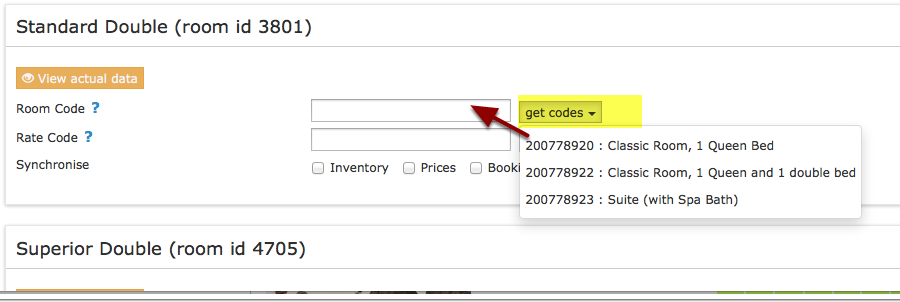
Map Rooms:
- Click on the "Get Code" link next to the room type id setting.
- Choose the channel room id you want to map to each Beds24 room and click on it.
- When the correct room id has copied to the room type id setting, click Save.
Map Rates
- For some channels you can aor need to map rates or daily prices. See the channel specific help pages for detailed information.
Click on the "View Actual Data" Button to check which prices and availability will send.
Preferences
You can set bulk settings for your Channel Managers in Preferences.
- Export Data = 1 or 2 years, if you want to send prices upto 2 years to the Channels, then as long as you have Rates/daily prices setup for the Channel, then you can select the appropriate setting here. Please Note :- we can not send 2 years data for all channels, you can see the specifics in the HELP page for each Channel.
- Import Channel Collect Payments - If any of your Channels collect payments on your behalf, if you set this = YES, then the details will be imported with the booking.
- Deduce language from country - when the guest enters their country, then we can deduce the 2 character language code that will be used if you have created language based messages to be sent to your guests.
Activation
Tick all tick boxes and then press SAVE.
Check Connection
The connection is working if you are not receiving error messages and the display in the channel is correct. If you are receiving error messages check in the "Common Errors" section on the channel specific help page why you are receiving the error and how to fix it.
iCal connections
iCal is a digital file format that allows to synchonize calendar event information. iCals can be shared between different calendar applications.
Our iCal sync updates all calendars which support the widely used iCal format including Google calendar and Outlook. Even though it was not designed for channel management it is now used by many vacation rental sites.
Use iCal only for channels for which an API connection is not available.
2-Way synchronization via iCal
With many channels including Airbnb, VRBO, TripadvisorRentals we offer specially constructed iCal sync option which are 2-way.
For other channels you can use our iCal export to send availability to the calendar and the iCal import to import bookings to Beds24.
FAQ
Will I receive notifications on new bookings?
After you activate the channel manager the channel will stop sending notifications. You will receive them from Beds24 instead.
Do guests receive a confirmation?
The channel confirms the booking with the guest. Beds24 will not sent a confirmation message. If you want to send one as well you can set up an Auto Action Email.
How do I modify or cancel a booking?
The channel manger can not send changes to bookings to the channel. Any changes or cancellations have to be made directly in the channel. Cancelling a booking in Beds24 will not cancel the booking in the channel and can cause a double booking (Exception: VRBO/Homeaway XML bookings can be cancelled in Beds24).
If for some reason you need to make a change in Beds24 and do not want an updat from the channel to override it, you can set "Allow Channel Modifications" = No or "All except room changes. You can either set this globally in (SETTINGS) CHANNEL MANAGER or per booking in the "Details" tab of the booking".
If you change a room for a booking from a channel in Beds24 the channel will still treat the booking as if it is in the room the guest booked at the channel.
How do can I access credit card details?
Some channels send credit card details. This is how you can view credit card details.
How do I receive payments?
Beds24 is not involved in deposit collections for bookings from booking channels. Each booking channels handles them according to their rules/your account settings. If the channel collects payments from the guest you can choose to import the guests payment into the booking.
If you use Stripe as payment gateway you can choose to send credit cards supplied by all channels from channels directly to Stripe where the cards can be charged.
How do I add a promotion or special price?
Special offers do not send from the channel manager. All special offers must be managed manually in the channels extranet.
Can I send different prices for different minimum stays or different numbers of guests?
The capabilities depend on the channel. Please see the help page for the channels you are using for details.
I have multiple properties. How do I set this up?
The system can handle multiple properties in one account. How you set this up depends on the channel. Please see the instructions for the channels you want to us.
What to do when I receive an overbooking?
- Check if you are receiving error messages by email or in the potential issues menu. Error messages need to be addressed immediately because they can mean the channel manger is able to make updates.
- Entering the same room code in multiple rooms in Beds24 can cause overbookings. Check your set up for warnings.
If you can not see a problem in your set up send us a support ticket with the booking numbers and dates.
Why did a booking not import?
- Check if the room for which you received the booking is properly mapped.
If you can not see a problem in your set up send us a support ticket with the booking number and the date the booking was made.
Why is the price for the booking wrong?
- A special offer set up in the channel may have reduced the price the channel manager sent.
- You have linked rates in the channel.
- Your prices are not set up as you expect.
- The channel manger can not import prices from all channels. If you have set up minimum prices in SETTINGS->PROPERTIES->ROOMS->SETUP the system will use these minimum prices.
What is pool allotment?
The idea of pool allotment or pool management is that you put all of your rooms into 1 pool, and that all channels take rooms out of that pool. The pool is empty when room are booked. This will automatically close all channels.
Can I send different availability to channels?
You can set up virtual rooms if you want to send custom availability to one or more channels. For example you may not want to sell via a particular channel at certain times of the year.
What are contracted rooms or base allocation?
This is an agreement between you and the channel where you agree to provide a number of rooms exclusively to that channel. This means you will not be able to sell these rooms directly or on other channels.
What do I do when I have a no show?
To report a no show to Booking.com open the booking and click the button in the "Details" tab. For other channels you will need to contact the channel if required.
Can I send messages to guests in their own language?
Yes, use the setting in Preferences 'Deduce language from country?' this will then enter the value in the Language field in the Mail tab of the booking. If there is no value the 'Default' language set in SETTINGS > BOOKING PAGE > INTERNATIONALIZATION -> BOOKING PAGE LANGUAGE will be used.
I need to show the booking charges on the guest invoice not the payout amount, how can I do this?
In SETTINGS -> CHANNEL MANAGER scroll down to 'Invoice' and select 'Booking Amount'
The Channels collect payments on my behalf at the time of booking, how can I see this?
Go to SETTINGS -> CHANNEL MANAGER and set 'Import Channel Collect Payments' = Yes, then the payments will be shown in the Charges and Payments tab of the booking.
How can I stop a Channel moving a booking back to the original room, when I have manually made a change?
If this is for all bookings, then go to Go to SETTINGS -> CHANNEL MANAGER and set 'Allow Channel Modifications' = All except room change' or you can set this per booking in the "Details" tab of the booking".
Can I have a different invoice for bookings from a certain channel?
Yes. See this help page for more information.
Connected Channels
This list gives on overview on the channels Beds24 connects to.
Contact channels directly to verify information before making any business decisions.
| Channel | Main Accommodation Types | Key Region Listings | Key Region Guests | Segment | Network | Contact/More Information |
| AAtravel.co.nz | hotels, motels, B&Bs, hostels, vacation rentals | New Zealand | Global | OTA | https://www.aa.co.nz | |
| Agoda | hotels, motels, B&Bs, hostels, vacation rentals | Global | Asia | OTA | https://www.agoda.com | |
| Agoda Homes | vacation rentals | Global | Asia | OTA | https://ycs.agoda.com/homes/en-us?cid=1828284 | |
| Airbnb | vacation rentals, private rooms, boutique hotels | Global | Global | OTA | https://www.airbnb.com | |
| Atraveo | vacation rentals | Global | Europe | OTA | https://www.atraveo.com | |
| Bedandbreakfast.eu | B&Bs, vacation rentals | Europe | Global | OTA | https://www.bedandbreakfast.eu/ | |
| Bedandbreakfast.nl | B&Bs, vacation rentals | Netherlands | Global | OTA | https://www.bedandbreakfast.eu/ | |
| Booking.com | hotels, B&Bs, hostels, vacation rentals | Global | Global | OTA | https://www.booking.com | |
| bookeasy | hotels, B&Bs, hostels, vacation rentals, camping | Australia, New Zealand, Indonesia | Global | Destination Management | https://www.bookeasy.com | |
| Casamiundo | Vacation rentals | Worldwide | Wordlwide | OTS | via Hometogo | 'https://www.casamundo.com |
| Ctrip | hotels | Global | China | OTA | https://www.ctrip.com | |
| Decoloar | hotels, resorts, hostels, lodges, inns | (Latin America, USA | Latin America | OTA | https://www.despegar.com | |
| Despegar | hotels, resorts, hostels, lodges, inns | (Latin America, USA | Latin America | OTA | https://www.despegar.com | |
| EDreams, Odigeo, Opodo | hotels, resorts, B&Bs, hostels, vacation rentalsl | Global | Global | OTA (Packages) | https://www.edreamsodigeo.com/our-brands/ | https://www.eDreams.com |
| Expedia | hotels, B&Bs, hostels, vacation rentals | Global | Global | OTA | https://www.expediagroup.com/expedia-brands/ | https://www.expedia.com |
| Ezibed | hotels, motels, B&Bs, hostels, vacation rentals | New Zealand, Australia, Pacific Islands | New Zealand, Australia, North America | OTA | http://www.ezibed.com/ | |
| Feratel | hotels, B&Bs, hostels, vacation rentals, camping | Germany, Austria, Switzerland | Global | Destination Management | http://www.feratel.com/ | |
| Flipkey.com | vacation rentals | Global | Global | OTA | https://www.flipkey.com | |
| Goibibo | hotels, motels, B&Bs | India/worldwide | India | OTA | https://www.goibibo.com/ | |
| Google Hotel Ads | hotels, B&Bs | Global | Global | Metasearch Engine | https://ads.google.com/hotels/partners/ | |
| Google for Vacation Rentals | vacation retnalsl | Global | Metasearch Engine | https://support.google.com/hotelprices/answer/10224602?hl=en | ||
| Guestlink.co.uk | hotels, B&Bs, hostels, vacation rentals, camping | UK | Global | Destination Management | https://www.guestlink.co.uk | |
| Holidaylettings.co.uk | vacation rentals | Global | Global | OTA | https://holidaylettings.com | |
| Homeaway | vacation rentals | Global | Global | OTA | https://www.homeaway.com/info/about-the-family/ | https://www.homeaway.com |
| HostelInternational | hostel | Global | Global | Membership organisation | https://www.hihostels.com | |
| Hostelsclub | hostel, B&B, private rooms, campsites | Global | Global | OTA | https://www.hostelsclub.com | |
| Hostelworld | hostel, B&B, private rooms | Global | Global | OTA | https://www.hostelworld.com | |
| Hotelbeds | hotels, hostels, vacation rentals | Global | Global | Bedbank | https://www.hotelbeds.com | |
| Hometogo | Vacation rentals | Worldwide | Wordlwide | OTA | 'https://www.hometogo.com | |
| Housetrip | vacation rentals, private rooms | Global | Global | OTA | https://www.housetrip.ccom | |
| HRS | hotels | Global | Europe | OTA | https://www.hrs.com | |
| Jasons.co.nz | hotels, motels, B&Bs, hostels, vacation rentals | New Zealand | New Zealand, Australia | OTA | http://www.ezibed.com/ | |
| Laterooms | hotels, B&Bs, hostels, vacation rentals | Global | Europe | OTA | https://www.laterooms.com | |
| Lastminute.com.au | hotels, motels, hostels, vacation rentals | Australia | Australia | OTA | https://Lastminute.com.au | |
| Latestays | hotels, B&Bs, hostels, vacation rentals, camping | Asia | Global | OTA | http://www.latestays.com/ | |
| Orbitz | hotels, B&Bs, hostels, vacation rentals | Global | Global | OTA | https://www.expediagroup.com/expedia-brands/ | https://www.expedia.com |
| Ostrovok | hotels, B&Bs, hostels, vacation rentals, camping | Global | Russia | OTA | http://www.ostrovok.ru/ | |
| Rakuten | vacation rentals, hotels | Japan | Japan | OTA | via Vacation Stay | https://vacation-stay.com/ |
| Traum-Ferienwohnungen | Vacation rentals | Europe | German speaking Europe/Europe | OTA | traum-ferienwohnungen.de | |
| Rakuten | vacation rentals, hotels | Japan | Japan | OTA | travel.rakuten.com | |
| Tablet Hotels | boutique hotels | Global | Global | OTA | https://www.tablethotels.com | |
| Tomas | hotels, B&Bs, hostels, vacation rentals, camping | Germany, Austria, Switzerland | Global | Destination Management | http://www.tomas.travel | |
| Travel.com.au | hotels, B&Bs, hostels, vacation rentals, camping | Australia | Australia | OTA | https://www.travel.com.au/ | |
| Travelocity | hotels, B&Bs, hostels, vacation rentals | Global | Global | OTA | https://www.travelocity.com/ | |
| Traveloka | hotels, B&Bs, hostels, vacation rentals, camping | Asia | Asia | OTA | https://www.traveloka.com | |
| Travia | hotels, B&Bs, hostels, vacation rentals, camping | Worldwide | Worldwide | Marketplace | https://www.godo.is/en/travia/ | |
| Tripadvisor | hotels, B&Bs | Global | Global | Metasearch Engine | https://www.tripadvisor.com | |
| Tripadvisor Rentals | vacation rentals | Global | Global | OTA | https://www.tripadvisor.com/Rentals | |
| Trivago | hotels, B&Bs | Global | Global | Metasearch Engine | https://www.trivago.com | |
| VacationStay | vacation rentals, hotels | Japan | Japan | OTA | https://vacation-stay.com/ | |
| VisitScotland | hotels, B&Bs, hostels, vacation rentals, camping | Scotland | Global | Destination Management | https://www.visitscotland.co.uk | |
| VRBO | vacation rentals | Global | Global | OTA | https://www.homeaway.com/info/about-the-family/ | https://www.homeaway.com |
| Wimdu | Vacation rentals | Worldwide | Wordlwide | Metasearch | via Hometogo | 'https://www.wimducom |
| Channel | Main Accommodation Types | Key Region Listings | Key Region Guests | Segment | Contact/More Information |
Subcategories
This category has the following 7 subcategories, out of 7 total.
Pages in category "Channel Manager"
The following 111 pages are in this category, out of 111 total. download this selection of articles as a PDF book
A
B
- Bedandbreakfast.eu
- Bedandbreakfast.nl
- Bookeasy.com.au
- Booking-Better
- Booking.com: Create and update properties and rooms on Booking.com
- Booking.com: Create Booking.com Rate Plans in Beds24
- Booking.com: Import Properties from Booking.com to Beds24
- Booking.com: Mapping
- Booking.com: Opportunities
- Booking.com: Promotions
- Booking.com: Reviews
- Booking.com: Synchronise bookings prices availability
- Bookit.co.nz
- BookVisit
- Boost your listing's search ranking
C
- Casamundo
- Channel Inventory
- Channel Manager Capabilities
- Channel with Custom Availability
- Close rooms or rates at a channel
- Combine indivdual properties into one property with multiple rooms
- Combine individual rooms into a roomtype
- Connect Airbnb Account
- Connected Channels
- Content Data Description
- Content for Airbnb
- Content for Booking.com